Desert Online General Trading LLC
Dubai, United Arab Emirates
Desert Online General Trading LLC
Dubai, United Arab Emirates

🔵 Upgrade your drive with smart, seamless stereo control!
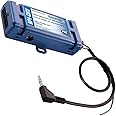
The PAC RP4-CH11 Radiopro4 is a compact, blue stereo replacement interface designed for select Chrysler, Mitsubishi, and Volkswagen vehicles. It features built-in steering wheel control retention, navigation-ready data outputs, and supports factory amplifier systems and rear seat entertainment activation, ensuring a premium, integrated audio experience.

| Item Weight | 9.9 ounces |
| Product Dimensions | 1 x 4 x 1.5 inches |
| Item model number | RP4-CH11 |
| Is Discontinued By Manufacturer | Yes |
| Warranty | 1 year |
| Height (inches) | 2 inches |
| Weight | 2.5 Pounds |
H**.
This Interface works!
I am working on a 2006 Dodge Ram 1500. I tried THREE Different Interfaces Before I used this one and this is the ONLY one that worked. First I tried the CRUX Brand interface for this truck. It worked when first installed, but the next day it would not. Had to shut off the truck and restart the truck and then it worked, but while driving the sound would stop. Had that one replaced with the same crux interface and had the exact same issue. Then I bought the AXXESS brand from Metra, I used the CHTO-013 model from metra. I did not realize the steering wheel controls were NOT part of the interface so I had to order their steering wheel control module separately. After installing everything. The interface SEEMED to work, but after about 20 minutes the Sound from the rear would go quite and then come back on louder all on its own. It was very annoying. Ripped that interface out and install this PAC brand interface. This time I read Carefully making sure the steering wheel controls were included in the interface. The Pac brand interface has worked and continues to work perfectly. What a waste of my time and money and ripping out my hair with those other brands. If ONLY I had known. I hope this helps somebody so they do not have to go thru all the headaches I went thru
A**K
Flawless operation, easy instructions, and easy concealment.
Used this interface module for a 2010 Volkswagen Routan. The instructions were excellent and explained things well. The replacement head unit I used is a Jensen VX7020. Once you get the installation manual for both the interface and the radio next to each other, this was a breeze.NOTE: If you new head unit does not have one of the 6 wires for the interfacing (such as Speed Sensor Output) then it is not required. For me, the radio had wire for each interface wire except for the Speed Sensor. Since the radio was a GPS enabled navigation unit, it picked up it's own speed. Some non-GPS/Navigation radios have the ability to show you your speed on the display and that is where this wire would be needed, but not for my case.Also, for the Steering Wheel Controls, I used dial selection 7 for my Jensen. Jensen brand was not listed as a radio brand supported, but #7 dial selection is for "Other". This worked perfect and every steering wheel function was functioning properly. I was also able to conceal this module neatly and easily behind the head unit and the dash. If need be, I have used 2' wire extensions between the radio harness and the factory wire harness so these modules can tuck further below or to the side of the unit. On the whole, it was a near perfect install.
T**A
Does what it's supposed to, but the included instructions are misleading
I opted to go with this unit over buying a wiring harness and a steering wheel control kit individually. I'm not sure if that was the better decision, since it was slightly more expensive and came with a second wiring harness that isn't compatible with my vehicle, but ultimately it did what I needed it to, which is connect an Atoto A6 head unit to my 2010 Dodge Grand Caravan.There were some things in the installation instructions that I found misleading, at least in the case of the Atoto A6:1) The SWC harness has a 3.5mm jack and a blue/yellow wire. The instructions say to use the 3.5mm in essentially all cases unless you have a Kenwood or "Newer JVC" unit. The Atoto A6 also has a nice 3.5mm input specifically for steering wheel controls, but if you use it with this interface it does nothing. Instead, you MUST to connect that blue/yellow wire to the orange/black "Steering Wheel Key +" wire on the A6 harness, AND you must leave the 3.5mm jack unplugged. I'm not sure if this is a fault of the A6 unit or the PAC interface, but it's something you should be aware of if you are connecting the two.2) Programming order is totally unnecessary, and in fact doesn't seem to work past the first 6 buttons. When I followed PAC's instructions for programming every function in order for a head unit in the "Other" category, only the first 3 buttons were picked up by the A6. Since you define each button's function in the A6's settings anyway, I found it easiest to just program all of my steering wheel buttons left to right, without following PAC's order. After doing it this way, I was able to get all of my SWC buttons working correctly.Hopefully these tips help someone out, as Android head units are becoming far more popular and I expect I'm not the only one who will experience these issues.
C**S
I Almost Gave Up Until I Bought This SWC Module!
After installing a Pioneer head unit in my 2007 Dodge Nitro I wanted a sterring wheel control (SWC) module/interface to retain my factory steering wheel controls for the stereo. After installing two different SWC modules that failed to work - even after contacting tech support for assistance - I finally got one to work. The PAC RP4-CH11 RadioPro4 came to my rescue! After following the instructions, and making all of the necessary connections, my steering wheel controls worked flawlessly with the new head unit. I almost gave up on having the feature before I installed this. My only regret is that I didn't buy this one first.Pros:1. You DO NOT need a separate wiring harness! It is integrated into the module.2. Works right out of the box with no additional programming needed.3. You don't need to cut into your factory radio harness!4. You can re-map the buttons if you desire to do so.Cons:Even though the instructions are pretty straightforward, it can be a bit complicated if you're not used to installing car audio equipment.
J**O
Must have if installing an aftermarket stereo.
Most moderns cars have CANBUS interfaces that connect to the factory stereo. If you want to change the stereo to an aftermarket one, as I did with my Dodge Avenger, you need this. If you don't use the interface, you will have to connect cables to the brake, reverse gear, and others to get the signals. With the interface, you can get all the signals directly from the vehicle bus and also control the volume and calls from the wheel.
Trustpilot
2 weeks ago
1 week ago