Desert Online General Trading LLC
Dubai, United Arab Emirates
Desert Online General Trading LLC
Dubai, United Arab Emirates


🎯 Elevate your PC gaming with SCUF Envision Pro — where every click counts!
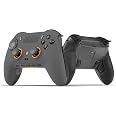
The SCUF Envision Pro is a wireless PC gaming controller featuring 21 buttons, including 11 fully remappable inputs such as five G-Keys and four back paddles. It offers instant trigger response with OMRON mechanical switches, customizable macros via Corsair iCUE software, and ergonomic side-mounted SAX buttons for enhanced control. Designed for professional gamers seeking precision and customization, it supports both wireless and wired USB connectivity in a sleek steel gray finish.
| Button Quantity | 21 |
| Additional Features | Wireless |
| Power Source | Battery Powered |
| Hardware Platform | Desktop |
| Controller Type | Gamepad |
| Connectivity Technology | USB |
| Compatible Devices | PC |
| Item Dimensions | 6.5 x 4.23 x 2.5 inches |
| Package Quantity | 1 |
| Item Weight | 0.29 Kilograms |
| Color | Steel Gray |
S**
Great Controller for Price!
I was unsure about buying this controller but after buying it, I was impressed. It has a good heavy quality and I have experienced no issues. It’s super compatible for COD and other shooters. The paddles are not elevated like the Xbox Elite and it’s refreshing. Good controller would recommend!
R**D
Software issues and stick drift
Really like to feel of the controller in the button layout, but I’ve bought three now and every single one has had crazy stick drift and other weird software issues like left and right trigger rapidly triggering really annoyingif I could get one where it didn’t have the drift software issues it would be my favorite controller I’ve ever held I really hope I can get a good working version of this controller.
D**.
Best Scuff, no software needed
Incredible. 2 paddles, 2 buttons- amazing mouse click triggers. Love the joysticks.
J**N
If you're looking for a Play Station style controller for PC this is a great choice
I love my Dual Sense controller, but there are some games for PC that do not work well, even through Steam. So I looked for a controller that wasn't like an X-Box style, and worked like my Dual Sense but was 100% PC gaming compatible.It feels great in the hands, and the button travel is near perfect. With the color scheme I got, it's hard to see the button labels, and I am use to Playstation symbols instead of the ABXY. so it takes some getting getting used to.The one thing I dislike though is that you must install the iCue software for the first time use. After that, you can uninstall it and the controller works just fine without it installed. Sure it updates the firmware, and lets you map combinations of keys to the settable buttons, but I'd rather not install it if I don't want to.
T**Y
Make it work on ps5 plzzz
Good product
K**N
useless stick drift controller
bought this and it has stick drift so what’s the point
D**R
Calibration Needed, but works well afterwards!
Out of the box it did have stick drift, but after a Calibration with the Icue app, it works fine! If i could reccomend this to someone i would. Cus even if it has stick drift, its an EASY fix. Reccomended if you can handle downloading Icue and doing a quick calibration!!
J**E
Great controller
Really liking the controller with the extra customizable buttons.
Trustpilot
2 weeks ago
3 weeks ago
4 days ago
1 week ago