Desert Online General Trading LLC
Dubai, United Arab Emirates
Desert Online General Trading LLC
Dubai, United Arab Emirates


🔌 Plug into smarter living — control, save, and protect with Tapo P115!
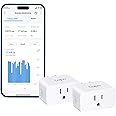
The TP-Link Tapo P115 Smart Plug is a compact, ETL-certified Wi-Fi device that supports up to 15A/1800W loads. It offers real-time energy monitoring with detailed usage stats and bill estimation, programmable scheduling for cost savings, and smart charging to prevent overcharging. Compatible with Alexa, Google Home, and Samsung SmartThings, it enables voice and remote control via the Tapo app, making it an essential upgrade for any energy-conscious smart home.


| Operation Mode | automatic |
| Current Rating | 15 Amps |
| Operating Voltage | 125 Volts |
| Contact Type | Normally Open |
| Connector Type | Plug In |
| Brand | Tapo |
| Terminal | Screw |
| Circuit Type | 1-way |
| Actuator Type | Push Button |
| Contact Material | Copper, Brass |
| International Protection Rating | IP00 |
| Number of Positions | 2 |
| Upper Temperature Rating | 4E+1 Degrees Celsius |
| Controller Type | Tapo app |
| Control Method | App |
| Connectivity Protocol | Wi-Fi |
| Color | White |
| Wattage | 1800 watts |
| Unit Count | 2.0 Count |
| Number of Items | 2 |
| Manufacturer | TP-Link |
| Compatible Devices | Smartphone, Tablet |
| UPC | 810142821391 |
| Part Number | Tapo P115(2-pack) |
| Item Weight | 5.6 ounces |
| Package Dimensions | 3.46 x 2.91 x 2.2 inches |
| Item model number | Tapo P115 |
| Size | 2-Pack |
| Style | Alexa Compatible |
| Pattern | Alexa Compatible |
| Item Package Quantity | 1 |
| Included Components | 2 x Tapo P115; Quick Start Guide |
| Batteries Required? | No |
N**N
Easy to Use Smart Plug with Great Features
Very happy with this smart plug. It works well right out of the box. The app is easy to set up and use. I also connected it to my Samsung SmartThings home system and that worked really well and easily. And through that I connected it to my Amazon Alexa system pretty easily. Probably the best part of the app is that you can tell it what your electricity rates are. And even if you have rates that are split between certain days or certain hours of the day, you can tell it that. And then it'll tell you how much the electricity used on whatever device you are measuring cost you per day or per month or per year based on the actual costs that you had entered. I've got it set up to turn on at 8 p.m. when our power gets cheaper on our electricity plan to activate the plug for our EV. And at 6 a.m. it turns that off. And so we're only charging the EV during the time when the rates are the cheapest. That timer was very easy to set up in the app. Solid product, highly recommended. Very good value for the money.
R**S
Plugs that work
These smart plugs have been pretty useful since I got them. They work well for my 3D printer and seedling grow lights, which is what I bought them for (I don't even bother with those fancy hydroponic setups). Setting them up was easy enough, though the app took a bit of fiddling around to get working properly. It does have some cool features though, like energy monitoring and scheduling. One time it showed me that my printer was using way more power than usual - turns out I had left it on all night by mistake! (I'm too busy thinking about new designs to worry about turning things off sometimes).The plugs themselves are small enough to fit into most outlets without any issues, and they have a nice clean look. The fact that they can be controlled with Alexa is a bonus - I don't even need to get up from my desk to turn on the grow lights now. They're pretty decent overall, though sometimes they take a while to respond to commands. Still, for the price, you really can't complain too much.
T**Z
GET THESE - For power monitoring, safety, Charge Guard, easy setup: SO WELL DESIGNED
It is rare that I see a TRULY well-designed product - software, and/or consumer electronics. But these are the rare gem: clearly well thought out, designed, and tested. SUPER easy setup (if you have the app installed and open, it will automatically prompt you to add when one is plugged in) - total of 75 seconds to setup, beginning to end INCLUDING a firmware update. (not including entering WiFi information - only needed for the first device)I originally got it just to monitor how much power devices were using (WAY cheaper than those Kill-A-Watt type meters: smaller, records history, AND remote monitoring!)But found so many more great, useful features when I started setting up the first plug:- SCHEDULE: you can set absolute times (i.e. ON at 5:03pm, OFF at 11:17pm), or RELATIVE times to Sunrise or Sunset, WITH OFFSETS - BRILLIANT! (other plugs only give you right AT Sunrise/Sunset). My living room gets dark about an hour BEFORE sunset - so I can set the ON = SUNSET-(1 Hour), OFF = 11pm, and it will adjust automatically throughout the year! Always 1 hour before sunset. No changing it with seasons, or Daylight Savings Time!! May use for low-voltage lights and Christmas lights (i.e. a little before sunset until a little before sunrise)- CHARGE GUARD (Beta): it will turn off whenever it detects the power dropping below a certain level (currently configurable 1-20 watts) for a certain period. GREAT to protect your battery, device, and HOUSE. I just set one up for my eBike charger: <20w for 10 minutes, and it shuts off when done charging. Safer, and better for the battery. Will be using them for charging my drones/quadcopters/RC stuff, drills, phones, cars, 3D Printer (ie when done printing), etc.- TIMED OFF (Auto-Off Timer): it will turn off after a set period of time, *every time you turn it on* (i.e. after pressing the power button on the plug, OR by remote)So use on things like: iron, hair curling iron, hotplate, soldering iron, EBIKE (mine is set to 10 hours), etc. This works IN ADDITION to "Charge Guard" and Power Limit.- POWER PROTECTION (LIMIT): turns off if your wattage limit is exceeded (short? failure? fire? etc.). I set my eBike charger plug to 300 watts, as it normally draws <200w.- AUTO FIRMWARE UPDATE: I'm tired of updating devices manually! And I have A LOT lol (time window configurable)- NOTIFICATIONS: I've only tested the "Charge Guard", but it sends you a notification "Charge Guard turned off Device X" - I expect similar from the other modes- Quick response: plug turns on immediately from the app (at least when I'm local) - some other devices have a few second delay- Good sized, long-term company. TP-Link has been around for years, with lots of networking equipment - so they'll be around for a while, and maintain their app - unlike the little no-name brands. This also suggests these should be well-designed for reliability and longevity.I feel much safer about charging my EBike with this (set to max 10 hours, 300w, and auto-off when the charging power drops below 20w for >10 minutes). A VERY low price for peace of mind!Oh - and I can see how much power a device is using - my original goal :) Current/real-time, past (history), which days, cost (if you enter your $/kWh), etc. All nicely graphed out.Additional features I haven't explored:"Smart Actions", like geofencing (turn things on/off based on your location, like lights on/off when you're home vs away)Device integration with things like leak detectors, contact switches (eg on doors), humidifiers/hygrometers, Smart Buttons, Group actions (when one device is turned on (or off), turn other device(s) on/off), cameras for motion detection
P**N
Performs great - easy to use - a bit large
I love these things - they do a great job. However they (like many others) have a big issue - their size. I knew they were a bit larger, but...yeah it limits where I can use them. I really wanted one on my covered porch, but the outlet is inside the wall just enough that I can't get this to even fit in. Bummer. So, it loses a star, but if that won't bother you then this is gold - I love it so far. Can't wait to use it with the Christmas tree next year - now I don't have to climb around the tree to turn it off each night.One of my favorite uses so far is to have it automatically reboot my router every night at 3am, then I wake up to everything running silky smooth.
Trustpilot
1 week ago
2 months ago