
DOWNLOAD THE APP


Customer Services
Copyright © 2025 Desertcart Holdings Limited
DOWNLOAD THE APP


🎬 Elevate your space with laser-sharp cinema vibes—anytime, anywhere!
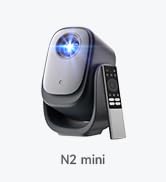
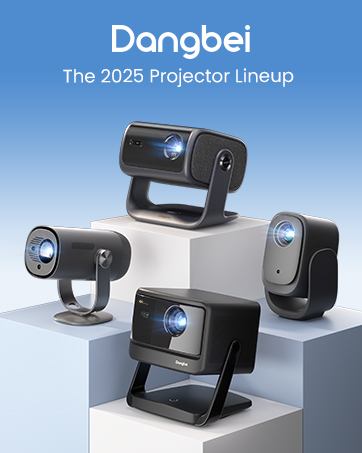
The Dangbei Atom Portable Laser Projector combines 1200 ISO lumens laser brightness with a stunning up to 180" 1080p display, all packed into a sleek 1.87" ultra-thin, 2.82 lb design. Featuring built-in Google TV and official Netflix, it offers seamless access to 10,000+ apps and 700,000+ movies and shows. With Dolby Audio-powered dual 5W speakers, 3D readiness, and smart auto-focus and keystone correction, it delivers a premium home theater experience that’s easy to set up and highly portable—perfect for millennials craving cinematic quality on the go or at home.









| ASIN | B0CLP5WMXC |
| Batteries | Nonstandard Battery batteries required. |
| Best Sellers Rank | #274 in Video Projectors |
| Brand Name | Dangbei |
| Customer Reviews | 4.5 4.5 out of 5 stars (269) |
| Date First Available | October 24, 2023 |
| Item Weight | 2.82 pounds |
| Item model number | DBOD02 |
| Product Dimensions | 7.68 x 7.68 x 4.92 inches |
| Special Features | 3d-Ready, Auto Focus, Built-In Speaker, Built-In Wi-Fi, Digital Keystone Correction |
E**E
Great laser projector, poor 3D menu interface
This is the best projector that I have ever had. The automatic focus feature is neat. The images are bright and clear and saturated and in focus across the entire screen for both text and movies. There is no laser speckle. I could do work on the projected screen as an external monitor. I recommend getting a camera tripod that is about 3 feet or 1 meter high. You might also want to buy a projector screen if you do not have one, because a projector screen is not included. I purchased the Dangbei Atom projector and Dangbei 3D glasses combination. The package includes 2 AAA batteries that you have to put in the remote control by sliding down the back of the remote control about 3 millimeters and then pulling the back of the remote control off to reveal the battery compartment. The 3D movie viewing experience, once you get it working, is better than using the PlayStation VR headset on the PlayStation 4. Unlike the PlayStation VR headset, there are no screen door video artifacts when you view 3D images projected by the Dangbei Atom projector. That PlayStation VR headset is heavy and squeezes my head like a vise while the Dangbei 3D glasses are comfortable and light and feel like a pair of sunglasses. The only downside is the totally unintuitive multi-step process for viewing 3D videos or movies. You have to first charge your 3D glasses by plugging the small end of the USB cable under the nose piece and plugging the bigger end into a powered USB A port in a computer, a powered USB hub, or a USB AC adapter. The light in the white button on the 3D glasses will be red at first and will eventually go off when it is fully charged. After the glasses are charged, you press the white button on the glasses once to turn it on. You hold down the button for 3 seconds or so to make the button blink 3 times and turn the 3D glasses off. The glasses also seem to turn off automatically if they do not see a 3D image for a while. You have to hold down the Home (white house) button on the right side of the remote control, navigate to Projector / Image Correction / Reset to Default Image. You can then press the white left arrow button until you exit the menus. I don't understand why the user has to do this. This should be done automatically for the user any time they attempt to activate the 3D setting. You make selections by pressing the center depression of the circular control on the remote control that lets you move up, down, left, or right in the menu. Dangbei also recommends holding down the Home button, selecting the cog symbol to enter the settings menu, selecting Projector / Focus / Advanced / Auto Focus When Moving. This will turn off Auto Focus When Moving. The selection is off when it is white to the left instead of blue to the right. The presence of the 3D mode option in the Home / Picture menu gave me the incorrect impression that I had to set 3D mode first before viewing a 3D video or movie. I was wondering why the 3D mode setting selection that I made in the menu never worked and kept changing back to Off. Instead, what you have to do is start to view the 3D video or movie first. When you see double images side by side or one image on top of another, you have to hold down the Home button that has a white house symbol on the button. That will then reveal a menu on the right side of the screen where you can select the Picture menu option and scroll almost all the way down to select the 3D mode. There are 3 options for turning on 3D mode where the images are on top of each other, side to side, or coming from a Blu-Ray player (such as a PlayStation 4 connected to the projector via an HDMI cable). After changing the 3D mode, you have to press twice the button that has the white arrow pointing to the left on the remote control. The Dangbei video on YouTube does not seem to show this last part, which is necessary or your 3D mode selection will return to Off. The PlayStation 4 requires some changes on the PlayStation 4's menu on the far right side for Settings / Sound and Screen / Video Output Settings / TV Size to specify the size of the projected screen. If you are off by 1 inch, the 3D image might not look right, as if you were crossing your eyes. For some scenes, I have to select 80 inches, and for other scenes, I have to select 81 inches. When you go back to viewing the video or movie after selecting the screen size, the 3D mode will be Off again, so you have to go through the process of holding down the Home button on the remote control, going into Picture, and selecting the 3D mode again after each try of adjusting the screen size in the PlayStation 4 settings. That is a really tedious and time-consuming process of trial and error. The reward is a clear 3D image.
S**Y
Insane value for money.
Huge value for money. I purchased this projector because of its tiny footprint and "decent"(1080p) definition along with a portable 100" screen to take on car camping trips to be ran off of my jackery solar generator with friends so we can have movie nights out in the middle of the forest. First things first this is not a 4k or 8k top of the line laser projector, I have a $6000 tri laser projector as my home projector and this isn't that so don't purchase this expecting mind blowing cinema quality 1in your home because if you do you'll be disappointed. This is a 1200 iso lumen 1080p micro sized laser projector and in that context this projector is punching WAY above its weight class in my opinion. I converted to 100% full time home projector as my main viewing medium in my home in November of 2023 so I'd say I've got a fairly good working knowledge of the positives & negatives as well as the capabilities that make a projector good or not so good. This projector when used in the proper environment project's an extremely good 1080p picture and makes for a thoroughly enjoyable viewing experience. It's "rated" for daylight use and it technically can be used with some ambient light but where this projector Excells is at nighttime, not pitch black dark room but just sun down lights off kind of nighttime. The picture is surprisingly good and vibrant. Setup is almost ridiculously easy which was one of the selling points that sold me on the projector initially because of my intended use of setting it up in the middle of the woods and in this aspect this projector really does not disappoint. When you first power it up and connect it to a wifi signal it does take a slightly annoying amount of time to do its software updates so be prepared for that, but afterwards I can pull this projector out of its case screw it on to one of my tripods that I use for my binoculars when hunting, plug it in and within a few minutes thanks to its ability to auto keystone, auto size the picture to fit the screen & auto focus I can literally have this projector up and running and playing movies in roughly 5 minutes give or take from start to finish and when paird with a portable alr screen makes for a truly enjoyable viewing experience. The first time I set this projector up I did it at home to learn how to operate it and set it up that way I knew what to expect and wouldn't have any surprises when I took it out camping in the middle of nowhere and this projector did NOT disappoint. I set it up in my backyard at around 8pm and ended up sitting outside in 40° weather watching movies in my backyard until 1:30 in the morning lol and only decided to call it qiuts because my dog was freezing lol. Now I would say that this projector is 100% worth the normal price of roughly a thousand dollars but I was able to buy it on a black Friday sale along with a protective carrying case for a almost laughable 549 dollars. When you consider that compaired to traditional lamp projectors that have a working life of between 3000-5000 hours before the bulb burns out and requires an expensive replacement bulb that this laser projector has a rated 30,000 hours lifespan, comes with Netflix and Google TV apps pre installed, is rated to throw a 180" picture (although I personally wouldn't try anything bigger then 120" because the picture quality will degrade the bigger it is), has Bluetooth capability allowing you to use Bluetooth speakers to enhance the sound quality and that it's footprint is less then 10" squared and roughly 2 inches thick and it weighs less then 3 pounds. As long as you understand what this projector is capable of and use it in the correct lighting environment this projector is mind blowingly good and in my opinion an incredible value for money. Dangbei really knocked it out of the park on this one in my opinion and my only real critique would be I wish they had installed controls on the actual projector because as it stands you can only control it with the included remote control so if that remote gets lost or damaged your projector will be useless as there is no way to operate it without the included remote. I HIGHLY recommend this projector to anyone looking for a small extremely portable, easy to set-up and operate 1080p projector capable of throwing a really respectable picture in some ambient light and an even better picture in a dark environment. I would ABSOLUTELY purchase this projector again and hope this review helps anyone on the fence, I'd say pull the trigger and especially if you can get it on a black Friday or cyber Monday sale you WILL NOT be disappointed, because the value for dollars your getting is kind of insane and I can't believe they are making any money on these things as good as they are at this price point.
M**K
Great picture and sound quality, nice compact size, good brightness. Offers good value
B**E
Super projetor , se fosse 4k natural e com alto falantes separados seria perfeito. E a surpresa que aceita também filmes em 3D nao só via HDMI, também via USB, mas tem que desabilitar algumas configurações automáticas de trapézio, etc, só assim é possível o 3D que é maravilhoso com esse projetor de FULLHD original de 1080p.
L**D
Produto muito bom! Atendeu as expectativas. Iluminação dele é bem forte, mesmo projetando em paredes irregulares, a qualidade da imagem fica muito boa. Com certeza indicaria.
D**N
This is, by far, the best portable projector I've bought/tested. I was looking for a tv screen, but instead I found this little folk! It has astonishing picture quality, displaying true Full-HD, with HDR10, regardless the time of the day (even at daylight, but, of course, the darker the room, the better), as well as it supports high fps (I've tested 60fps videos and they do look smooth). I also like the fact that it still supports Active 3D (cause I still have a collection of 3D Blu-ray movies). On the other hand, I like the way it automatically adjusts to the surface/screen you want to project, as well as it runs Google TV natively, then it allows you to install apps like Disney+, Netflix or Amazon Prime Video (they are also factory installed). Lucky me, I purchased this during Black Friday, cause it actually costed me the same as a 65in screen, but with this guy I can project on a wall giving me exactly a 150in (it still can project a larger scale: 180in, but 100in is recommended and enough). The only "con" is that it doesn't support 4K or larger display formats, but you won't really need it, as it natively displays 1920x1080 with great accuracy and with high contrast and it also blends somehow the pixels, so you won't even notice them. You can still watch 4k, but after scalling it to 1920x1080, with the means of a computer using HDMI. Finally it has Bluetooth, which you can use to sync your headphones, which will also reproduce sound with great quality, as well as by the mean of a jack 3.5mm. I used my Bose AE2 headphones connected straight with the jack 3.5 as well as with a Bluetooth receiver and the audio was great both ways (the wired one was of course better). I also tested it with my Sony WC-500, with great sound quality too! The only way I haven't tested it yet is with a home-theater (it supports also eArc through HDMI) but I'm sure it will work great either!
L**O
Purchased in October 2024. Broke at the end of March 2025 - no image/light output. Waiting for 2 days to hear back from the company. Update April 17, 2025: I received a replacement for the defective projector. Overall, it was okay dealing with the company over emails. I appreciate they sent a new projector. Overall the picture quality is very good for its size, and the built in apps - including Netflix really helps. It's a nice, small projector that offers more benefits than a lot of other established brands.
Trustpilot
1 week ago
5 days ago