We remain fully operational. Our teams are working around the clock to ensure your deliveries continue safely.

DOWNLOAD THE APP


Customer Services
Copyright © 2025 Desertcart Holdings Limited
DOWNLOAD THE APP


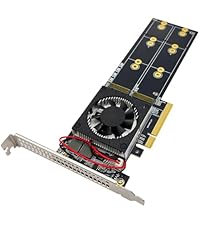
🚀 Elevate your desktop storage game with dual NVMe speed and unmatched flexibility!
The 10Gtek Dual M.2 NVMe SSD Adapter Card transforms a single PCIe x8 slot into two high-speed NVMe SSD ports, supporting multiple M.2 sizes and PCIe 3.0 for ultra-fast data transfer. Ideal for professionals seeking to expand storage capacity and speed, it requires motherboard BIOS bifurcation support and includes versatile mounting options for seamless desktop integration.




| ASIN | B09NKTYFHX |
| Best Sellers Rank | #114 in Internal Solid State Drives |
| Brand | 10Gtek |
| Compatible Devices | Personal Computer, Laptop |
| Customer Reviews | 4.5 out of 5 stars 120 Reviews |
| Hardware Interface | PCI Express x8 |
| Item Weight | 0.12 Kilograms |
| Manufacturer | 10Gtek |
| Model Number | PCIX8M2-2 |
| Operating System | Windows, macOS, Linux |
| Style | Classic |
| Style Name | Classic |
| Unit Count | 1 Count |
A**R
My PC supposedly will not support bifurcation (Dell T5810) but...
Excellent. For some reason, the whole PC is noticeably faster with this card. Works fine with C610 chipset using hardware switch on-board, even though it does NOT support bifurcation, and yes, both drives work fast. Solved my issues and more. Card quality looked good. Good sockets.
M**T
Add an ssd to any pcie slot
Works as designed.
D**E
It does what you think it does. Looks good too.
I don't usually write reviews for a product unless there is something dangerously wrong with it that people need to know about, but I had to take a chance on this item because it is a new listing without many reviews, so I wanted to share my thoughts. Short version: there is nothing wrong with this item and it works exactly as I would expect it to. I purchased this to boot from NVMe disks on an HP Z440 (intel C612 based system with a v3 Haswell Xeon CPU). I changed the setting for bifurcation in BIOS from x8 to x4/x4 on the only PCIe 3.0 x8 slot on the board and it recognized and booted from the installed 500GB SN570 without any further fiddling around. I found the item itself to be properly packaged and very sharp looking, which is to say that there were no signs of sloppy manufacturing, badly stamped or machined brackets, shoddy solder joints, etc. The packaging was mundane but adequate to protect the item in shipping. What else is there to say? It is a competently manufactured item, which does the job it claims, with no fuss - for about 20-30% less than the cost of other no-name competitors, or less than half of the name-brand alternatives. Buy one - find out for yourself! Please do keep in mind that it will not support dual (or quad for that matter) disks unless your motherboard properly supports bifurcation, and you'll need a free PCIe 3.0 slot (or higher) to achieve the maximum rated speeds.
C**S
Good module, but verify that your system will support the 2 or 4 device version before purchase
Review based on the two device version. I liked this one well enough that I also purchased the single module version. It seems to be a well made, functional adapter at a reasonable price. It is easy to use except for attaching the hold-down screw and brass "nut". These are very small and require good close-up vision and some manual dexterity to install. Note that the brass nut has a slot which engages the edge of the M.2 module. The slot is offset. When installing, the thicker part of the "nut" goes against the PCB. This adapter does not have a heatsink, and usually a heatsink is not required. It actually makes it easier to use as there are no additional steps to removing and replacing a heat sink. In case one is going to install a 2T M.2 module, and drive it hard, then the heatsink models might have an advantage. It should be repeated that not all PCs will work with the two or four module versions of this ( or any other ) adapter. The PC needs to support PCIe bifurcation, and there needs to be enough PCIe lanes for the drives that you are adding. Four more lanes per drive. Usually only the workstation class of PCs or servers have the slots to work with these at the same time as a graphics card. The symptom of not supporting bifurcation ( or the bifurcation feature not being configured in the BIOS ) is that only the first M.2 is recognized by the system
T**L
Works great
Works great. Had to fiddle with bifurcation settings to get second drive to show up. Very rarely drops drive on boot, but that's probably a motherboard or setting issue. Just reboot and appears fine. Works when set pcie link to 4.0 even though description says 3.0 compatible. Haven't done any speed tests but works for what I need it for.
T**.
Great product.
Work great on my server. When you purchase this card make sure your motherboard has bifurcation capability. Set the port at 4x4 if pcie 8 or 4x4x4x4 if pcie 16. There is room for nice heat sink on the nvme ssd. Nice product.
H**L
Works well!
I installed two Samsung 990 4TB NVME M.2 on this card. They work beautifully on a Proxmox running on a SuperMicro server hardware. Had to experiment to find the right BIOS bifurcation setting. Turned out to be 4x4x4. Do note that this card will not work for you if you do not have bifurcation available.
J**H
Great for ZFS pool or mirrored boot drives
Bought this to use with an Asrock Rack server motherboard. Installed 2 drives, enabled bifurcation in the bios and started up system. Both drugs were detected individually and able to create a ZFS pool. So it works as advertised if you have bifurcation enabled on your motherboard.
Trustpilot
1 month ago
3 weeks ago