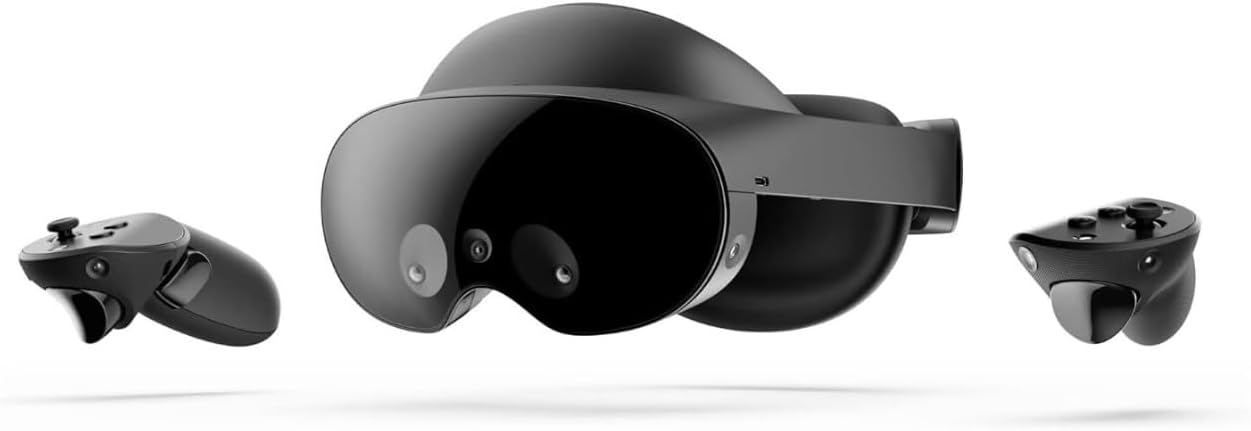
Meta Quest Pro
Product ID: 477913913
🎯10 advanced VR/MR sensors for precise tracking
🕶️Pancake lenses with quantum dot tech for stunning clarity
🖥️256GB storage for seamless multitasking
Buy anything from 5,000+ international stores. One checkout price. No surprise fees. Join 2M+ shoppers on Desertcart.
Desertcart purchases this item on your behalf and handles shipping, customs, and support to SINGAPORE.
🚀 Step into the future of work and play with Meta Quest Pro — where reality meets imagination.
Meta Quest Pro is a premium mixed reality VR headset designed for professionals and creators, featuring 256GB storage, 12GB RAM, 10 advanced sensors, pancake lenses with quantum dot technology, and real-time avatar expression tracking. Its ergonomic design and high-resolution full-color passthrough enable extended comfortable use while seamlessly blending physical and virtual environments for work, collaboration, and entertainment.


| ASIN | B09Z7KGTVW |
| Additional Features | Gesture Tracking |
| Age Range Description | Adult |
| Best Sellers Rank | #3,436 in Video Games ( See Top 100 in Video Games ) #24 in Standalone Virtual Reality Headsets |
| Brand | Meta |
| Built-In Media | VR headset |
| Color | Black |
| Compatible Devices | Meta Quest |
| Controller Type | Touchpad Control |
| Customer Reviews | 3.8 3.8 out of 5 stars (744) |
| Field Of View | 106 Degrees |
| Global Trade Identification Number | 00815820023159 |
| Is Mixed Reality Compatible | Yes |
| Item Dimensions D x W x H | 15.75"D x 9.45"W x 7.87"H |
| Item Weight | 879 Grams |
| Lens Technology | Pancake |
| Manufacturer | Meta Platforms Technologies, LLC |
| Memory Storage Capacity | 256 GB |
| Mfr Part Number | 899-00412-01 |
| Model Name | Meta Quest Pro |
| Model Number | 899-00412-01 |
| Platform | Meta Quest |
| Specific Uses For Product | Work, Gaming, Mixed Reality |
| UPC | 815820023159 |
| Warranty Description | 1 year manufacturer |
M**.
AMAZING. Completely disagree with people saying it's over-priced.
People will spend $2k on a great TV or monitor, and yet take issue with a headset that is a standalone device with crystal clear lenses, great FOV, eye tracking, face tracking, and amazing controllers costing $1500. I can see why. Consumers had the bar set too low in terms of pricing with the Quest 2. At the end of the day this IS a premium device. Working inside the quest 2 is uncomfortable and the lenses make it so that you have to move your head to look around. The lenses on the pro are so clear that you can just move your eyes. This product is a step forward, as it gives developers everything they need to work towards a next-gen experience. Local dimming, foveated rendering, and color passthrough for AR. Sure, the resolution could be higher - but reading 12 pt font is still plenty comfortable. By the way, even though it's lower than the Quest 2 in terms of total pixels, there are still more pixels per degree (the metric that actually matters). If you just want it for PCVR - it might not be worth it, but if you want to work and experiment with a device (and also want to play some games), this thing is AMAZING.
T**Y
Love this thing
I pre-ordered an Oculus Quest 2 before they launched. Used it a ton prior to the Quest Pro release. Switching to the Pro was quite the eye opener. The faster performance, the incredible lens clarity, the COMFORT, face/eye tracking - this thing is incredible. I purchased this at full price prior to the 33% price drop, and I'd do it again. Don't let the Meta haters talk you out of it. However, writing this review in May of 2023, I recommend most wait for the upcoming Quest 3. It's going to use the identical lenses to the Pro but with higher resolution displays. The dramatically increased processing and graphics power of the Quest 3 will be more future proof. Unfortunately Meta has been extremely slow to implement work features. Last time i checked, I still can't use virtual monitors with a Windows PC, only Mac. If you're buying this for work, just know that it may not speed up your workflow but actually make it worse. For traveling however I've found this to be a useful tool to have more screens while I'm mobile with just a laptop. Overall, for an enthusiast, this headset is great. For the average everyday consumer, I recommend waiting for the Quest 3.
A**N
Major upgrade that doesn’t feel major
The first thing that I will say is that, even though it’s a major upgrade from the quest 2 the pro doesn’t shine as much as you would expect. Maybe they haven’t done enough to this point to take full advantage of the hardware. As other users have said, there definitely is a sharper image when you’re looking on a different areas. The edges are definitely more defined. Watching videos off your computer is definitely a little sharper. Although the visuals are definitely welcomed, they’re not enough to justify the price tag. The games are a little bit sharper, but you still have the old games. There’s nothing gnu as far as games or apps, or anything along those lines. The pass-through is definitely much better with color added, but it is so blurry that it’s almost unusable for things in the room even though you can use it, it’s basically the black-and-white version but now in color that being said, there is a virtual desktop that comes along with the pro that allows you to use your desktop on a computer using the pass-through it is very easy to see your keyboard and your mouse. The image is sharp enough to see the keys nowhere to put your fingers on the keys. You may not be able to see the letters on the keys very well, but you know if you type for a long time where the keys are by memory, so with the display of your curtains, pewter desktop up and visual images of the keyboard and mouse. It is definitely usable VR version of your computer. However, I things like your phone or TVs or any other images that show on the screen are so bright that you can’t even use them so if you’re setting up a virtual desktop for your computer to use basically the only thing you’re gonna be able to use is your computer and things within the VR headset overall the price tag is pretty steep, but it is definitely will worth an investment. I added the full light blocker and it works fairly well. I never use the side blockers I went straight to the full blocker. I have noticed that you have to tighten the headset to keep it on your head. It can’t be loose or it drops down below your eyes when it’s tightened, it does leave an impression on your forehead. It would be nice if there was a top strap that went over the top of your head so you didn’t have to tighten it as tight. I do like the fact that the controllers have chargeable batteries in the dock is pretty nice , overall I think this is a good purchase, even though I think the price tag was pretty steep
M**T
Pain, discomfort and glitchy controllers.
Compared to the Meta Quest 2 the Pro has a stunning display. It's really something to see. I've had this for about 24 hours and have the following issues. 1. The forehead strap causes severe pain and red welts. This wasn't after hours of use. This was maybe 20 min. The pain persisted until the next morning with the welt gradually subsiding. I've never had this issue before with any other VR device. Even the Quest 2 original face plate didn't give me this problem. As I write this my forehead still hurts. It's like someone took steel wool and scrubbed my forehead with it. 2. The controllers are glitchy. They lose tracking and drift to different points. Mostly floating six inches or so from the real work location. It wasn't a one time problem. It happens often. 3. The wifi performance is not nearly as good as the Q2. I get about 40% the performance as a Q2. Rather dismal, I think. I can't test the collaboration or anything else since I can't wear it without a large degree of pain. This device turned out to be a bitter lemon for me. It has to go back.
J**.
The Meta Quest Pro is a Pro-Consumer Device
Look the Meta Quest Pro is one heck of a device. There is truly nothing like it. It's not perfect and depending on your preconceptions from how it was advertised, it will not be convincing for most. Nor should it be, this device is Meta's (Facebook's) first attempt to step into an AR territory. It's a great device but there's one problem. The software and AR app support is lacking. This is expected and is why this device costs so much - it's a DEV kit. It's really aimed at developers and VR/AR enthusiasts. For $1500, your likely the type of individual who has already been convinced that AR will be the next technological advancement regarding human technology interaction. For $1500 your more than likely the type of individual who wants to help make this happen, experience it and contribute to its growth.
A**R
Great Condition, But Didn’t Work. Refund Saved It
I really wanted to like the Meta Quest Pro, but this ended up being a pretty frustrating experience overall. ✅ What was good - Arrived in brand-new condition, everything was sealed and untouched - Packaging looked perfect, with a manufacture date of January 2023 - Refund process was smooth and hassle-free - Full refund issued without any problems ❌ Main issue (dealbreaker) - “Black Screen of Death” right out of the box - Headset powers on, audio is heard, but nothing displays - Impossible to complete initial setup - Completely unusable 🔧 Troubleshooting attempts (none worked) - 10 factory resets - Fully charged to 100% and drained to 0% - Attempted sideloading updates via Meta’s software update tool - Tried bypassing initial setup → constant failures ⚠️ Big downside - The Quest Pro is discontinued - No real customer support available through Meta for this issue 💭 Final thoughts (TL;DR) - ✔️ Looks brand new - ❌ Completely defective and unusable - ✔️ Easy, full refund If you're considering buying one of these now, be aware that even if it appears perfect, you may be left with a non-functional device and no support. The only reason this isn’t a 1-star review is that the return process was painless.
D**N
Extremely Overpriced. Excellent Comfort. Very Poor Display.
I recently purchased this to upgrade from my first gen Oculus Rift and first gen HTC Vive, which are both several years old now. The bottomline is, for $1600 I was expecting to be blown away. Instead, I came out of it saying, "Well, this is nice!". I will rate some of the pertinent aspects from 0 - 10, with 0 being Horrible and 10 being Outstanding. I will not be rating some common aspects like software & library, which is common between all quest and rift products; essentially most people who know about VR, are familiar with the differences in libraries and software etc between different platforms. Product Quality & Packaging Score: 10 Very, very impressed by both product quality & packaging. As soon as I started opening the box, I could feel this was a $1600 product. Nicely packaged. Very similar to most 'Apple' products, a bit of minimalism but sturdy, convenient and accessible. The headset feels extremely well constructed. Again, I could tell this was an expensive product while holding it. From glasses to headband to buttons, everything was very professionally polished & built. It did not appear to be 'cheap' in any way and didn't appear they cut corners. Controllers, charging dock, and a couple of accessories included were the same way. Impressive. Comfort Score: 9 I'm very impressed. My last headset was the Oculus Rift (First Gen) and HTC Vive (First Gen). Wow!! They have come a long way!! I was astonished. Putting it on and adjusting tightness is extremely easy with the wheel at the back. I didn't have to struggle and finagle with it to make it fit right or sit comfortably. It just did! Nothing goes over or below your ears, or below your eyes, so the rest of your face can breathe and be free. Love it! There is no more glass fogging because you're not breathing up into the glasses. You're breathing below it. I have long eyelashes (go figure!), which usually hit the glasses on my other 2 sets. I was able to adjust the distance of glasses to my eyes which solved that issue. Adjusting lens distance is much easier now, you move the actual lenses. What I loved most is the design which gives you both options; you can leave the area below and around your eyes open - this allows you to see your environment next to you, for example, I got a text on my cell while I was setting this up, I didn't need to remove or even move the headset, I was able to look down and handle my cell with ease. But it also gives you the option to seal it off if you want complete immersive experience and want to disconnect from your surroundings entirely. The only reason I knocked off a point is because after some time the front of the headset started to feel a bit heavy on my forehead, applying some pressure on it. This is understandable, as the primary equipment is all at the front; and this is subjective. It may not bother some people at all. Performance Score: 4 There is a huge caveat here defined in the next and final rating; but I'll try to keep this separate from that. Viewing area is nice, big, immersive and very colorful. Colors are vivid and overall the picture looks significantly improved over my last 2 headsets. What did disappoint me was that the objects, like frames, borders and edges, seemed very jaggedy and pixelated. They were not smooth as you would expect digital animation or computer graphics to be. For $1600, I expected very sharp edges and solid borders. Moving your eyes/head left-right also made the edges squiggly. This was a very instant let-down, as right after the Meta logo, as setup begins, everything is contained within boxes and frames. I thought I had some setting wrong, but it wasn't so. Screen Door Effect Score: 0 The screen door effect was a deal breaker for me. For $1600, I expected next to nothing; I would have lived with 'minimal' as well, but the screen door effect, for me, personally, was horrible!!! Oculus Rift & HTC Vive were several years ago. What bothered me most about VR then was the screen-door effect. I sort of assumed that issue had been fixed or at least minimized to inconsequential all these years later. Like I said, for $1600, I expected little to no screen door effect. It was very prominent for me. Every letter of every word, every box, every circle, every graphic - as I spent more time inside the headset, it only became more and more noticeable to the point where I was seeing it in everything over the colors and graphics. If I'm honest, one of the most important reason I wanted to upgrade to latest gen and higher end VR was to get rid of screen door effect. Huge disappointment. Having said all of the above - keep in mind - I found that screen door effect is also subjective. Some don't see it; some see it but doesn't bother them; and some are like me. I can't stand it. Its also possible this is not the product's fault. Maybe this is the best VR industry can do right now. I don't know. I have no other current/latest VR headsets to compare. Is it improved and better than first gen rift & vive, yes of course! But for me, not enough at all. Not for $1600. If it was a $300 headset, I would live with it and keep it until something better came out in a couple years, just to upgrade from my rift/vive. Final Result Returned. Already processed return with Amazon and dropped off at UPS Store. That was my experience with Meta Quest Pro. It was short lived and rather disappointing.
N**H
The best at a price!
The Meta Quest Pro is hands down the best standalone VR headset available today. If money is no object, or if your a true VR enthusiast, this is the one to buy. There is a HUGE improvement in comfort and clarity over the Quest 2. The controllers and amazing and now it comes with a charging pad. I can wear this headset for hours with not fatigue. My only wish would have been better pass through cameras for a better augmented reality experience. Also for the price they should have thrown in the complete blackout filter (approx $50 extra) not just the side filters. Meta wants this to be a business tool, but I love it for games, movies and entertainment. Not sure how this will work in a business environment, don't think we are ready for VR at work just yet. All Meta/Oculus games from prior generations of headsets work with the Quest Pro.
R**A
Ótimo produto
Ótimo conforto e peso reduzido
P**I
Funzionante, non da raccomandare.
La consegna è andata bene, apparte per il fatto che ho trovato lo stesso prodotto sul sito di Meta a circa 300 euro in meno. Decido di restituirlo perché il VR non mi è piaciuto, e il venditore fa il furbo dandomi un indirizzo estero a cui rispedire (per fare pagare a me le spese di spedizione). Risolto questo, il venditore sottrae dei soldi dal rimborso perché "l'articolo non è sigillato". Quasi tutti gli articoli Amazon non sono sigillati quando vengono mandati indietro, è palesemente una scusa per tenersi dei soldi. Il mio articolo è l'ho rimandato indietro dopo qualche giorno, in condizioni perfette e impacchettato uguale a come mi è arrivato. Per un piccolo sigillo di plastica, si tengono 300-400 euro?
E**X
Análisis
Soy un profesional del audiovisual, trabajo en software 3D y realidad mixta. Desde mi conocimiento seré lo más crítico y objetivo. Introducción: Es importante pensar este producto como algo de primera línea, con esto me refiero a que su competencia no son las quest 2 o las pico, sino las gafas que tienen el mismo costo. Con esto descarto el punto recurrente de los haters que es el precio, con otras gafas de su categoría compite en costo, incluso con las que salen el próximo año con la misma tecnología. Otra comparación es con el costo de las psvr 2 pero esto también es una falacia, si bien tienen las misma tecnología de seguimiento ocular y facial las psvr 2 no funcionan de manera independiente, esto significa que el costo de la ps 5 es obligatorio. Si sumamos el costo de las psvr2 y la consola para que funcionen hablamos de unos 1200 usd, casi el mismo costo que las pro teniendo que cuenta que las de Sony funcionan con cable y eso resto muchísimo a la usabilidad del dispositivo. En resumen, las oculus pro tienen un costo similar a las de su categoría pero ofrecen lentes de mejor calidad y tecnología extra como realidad mixta e independencia de una pc en caso de no tenerla. Diseño: El diseño del dispositivo es de altísima calidad, muy superior al quest 2 y lentes del mismo precio. Sin dudas los lentes son la pieza más costosa y de más calidad. La estación de carga es un aporte que suma muchísimo, se me hace una exageración los usuarios que se quejan porque les cuesta usarla, funciona y se adapta Perfecto, es cuestión de prestar atención. En cuanto a la batería dura bastante si se desactivan las funciones de seguimiento, seguramente en un tiempo harán ajustes en el software para optimizar el gasto de energía de esas funciones. El diseño del dispositivo se adapta y acomoda muy bien a la cabeza, es fácil de colocar y sacar. El software te ayuda a acomodar la distancia entre lentes así como la posición del quest en general, este punto se me hace muy útil y amigable con el usuario. Los controles son el mayor punto, el diseño y seguimiento son sin dudas de primera. personalmente no me molesta la duración de la batería ya que es muy fácil ponerlos a cargar luego de su duración, es literalmente dejarlos sobre un estante como lo harías normalmente. Sólo puedo criticar la almohadilla delantera, es bastante incómoda y lastima la frente luego del uso prolongado. Resolución/Gráficos: En cuanto a la resolución es menor a la del quest 2 lo cuál al leerlo desagrada, sin embargo la resolución por pixel es superior, esto sumado a los lentes de mayor calidad hacen que la imagen sea mucho mejor. Los lentes además de tener más ángulo de visión tienen una claridad perfecta y ninguna distorsión. Los colores están contrastados lo cuál no me encanta pero se consiguen negros plenos y es un gran punto a favor. Veo a mucha gente diciendo que no hay diferencia con el quest 2 en cuanto a resolución pero vuelvo a reiterar que claramente es ignorancia por parte del usuario al no saber configurarlo. Si tu PC puede soportar altos gráficos basta con subirle a la resolución en la aplicación de windows de quest y los juegos de pcvr se ven increíbles, se nota muchísimo el salto de calidad con las quest 2 y gafas del mismo precio que las pro. Esto se debe a la calidad de los lentes, recordemos que en vr no sólo importa la resolución en pixeles, también depende mucho de las lentes y en este caso son las de mayor calidad en el mercado. En cuanto a standalone también maneja una resolución superior a quest 2, basta con ver la imagen cuando abres por primera vez red matter 2 para notarlo, la nitidez es increíble, el problema es que no tenemos muchos juegos y apps para explotar al máximo mas capacidades del pro, punto negativo. Al jugar y usarlo en general se nota mucho lo superior del tracking de los controles. El audio tiene también mucha calidad. En cuanto a la realidad aumentada es sin duda un punto extra pero no termina de gustarme la calidad de las cámaras. El espacio y los objetos se trackean bien, considero que es un punto en contra ya que aún está muy verde este apartado, esperemos se mejore con las actualizaciones. Los textos e imágenes es verdad que se ven bastante nítidos, se hace cómodo leer y ver videos. Conclusión: El precio es elevado, mi recomendación es que no gastes tus ahorros en una compra así y en ninguna otra cosa, estos productos al igual que un celular del mismo precio están pensados para quiénes pueden pagarlo, no son algo de primera necesidad sino más bien de ocio. Si tenes unas quest 2 el salto en calidad es mucho, entiendo que esperes más pero las pro son lo máximo que te puede ofrecer hoy la realidad virtual. Claramente hay mucho hater para este producto, si podes comprarlas diría que te arriesgues y si no son de tu agrado se pueden devolver. Eso si, no te olvides de configurar las resoluciones para disfrutar los gráficos tal y como son. Por último el precio es acorde a un producto de primera línea, teniendo en cuenta todo lo que ofrece, una laptop gammer o un celular de última generación cuestan lo mismo.
A**S
A great headset with some unpreferred cons.
The Quest Pro was released on 2022 October 25, and while it has been almost 2 years. I still think it is a great headset to go with if you have the money for it. As it has features that other headsets don't. Face tracking, Eye tracking, Local Dimming, controllers that track by themselves and etc (IPD adjustment way better than quest 2, 2 x QLED screen and so on and so on...). However the headset is heavier than the quest 2 even though it "looks" smaller. It is a great headset for sure if you are going to use it for PCVR... but if you aren't, do not go for it. There is almost no reason not to go for the quest 3 if you are gonna go standalone. Now the quest pro resolution honestly does not matter (it is the same as the quest 2, which is good enough). What matters is the FOV and it is about 106 horizontal and 95-ish diagonal. Which is meh to be honest. Controllers sometimes lose tracking but not often enough for it to be annoying. And the fact that it tracks on it's own is great. (might feel heavy for you though since it's bulkier than quest 2 controller or quest 3 from what i've heard) The worst thing about this headset is the headstrap. I mean HOW in the world are you suppose to wear this thing? you literally can't go for more than an hour without a random forehead pain. You need to buy a 3rd party headstrap or something to make this comfortable, which i did and it is 100 times better. However i still don't get how you wear this thing, is it suppose to go higher than desired or lower? Wearing this thing is a mystery for me currently. But how's the eye tracking and face tracking? Well... It's actually not bad at all. The eye tracking is pretty decent, and the face tracking is not bad at all. Keep in mind though that the eye tracking and face tracking is suspectible to sweat damage, this thing has virtually no sweat protection. So do not dance or exercise while using this thing, just dont. (bonus note: controllers don't need batteries, they recharge by themselves using the charge deck that comes with the headset, pretty neat. and they last more than needed, probably around 8~10 hours, i've never ran out of charge while using it)
C**N
Amazing VR Headset
Works amazing if your going to get a vr headset. I recommend this one!
Trustpilot
1 week ago
1 month ago