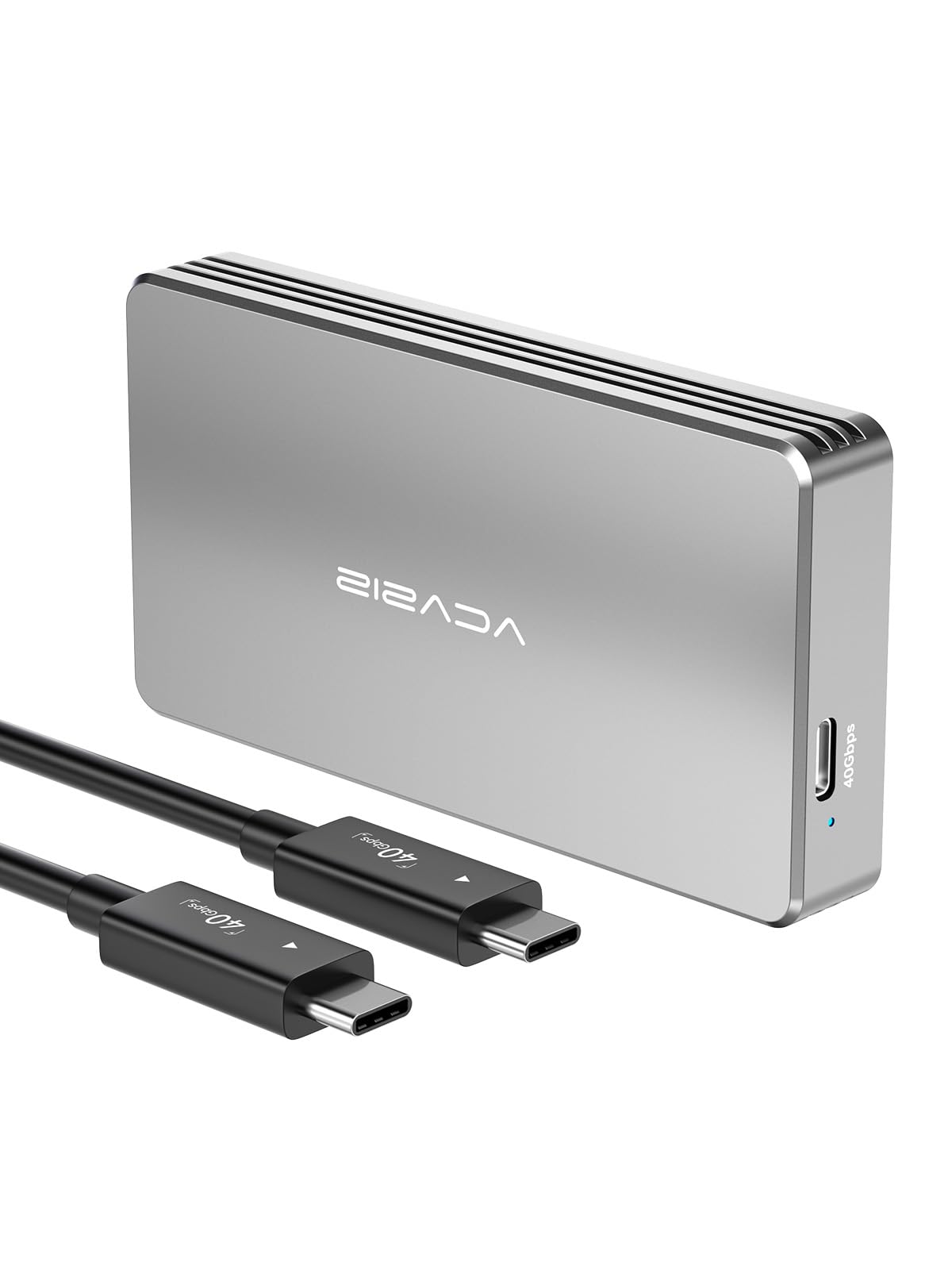
⚡ Unlock Lightning-Fast Storage, No Tools Needed!
The ACASIS 40Gbps M.2 NVMe SSD Enclosure combines cutting-edge JHL7440 + RTL9210 dual-chip technology with USB4 compatibility to deliver ultra-fast, stable data transfer speeds up to 2800MB/s. Designed for professionals and creatives, it supports a wide range of NVMe SSD sizes up to 8TB and offers tool-free installation in a rugged, fanless aluminum chassis for efficient heat management. Compatible across multiple platforms, this compact enclosure is ideal for anyone seeking high-performance external storage with effortless portability.


| ASIN | B0BB74BQVN |
| Best Sellers Rank | #170 in Enclosures |
| Brand | ACASIS |
| Built-In Media | enclosure |
| Compatible Devices | Laptop, Desktop, Tablet |
| Customer Reviews | 4.5 out of 5 stars 678 Reviews |
| Data Transfer Rate | 2300 Megabytes Per Second |
| Enclosure Material | Aluminum |
| Hard Disk Form Factor | 22 Millimeters |
| Hardware Interface | Thunderbolt |
| Hardware Platform | Multimedia, Gaming, Business, PC, Linux, Mac |
| Item Dimensions L x W x H | 4.09"L x 2.13"W x 0.63"H |
| Item Height | 6.1 centimeters |
| Item Weight | 137 Grams |
| Manufacturer | ACASIS |
| Material | Aluminum |
| Memory Storage Capacity | 8 TB |
| Product Dimensions | 4.09"L x 2.13"W x 0.63"H |
| Supported Devices Quantity | 1 |
| Warranty Description | 1 YEAR |
M**A
Zoom
When I originally received this enclosure it was missing the heat pad and the usb-c cable that was included was short and only capable of usb 2 speed so when I wrote my original review I complained about the low data speed (30MB/s) and the missing heat pads and only gave the product 3 stars. The enclosure was fine, the accessories were bad or missing. After a long email correspondence with Acacias Customer Support, which included pictures of what I received, they told me that the cable I got was not their cable and so I thought I might have received a device that had been shipped to someone else and returned without the heat pad and with a useless usb cable, and I ordered a replacement. The Acacias product package was not sealed so it was not possible to tell if it already had been opened. The replacement just came in and when I opened the package (it was also not sealed) it contained a proper Thunderbolt 4 cable and the heat pad, and when I tested it I received the kind of speeds I expected - about 2800 MB/s using the WD 1 TB 2280 memory. That makes it clear that I received the bad usb cable due to my original order having been returned to Amazon by another customer and not due to the fault of the vendor, so I have revised my review. This enclosure works very well, although it does get very warm and probably needs a cooling fan as well as the included heat pads. The speeds are everything I expected and the included Thunderbolt cable works properly. It is a bit short for me, but it is the length specified in the product description. I am happy with the replacement and feel capable of recommending it. If you want external drive speeds close to the speed of your computer memory consider this enclosure. --------------- I recently bought the version of this enclosure that contains a fan for cooling and when I tried to leave a review Amazon told me that I had already reviewed it, although that version was the version without the fan, so I am adding this review to the end of the original review. While the original enclosure is a great way of adding high speed memory to your system it suffered from one drawback and that is it needs cooling. I solved the problem by buying a small muffin fan and attaching it to the enclosure and, with that, it ran cool and I had no heat issues. This new enclosure solves that problem and I have replaced the version without the fan with this one. This is a first class enclosure with transfer speeds as high, if not higher, than the internal memory of my Mac M2 Mini. Repeated use of the Black Magic speed app showed no slowdowns due to thermal throttling so it is dependable and fast, even after long use. Thee are some minor issues. First, the manual that comes with the enclosure is the manual for the version without the fan so it contains no information about the cooling fan. There is a small button on the side of the enclosure to turn the fan on and off, but even when holding the unit next to my face I could not feel air moving. To be sure that the fan was working I had to hold it next to my ear, and I could hear it running. There is also a small LED on the side of the enclosure and it shows a constant light when the fan is running and a blinking light when the fan is not running. I have picked up the enclosure during the day and found it to be slightly warm while the old enclosure was hot to the touch without the muffin fan I attached. This is a great enclosure and I believe that it deserves the 5 stars I have given it.
C**P
Reliable, fast, solid construction, easy to re/use with no tools, stays fairly warm
This enclosure seems reliable, fast, easy to use, and is recommended (though a major caveat is I’m a first-time user of SSD enclosures and in the first month of use.) FEATURES The enclosure is aluminum and seems solid. The no-tool installation was super fast and easy. ACASIS includes plastic spacers so SSD sizes shorter than 2280 are supported, plus there are couple thickness of thermal stickers ready to apply that help dissipate heat between drive and enclosure. The installation could not have been easier, plus it’s easy to pop open if needed. The kit also comes with a USB4 compatible wire that’s less than 12” long. That’s short but I’ve read this length is best for highest transfer speeds in USB4 so doesn’t seem a shortcoming of ACASIS. BASIC SETUP So far it’s been fast and reliable. My setup is 3-partitions on a 4TB drive connected to Thunderbolt/USB4 MacBook for Time Machine backups in one partition, SuperDuper! app weekly backups in another partition, and manual archive in a third. SPEEDY All seems fast, reliable, and compatible with USB flavors from 2.0-4. My SSD supports 3500MB/s transfer with actual rates in practice at around 2750. This is apparently expected performance via Thunderbolt/USB4. Regardless, it’s a helluva lot faster than my old USB3 SSD and platter setups with speeds of just 50-70! WARM The enclosure does stay fairly warm, with added heat during backups. It’s not uncomfortably hot as I can easily tough the enclosure, but it is significant. I don’t have experience here so I can’t say if too hot or fine. Hopefully this won’t bite me later. TO FAN OR NOT TO FAN I was close to choosing an enclosure with a fan because I read lots of reviews about heat issues. I chose against it because there are even more complaints about whining noise and broken fans over time. I figured the fan would be tiny and prone to breaking with replacements hard to find. Then, I’d end up with an enclosure without a fan anyway. I’ll have to see if the heat is a problem over time. SATISFIED All told, this setup seems solid, fast, easy to re/use, and is recommended. Biggest issue maybe heat though it may not because it’s actually normal temp.
R**G
Fast, solid, good heat dissipation
For a few weeks now, I been using a few Acasis NVMe M.2 enclosures for multiple Mac computer systems connected to Thunderbolt 4 ports. Especially the TB405 and the TB401 (for this specific review). The drives I have tested them with are the Samsung 980 Pro 2 TB and the Seagate FireCuda 530 4 TB. So far, the enclosure has been very reliable and fast (I mean fast …). For the Samsung 980 Pro 2 TB: - Blackmagic V3.4.2: o Write 2,817.2 MB/s o Read 2,708.6 MB/s - AmorphousDiskMark V4.0: o Read: 3,101.55 MB/s o Write: 2,937.15 MB/s For the Seagate FireCuda 530 4 TB - Blackmagic V3.4.2: o Write 2,612.9 MB/s o Read 2,625.3 MB/s - AmorphousDiskMark V4.0: o Read: 3,116.61 MB/s o Write: 2,722.06 MB/s The Samsung a little ahead for the Seagate FireCuda. The Aluminum casing sitting on top of my metal monitor stand does a great job dissipating the heat. We have used as well external SSD’s (Samsung T5 and T7). Both of those got constantly real hot and very uncomfortable to touch. Not so the NVMe with the Acasis enclosure. During video rendering the temperate does increase, but never to the level of the external SSD’s. Cost: This enclosure together with the fast Samsung 980 Pro 2 TB is less than $400, while the Samsung X5 is still at $900. Especially the TB401 is very easy to install, and the little extra work compared to an off the shelf solution, gets you great speed for less than half of the cost. Summary: This is a fantastic enclosure which works well with the Samsung 980 Pro and Seagate FireCuda 530. It provides excellent reliable speed with good heat dissipation. Just make sure to use the Thermal Pads to make contact between the drive and the enclosure (probably use both which are provided). Overall this enclosure is a solid winner. Personally between the two versions TB401 and TB405, I prefer the TB405. It seems to dissipate heat even a little better with the corrugated surface. However, the TB401 is easier and faster to install. Both are great!
J**E
Very good speed, supports 8TB SSD, has a nice metal and tool-less design.
The ACASIS NVMe M.2 SSD 40Gbps Enclosure (TBU401E) has a nice metal tooless design. Its metal construction helps the NVMe SSDs with heat dissipation, thus lowering the operating temperature. The unit has a single USB-C Thunderbolt port in one end, with a pinhole status LED to the side. Included there is a USB-C Thunderbolt cable a couple of thermal pads, two rubber push pins, and manual. There are some confusing advertising on this and similar enclosures. This ACASIS NVMe M.2 SSD 40Gbps Enclosure has and Intel JHL7440 Thunderbolt 3 Controller, which according to Intel specs has a "Theoretical speed" of 24Gbps. If 24Gbps is the max theoretical speed, then this devices should be advertised as such...instead of the magical pulled out a hat 40Gbps speed. I tested half a dozen SSD and the fastest speed was reached on a Windows laptop over TB4 port 3065 MB/s (24.5 Gbps). On a Macbook Pro over TB4 reached 2378 MB/s (19 Gbps). I used ExFAT and APFS formatting on Mac and ExFAT and NTFS formatting on Windows. A couple of the SSD tested could reach write speeds of 38.4 Gbps (4800 MB/s) and read speeds of 40 Gbps (5000 MB/s) when connected directly to a Mac or Windows computer. Some disk like the SK Hynix PC711 NVMe disk and SK Hynix disks with Cepheus NVME controllers did not work on this enclosure. By the way, USB4, TB3 and TB4 are not the same when it comes to requirements, standards and performance. There are minimum requirements for each platform and that is where the real difference becomes apparent. USB4 as well as TB3 and TB4 could reach 40Gbps (theoretical), but USB4 minimum requirement is just 20Gbps. The ACASIS NVMe M.2 SSD 40Gbps Enclosure (TBU401E) is a nice tool-less enclosure, that it is very useful when swapping SSDs. It comes with a nice cable and has good heat dissipation. I would have liked clear specifications about the unit, to prevent confusing buyers. I also have a similar unit that cost 35% less and performs just as good as this unit, since they both have the same Intel JHL7440 Controller.
T**.
Great high performance ssd enclosure
Extremely fast ssd enclosure, great quality! My WD SSD fit in without issue and connected up to my Mac mini. No issues with overheating of other problems
S**A
Best Way to get a Screaming Fast External Thunderbolt SSD
This enclosure (along with most other Acasis, Orico, ...40gbps NVME ones) will get you the fastest external SSD available at a value price vs. the top-rated $300 yet ~500MB/s slower Sandisk Pro G-40 1TB. However it did take quite a bit of research to understand what speeds to expect with my M1 Pro MBP and what SSD's to try. With Black Friday pricing I spent $155 on this enclosure along with a 500GB WD SN770 SSD (it would've been $185 for the 1TB). With my MBP I get 2,750/2,300 MB/s R/W per Black Magic. I fortunately had learned before the purchase that these results (mainly the write speed) depends on the PC/Mac model, CPU and SSD installed in the enclosure; and that my MBP TB4 ports throttle the write speeds down by 400-500MB/s (oh well...2,300MB/s is still crazy fast). With an M1 Max Mac, M2 Mac Air or a higher-end Intel PC I'd probably get 2,700-2,800 MB/s write speeds which is close to the max for a TB3/4 port. OTOH the M1 Mac Air TB4 port seems to greatly throttle the write speeds down to ~1,500 MB/s. Most of the research time I spent was on selecting an SSD that would provide the fastest speeds at the best price. The best choices I found are the value-priced NVME Gen4 SN770, 980 Pro or Rocket 4 Plus (I tried all three and they gave similar results unless you need the superior sustained large file write speeds of the 980 Pro). Spending more on the SN850x or 990 Pro won't give you a faster enclosure/SSD combo. OTOH Gen3 SSD's will definitely result in slower speeds and I also read about possibly slower speeds from some other quality Gen4 SSD's like the Crucial P5 Plus, Hynix Gold...). As for this particular Acasis enclosure (or the similar Ankmax): I really like its tool-less design and quality/solid construction (and it's sleek looks don't hurt either). I also tried the Orico M2V01 and really didn't like that it uses one ridiculously teeny screw to hold the the enclosure's cover in place (i.e., to get the cover on tight-enough to stop it from rattling I had to tighten it down well-beyond the torque level I'd feel comfortable with for something that small, and, even though this Torx head screw and the provided screwdriver seemed to handle the torque, I can't imagine it won't strip eventually). The only downside of the Acasis's tool-free design is that it makes it difficult to "feel" whether the thermal padding is thick-enough to make good contact with the cover (i.e., the cover's spring-loaded detent system pulls the top into place and masks this "feel" vs. the screw-on cover of the Orico). I came up with a couple of blacksmith-engineered techniques to determine if the padding was thick enough so I'm now mostly-OK with that issue. Perhaps an enclosure that uses four screws to hold the cover in place, like the Siliking, might be the best compromise between a tool-free design and one that uses a single teeny screw to hold the cover in place? Either way this one's a winner!
S**.
ACASIS 40Gbps M.2 NVMe SSD Enclosure - fastest for TB3/TB4 ports
This review is for ACASIS 40Gbps M.2 NVMe SSD Enclosure (TBU-401). I was searching for 40Gbps USB-C enclosure to store my collection of LLMs. There were mainly 2 types of them on Amazon: the ones that use ASM2464PD chip (the latest available at the time of this review in 06.2024), and JHL7440 (Intel-certified Thunderbolt 3 chip). ACASIS 40Gbps M.2 NVMe SSD Enclosure is based on Intel JHL7440 controller + RTL9210B chip so it is perfectly suited to be connected to 40Gbps Thunderbolt 4 ports on MacBook Pro M2 Max and Dell XPS 17 9720 (the systems I use). Knowing that the Gen 4 NVMe SSDs are getting hot, I specifically picked up TBU-401 over TBU-405 (and TBU-401/TBU-405 Pro that is actively cooled, but the fan should be turned on manually via button). Installed 2TB Samsung 980 Pro SSD inside (capable of R/W speeds of up to 7000Mb/s) and started testing on MacBook Pro M2 Max with 32GB uRAM. BlackMagic's DiskSpeed Test consistently showed over 2800Mbps read and write speed: half of advertised (theoretical) speed of 40Gbps but still better than any of SSD such as Samsung T9 or SanDisk 2TB Extreme Pro. The enclosure was getting hot, especially during write operations when I was writing 80-90GB LLMs on disk, so I decided to find a suitable radiator for passive cooling. The one that was suitable for this enclosure was the right size and also came with thermal tape (search Amazon for ASIN : B0BC15L51H). Two of these Easycargo 4pcs 50mm Heatsink Kit 50mmx50mmx20mm + 3M8810 Thermal Conductive Adhesive Tape fit well on top of ACASIS enclosure and coupled with 4 rubber feet applied on the bottom, provide amazing passive cooling to this enclosure. Note about TBU-401 vs TBU-405 enclosures: they are 100% the same internally (even the logic board was produced on the same month), but I feel that the solid surface of TBU-401 that is 28g heavier than TBU-405 is suited better for the heatsink applied on the top. Striped surface of TBU-405 with more fins will help it dissipate heat better (if used without additional heatsink as it is in my mod). After testing Acasis TBU-401 with 2TB SSD and satisfied with speed results (knowing that the existing generation of chips cannot provide full 40GBps R/W speed regardless of internal SSD/interface used), I replaced the SSD with 4TB Samsung 990 Pro and that's what I am going to use as external storage on my Mac and PC. Additiona notes: - choose single-sided SSD such as above mentioned 980/990 Pro SSDs; - Replace the included 1mm thermal pad with a single 2mm thick pad such as Gelid Solutions GP-Ultimate 15W; - You can go without heatsink if you attach the SSD enclosure to any cool (preferably metal) surface using thermal tape (such as ASIN: B083HCB4TP). I have my second TBU-401 enclosure attached to the back of Omoton Vertical Laptop Stand (ASIN: B078X49YQQ) and it is perfect for cooling the enclosure.
M**H
Now the transfer speed is super fast
I bought a 4TB Crucial P3 Plus NVMe M.2 SSD from Amazon which is rated up to 4800 MB/S, and Amazon suggest a Sabrent enclosure https://www.amazon.com/dp/B08RVC6F9Y?ref=ppx_yo2ov_dt_b_product_details&th=1. Which says it's rated at 1000 MB/S, after carefully reading the description. What confused me was the description also said USB 3.2 supports data transmission speeds of up to 10Gbps, so I was expecting higher transfer rates. Then I realized lower case b in Gbps - is Gigabits per sec, not gigabytes per second - 10 Gbps is 1.25 GB/s. - which is 1250 MB/S max, and I was getting less than half that. - ~ 600 - all depends -- sometimes as much as 750. Then I learned about thunderbolt 4, and realized you need a different enclosure using a thunderbolt 4 cable. Which is much more expensive but worth it. So I needed to spend - $110 for the ACASIS enclosure which is 40 Gbps which translates to 5000 MB/S, and with the T4 cable I get about 2000. -- There must be some loss somewhere. I have an IMAC 27 inch 2017 which has an internal SSD drive (probably a NVME) and I get about 2200 MB/S. Not sure how to get a higher transfer rate -- but 2000 MB/S is plenty plenty fast - or as Larry David would say pretty pretty good. So I am very very happy now. I created a bootable drive with the idea of being able to go to any Mac and boot up from my own drive - which is encrypted and needs a password (if the external drive gets lost or stolen) , and it works great. The only problem is that I cannot boot from my M1 MacBook or any M1 because M1 and Intel data partitions are a bit different (I learned about that as well) and the bootable drive was created using my Intel IMAC. But I can use it as an external drive on any machine. So why did I care so much about the speed. Apple charges a lot for extra SSD internal storage -- so one could purchase a Mac with the minimum SSD and then just attach this drive with the amount of storage you really want and you will not see any degradation in performance. I was able to get the SSD for $300 - 4TB, plus $110 for the enclosure. -- so a total of $410. An entry level MacBook M1 with 512 MB is $1999 retail, for the same computer but with 4 TB the price is 3199. - so a difference of $1200 vs $410. Some people will not want to attach an external drive to a laptop. However for a Mac mini or IMAC it does not make a difference. For a Mac mini it would cost an additional $800 to go from 256 GB to 2 TB. Again I like the fact that I can attach the external SSD to any Mac computer (at least from 2017 onward). More mobile, especially important for my every growing photos library which includes lots of videos. Any in summary the ACASIS is working well so far. It's only been a few hours, so I will update this review in a few weeks to tell you if there are any problems. Easy to install, instructions were easy to follow. Update. Still works flawlessly
Trustpilot
2 months ago
1 month ago