We remain fully operational. Our teams are working around the clock to ensure your deliveries continue safely.

DOWNLOAD THE APP


Customer Services
Copyright © 2025 Desertcart Holdings Limited
DOWNLOAD THE APP


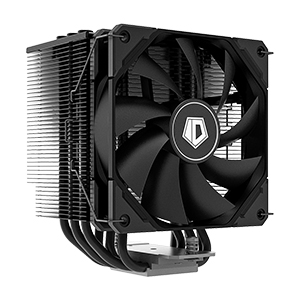
🌟 Elevate Your Cooling Game!
The ID-COOLING SE-226-XT BLACK CPU Cooler is engineered for exceptional heat dissipation with its 6 heat pipes and 120mm PWM fan, ensuring low noise levels and 100% RAM compatibility. Its pure copper base guarantees rapid heat transfer, making it compatible with a variety of Intel and AMD sockets.




H**L
12700K + this cooler = idle temps @ 75-80F
Update 1/15/22Still holding its ground with temps. After a couple of months I have a better idea on how this performs and it performs better than the FUMA mentioned below. @ $50 this thing is build like a tank and temps are kept in check. The most intensive task the CPU sees though is video transcoding for a minute or so and the temps might hit 130F max for a few seconds while the fans tamp up.I slipped an IC Graphite pad between the cooler / CPU instead of wasting time on paste since I had done the same on the 8700K a while back. The graphite pads work just as well as any paste and don't require all of the mess if you want to swap coolers or need access to the CPU later on.-------------------------------------------------------------------------------------------------------------------I took a leap on this since my FUMA 2 required an upgrade kit that they wouldn't provide w/o a fee. I decided to rebuild my server from a 8700K >> 12700K and was debating between something like this cooler or going liquid. Well, I don't really like the idea of fluids and electronics being mixed together so...The only thing that was a bit of a PITA was the screwdriver you need and is not included needs to be 6 inches to fit down the hole in the fins to reach the screws to clamp it down onto the CPU. I ended up hitting WM and picked one up for $2 but, that sort of thing should be included in the package if you have a 1-off design to tighten things down.I haven't been able to push the new 12700K too much at this point but will do some more testing on the setup and report back if things go haywire with the temps. Since this and the FUMA are so alike I expect there to not be much of an issue. The FUMA kept things under 130F under an extended load and this at idle is actually ~10F lower. It's sturdier in design as well. The approach makes it feel solid compared to the FUMA in that the tower is solid instead of split w/ room for a fan in between and the fins don't have that flex feel to them as much.I didn't bother using the fan included so I can't say how the noise is on that. I used the Arctic P12 PWM PST fans instead from the prior build since they're extremely quiet and you can use a single fan header since they plug into each other in a daisy chain configuration. The PST feature is really helpful when you're working with limited headers for power.Overall though this thing keeping idle temps @ 5F from ambient is a good deal @ $50 vs paying $100+ for other setups. Save yourself the premium that other setups are charging and get the same or better cooling for less cash.I run my server 24/7 as a router / switch / wifi / firewall / NAS / DVR / HTPC / etc. and cooling is important to keep things running smoothly. For the case I went with a "Meshify 2" which has ample 140mm fans spots for breathing and installed 5 of them for intake and 1 for exhaust as well as 2 on the cooler itself.
A**
Effectively cools a 5900x in a mini itx case.
Abridged review:even though it doesn’t come with a screwdriver… (6” long, #1 Philips head, skinnier than a standard no 2 wood pencil should do the trick)this is a wonderful product. Easy install on am4 with great performance. My included fan made a rather loud hum past 50% speed, so I swapped it. The paint chips kinda easy. But still… This thing can keep a pretty spicy higher end cpu in a small case at bay. For 50 bucks?! Buy it.Deep, deep dive:B550i aorus itx, r9 5900x (default amd power limits, pbo limits disabled, -10 all core uv) Noctua nt-h1 paste, se-226-xt, nr200 mesh panelAirflow setup in this case: 2x A12x25 on this heatsink intaking from rear fan slot above motherboard, 2x s12x25 exhaust on top of case. Adding a rear slim 92mm intake actually made temps slightly worse. I believe this might have impeded the negative-ish pressure airflow achieved by this fan setup. Ambient temps typically around 68f/20c.Under lightly threaded workloads when the cpu is boosting up to 4.95 ghz (which is higher than stock 4.8!) i rarely see low 80s c. This might happen when hitting a loading screen in a modern multithreaded game after an extended (3 hrs+) session. Typically i see mid-low 70s c while loading, with gameplay hovering in the low-mid 60s c. This temp range is specified as within spec from amd themselves. A synthetic full 100% load (cinebench) sees about mid 60s c peak running at ~4.3ghz across all cores. I have never once seen thermal throttling being reported in hwinfo.Keep in mind, I have this heatsink in a small mini itx case with slightly aggressive fan curves set to ramp to 80% at 80c. With a 30 series gpu right next to it. In a bigger case with more room to breathe, I believe this cooler would have even more thermal headroom. Good stuff. Really good stuff.*cooler master nr200 note*in order to mount a 25mm thick fan above this heatsink with this particular case/motherboard combo, remove the top panel mesh. Use a washer with a case fan screw, then screw it in from the top. You will buy yourself some precious space doing this. It’s a very very close fit, but no there’s rubbing from the fan clips on the fan blades. I don’t think adding the provided fan guard will clear the gap. I ran out of washers in my picture, that’s why there’s a long screw in on of the fan holes haha
S**
Good cooling, low noise
Good quiet PC cooling with good heat purge. Been running this fan for 1 yrs now and am very happy with the performance. Fits well in the Corsair 3000D PC case, easy to install.
P**7
Decent Budget Cooler
This cooler is being used to cool a 12700K as I type this. It is a good cooler with a major caveat... only if you undervolt. At the stock speeds and clocks of the 12700k, this cooler will not thermal throttle, but you will have temperatures well near 99c occasional spikes around 100c on single cores while running Cinebench R23. After some quick searching, I was able to undervolt my CPU by -0.150 volts, and is 100% stable while keeping the stock clocks at 4.8 all core boost for the full duration of the run and maxing at 77c, all while gaining about 50 points in the same cinebench run.Cooler can get a little noisy at full fan speed, but stays fairly quiet around 60% fan speed while intense gaming and never peaking over 50c while gaming with the undervolt.Cooler mounting was VERY easy, reminded me of Noctua's mounting system which is painless, Just make sure that you have a #2 phillips screwdriver with a 6" shaft in order to mount the rear screw. Came 100% LGA 1700 ready out of the box and installed easily.TLDR: Good cooler if you undervolt, not too noisy, easy to mount.
Trustpilot
5 days ago
1 month ago