

Desert Online General Trading LLC
Dubai, United Arab Emirates
Desert Online General Trading LLC
Dubai, United Arab Emirates


🎧 Elevate Your Audio Game!
The Avantree Leaf Class 1 Long Range USB Bluetooth Audio Transmitter Adapter is designed for seamless audio streaming from your PC, laptop, Mac, PS4, or Nintendo Switch. With plug-and-play functionality, aptX Low Latency technology, and a range of up to 60ft, it ensures a high-quality, interference-free audio experience, perfect for gamers and movie lovers alike.





| Data Link Protocol | Bluetooth, USB |
| Data Transfer Rate | 3 Megabytes Per Second |
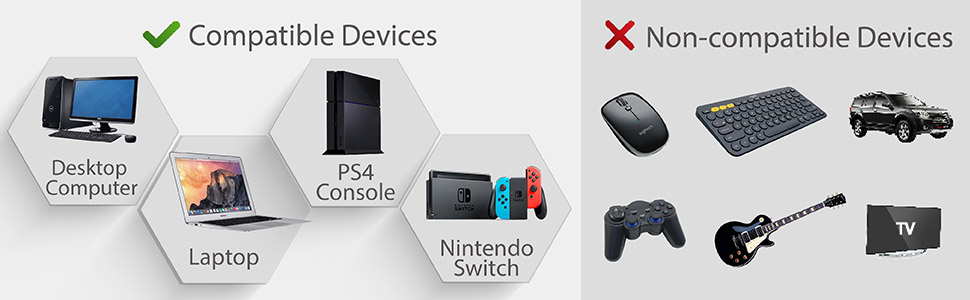
| Compatible Devices | Laptop, Desktop, Mouse |
| Hardware Connectivity | Bluetooth |
| Item Weight | 10 Grams |
| Item Dimensions L x W x H | 2.6"L x 0.71"W x 0.59"H |
| Color | Green |
H**Y
Works like a charm with PS4
This thing is a magical little device that works flawlessly with the PS4. It was simply plug, sync up with a pair of bluetooth headphones, and play!We're using a pair of Sony MDR-XBR950BT's in conjunction with the Avantree USB stick. It worked perfectly right after opening the box, and the quality of the connection has been pristine (even with our PS4 right next to our modem).I have been looking for a while to an audio solution that was simply "Plug n' Play" with the Sony XBR950BT headphones and PS4. The Avantree provides exactly that, plus I can use bass boost and have the volume as loud as I wish it to be (an issue when you have headphones or earbuds plugged directly into the controller).For those looking to a solution with your PS4 and have bluetooth headphones that supports aptX, this is precisely the ticket. I highly recommend these to others looking for a rudimentary solution that are described in the above situation, and also unhappy being tethered to the DS4 controller.There's also something that I forgot to mention. The green soft plastic guard that encases the USB stick (it swivels back and forth) is easily removable. We couldn't fit that into the narrow opening on the front of the PS4 (Slim variant) USB connection. Just give each side a gentle "tug," and the green soft plastic guard pops off easily. You can place it back on whenever you wish, but we have no need for it. I could see someone wanting it on there if traveling, or to hook it onto a key chain or something.That about covers and our experience with it, albeit a short time. It's basically been a wonderful experience right out of the box, and one of the simplest solutions we've tried. Just remember to note that the soft plastic guard is removable - you will have to with the PS4 Slim (since the USB slots have a narrow opening with the case shell).A+
G**Y
APPLE AIRPODS ON PS4! THIS IS AWESOME!
This is an excellent product and IT WILL ALLOW YOU TO CONNECT THE APPLE AIRPODS TO PS4!!! Finally a solution that works and is reliable and inexpensive!!!Avantree aptX Low Latency LONG RANGE Bluetooth 4.1 Adapter for PC, Driver-Free Wireless USB Audio Dongle Transmitter for PS4 Windows 10 7 Linux Mac, Mhttps://www.amazon.com/dp/B01G3J1I5M?ref=yo_pop_ma_swfStep 1 : HARDWARE SET UPplug the usb dongle into the suppied usb cord and connect both to your Ps4 it will recognize in settings under devices> audio devices > under & input and output both as “usb headset (avantree leaf)”Step 2: PAIRING APPLE AIRPODS“PAIR” the Avantree dongle to APPLE AIR PODS by first Placing the dongle in “PAIR MODE” by holding the button on the dongle for 2 seconds. Next on your (MAKE SURE APPLE AIRPODS ARE IN THE CASE AND THE LID IS OPEN) press the button on the back of the CASE and hold it until its in “pair mode” while close proximity to the dongle and it should connect automatically.You will know its connected when the light inside the AIRPOD CASE Turns ORANGE AND the Light on the AVANTREE DONGLE pulsates BLUE.**note DO NOT Use the playstation bluEtooth set up to find AIRPODS *****if you have any issues try to make sure you dont have any other audio devices like Bluetooth speakers in discovery mode while pairing**Step 3: TESTING AUDIOREMOVE AIRPODS FROM CASE And PLACE THEM IN YOUR EARS. AIRPODS will make a CHIME SOUND in both ears to let you know its they are connected to test the sound ON YOUR PLAYTION 4 controller hold the PS BUTTON FOR THE QUICK MENU Under SOUND DEVICES scroll down to “OUTPUT TO HEAD” and switch it to “ALL AUDIO (**this is just to test you DO NOT HAVE TO STAY IN THIS MODE**)” if you can hear system Sounds and game sounds you are all set up!Step 4: VOICE CHATto voice chat in a party or in game you need to enable “TALK MODE” on the AVANTREE dongleDOUBLE CLICK the button on the side. The light on the dongle should now STAY SOLID WHITE! Doing this will enable the MICROPHONE on the APPLE AIRPODS for voice chatting.To MUTE voice just DOUBLE TAP APPLE AIRPOD while in your ears (note doing this takes AVANTREE dongle out of “TALK MODE” DOUBLE TAP the button to enable the microphone agin)****Pressing the side button on the Avantree dongle ONCE .reconnects AIRPODS if disconnected**Any questions feel free to ask em.
Trustpilot
2 weeks ago
1 week ago