We remain fully operational. Our teams are working around the clock to ensure your deliveries continue safely.

DOWNLOAD THE APP


Customer Services
Copyright © 2025 Desertcart Holdings Limited
DOWNLOAD THE APP

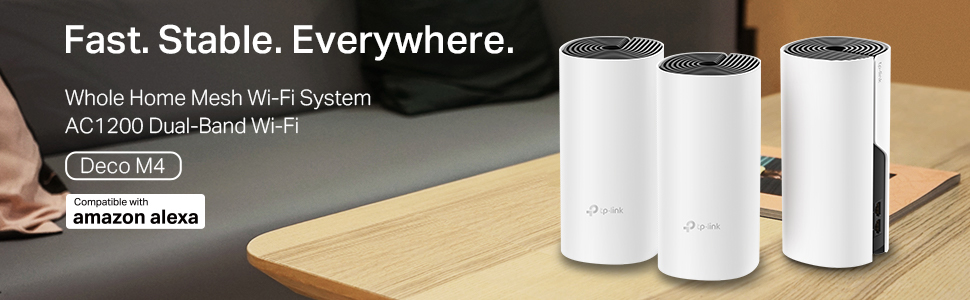
🚀 Elevate your home Wi-Fi game—fast, flawless, and future-ready!
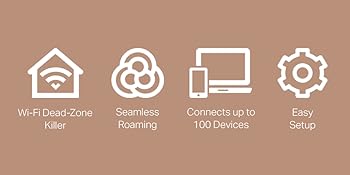
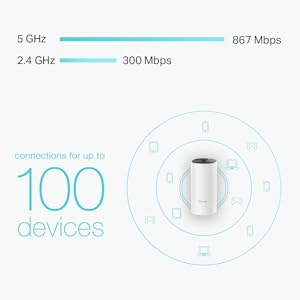
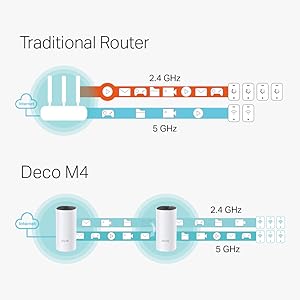
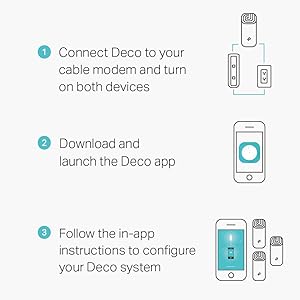
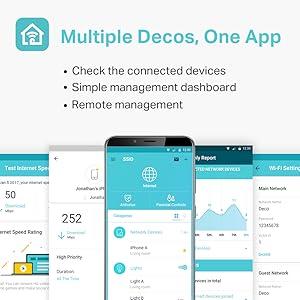
The TP-Link Deco M4 is a powerful AC1200 dual-band mesh Wi-Fi system with three units delivering up to 5,500 sq ft of seamless coverage. It supports speeds up to 1167 Mbps, connects up to 100 devices without lag, and features 2 Gigabit Ethernet ports per unit. With easy setup via the Deco app, parental controls, and a unified network name, it’s designed to keep your smart home connected effortlessly and securely.




| ASIN | B07P61C7KZ |
| Antenna Location | Gaming |
| Antenna Type | Internal |
| Best Sellers Rank | #4,102 in Computers ( See Top 100 in Computers ) #85 in Routers |
| Brand | TP-Link |
| Built-In Media | 3 Deco M4R Units 1 RJ45 Ethernet Cable 3 Power Adapters 1 Quick Installation Guide |
| Color | Black |
| Compatible Devices | Smartphone, Personal Computer, Tablet |
| Compatible devices | Smartphone, Personal Computer, Tablet |
| Connectivity Technology | Wi-Fi |
| Control Method | App |
| Coverage | Up to 5,500 Square feet |
| Customer Reviews | 4.3 out of 5 stars 262 Reviews |
| Data Transfer Rate | 1167 Megabits Per Second |
| Frequency | 60 GHz |
| Frequency Band Class | Dual-Band |
| Frequency band class | Dual-Band |
| Is Modem Compatible | No |
| Item Dimensions L x W x H | 24L x 16.5W x 36H centimeters |
| Item Weight | 1 Kilograms |
| LAN Port Bandwidth | 1000 Mbps |
| Manufacturer | TP-Link |
| Maximum Upstream Data Transfer Rate | 1167 Megabits Per Second |
| Model Name | DECO M4 |
| Model Number | DECO M4 (3-PACK) |
| Model name | DECO M4 |
| Number of Ports | 2 |
| Operating System | Linux |
| Other Special Features of the Product | Parental Control |
| Security Protocol | WPA-PSK, WPA2-PSK |
| Special features | Parental Control |
| Warranty Description | 1 year Warranty |
| Wireless Compability | 802.11ac |
| Wireless communication standard | 802.11ac |
P**Y
finally found a real solution
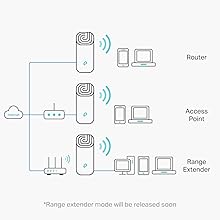
hello folks , i would like to share my personal experience here . before telling the long story , let me give you a quick goods words about this device , it is good , super easy, strong and stable and i will give it the 5 stars and recommend it to others. if that what are you looking for so you got what you want . but that device only ( or any other ) will never solve the dead spot problem unless you figure out how to do the right setup and installation in you home , i am talking her about the hard ware , not the software setting . i suffered for almost a decade from the wi-fi spots i invested a lot in Buying super premium Routers, but regardless the brand or the price , whenever signals face concrete wall, it cant go through . so here is my first conclusion : one centralized router will never solve dead spots problem regardless its brand , price , technology or location . then i thought in Range extender ( signal repeater ) , eventually it will impress you at the beginning that you will get a four bars in your wifi indicators , but , the problem will be always that the repeater is not able to get good connection with the main unit , so even with full signal indicator on your phone , you will have no real network. second conclusion : stay away from range extenders and repeaters then i considered adding more routers ( conventional routers before mesh technology come over ) , i managed to get wifi in every room has a router, but every room has a separate network , every time i move form one room to other i have to register with that room network ... which also lead to lose the connection for while during this painful process , third conclusion : adding more conventional routers can give you good individual coverage , but you need to stay on one place or manage the switching between the networks by yourself ... very painful . then the wifi mesh came over , excellent approach to unify single network in the entire home through multiple distributed devices connected wireless .... it gave me quite a good partial solution , however the communication between the main units and nodes remain the bottle neck. which caused drop in the internet seed to more than half . after further extensive research i started to read about the wired Backhaul connection , which mean to connect the nodes with the main unit through Ethernet cables to solve the above mentioned bottle neck , and enjoy both the speed and coverage .... i thought a lot on how to run those cables across my two floors villa , but the fact is : this cable network is already there in most of homes ( cables are running already inside your wall from the main connection point to each internet plug in your wall ), you just need to understand how it is distributed. the internet is coming from your service provider to your house through fiber optics cable ( tiny yellow cable ) , this fiber optics is connected to one device provided by your service provider which acts as a router ( without wifi ) , this unit called Modem , this modem input is the Fiber optics cable, and the out put are multiple internet cables ( data ) , then each of those cables will come out from a channel in the modem to plug in a very adjacent unit called the main switch, and each channel in the main switch is connected to one wall plug at your home ... this is how internet is is distributed from a single cable coming from your service provider to all the internet plugs in your home . what you need to do is the following : 1- identify the location of the modem and the main switch in your home , they should be close to your door , either in distribution board or above the ceiling , but mostly very close to your door . 2- insert the main router unit between the Modem and the main switch , so the modem feed the main router , and the router feed the main switch, means now all your wall plugs across the home are connected to your main router. 3- most of mesh routers will have only one or maximum 2 out put plugs , and you may want to connect more than those plugs , then you need to buy a small switch ( 5 ports one will do the job ) , so the setup now will be modem > main router > small swicth > home main switch. 4- then now when you connect each node to the wall plug , it will be weird connected to the main router , and then all the home network is perfectly smooth and strong . if you still reading , means you found the above interested , and Hence , here are some additional tips which you surly deserve. 1- Wi-Fi 6 is a new technology , and as promoted it is really preforming much better specially with data monster devices like 4k streaming and Gaming , but it is also much higher cost wise compared to wi-fi 5 , what i did , is i bought a single unit wi-fi 6 device which is TP link X20 , and used it as my main router , and i bough M4 mesh system (3 unit pack ) and used them as a nodes. 2- in addition to above , at every TV or Gaming device location , i bought another small switch ( those are really cheap and make huge differnce ) , so i could split the wall signal between the node unit and the TV , in that way , my all my TV's are directly connected wired to my wi-fi 6 router , and taken out from causing traffic to my wifi 5 network. 3- all my devices ( TP link DECO X20 - TP link DECO M4 - 3 TP Link Super switch ) , are all from same brand ( TP-Link ) , which was a great idea to avoid any compatibility issues . 4- as per TP link technical advice , you need to connect the nodes to the main router to create the mesh wireless first , than when you plug the nodes to wall , they will automatically recognize the wired connection. to do the above , after you setup the main Router , get all the nodes close to the main router and do the wireless mesh setup first , then move the nodes to individual rooms . 4- though it seams that i bought many devices, i am still investing less than half if bought a premium wi-fi 6 mesh system , and for sure i got much much better coverage , signal strength and stability . finally , it took me ages to figure out the above , but i am finally happy that i have reached a solution , hope that above could be helpful to many others .
R**Y
Covers 2-3 bedroom apartment with the 3 piece deco
Very happy with this product. It easily covers a 2-3 bedroom apartment. I installed the main unit in the living room where the Etisalat modem is connected. Another in the hallway and another in a bedroom. Entire home is covered. Best thing is the WiFi network remains the same and doesn’t need to switch like in the case of a wifi extender which will a different network name. Setup was easy. Has to be done by installing the deco app on a phone or tab. You need to know your isp connection settings like connection type pppoe/dynamic ip, username/password, vlan id etc. You can check these from your existing router setup page 192.168.x.x. Here’s a tip - vlan Id is hidden with asterix like when you type a password. Select the vlan id, right click and select inspect. On the inspect browser double click password and replace it with ‘text’ and hit enter. Now the vlan id number will show! The speed is best with the main deco obviously and slightly less in connected decos. But still the speeds are very good and usable. For bigger apartments or villas you may need to buy additional decos to get full coverage.
U**6
Good value for money
Cost effective and works well.
R**N
Moderate setup ease take a while to work seamlessly
Got this as I moved to a bigger two story house. Installation was relatively easy using the app but took a while to get it synced and for the first few days the nodes kept dropping off haphazardly but a week in they just all never missed a beat. And it's been over a month now. Coverage is now comprehensive minus some weakness due to some nuclear bunker level concrete walls in the house. I however didn't find the backhaul setup easy enough. I might still try it to access my main line's full speed potential but it's working well for my needs. And the price I believe is good for the setup.
D**Y
excellent
Bought 3 sets of Deco. M4, X55, X60. All are great. Work as promised. I have great coverage in the house now. Almost no missing spots. Around 4,500 sq ft being serviced by 3 M4, 3 X55 and 1 X60. Set up was a breeze. The Deco app is great. I am able to monitor all the nodes and the connected devices. Haven't tried parental controls etc.
C**N
Can't recommend to my loved ones
I bought this trusting the reviews of parental controls and all I can say is it is no where near the reviews. 1- devices cant be grouped into different groups (this is available with google wifi) 2- interface is sooo slow 3- machines cant be paused only groups can be paused After coming from google wifi interface speed feels like porsche 911 vs hyundai accent Ideas are nice within the controllables but without above implementation is fiasco. Modems are almost size of a mini pc so form factor is 2010 design not 2020 Apart from that Signal is good Mash is good 5ghz is good
F**Y
Seamless Connection, No more deadspots, and amazing software
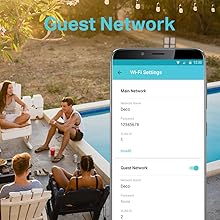
The setup was ridiculously easy. The Software app that comes with it is amazing, easy controls, guest wifi, upgrades, setups, etc... the software also tells you how much of a good connection the non-main extenders have and by moving them around you can get the best out of these. It's worth mentioning we have a two story house and we're covered 100%
G**.
Supplier doesn't support if service required
Product is good but supplier service is very bad, one of them doesn't work anymore but I was not able to reach supplier for repair they are not responding. Local tech support denies service. I do not recommend eDream.
Trustpilot
3 weeks ago
1 week ago