Some deliveries may take a little longer than usual due to regional shipping conditions.

DOWNLOAD THE APP


Customer Services
Copyright © 2025 Desertcart Holdings Limited
DOWNLOAD THE APP

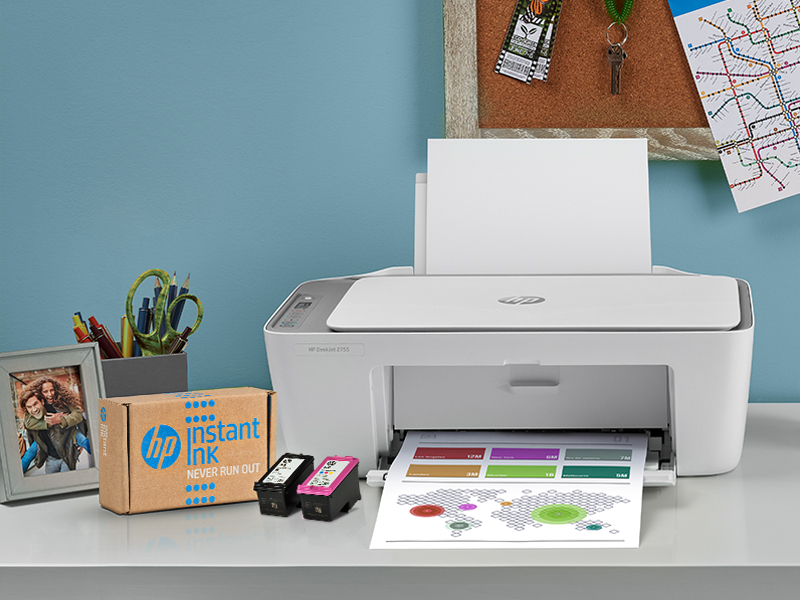
With the HP DeskJet 2755 All-in-One Printer, get all the essentials you need in one affordable, easy-to-use device. Breeze through projects with simple printing at home and scan and copy versatility. With HP Instant Ink, this wireless printer automatically orders ink and delivers it straight to your door with up to 50% savings on ink (subscription required). Get faster, more reliable connections using the color printer's dual-band Wi-Fi® with self-reset. Set up the all-in-one printer in a few easy steps and get high-quality scanning and sharing to Dropbox, Google Drive, email, or the cloud from your smartphone using the HP Smart app. Review: Client Purchase - Bought on behalf of someone else but they haven't complained so ik assuming it works. Review: great product - works awesome



| ASIN | B083ZY6XFQ |
| Additional Printer functions | Copy, Fax, Scan |
| Best Sellers Rank | #448,381 in Office Products ( See Top 100 in Office Products ) #266 in Ink Tank Printers |
| Compatible Devices | Laptops, PC, Smartphones |
| Control Method | App |
| Controller Type | Amazon Alexa |
| Customer Reviews | 4.1 4.1 out of 5 stars (11,921) |
| Date First Available | June 14, 2020 |
| Dual-sided printing | Yes |
| Duplex | Manual |
| Hardware Interface | USB 2.0 |
| Included Components | 3XV17A HP DeskJet 2755 All-in-One Printer; HP 67 Setup Black Instant Ink Ready Cartridge; HP 67 Setup Tri-color Instant Ink Cartridge; Ink Caution flyer; Setup guide; Reference guide; Power cord 1.5 m; Instant Ink flyer |
| Ink Color | Black |
| Item Weight | 7.55 pounds |
| Item model number | 3XV17A#B1F |
| Manufacturer | HP |
| Max Copy Speed (Black & White) | 7.5 ppm |
| Max Input Sheet Capacity | 60 |
| Max copy resolution black-white | 1200 x 1200 dpi |
| Max copy resolution color | 1200 x 1200 dpi |
| Maximum Black and White Print Resolution | 1200 x 1200 |
| Maximum Color Print Resolution | 1200 x 1200 |
| Maximum Media Size | 8.5 x 14 inch |
| Memory Storage Capacity | 86 MB |
| Model Series | DeskJet |
| Number of USB 2 Ports | 1 |
| Print media | Card stock, Envelopes, Labels, Paper (plain) |
| Printer Ink Type | dye-based ink |
| Product Dimensions | 11.97"D x 16.7"W x 6.06"H |
| Scanner Type | Flatbed |
| Series Number | 1000 |
| Sheet Size | 3 x 5 to 8.5 x 14 |
| Smart Home Compatibility | Smart Home Compatible |
| Specific Uses For Product | Home |
| Supported Media Sizes | 3 x 5 inches |
| Total USB Ports | 1 |
| UPC | 194441901474 |
| Warranty Type | Limited Warranty |
| Wattage | 1 watts |
S**A
Client Purchase
Bought on behalf of someone else but they haven't complained so ik assuming it works.
B**N
great product
works awesome
K**.
Good product but setup isn't very intuitive
So I would have give this a 5 if not for the setup in getting the printer connected to wi-fi. So let me start by saying I am an IT professional, I work in a very technical job and I understand IT and how this stuff works. This took me far longer than I would have expected to get setup. The biggest issue is simply that it never explains how to get connected... so below is a quick guide to hopefully help others. Assuming you have a smartphone and are familiar with installing apps from the app store (I use android) then this should help. Start by turning the printer on, you should see the wi-fi button blinking blue. Now download the HP Smart app on your phone, open the app and at the top you should see a selection for Adding a printer or finding a printer. Select that and it will take you to another screen and start to scan, this is where the confusion starts. The app appears to be scanning for a printer already on your network, however you haven't connected your printer to your network yet so it will not find anything. Instead you need to click "Add Printer" at the bottom of the screen and place your phone very close to the wi-fi button (I have a large phone case so 3-4 inches away worked for me). This will connect your phone to your printer through Bluetooth, which will allow you to actually get your printer on the wi-fi. After a few seconds it should find a printer, select the printer and then it will ask for a Network password (Assuming your phone is on your wi-fi). Enter your password and then it will take you through a prompt to connect the printer, keep your phone close to the wi-fi button on the printer. Once you finish this, your printer will be connected to the wi-fi. You can then go through the rest of the app, and it will walk you through installing paper and ink and doing a test page. Not sure why the HP App doesn't explain all this, but anyways I hope this helps.
C**N
Did not work!!
Set-up was easy until trying to connect to Wi-Fi! Had to replace with an HP 4700 series printer, which worked very well.
L**T
The worst printer experience ever
Bought in 2020 for small at home business. Occasional monthly use but somehow new ink cartridges are always low after 5-10 prints/copies. Printer could never consistently stay connected to wifi so no luck with HP App. I believe I was able to connect once years ago and used the app for printer maintenance but lost lost connection as usual. Regardless was able to print and copy manually via usb..scanning was tricky as option is on the HP App. occasional printer trouble including stopped printing black, won't make copies or print from computer after new HP cartridge installed. After searching the internet noted possible reasons including misalignment, clogged nozzles etc etc...but HP App can't find my computer not even via IP or other ways (including turn your printer off and back on 100 times) that took hours out of 2 life days, so no deal. Meanwhile internet on my FIRETV, cell , and computer have always worked just fine. Bring Back Printers with full control panel on actual printer!! Beware...HP is all about their INK. I'm trashing mine and aiming for a different brand of printer hopefully with better luck
J**N
Happy with printer
Love it easy of access at home
M**A
Kind of chintzy for an HP
The print cartridges on this printer look like they're not as expensive as for other models, but even the XL size only lasts for 240 pages, so these print cartridges are no bargain. Also the printer just stops working properly and doesn't really notify you it's because it's out of ink. I spent way too much time figuring out that was the problem with my printer, maybe because I had just put the new XL print cartridge in I thought it had a thousand pages like the XL HP printer cartridge for my other HP Office jet. I made a mistake by this because it is clearly for someone who barely ever prints and I think I must print too much for this to be a practical tool. The scan on this printer is positively primitive; It's far worse than scanners I had on printers 10 or even 20 years ago. The whole machine just seems so cheap and fragile that I wonder how long it will last. I bought this rather than a proper inkjet because I have very limited space for a printer right now and this actually fits in the space.
B**9
Works like a charm!
I read the reviews of this printer and was a little concerned with so many having trouble with the initial set up. Happily I can say that I did not have any trouble connecting to my wi-fi, as per the other reviews said. It was super easy. Also found I could download and install the installation app on my laptop and did not need to put it on my phone, as some of the complaints were about. This printer is far better and cheaper to operate than the one it has replaced, of another brand. So pleased with the reasonable cost of ink for it. So far I am buying my own replacement cartridges, not using the subscription service from HP as I do not print very much. Always had HP printers and was happy with them, until the one before this and I changed brands because friends and relatives said the other brand was so much nicer. No, it was not! As to the tech support rating, I did have one issue with it not wanting to print one specific thing after I got it set up. I did a live chat with a support person and he solved it in about 20 minutes time. Tech support worked just like it should and I was pleased with that too. The printer has been working fine and even paired up with my later purchase of a different branded new laptop without any trouble at all. As to the sleep mode, I cannot rate it as I do not use it. When my printer is not in use, I turn it off. I would definitely recommend this printer.
J**.
I have used it for two months now. Setting up was alright. The wifi took a bit to become stable but once it start working it hasn't caused me any trouble. Overall it's worth the price and fulfills all my needs.
R**E
If you just need a printer to print paperwork like me, it's alright. The print speed is insanely slow, takes a few minutes per page to print. The quality is good enough for what I need, but if you want to print photos or anything other than text it's not amazing. I recommend if you just need something cheap and basic, otherwise, save up and get something better. Setup was also a bit of a pain. Had to youtube how to insert the ink! The printer feels light and cheap too. Honestly, not the worse printer ever, so if you just need to do paperwork then it's fine.
K**Y
It was actually work perfectly, no hassle at all unlike the bad reviews I read before getting it. It comes with black and tri colour. Connected it easily on my smartphone and laptop in just a minute and yes there was NO hardcopy instructions. However, I thought I am getting a two month free trial for instant ink?? It says one month only on the app which I am very disappointed and hoping to connect with an agent so that I can avail that two month free. That would be very much appreciated! Overall I like the how sleek it is and is very simple to use.
O**G
This printer is an absolute piece of garbage. Literally. I will be taking it to an electronics recycling point. I have never had so much trouble with a new printer. From day one it has given me trouble. The computer program for it is faulty and I've had to reset the printer 3 times but it keeps disconfiguring itself somehow. The mobile app isn't any better. I've had HP before and it used to be super easy to print from the HP Print app. Now it requires some plug-in app... so, two apps, and it's just not straight forward anymore. Paper gets jammed frequently and the lack of a screen to troubleshoot a troublesome printer basically renders it useless unless you have the time and patience to spend 30-40 minutes reconfiguring the thing every time you need to print a page. Don't buy this if you need reliability. This printer cost me a zero on a test that I could not print. On the flip side, I've done a lot of research and there doesn't seem to be any affordable alternatives that don't sacrifice reliability. I'll likely end up needing to pay at least twice as much for something that will print when I need it to.
M**.
This is a great little printer. I signed up for the smart print, which is genius and I have 5 free months! The only problem I had - which was a real pain, was setting up a new windows device on it. I spent an hour trying to figure it out and ended up calling support and it took them over 2 hours to get it done. Aside from this, highly recommend this unit, great value and great printer.
Trustpilot
1 month ago
1 month ago