


🖥️ Elevate your workspace, command your day.
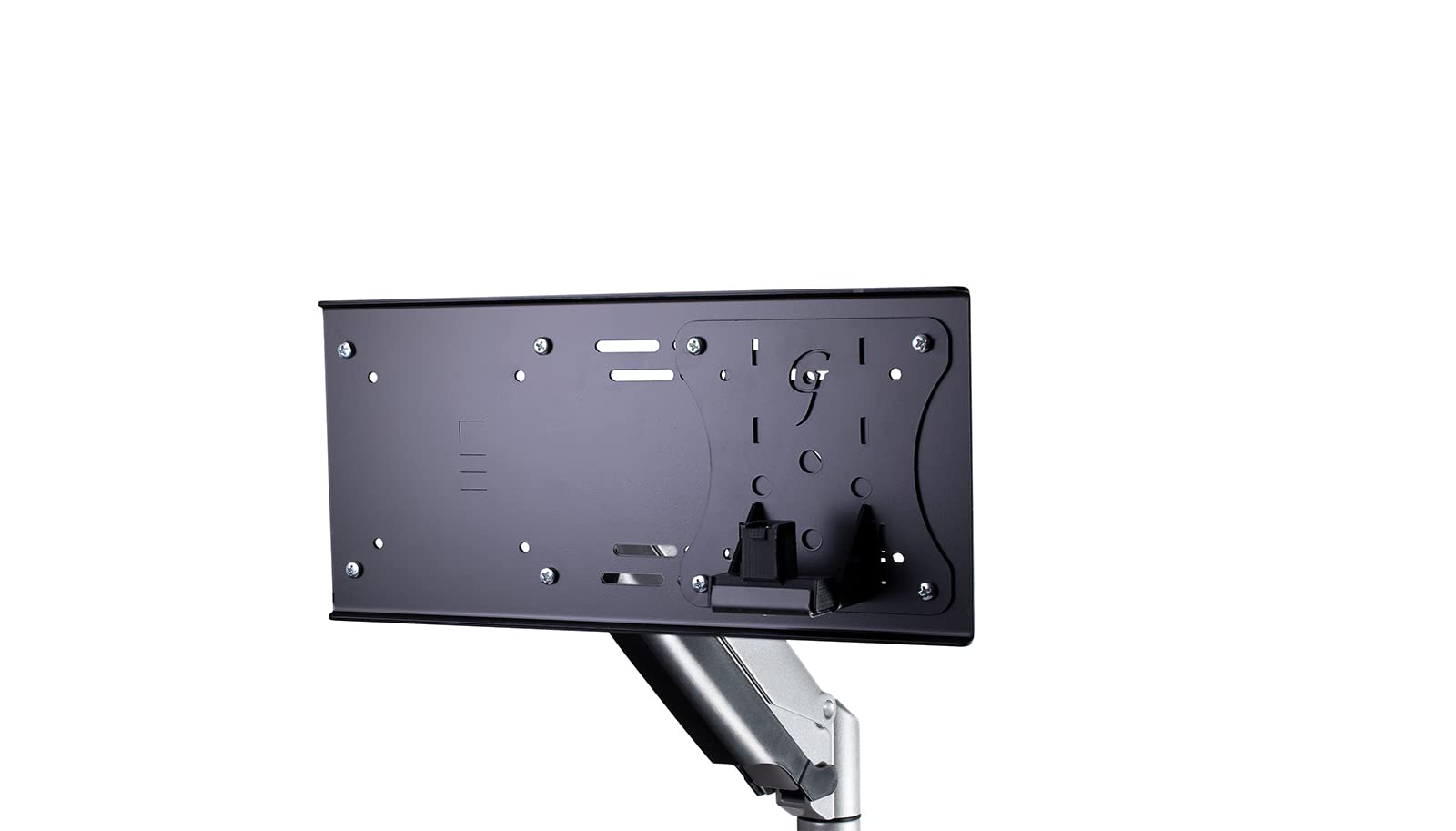
The Gladiator Joe Monitor Arm/Mount VESA Adapter Extension is a robust, laser-cut Canadian steel plate designed to enhance your monitor’s positioning. Compatible with 75x75 and 100x100 mm VESA patterns, it allows precise height and lateral adjustments, seamlessly integrating with Gladiator Joe mounts to optimize ergonomic comfort and workspace aesthetics.


| ASIN | B07QC94ZZ3 |
| Best Sellers Rank | #385 in Computer Monitor Arms |
| Brand Name | Gladiator Joe |
| Color Name | black |
| Customer Reviews | 4.3 4.3 out of 5 stars (164) |
| Date First Available | November 30, 2018 |
| Is Discontinued By Manufacturer | No |
| Item Weight | 1.78 pounds |
| Package Dimensions | 12.32 x 9.25 x 0.83 inches |
U**R
Good quality, heavy duty
Really nice quality heavy duty adapter plate. I used this to offset a 49" G9 Odyssey about 5". The monitor was not center because the monitor arm I have needs depth in the rear to bring the monitor to center when it's pushed back. Even with my desk pulled out about 6" from the wall. This adapter did the trick and now the monitor is perfectly center. Because of the weight of the monitor I had to use a 5lb counter weight on the opposite side. Otherwise the monitor would slowly tilt. But that is not the fault of the plate. My monitor arm was just not designed to have that much weight off center. Anyway, very easy to install, just be careful to not damage your monitor when offsetting. I don't think it would be difficult to cause damage if you're not careful.
M**S
Works perfectly
Install was very easy and straightforward. The product is very high quality and I have no worries about it holding up my monitor. It is slightly heavy and large so if you're putting it on an arm or stand that you're already nearing the edge of the weight limit I would be wary of this. I would also watch out if you're putting this on a smaller monitor as it might stick out the bottom or top of your display. I used this on a 24 inch display and it goes from nearly the top of the display to the bottom and is barely hidden.
C**A
Easy to install vesa mount bracket
Excellent for use with a standing desk to elevate to eye level. Room on the bracket for my clock, too.
R**2
Dell dock mount
I have a Dell monitor that isn't compatible with the dock mount that they make. However, their mount kit comes with a VESA mount that easily mounts to this GJ bracket. This combination of hardware also allows for the dock to be mounted on either side of the monitor. The GJ bracket is clearly overbuilt for my purpose, but it works well and is very secure.
A**R
Great product!
This is a simple product that does its job well.
N**E
Suits the job for a TV, with some minor modifications
Bought this to accommodate a larger TV on a swiveling mount that's tucked away in the corner of a room. Without getting into the geometry of it all, for the TV to fit in the space, the center of the TV had to be offset ~5 inches relative to the center of the mount. Stumbled across this piece of hardware and gave it a try. Happy to say that it did the job, with two caveats. First, the holes on the 100 x 100 mm side were too small for the screws/holes on the back of the TV (probably because this adapter was designed for a monitor). As a result, I had to open the holes up with a drill. Easy enough, but requires a mild amount of technical ability (e.g., the ability to enlarge and clean a hole in a metal plate). Second, as you might notice in the pictures, this is not flat stock, it's got a mild (¼-½ in. or so) channel/lip along the long edges. Presumably, this adds some structural support, so best not to try and remove them. This likely isn't an issue for a monitor (you can probably orient the lip/channel side of the adapter toward the monitor mount you're extending, and still get a flush fit; then attached the monitor to the flush side of the adapter). If you're trying to adapt a TV mount that can fit larger VESA configurations (as I was), you run into an issue: you can't get a flush connection between the adapter and both the monitor and the mount, and one of the two is going to be mounted against the channels on the lip/channel side of the adapter. Thankfully a couple of spacers (or a stack of washers, etc.) can work you around this. So not a "perfect" fit for adapting a TV mount, but it certainly works. Just make sure you tighten the nuts attaching the adapter and mount before putting your monitor/TV on the adapter!
J**R
Will adjust your monitor within it limits. Simple, straightforward, with all hardware included.
Perfect for my need to lower a monitor 3 1.4", but offered much more.
A**A
Sturdy and does the advertised job.
I have 2 34" ultrawide monitors stacked on top of each other. Unfortunately, base for the dual-monitor arm that I use is not tall enough and the bottom of the top monitor was getting covered up. I managed to increase the height by quite a bit thanks to this plate and it works very well. It feels solid, thick and I know it will reliably hold my monitor. Do keep in mind that by using the plate (which adds weight) and raising/lowering your monitor, you are changing its center of gravity and if your monitor arm is not strong enough, your monitor will tilt so make sure that you take into account the weight capacity of your monitor arm.
A**U
Helped me put my screen closer to the wall by allowing my arm mount to extend higher but keeping the monitor at the same height as the other one. In the end, my speakers are closer to the center, which made my setup look better and the speakers sound better because they aren't too wide apart like the way they were. Thanks for the quality product. Shipped fast too!
A**R
Sturdy. Lots of layout options. The screws that are included jut out further than needed (see photo). Not a problem for me but something to keep in mind.
I**R
The current (2024) iMAC is 18.1" high with the integrated factory stand. We needed it to be < 18" high to fit under a counter. When the iMAC is ordered with a VESA mount instead of a stand, the iMAC VESA mount is very is low on the computer, making the screen ride very high on a standard stand. Successfully used this Gladiator bracket with a Dell MFS22 stand to make a nice integrated solution (iMAC was ordered in matching silver) that can be adjusted to have the top as low as 16.5". Used the adjustable part of the bracket on the stand and the fixed 100*100 mm part on the computer. Bracket is stronger than the rest of the stand.
M**R
Has a lot of holes for the configuration that you need. Unfortunately the way my monitors attached to my stand, I had to modify slightly and drill two more holes for my monitors to line up. Nothing to do with the product itself, just unfortunate that's how my monitors lined up!
T**.
Pricy but works excellent. No issues fitting it. Attached to the back of my screen no problem. I attached it to an arm that provides even more height and now my 6 for 4 self can actually look up at my screen as I can push it above my head and relax my whiplash. If your eyes do not line up with the middle of your screen when you're sitting up right in your chair. Get a lifting arm. If that's still not enough, get this product.
Trustpilot
2 months ago
1 week ago



