Desert Online General Trading LLC
Dubai, United Arab Emirates
Desert Online General Trading LLC
Dubai, United Arab Emirates


🎶 Unleash your inner beatmaker—wherever inspiration strikes!
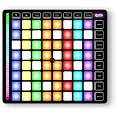
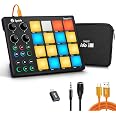
The Synido TempoPAD Z-1 is a sleek, portable MIDI controller featuring 64 velocity-sensitive RGB pads, USB-C and Lightning connectivity, and 5 customizable performance modes. Designed for beginners and pros alike, it offers fixed chord mode for effortless chord playing across 4 octaves and broad DAW compatibility, making it the ultimate on-the-go music production companion.

| Outer Material | Aluminum |
| Material Type | Acrylic |
| Size | 64 Pads |
| Item Dimensions D x W x H | 9.45"D x 10.5"W x 0.8"H |
| Style | Modern |
| Color | Black |
| Platform | Windows 7, Windows, Mac |
| Human Interface Input | Touch Pad |
| Hardware Platform | PC (Windows/ MAC) /IOS /Android |
| Control Method | App, Touch |
| Noise Control | None |
| Supported Software | Compatible with Mainstream DAW like Ableton Live, Fl Studio, Cubase, Logic Pro X, Bitwig, Reason, Studio One, Garage Band, Pro Tools |
| Connector Type | USB |
| Hardware Connectivity | USB Type C |
| Keyboard Description | 64 Pads |
| Control Type | Lighten Midi Pad Beat Maker |
| Number of Keys | 64 |
| Connectivity Technology | USB |
| Additional Features | Beat Pad, Beat Maker, Touch Sensitive Pad |
| Instrument Key | 64 |
| Compatible Devices | iPhones, PC, iPads, Phones |
E**J
Great Pads, Solid Build, and Excellent Connectivity
The pads have an excellent feel, and the unit itself is solid and well built. With TRS MIDI, BT MIDI, and USB MIDI, the connectivity is great. Battery power is also a big plus. The four banks of pads and knobs allow for extensive mapping, and it pairs especially well with Koala Sampler, making it feel almost like a standalone device. I also love that MIDI CCs for the knobs can be configured directly on the unit without needing an app. If a future firmware update allowed naming the knobs, that would make it even better.
A**R
Best choice for koala +ipad EXCELLENT.
Excellent product,. easy to setup (i use it with my ipad air 2 and koala sampler using BLE and midi mapping). Its well built,. responsive and so intuitive. i love ti !!
A**
Does the job
There is a very slight delay in the midi from when the pad is pressed and the inputWorks great when you know how the software works and how to implement this into midi, watch some tutorials for pad implementations for your desired DAW
M**T
Terrible
Does not sync with ipad, phone or any other devices as advertised... terrible instructions that were poorly translated and make little to no sense.
J**J
Great match for the iPad Mini... or whatever
I honestly already have far too many pad controllers, but the size of this pairs up with the ipad mini so well, I couldnt resist. Not the most intuitive, but a great little controller.The knobs, buttons and pads are very smooth and responsive. The build, although plastic, seems very sturdy. I had a bit of an issue and the seller replied immediately and had it going in no time. If you have an issue, definitely reach out to them.
A**R
Nice device, however …
… not really compatible with Ableton (for example) unless you program manually and even then the device light do not follow Ableton’s status. As a drum pad it’s pretty good for the price considering it is pressure sensitive. There are other capabilities which are fun .. but not really much use to me
A**R
Perfect for musicians
The item appears to be worth the investment for music makers. It was more of an impulse buy for me. So, I returned the item immediately without even testing it out.
N**A
Not exactly what I was expecting from a "portable" device.
Just so you know what you're getting: Yes, it's portable in that it can be moved. But you're totally tethered to a computer, or an iphone/ipad (no android support). This device makes no sound, has no speaker, and has no headphone/speaker output. So, it's not standalone portable, if that's what you're thinking. It just has a midi output that can only be ran into a midi-compatible amp with a midi-compatible cable. It HAS to be ran through another device that's running third-party software. Looks like it only works with Apple devices and Windows computers. This device only has configuration editing software. There's no recording software or sound libraries that come with it. When you plug it into a Windows computer, it does nothing unless you have some kind of additional studio software. Don't think you're going to be able to just plug this thing in and start cranking out beats in a few minutes, unless you already have everything else that you need that doesn't come with this device, and you already know what you're doing. I have no clue. I'm a beginner, and this device, believe it or not, was supposed to be for beginners. The configuration app hurt my brain just looking at it. So, I guess it's going back in the box, until I have a lot more time to figure it out, and a thousand dollars to spend on a new laptop, midi-compatible amplifier, and a cable. Either that, or I am returning it. It's not exactly what I was expecting.