Desert Online General Trading LLC
Dubai, United Arab Emirates
Desert Online General Trading LLC
Dubai, United Arab Emirates


🎯 Label like a pro, anywhere you go!
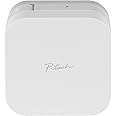
The Brother P-touch CUBE is a compact, Bluetooth-enabled label maker designed for professionals who demand style and efficiency. Compatible with Android and iOS devices, it offers over 450 symbols and multiple color options via the free Design&Print2 app, enabling quick, durable, and personalized label printing from your smartphone or tablet.


| Product Dimensions | 2.5"D x 4.6"W x 4.6"H |
| Controller Type | Android |
| Maximum Media Size | 3 x 5 inch |
| Included Components | Brother P-touch Cube Label Maker, Black on white standard laminated Tze starter tape 0.47" (12mm) x 13.1' (4m), AC Power Adapter (white), Users guide |
| Print media | Labels |
| Scanner Type | Portable |
| Max Input Sheet Capacity | 1 |
| Compatible Devices | Smartphones |
| Maximum Color Print Resolution | 180 dpi |
| Sheet Size | 3 x 5 inches |
| Maximum Black and White Print Resolution | 180 |
| Warranty Type | limited warranty |
| Dual-sided printing | No |
| Maximum copies per run | 9 |
| Max copy resolution color | 180 dpi |
| Max copy resolution black-white | 180 dpi |
| Duplex | Simplex |
| Hardware Interface | Bluetooth |
| Ink Color | White |
| Additional Printer functions | Print Only |
| Control Method | App, Touch |
| Output sheet capacity | 1 |
| Processor Count | 1 |
| Model Series | P-touch |
| UPC | 012502643975 |
| Printer Ink Type | Thermal Tape |
| Supported Media Sizes | 3 x 5 inches |
| Global Trade Identification Number | 00012502643975 |
| Manufacturer | Brother Printer |
| Item Weight | 13.4 ounces |
| Item model number | PTP300BT |
| Batteries | 1 AAA batteries required. |
| Is Discontinued By Manufacturer | No |
| Material Type | Plastic |
| Number of Items | 1 |
| Size | 2.5 x 4.6 x 4.6 inches |
| Manufacturer Part Number | PTP300BT |
A**R
Compact, Versatile, and Surprisingly Addictive
I’ve been using this label maker for a few months now, and I can confidently say it’s one of those devices I didn’t realize how much I needed until I had it. Whether for home organization, office projects, or even creative labeling, this label maker has quickly become a staple in my workspace.The compact cube design is incredibly space-efficient. It fits easily on a shelf or desk without taking up much room, and the clean aesthetic actually makes it look like part of the decor rather than just a piece of office equipment. The build quality feels solid and durable, and the unit is lightweight enough to move around as needed.Setup was refreshingly simple. The Bluetooth pairing with my smartphone was instant, and the companion app is intuitive and easy to navigate. Within minutes of unboxing, I was printing my first labels.
S**N
Easy setup
Easy setup and printing using iPhone app.
J**
🩷
Easy to use, I love this little portable label maker it’s so convenient.
M**S
Did it come with one starter label cartridge?
Good unit e price.
G**Y
EASY Setup & Great Quality - Ignore the Nonsense!
I was very glad I decided to read the App Store reviews for the app for this product before I invested too much in the Amazon reviews. The App Store reviews were steller, this unit was $60 at the time so I took a leap despite a lot of negative reviews here.I had this set up and printing labels in 5 minutes and I didn't bother with reading any instructions. Some of the information on this product is outdated (as are a lot of the reviews I suspect), there is ONE app now for this - Brother Design & Print 2 (just search "Brother P-Touch" and you'll find it) and Brother has done a great job with this app. It comes with a ton of easy to use templates to create your labels.I had turned on my printer before I even downloaded the app, after installation the app instantly found the printer on Bluetooth and I was set to print in moments. I got this printer mainly to print FAA registration numbers for my drones and it did that very well.Is there a little bit of tape wasted? Yes, yes there is. My guess would be this is because the printer laminates AFTER it does the thermal print job. The label looks to be separated with a base and laminate in the cartridge and laminates when it prints. Therefore, you can't just wind the tape back in so none is wasted as it's been laminated. Two seconds with scissors and your problem of extra space is solved.Is larger text a bit fuzzy at some of the edges? Yes, yes it is, this is a thermal label printer, not some laser printer generating print copy. I found the label perfectly appealing and legible, if you want to stick your face in it to see some fuzziness, have at it, can't see the point.I thought about getting the higher-end ones with the power cutter, it's completely unnecessary, quick push of the button and it cuts perfectly. This is a great little printer and was very easy to use in the app, much preferable to some big clunky device with a keyboard on it. For $60 it's also the same price if not less than most of them.Great product, ignore the whining in a lot of these reviews, I found it to be super easy to use.
A**O
Super fan! Works very well.
It's easy to use. Small machine has good quality. Print is nice. I like it very much. I organized so many staff. I'm having fan!
A**Z
Better and faster than the P-Touch label makers with a keyboard
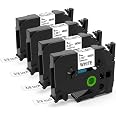
I bought this P-Touch label maker on sale, so it was actually cheaper than some of the Brother P-Touch label makers with keyboards. The P-Touch Cube uses my previous TZe cartridges, which was nice. Another nice feature is that the P-Touch Cube comes with a plug-in power supply, which was not included with my previous P-Touch device. The Cube can also be powered by batteries, if you desire.The P-Touch Cube requires you to install an Android or Apple phone app to configure and print your labels.The phone app has a lot more features than my previous keyboard P-Touch, providing the capability to save labels, select from a family of label templates, and even adds some nice graphical options.I also found the Android "Design & Print 2" phone app much quicker to create labels due to the use of the phone keyboard. The Brother P-Touch keyboard was always slow and clunky to use, especially when searching for basic special characters like a colon or dash. The quicker access to common characters on the phone keyboard was a big hit for me.Highly recommended if you are looking for a new label maker.
R**Z
Not Impressed So Far
I had the old school Brother label printer (dark green, little keyboard) and it finally gave out after years of service. So I bought this one thinking it might be a bit more sleek and modern. And while it is from an industrial design perspective, I can't say I'm impressed by much else so far.It's a little bigger than I anticipated, but it's still unobtrusive and easy to move around.Issue #1: Power cord -- why does this have its own proprietary power cable? Why wouldn't it use USB-C so I can use my existing cables and not have to keep track of yet another one?Issue #2: Batteries -- why would you build this to require 6 batteries instead of must making it rechargeable?Issue #3: App-- Not intuitive. So many more steps than just firing up my old Brother, typing a label and printing it out. Now there are hundreds of templates to scroll through. Endless print settings (why offer a 32 pt font if the label itself isn't that wide??). The UI of the app looks like it was designed by the developers.I may keep it a few more days to see if it grows on me or I may return it for a more traditional label printer.
TrustPilot
4天前
1天前