We remain fully operational. Our teams are working around the clock to ensure your deliveries continue safely.

下载应用程序





🌟 Upgrade your iMac like a pro—cool, quiet, and future-ready!
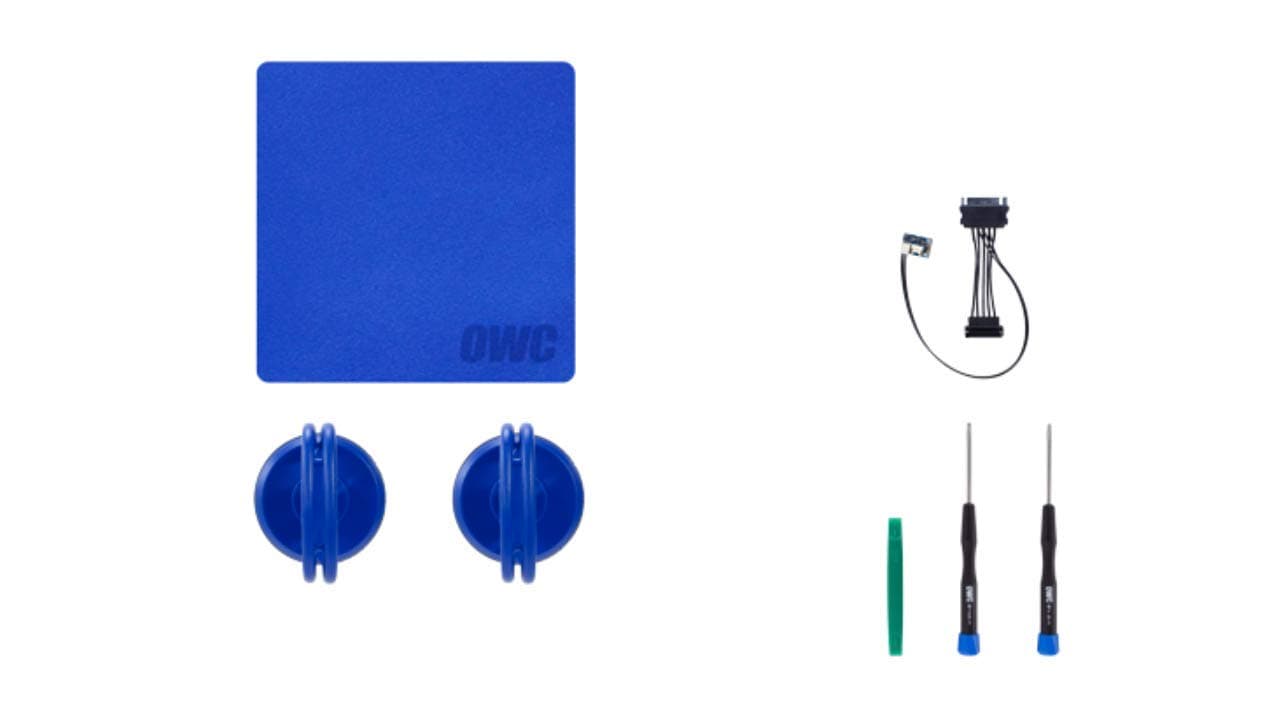
The OWC In-Line Digital Thermal Sensor HDD Upgrade Cable and Install Tools kit is designed specifically for 2011 iMac 21.5" and 27" models, enabling seamless installation of any SATA hard drive without software hacks. It includes a digital thermal sensor cable to maintain optimal fan control, plus professional-grade tools like Torx drivers, suction cups, and a microfiber cloth. This kit eliminates fan noise issues post-upgrade and comes with a 1-year warranty and free installation videos, making it the ultimate DIY solution to breathe new life into your aging iMac.

| ASIN | B00J42F81Q |
| Best Sellers Rank | #383 in Internal Hard Drives |
| Brand | OWC |
| Color | Black |
| Customer Reviews | 4.4 4.4 out of 5 stars (316) |
| Date First Available | March 19, 2014 |
| Flash Memory Size | 4 |
| Hard Drive | Hdd |
| Hardware Platform | mac |
| Is Discontinued By Manufacturer | No |
| Item Dimensions LxWxH | 8 x 8 x 3 inches |
| Item Weight | 7.1 ounces |
| Item model number | OWCDIYIMACHDD11 |
| Manufacturer | OWC |
| Product Dimensions | 8 x 8 x 3 inches |
B**E
Fast delivery & good product
Fast delivery. We'll functioning piece. Will buy again.
B**H
Problem Solved
This thing has been fantastic. I had no idea why my 2011 iMac fans were running all of the time until a Google search finally revealed that it could be related to replacing the hard drive. I bought the full kit, which is a no brainer for $3. Disconnecting and reconnecting the cables was a little tense, but overall it was easy. The unnecessary fan running immediately stopped. In fact, I have not heard the fan since I installed this kit. By the way, I am running Linux Mint on my 2011 iMac with 32 GB of ram, probably way overkill, and 1 TB SSD. It runs great. Linux Mint Cinnamon edition gave new life to my 2013 Macbook Air that only has 4 GB of ram, too.
P**1
Working great, but not so easy for everyone
This is must buy for upgrading 2011 iMacs from HDD to SSD; however, it won't be as easy for everyone... especially if you don't routinely dismantle electronics. I recommend 2 people on hand to limit anxiety when somethings stuck or hard to reach in a tight space and you need 2 free hands (other person can hold/balance the LCD screen). Some cable connections are VERY small/delicate and could possibly break if stressed. Alone, I went very slow and methodically finished in a few hours. Everything works great, my mac is faster than it's ever been, and completely SILENT. While the video OWC provides on Youtube is excellent, I feel there are additional tools and strategies you might want got consider. In my case the first connector (tiny connector, tiny/thin wires that look like they could break at the slightest wrong pull) wasn't coming apart without lots of effort. The flat ribbon cable was actually affixed to LCD screen with adhesive (so didn't expect that either). Also be prepared for lots of DUST to clean-up, so vacuum (preferably hand-held) and compressed air are very helpful. I'd limit compressed air to kicking dust off the fans (and avoid spraying directly circuit boards directly to avoid damage). The dust is problematic while trying to keep Glass & LCD screen's dirt free. I wore disposable rubber gloves for most of the installation (avoid hand oils transferring to the screen) and kept glass/screen in a separate room. You can also get a cheap pair of lint free microfiber (photo lens cleaning) gloves to wear when it's time to clean the last remnants of dust & close up. I highly recommend needle nose tweezers to help remove/install screws surrounding the screen. Magnets will drive you crazy if you don't have something to help guide screws in cramped places. OWC's video mentions tweezers as part of the kit, but they're not included, and this is likely reference to a previous kit. An extra spudger (spelling?) may come in handy too. I also recommend you clone your HD to the SSD, and CONFIRM IT BOOTS (target drive mode) before attempting installation. If something goes awry in the install, you want to be sure it's not the SSD when troubleshooting. SuperDuper is great software for creating bootable drives (and is free for 'all files' clone option).
M**D
Awesome Kit! Make sure you fully research what's involved!
I've purchased OWC products in the past and have always been pleased. This kit gives you all of the tools to replace the original HDD in the iMac. The cable shown in the stock photo must be an earlier version because I received a black cable that looks cosmetically different, but I assume it functions the same. Now, this job could be easier if you had the following things that aren't included: -An anti-static wrist band and/or anti-static mat. -A head lamp or really good lighting. -Some latex gloves to help you prevent getting fingerprints on the LED and/or monitor glass when handling them. -Maybe a second person when removing/installing the LED. I was able to do it solo, but I have done jobs like this before. -A replacement 3.5" HDD or 2.5" SSD, which is a given. If you buy an SSD, ensure it has a Sandforce Controller so you don't have to bother with enabling TRIM (Yosemite has made that tough). All OWC SSDs have a Sandforce Controller, but some other SSDs brands out there do. -If you're installing a 2.5" drive, then you'll need a 2.5" to 3.5" Drive Converter Bracket. I got an AdaptaDrive on Amazon, although any quality bracket could work. -A plan for installing OS X and migrating your data from your old HDD. I think buying an external drive enclosure is the easiest and most practical approach. If you're installing a 2.5" drive, then ideally you'd want to buy an enclosure that can adapt to both 2.5" and 3.5" sizes. An external enclosure allows you to format/partition your new drive and install OS X before the drive upgrade. In addition, it helps you migrate the data from the external "old" drive to the newly upgraded Internal drive post installation. Also, you can continue to use your old drive in its enclosure for more disk space, a Time Machine backup, etc. -A device running the OWC YouTube tutorial that breaks down the process. I had a laptop running the video and just paused it at each step. The video is really well-done and comprehensive. All in all, the install is tough, but not nearly as bad as the SSD Upgrade Kit process. That adds a secondary SSD behind the DVD, which is significantly more involved. This upgrade process was shorter and much easier. I'd definitely recommend this product and upgrade! PS. I uploaded images of how everything looks when assembled prior to reassembling the LED. I figured it might help to see an actual install with an SSD.
A**R
Didn't work
I installed the hard drive temperature monitor so my fan does not run high. The hard drive works great but the fan runs on full noisy mode. The install video was good, the tools good but the most expensive part was the temp monitor adapter and it did nothing. I appreciate the video. Do yourself a favor and buy the suction cups and download the fan control for your iMac because this device didn't do it's job. It is too much of a risk of breaking an LCD connector to remove it and return it or I would be returning it. It seems that with the different product offerings from OWC I was looking at one fro a 2010 iMac and accidentally got the one for a 2011 iMac. They are different in one small detail that communicates the temperature so it was my mistake. Be sure you get the right one for yours as the offerings don't look any different.
C**E
Suction cups and screwdrivers weren't the best quality. Screwdrivers seemed to fail when tightening the ...
Suction cups and screwdrivers weren't the best quality. Screwdrivers seemed to fail when tightening the final screws. Have another set of suction cups at the office from iFixit that work great.
A**3
Essential for Replacing Hard Drive in 2011 iMac
I purchased this kit to replace factory installed 1TB Hard drive in 2011 iMac 27". Using above kit, I installed Seagate Barracuda Green ST2000DL003 2TB hard drive. Packaging contents: - OWC In-line Digital Thermal Sensor cable - Tool-Kit with all necessary tools - Heavy duty Suction Cups - Cleaning cloth (microfiber) Summary: Everything came in condition as expected and worked as expected. If you are replacing a hard drive your self, please make sure to view the instruction video on OWC's website prior to beginning the operation as it is essential for successful job. OWC In-line Digital Thermal Sensor cable: This cable has a sensor that gets affixed on the hard drive which reports temperature data to the power circuit and fan speed is adjusted according to hard drive temperature. Without this cable in-between, hard drive itself will work fine, but fans in iMac will keep running at maximum speed - which can cause noise and reduce longevity of the cooling mechanism. While cable itself costs around 50$ (ouch!), i think it is a necessary component for the proper operation of the iMac. Other parts of kit (suctions, tool-kit and cloth): These things are necessary for proper installation of the hard drive and in appropriate job, most tools will be utilized. In the tool kit however, things are not 'magnetized' adequately causing screws to fall from the screw drivers especially when removed from narrow spaces. Manufacturer can do a better job at this. I would advise keeping around a small magnet for short term fix. I should also mention that in addition to replacing the factory hard drive, I also installed an SSD in the same operation and the kit had all necessary tools for task. I had to purchase separate cable/kit (ASIN: B00BJAKBMM) to place SSD, but it was a worthwhile upgrade. All together, while this kit is pricey, it is worthwhile purchase for anyone looking to perform Do-it-yourself replacement of the hard drive in 2011 iMac. I would strongly recommend above product for replacement of the hard drive in 2011 iMac.
M**S
Works in my 2011 iMac 21.5"
Purchased for a SSD installation in my 2011 iMac 21.5". I replaced the original magnetic drive with the SSD, which did need a converter bracket to go from 2.5" to 3.5" as the bay expects. The OWC site and installation video series didn't really specify the need for a bracket, so I bought one just in case and did end up needing it. The thermal cable was easy enough to install, but getting it to set under the iMac's components was a bit tricky and time-consuming. I ended up sliding it carefully under the SSD bracket where there seemed to be enough space. Fiddling with this cable to get it situated took a long time in the overall process. Otherwise, it was easy to make the connections and apply the thermal sensor. While the cable is designed to keep the system fans from running constantly, it seems overly expensive for a SATA cable. While it was necessary evil for the drive temperature monitoring, I think it was rather expensive and essentially negated the great deal I got on a 480GB SSD drive to upgrade my 2011 Mac. I understand it is an Apple design issue to require the cable, I just can't understand why the cable is as costly as it is.