



📷 Preserve your past, perfect your present.
The Epson Perfection V600 Photo Scanner is a high-performance imaging device designed for professionals and enthusiasts who demand exceptional photo and film digitization. Featuring an ultra-high 6400 x 9600 DPI resolution and 3.4 Dmax optical density, it delivers razor-sharp scans with vivid color accuracy. Its DIGITAL ICE technology removes dust and scratches automatically, while one-touch color restoration breathes new life into faded images. Compatible with both Mac and Windows, this scanner streamlines photo archiving with multi-photo scanning and individual file cropping, making it the ultimate tool for preserving memories with professional precision.


| ASIN | B002OEBMRU |
| Are Batteries Included | No |
| Best Sellers Rank | #164,837 in Computers & Accessories ( See Top 100 in Computers & Accessories ) #33 in Film Scanners |
| Brand | Epson |
| Computer Memory Type | DRAM |
| Country of Origin | India |
| Customer Reviews | 4.1 4.1 out of 5 stars (6,541) |
| Date First Available | 3 August 2012 |
| Generic Name | Scanner |
| Imported By | M/S EPSON INDIA PVT. LTD 12th FLOOR,THE MILLENLA, TOWER A, NO.1 MURPHY ROAD,ULSOOR,BANGALORE-560008 KARNATAKA STATE |
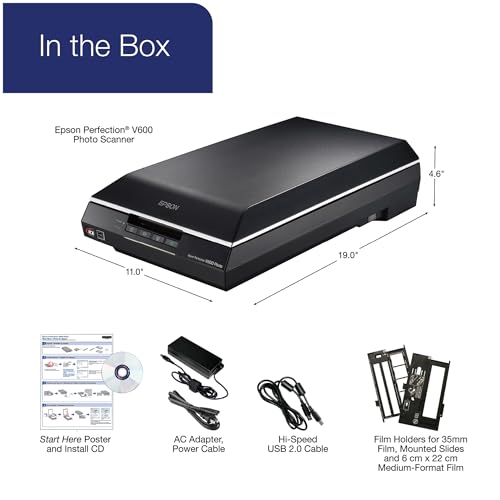
| Included Components | Scanner, Adopter, Power Cable, CD and USB cable |
| Item Dimensions LxWxH | 48.3 x 27.9 x 11.7 Centimeters |
| Item Height | 4.6 Inches |
| Item Weight | 4 kg 80 g |
| Item Width | 11 Inches |
| Item model number | B11B198011 |
| Manufacturer | SINGAPORE EPSON INDUSTRIAL PTE LTD |
| Net Quantity | 3 Unit |
| Packer | China Epson (China) Co., Ltd. Factory Automation Division 7F, Jinbao Building No. 89, Jinbao Street, Dongcheng District, Beijing, China, 100005 |
| Product Dimensions | 48.26 x 27.94 x 11.68 cm; 4.08 kg |
| Series | Epson Perfection V600 Photo Scanner |
| Wattage | 16.5 Watts |
C**R
Bought this product to create a family photo archive and loved it
Purpose: I bought this scanner to digitise 1000s of 1970s, 80s pictures of our family. Most of the photos were already faded and lost colour. Progress: I have already completed scanning 2000+ photos and works like charm. Exactly what I expected. Feedback: 1. Works perfectly on my Mac (despite some reviews say it doesn't). I am using latests Mac OS version on MacBook Pro. Was not hard setting it up on my Mac. Just downloaded the latest version software "Epson Scan 2" from the website and it worked. 2. Picture Quality is much better than any other scanners I tried (& bought) before trying this one. Quality is close to what you can see in the picture, is what you will get it on your file. Other scanners, though they claim 48 bit colour, they gave colour banding issues. 3. Faded colours are auto corrected if the feature is enabled during scan. (I still had to do some on Photoshop) 4. Both Colour and Grayscale pictures worked perfect. 5. Best part is, when you scan multiple photos, the photos are cropped into separate files and colour restoration works for each photo separately. Overall: No complaints so far. Bit expensive though.
A**Y
The perfect budget film scanner!
The Epson V600 photo has to be the most efficient and budget-friendly scanner out there. If you are a photographer who shoots on film and wants to have more control over your negatives then go for it! I have scanned 500’s of 35mm & 120 mm film negatives and I found no flaw as of yet. PRO TIP : You can get yourself a free Silverfast scan software by just entering your product ID number. Go to the EPSON website to get more details on it.
D**I
Good
Good Product.
G**.
Amazing Scanner for Negatives
I purchased this scanner for scanning negatives and converting them into digital image files. All negatives are 25 to 30 years old. The scanner is amazing in scanning them into positives with image correction through software. One must use professional mode for correcting colour, tone etc. using curves. Lot of options are available. I will come up with detailed feedback later. The scanner is highly recommended for negatives as well as positives.
R**N
I purchased this scanner primarily for its film and slide capabilities, and it has exceeded my expectations. Starting at the beginning. . .setup was effortless. I installed it on a name brand PC with a Pentium 4 processor, 1 gig of ram, running Windows XP with Service Pack 3. Installation and operation have been flawless with this OS and hardware configuration. Next point . . . speed. I have never been able to do high resolution scans at this speed; this machine is fast. I have another scanner (different brand)that is nearly brand new, but drastically slower than this little Epson. The V600 Perfection can do high dpi scans in a fraction of the time compared to my other scanner. With my processor and memory configuration the V600 has been able to do 4 instamatic slides at 6400 DPI in about 10-12 minutes. And there is definitely an improvement in output with 6400 as opposed to 3200 resolution. But . . .resolution alone does not tell the whole story either. The output from this scanner has a visual "presence" that must be seen to be fully appreciated. I have also scanned a lot of really old 120 (620) negatives (some in excess of 90 years old). The results have been nothing short of stunning. So much for the hardware. Now to the software . . .I have primarily used the Epson scanner software without doing any "enhancement" commands. On a few occasions I have done "color correction." "Unsharp mask" has been used once or twice and "backlight correction" has been used a time or two. When I have decided to do software correction the results have been good. The color correction command has been very accurate on 40 year old color slides. So much so, that I have not needed to do any other restoration. Finally, some folks have commented on Digital Ice. I have used it sparingly, mostly for creased and torn snapshots. In one particular case, a 70 year old snapshot was creased and torn---some might say "badly mangled." The ICE result was very good, though I decided to use Photoship to finish the restoration. However, the crease and tear correction done by ICE saved me a lot of time and effort in Photoshop Elements. Bottom line . . . I can't believe this scanner was so reasonably priced. Comparing output, software quality and ease of use, the Epson V600 is THE BEST scanner I have ever owned or used (and this is the 5th scanner I have owned over the years). The Epson V600 Perfection's ability to scan old negatives and slides is unbelievably good. The learning curve was relatively rapid---though it takes a few days and some practice scans to fully learn the capabilities of this fantastic machine and software. August 31, 2011: The Epson Perfection 600 works superbly with an i7 processor in the Windows 7 64 bit environment. Huge (high pixel) scans take very little time, and continue to be beautiful, both in color and black and white. After four months and several hundred negative and slide scans, I remain totally impressed with the quality of this machine.
R**O
Tengo un monto de negativos de 35mm y 120mm que necesitaba digitalizar. Estuve buscando varios escaners y este me parecio bueno para el precio pero tenia mis dudas. La verdad es que no me ha decepcionado. La calidad de las imágenes es bastante buena con el software que viene por defecto. Me tomó varias pruebas para lograr los ajustes (en el software) necesarios para tener los mejores resultados pero ya se pagó solo.
L**H
Fantastic piece of kit. Simple to use and does a fantastic job
F**.
I was very unhappy with the scanning of my artworks, on which I put a lot of effort in terms of the detail, the technique and the colours, only to have my ordinary scanner-printer-copier downgrade them on all those things. So I investigated scanner for artworks and I came across this one. It definitely scans so much better than the 3-in-1 copier-scanners. In fact, the reproduction of detail is so good that now I have to be careful with little errors that did not appear on the previous scanner images! Besides, it has got several adjustments you can make on colour, definition, contrast and the like. This allows you to tweak the settings gradually until you get the ideal combination of them and then you save them for all subsequent scans. But....yes, only one disadvantage: The scanner is an old model and WiFi was not even available for it. So you have to connect it with the old USB cable and the computer often struggles to make the connection with the scanner, even with the cable. Sometimes I even have to restart the computer and the scanner in the hope that they will see each other. As the quality of scanning is more important than the convenience of wireless communications, for me, I am prepared to live with this small inconveniences.
S**M
Had to buy an adapter to make it work. This was not mentioned on the Amazon.com.au advert.
TrustPilot
2 周前
1 个月前



