We remain fully operational. Our teams are working around the clock to ensure your deliveries continue safely.

下载应用程序


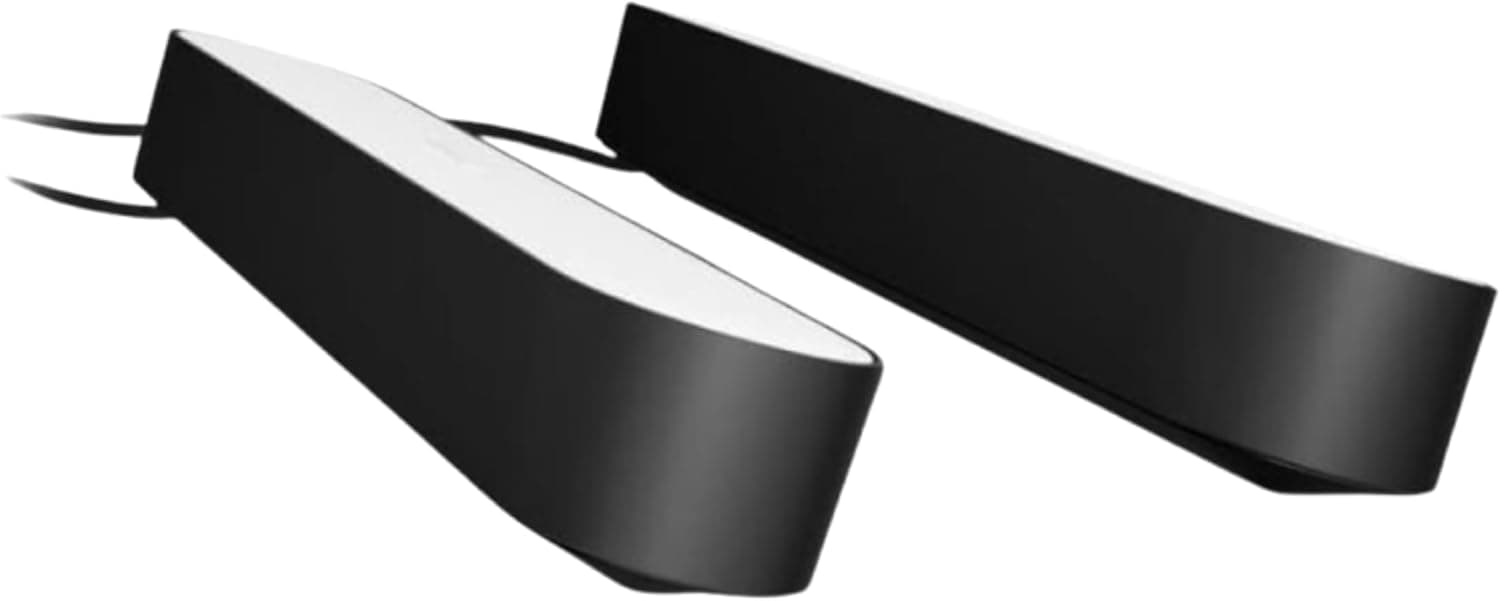
🌟 Light up your life — because your setup deserves to be legendary!
The Philips Hue Smart Play Light Bar Base Kit includes two sleek LED light bars offering 16 million colors and white ambiance options. Designed for immersive TV and gaming experiences, it requires the Hue Bridge for full smart home integration, enabling app and voice control via Alexa, Google Assistant, and Apple HomeKit. With easy mounting options and expandable compatibility, it elevates any living space with dynamic, customizable lighting.


| ASIN | B07GXB3S7Z |
| Additional Features | Motion Sensor |
| Base Material | Plastic |
| Best Sellers Rank | #8,865 in Tools & Home Improvement ( See Top 100 in Tools & Home Improvement ) #116 in Under-Counter Light Fixtures |
| Brand Name | Philips Hue |
| Bulb Base | E26 |
| Bulb Shape Size | AR111 |
| Color | Black |
| Connectivity Protocol | Wi-Fi |
| Control Method | Voice |
| Controller Type | Amazon Alexa, Google Assistant, SmartThings, homekit, nest |
| Customer Reviews | 4.6 4.6 out of 5 stars (7,707) |
| Efficiency | High |
| Finish Types | Painted |
| Global Trade Identification Number | 00046677802516 |
| Included Components | 2x Philips Hue Play White & Color Ambiance Bar Lights, Black, Power Cable |
| Indoor Outdoor Usage | Indoor |
| Installation Type | Semi Flush Mount |
| Is Product Cordless | No |
| Is Waterproof | False |
| Item Dimensions D x W x H | 1.74"D x 9.97"W x 1.41"H |
| Item Type Name | Bar Light, Smart Light, Light Bulb Accessory |
| Item Weight | 454 Grams |
| Lamp Type | Mood Light |
| Light Source Type | LED |
| Lighting Method | LED |
| Manufacturer | Signify North America Corporation |
| Manufacturer Warranty Description | 2 years. |
| Material Type | Synthetic Polymer (PMMA) |
| Model Number | 7820230U7 |
| Mounting Type | Wall Mount |
| Number of Items | 2 |
| Number of Light Sources | 1 |
| Number of Pieces | 2 |
| Power Source | Corded Electric |
| Room Type | Living Room |
| Shade Color | White |
| Shade Material | Acrylic |
| Shape | Bar |
| Specific Uses For Product | Home |
| Style Name | Light Bar |
| Switch Type | Remote |
| UPC | 046677802516 046677802523 |
| Unit Count | 2.0 Count |
| Voltage | 240 Volts |
| Wattage | 6.7 watts |
K**S
The features of these lights come with are great
I bought the Philips Hue Smart Play Light Bar Base Kit, Black - White & Color Ambiance LED to add some ambiance to my gaming setup. I have to say, I am very impressed with the quality and performance of these lights. They are easy to set up, sync with the Hue Bridge and app, and work with many games and apps that support Hue Sync. The colors are vibrant, the brightness is adjustable, and the effects are immersive. I love how they can create a dynamic lighting scene that matches the mood and action of the game. The only downside is that these lights are quite expensive compared to other LED strips or lamps. They cost around $130 for a set of two light bars, which is a lot for some mood lighting. However, I think they are worth it for the premium features and compatibility that they offer. They are also very durable and well-made, so they should last for a long time. If you are looking for a cheaper alternative, you might want to check out some of the third-party lights that are compatible with the Hue system. Philips has recently opened up its Hue platform to allow other manufacturers to make lights that work with the Hue Bridge and app. This means you can get some more affordable options that still offer some of the benefits of the Hue ecosystem. However, keep in mind that these lights might not have the same quality, reliability, or functionality as the official Hue products. Overall, I am very happy with my purchase of the Philips Hue Smart Play Light Bar Base Kit. They are a great addition to my gaming setup and they create a fantastic atmosphere. They are definitely on the pricey side, but they are worth it for the features and performance that they deliver. I would recommend them to anyone who wants to enhance their gaming experience with some smart lighting.
C**E
Great, quality lights
These lights are awesome. Very worth paying the extra for the name tag started these type of lights. I’ve had them for quite some time with no issues. Makes watching movies, shows, and even YouTube 10x better!
E**C
Great lights like all hue, a bit expensive
If you have any hue lights before you get these, you know what to expect. They're physically solid, well packaged, and function exactly as you expect. They have a base which can be mounted on the bottom so the lights face straight up, or on the smallest end, so the lights stand up and face horizontally. I put one behind my couch and one on a shelf, both facing up to light the wall behind my couch. They connected without trouble to my hue bridge. They're what I would call a "medium" brightness - they're fine for accent lighting but not bright enough for the pair to serve as the main lighting for a room. For the price, I wish they were a bit brighter.
G**S
Got the HUE SYNC to sync with everything! (ROKU, PS4pro, AVR...etc)
I have 2 sets of HUE play, it’s great. For many of you wondering how to get the HUE SYNC (pc and mac) to work with things like ROKU (Netflix), gaming consoles (PS4, Xbox, Switch)...etc etc, let me walk you through this extensive process of making it happen along with the devices you’ll need: ******5/2/2019 UPDATE****** (If you get confused, grab a piece of paper and draw it out lol) 1) HDCP2.2 HDMI Splitter with at least 2 Outputs (Look for splitter that has auto step down to 1080 from 4K for second output) If your TV is 4k, then make sure the Splitter you get is 4k and HDCP2.2 ready. It must say HDCP 2.2 and not just 4K or HDCP1.4 in the description of the splitter! As For input side, you only need the amount of devices that you have (no you shouldn’t run multiple splitters into one splitter). For me, I have all of my devices going into my AVR, so I just need 1 input with 2 outputs HDMI Splitter (1x2). If you have just a ROKU, then that’s what you need. If you have ROKU and a XBOX/PS4, then you’ll need a HDMI switch that has 2 inputs and 2 outputs (2x2). No matter how many input you need, you must have 2 outputs and the second output has the feature to convert 4K to 1080. This is not a feature you need if your TV is 1080p, but very important for the 4K people because it’ll save you a lot of headache in adjustments. 2) HDMI to USB Video Capture Device Most HDMI video capture only captures 1080p, there’s absolutely no reason for 4K just for HUE Sync if you are simply trying to pick up the color from the video capture. Connect the video capture device to the Output 2 of the HDMI splitter on one side via HDMI cable, and the USB side connect it to your PC/Mac. 3b) STOP! Before doing anything else, download the Philips Hue smartphone app, and connect the lights you want to sync with your TV to the Hue Bridge first. Update everything and make sure it’s ready BEFORE you setup with the HUE Sync software on the PC/MAC. 3c) On your PC/MAC, download “OBS Studio”, install the driver/software. I’m running Windows 10 here, so I don’t know if it will work with Chromebook or any other OS. With the OBS Studio software, what I did in the setting is to make sure the canvas screen is set to 1080 so the screen ratio of the video capture is correct. You don’t need high frame rates and you don’t need high resolution here! Lower left side of the OBS Software you’ll see the sources box, select + and select OEM Video capture. Set the PREVIEW screen to full screen, and make sure there’s no black cutoff portions. 4) HUE SYNC Install HUE Sync, there’s plenty of YouTube video telling you how to setup the HUE Sync on your computer, so just go ahead and do that and you’re good to go. What I did do is turn off music sync, intensity to subtle. NOTE: Under Settings/General-Preference/Background-lightning: Turn off background lighting. It messes with the HUE Sync with this low white light when the same section of the display is showing black. Optional: I bought a mini windows PC to run as a dedicated TV PC. Please install a CCleaner and run it automatically at start up so you won’t ever see the infamous Windows “slowing down” issues. In the HUE SYNC PC software, you can set specific buttons on the keyboard to start Syncing. I have to say, that I did end up buying 3 different mini PC and returned two of them because they simply can’t power 4K without freezing. I ended up getting a MSI cube n with a 5000N processor with 8GB ddr4 ram. I changed resolution down from 4K to 2048x1152, and refresh rate to 60Hz. It runs very smoothly all day without issue. If you do all of this correctly, you now can watch or play everything on your TV and enjoy HUE Play, regardless of the source. Remember to check your 4k setting in your Xbox/PS4 pro/ROKU to make sure it’s able to output 4K on your 4K tv. If the splitter you use or any parts you use besides the video capture is NOT HDCP2.2, you will not be able to watch 4K. If you force 4K output on your ROKU, it may work but the video capture will show a black screen. Make sure your HDMI are at least 2.0, amazon’s cable works fine, there’s no benefit with more expensive HDMI cables. I’ll take my 2 cents, thanks.
A**A
I loved it . You only have to remember that both the lights connect with the same adapter . So if you are thinking to place the light far from each other then it’s going to be a problem . Syncing with tv will need hdmi sync box .
G**D
Parfait et facile à programmer
T**A
D+++
U**A
Estas luces las tengo sincronizadas con el Philips Hue y simplemente son hermosas 🤩 y un deleite, pero son un gusto algo caro. Te explico. Primero compré las luces y como toda luz inteligente 💡 de Hue se veía bien 👍🏽 pero pues se quedaban estáticas ya sea conforme el color de la sala o estáticas en un color que yo dispusiera, y en una oferta 💰 compré después el Hue y pues ya otra cosa. Ahora veo películas 🎥 o juego videojuegos 🎮 preferidos y visualmente son un deleite, se disfruta visualmente y sientes un ambientación e inmersión excelente y para las fotos se ven padrísimas. Con el pasar de los años lo vi como una inversión, han durado ya un par de años, pero su precio no a bajado al contrario 🔄 ahora las veo más caras 😬. Deberías de buscarlas de oferta.
N**A
Product is seen as having UK plug (the one used in Singapore). However, it doesn't come with a UK plug. As such, it's unusable in the region. Do not buy, unless you want to add yet another adaptor.
TrustPilot
1 周前
2 个月前