
下载应用程序


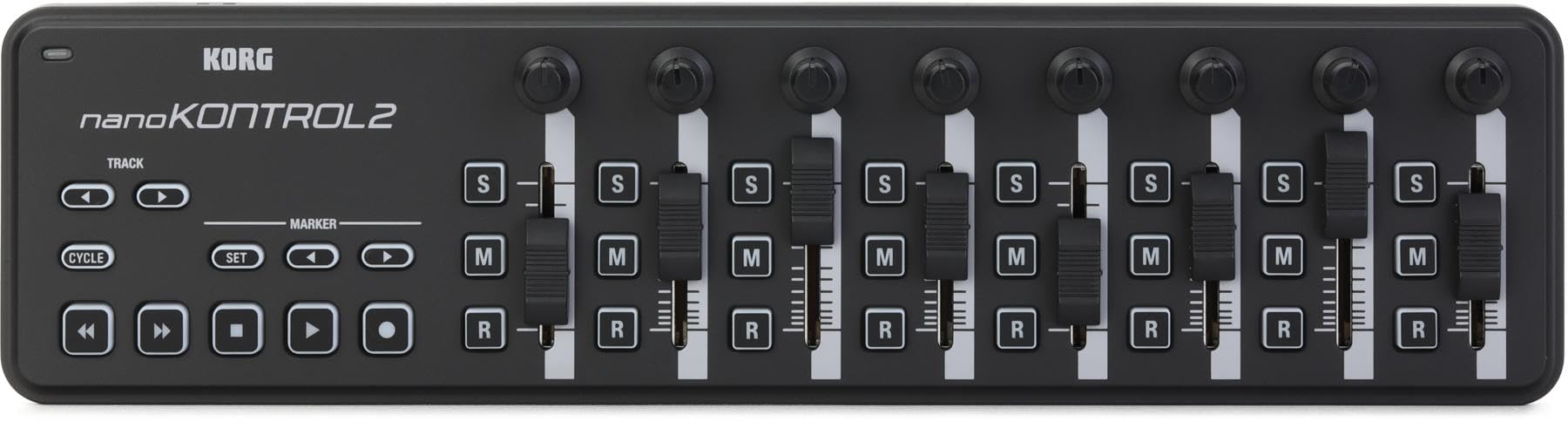
🎶 Elevate your studio game with the ultimate slimline MIDI powerhouse!
The Korg nanoKONTROL2 is a compact, USB-powered MIDI control surface featuring 8 high-quality faders, pan knobs, and illuminated buttons. Designed for professional and home studios alike, it offers deep customization with up to 16 MIDI channels and 24 programmable controls, ensuring seamless integration with popular DAWs like Ableton Live and Reaper. Its slim, durable build and responsive controls make it a top choice for millennial creatives seeking affordable, high-performance music production gear.


| ASIN | B004M8UZS8 |
| Additional Features | Mute Controls |
| Best Sellers Rank | #4,506 in Musical Instruments ( See Top 100 in Musical Instruments ) #21 in Computer Recording MIDI Controllers |
| Brand | KORG |
| Brand Name | KORG |
| Color | Black |
| Compatible Devices | Laptop |
| Connectivity Technology | USB |
| Connector Type | USB |
| Control Method | Touch |
| Control Type | Push Button |
| Customer Reviews | 4.6 out of 5 stars 3,116 Reviews |
| Global Trade Identification Number | 04959112081086 |
| Hardware Interface | USB |
| Hardware Platform | macintosh |
| Human Interface Input | Buttons |
| Included Components | USB Cable |
| Instrument | MIDI Compatible Installation |
| Instrument Key | Any |
| Item Dimensions D x W x H | 12.8"D x 3.27"W x 1.18"H |
| Item Type Name | Midi Controller |
| Item Weight | 293 Grams |
| Keyboard Description | Compact control surface with buttons, no traditional keyboard layout |
| Manufacturer | Korg USA Inc. |
| Material Type | Plastic |
| Mixer Channel Quantity | 8 |
| Model Name | NANOKON2BK |
| Model Number | NANOKON2BK |
| Model Year | 2017 |
| Noise Control | None |
| Number of Keys | 1 |
| Platform | Mac |
| Product Dimensions | 12.8"D x 3.27"W x 1.18"H |
| Product Style | Slim-Line USB Controller |
| Size | Einheitsgröße |
| Special Feature | Mute Controls |
| Supported Software | Ableton Live |
| Total USB Ports | 1 |
| UPC | 884088605964 |
| Unit Count | 1.0 Count |
| Warranty Description | 1 year manufacturer. |
J**X
worth the 59.99 i spent on it! i use it with Reaper 3.76.
I recieved this in the mail 2 days ago, and i must say i am totally impressed with this unit. I programmed Reaper 3.76 using it's Midi CC message mode, and it took time using the action option in Reaper to manually program the NanoKontrol 2, to use it as the transport and mixer functions of the daw. Once i set it up (i got it programmed to 24 faders and pan knobs, plus all solo/mute/record arm buttons and the full transport as well using 3 out of 16 availiable midi channels! But if you like you can max it out at 8 tracks per midi channel, up to 16 midi channels giving you a max of 128 channels/tracks!) it worked smooth as butter. The pan knobs feel really good and not cheap, the faders have a nice feel of resistance to them like mixing boards do. The buttons light up when they are armed to toggle, i am very impressed with the quality of this unit. The pros to this unit is that it is definitely a step up in the construction and build quality of this unit compared to the version 1 of the NanoKontrol. The added transport functions are great , all the solo/mute/record arm buttons, as well as the transport buttons don't feel cheap at all, and feel solid which is a big surprise granted the cost of this unit (59.99 as of 7/3/2011). It has a decent weight to it, around 3/4 of a pound. It looks cool too during use in a session. The controls are very responsive with Reaper 3.76. I use this controller with it's Midi CC Message mode. The cons i have is that the scene button from version one was removed, and instead is now a part of the Korg Kontrol Editor, a program you get from the Korg website after you purchase the unit, and this program allows you to set the functions and switches, from monetary press to toggle mode, as well as set the seperate midi channels (midi channels 1-16) to switch between 8 sets of tracks(per one of the 16 midi channels you can select in the Korg Kontrol Editor) you program the NanoKontrol 2 to use. In order to switch between the midi channels, you must open the Korg Kontrol Editor and write the scene to the NanoKontrol 2 for every time you need to swtich between midi channels in your daw. The Korg Kontrol Editor doesn't take too long to load to make the changes to your NanoKontrol 2, so it isn't a big deal but some might have preferred the scene button on the device itself. But it doesn't bother me much so i like it as is. And if you have no idea how to program midi cc messages to your controller from your daw, it might frustrate a few folk who might see programming midi into a controller a bit frustrating at first. This was my first time ever programming any controller using midi cc messages from Reaper's built in Action Option window, and once i understood how it worked (took me from openeing the package and programming the actions for up to 24 tracks of faders/pan knobs/ solo,mute and record arm buttons, plus full transport controls took me about 2 hrs tops) it was so easy to program, and i got it after seeing how it worked! The second con is the version 1 of NanoKontrol had 9 faders instead of version 2's 8 faders. I wish they would have kept the 9th fader, due to the fact that the 9th fader could have been used as the master volume track and that would've been great. But for what i paid for it, and for what it is worth, i have to truly say the cons aren't so great to me, that it makes me regret my purchase. Matter of fact i will say that this is the best 60.00 i spent on a cheaper piece of gear and i would totally buy another one, that is how great this daw controller is. In short, it is worth your 60 dollars, it has a sturdier build than the first version, it has a nice feel and good resistance on the faders and pan knobs and all toggle switches feel durable and better quality than the cost of this unit. I would HIGHLY reccommend the NanoKontrol 2 usb/midi Daw controller for your home studio, and even pro studio use.
A**R
Great product at on affordable price.
Works perfect. I really dont know why its taken so long for me to get one.
J**T
Working great, good price, fast shipping
The Korg nanoKONTROL2 Slim-Line USB Control Surface in black is a fantastic addition to my sound mixing setup. I use it with the Sound Devices Mix Pre II 6 channel sound recorder, and the unit works flawlessly. Its compact and lightweight design makes it incredibly portable, while the responsive sliders, knobs, and buttons provide precise control over my recordings. Setup was straightforward, and it seamlessly integrates with my equipment, significantly enhancing my workflow. Fast shipping and a good price were added bonuses, making the Korg nanoKONTROL2 an excellent investment for any sound mixer who uses Sound Devices Mix Pre II recorders.
R**K
Good product - tricky setup (on Windows, using ProTools) - helpful tips enclosed.
I'm adding a review in order to address a set-up issue that I had with the nanoKONTROL2. I hope this saves some people some time. I just got this product (shipped free in one day - yay Prime!), and so far I'm happy with it. It's small and light, with decent build quality, and ultimately works as expected. However, I had trouble setting it up. I wanted to use the nanoKONTROL2 with ProTools on Windows, mostly to have a dedicated transport control, but also for the faders, etc. Here are some tips: 1. Get the latest drivers from Korg (http://www.korg.com/us/support/download/product/0/159/#driver), and install the Korg Kontrol editor software 2. Check to see if the device is recognized by the Korg software: 2a. Open the KORG KONTROL Editor 2b. The editor should automatically recognize the device, and list it in the opening screen. If the devices is not listed, or listed as "not connected" then you may have the same problem that I had. Here's how to fix it. It turns out that the KORG software won't recognize the nanoKONTROL2 if it was installed with a MIDI device number higher than 10. So, you need to free up a lower MIDI device number, and re-install. Here's how: 0. Unplug the nanoKONTROL 1. Close the KORG KONTROL Editor 2. Open the program "Uninstall KORG USB-MIDI Device" (I know, this sounds unintuitive) 3. Check to see where the nanoKONTROL is installed. If it's higher than midi9, then that is likely causing a problem 4. You'll need to remove some devices lower than midi9. Click on Option, and uncheck "Delete KORG MIDI Device only" in order to be able to remove non-KORG devices. Select devices you are no longer using in order to create a blank spot lower than midi9. Also, go ahead and delete the nanoKONTROL device. 5. Quit out of the KORG MIDI Driver Uninstall Utility 6. Plug the nanoKONTROL2 back in (remember to hold down SET MARKER and PLAY buttons to put it in Pro Tools mode, if you're using Pro Tools). This should cause Windows to reinstall the device, and it should choose one of the lower midi device numbers that you just freed up. 7. You can launch the KORG KONTROL Editor again to check if the device is recognized. After that, set up in Pro Tools is straightforward. You can find instructions for making it work with ProTools in the documentation that comes with the device or with any search. Briefly: 1. Hold down the SET MARKER and PLAY buttons when you plug in the device. That puts it in "Pro Tools" mode. 2. In ProTools, go to Setup->Periperhals; go to the Midi controllers tab; select HUI as type, and NanoKontrol for the ports That worked for me, although it took me a bit of time searching around the Internet to figure out the issue. Hopefully, this saves some folks some time. Good luck!
G**N
Flawless Fl Studio Integration!!! No MIDI programming required!
Bought this to perform live with FL Studio 11 and it worked great! What's cool about the nanoKONTROL (1 or 2) with the latest version of FL is that FL gives you a file that you can just drag and drop into the included KORG software that pre-maps all the transport controls and makes all the other buttons, knobs and faders assignable to ANY button, knob, or fader in FL. I've been using this in live performances to crossfade between tracks with the faders, turn effects on/off or launch samples with the buttons, and use the knobs to control Lo/Hi-pass filters...etc, but like I said: These controls are mappable to ANYTHING! No MIDI programming required! Just right click and tweak. You can even go in further and change the way the software responds to knob tweaks. eg: instead of a smooth rotation, make the parameter increase by increments of 10%. Useful for changing things like LFO speed.... Another great feature of the device itself is its size. This thing can go anywhere! I don't have a lot of desk space but this fit great right in front of my desktop keyboard. It also has small rubber grips on the bottom so that it doesn't slide around when your practicing. I would have liked the extra knob/ fader combo from the nanoKONTROL1, but this one has more buttons and the transport controls seem to be in a more convenient layout than its predecessor. The actual size of the controls is nice too: small enough to have a lot of them, but still chunky enough to make it easy to tweak parameters without looking down. The only con that I have is that there are no markers around the knobs. But all in all: Great product for a great price!!! Thanks KORG!
N**R
BEST BANG FOR BUCK/MUST HAVE FOR TRAVELERS, YOU WON'T GET VELOCITY TRACKING THIS GOOD AT THIS LOW!
Absolutely stunning device, Light-weight and compact but IT DOESNT FEEL CHEAP! Right out of the box i just WORKS, and for usb midi thats actually really good, any keyboard I have bought in the past 2 years I always had to trouble shoot for hours to make it work but nope, Not gonna have that problem AT ALL. My one and ONLY complaint is that the keys wiggle from sides to side a bit (but it kinda helps as you can hit the key from an angle and it will register every time) mind you, It doesn't detract from the experience but it just looks like a point of failure waiting to happen but we shall see! It is just quite simply a midi keyboard and I love it for it, Never have I had a midi that can actually fit your pocket (Albeit sticking out a lil) making this thing a MUST HAVE if you are a musician on the go, Regardless of where you are at and platform (Other reviews indicate successful use on android via otg, and IOS is supported right outta the box) it will JUST WORK. Fantastic stuff, leave it to korg to shake up the market with some ACTUAL competition. Lots of love your software and it look like you put the same care into your hardware as well, Thank you korg for such a fantastic budget option!
D**Y
A great small usb-powered set of controllers for use with DAW software, either live or in the studio
The device is a great device -- the company that sold it is not so great so I returned it. It had obviously been opened and returned and it did not work as it was supposed to. So I have bought a brand new unit from a different company. Yes I have paid more, but it's deceptive to charge so little and deliver so little. Thankfully Amazon refunded my money. I bought this so that I would have sliders to use in combination with a mini-keyboard that I use for travel so that I can work with my DAW software and assign midi CCs to the sliders to get more subtle control over the sounds as I play them in . I had one of the original nanoKontrols which was not recognized by Korg's own Korg Kontrol software and was not recognized by my software so I have replaced it with this. The throw on the sliders is not very great but for travelling the size and portability of this makes it a great device. In my main music studio the full 10-centimeter throw sliders on my full-size MIDI keybaord give greater control but for travel these work just fine. And everything on this is user-configurable so the buttons which by default are for mute/solo/etc. can all be reassigned to whatever I want.
W**G
Excellent controller for DMX software
This is such an incredibly useful little tool! I work for our church (watermark.org), and when we needed a simple and affordable lighting controller for a kids space, I decided on the freeware DMX software QLC+ in Kiosk mode. The nanoKONTROL2 works seamlessly with this software, giving our volunteers simple fader control over lighting in the small space and allowing us to recycle outdated Mac's and PC's as lighting controllers. Pros: Quality. This is a professional product up to Korg's usual standards. Usability. It functioned out of the box on 4 different machines, 3 different OS's (OSX 10.6, OSX 10.9.4, and Win7), and multiple free DMX softwares (QLC+, DMXIS, etc). Affordable. At under $50, I couldn't find anything that came remotely close to this level of functionality and quality. The next options were 2-3x the cost with no real difference in function or quality. Cons: Lack of motorized faders isn't so much a con as a feature out of this price range. The next priced option with motorized faders is Behringer's BCF-2000 at $300. From there, pro lighting wings will start in the low thousands, many without motorized faders. The faders have a short, though not prohibitive, travel. This just means you have to get used to shorter faders if you're accustomed to full sized faders.
TrustPilot
1 个月前
2 个月前