
🚀 Power Meets Precision: The Mini PC That Means Business
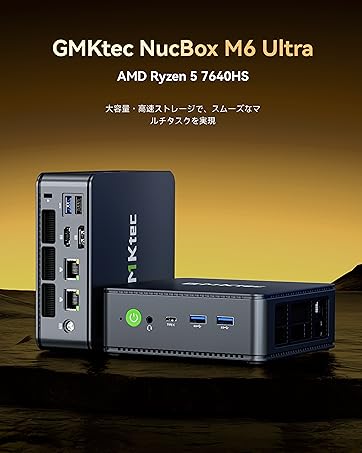
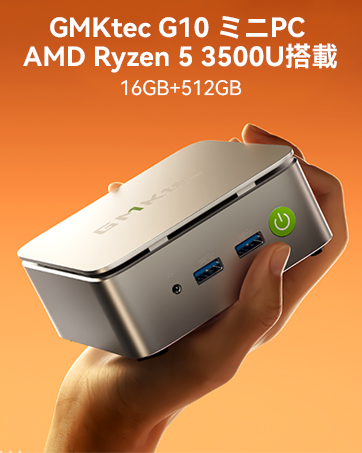
The GMKtec NucBox K10 Mini PC is a high-performance compact desktop featuring the latest 13th Gen Intel Core i9-13900HK processor with 14 cores and 20 threads, turbo clocking up to 5.4GHz. Equipped with 64GB DDR5 RAM and a 1TB PCIe 4.0 NVMe SSD, it delivers seamless multitasking and rapid data access. Supporting up to four simultaneous displays including 8K resolution, it’s ideal for professionals requiring expansive screen real estate. With advanced connectivity options like 2.5G LAN, WiFi 6, Bluetooth 5.2, and multiple USB/HDMI/DP ports, plus an industrial-grade COM port, this mini PC blends power, versatility, and space-saving design for demanding business, creative, and industrial environments.









| ASIN | B0DWN6C157 |
| Amazon Bestseller | #26,550 in Computers ( See Top 100 in Computers ) #104 in Mini Computers |
| Are Batteries Included | Yes |
| Batteries | 1 Lithium Metal batteries required. (included) |
| Brand | GMKtec |
| Computer Memory Type | DDR5 RAM |
| Customer Reviews | 4.3 4.3 out of 5 stars (71) |
| Date First Available | June 25, 2024 |
| Graphics Card Description | Dedicated |
| Graphics Card Interface | Integrated |
| Graphics Coprocessor | Intel UHD Graphics 770 |
| Graphics RAM Type | DDR5 SDRAM |
| Hard Disk Description | SSD |
| Hard Drive Interface | PCIE x 4 |
| Item Weight | 2.21 Kilograms |
| Item dimensions W x H | 9 x 37 x 18 cm |
| Item model number | K10 i9 13900HK 64+1TB |
| Lithium Battery Energy Content | 0.3 Watt Hours |
| Lithium Battery Packaging | Batteries contained in equipment |
| Lithium Battery Weight | 0.6 Milligrams |
| Manufacturer | GMKtec |
| Maximum Memory Supported | 96 GB |
| Memory Technology | DDR5 |
| Nombre de cellules Lithium-Métal | 1 |
| Number of HDMI Ports | 2 |
| Number of USB 3.0 Ports | 6 |
| Operating System | Windows 11 Pro |
| Optical Drive Type | なし |
| Processor Brand | Intel |
| Processor Count | 14 |
| Processor Socket | FCBGA1787 |
| Processor Speed | 5.4 GHz |
| Processor Type | Core i9-13900K |
| Product Dimensions | 9 x 37 x 18 cm; 2.21 kg |
| Resolution | 7680x4320 |
| Screen Resolution | 3840 x 2160 |
| Series | K10 i9 13900HK |
A**ー
コンパクトで高性能。満足です。
り**く
Windows10のサポート終了が近くなってきたのでメインPCの乗り換え用に購入。 SSDはCrucial P3Plus 1TB・MemoryはTWSC製32GB DDR5-44800 x2枚を搭載。 TWSCは深圳市に拠点を置く半導体メーカーで深圳市德明利技术股份有限公司が正式名称。 他サイトのレビューではメモリーは別メーカー製の場合もある様子。 ACアダプタは19V 6.32A 120WでGVE製のGM122-1900632-F、PSE取得品でした。 OSは英語版がベースの様でしたが特に問題なくセットアップは完了、しかしWindowsUpdateの途中で問題が発生。 修復を試みましたがラチが明かなかったので日本語版ISOファイルをMicrosoftのサイトからダウンロードして再インストールしました。 再インストール後に一部ドライバが当たってなかったのでGMKtecのサイトからドライバーをダウンロードして解決しました。 その後WindowsUpdateは問題なく終了し現在は正常に稼働しています。 GMKtecのサイトからはドライバー以外にOSインストール用のISOファイルもダウンロードできますのでそちらを使用して購入時の状態に修復することも可能です。 あとOS再インストール前はDMチャネルだったライセンスがRETAILチャネルに変わっていました。 RETAILチャネルはOSを単品購入してインストールした場合のライセンスなので、たまにあるボリュームライセンスのように途中でライセンス切れになるようなことはないので実用上の問題はありません。 現在SSDを3枚装着していますが、3枚ともに最高温度が70℃まで達しておらず排熱問題は実用上なさそうです。 CPUに関しては最高温度が99℃に達していますが、おそらく100℃を超えない制御が働いています。 現在の運用がバランスモードなので多分パフォーマンスモードにしてもサーマルスロットリングの関係で性能的にそこまで差は出ないかもしれません。 この運用モードはBiosで変更可能でしたが他のモードでどうなるかは試していません。 基本ゲームをしませんのでグラフィック処理能力に特に不満もありませんし、モニター3枚運用(4K/2K/WUXGA)ですがこちらも特に問題ありません。 また前面Type-Cポートを使用した4画面目の出力(2K)も問題なく動作しました、 しばらく運用した感想としてはCPU処理能力とメモリーに余裕があるので特に気になるような点はありませんでした。 唯一の不満点は前のPCのNVIDIAのGPUでは仮想解像度の設定が可能でしたが、IntelのGPUでは設定できない点です。 それ以外については今のところありません。 元々同等性能のミニタワー型PCを購入候補としていましたが安くても15万程度はする金額でしたのでゲームをメインとする人や拡張性にこだわる場合以外には非常にコスパの高いPCになると思います。
カ**チ
コスパが良い買い物でした。 まだ、使い始めて数ヶ月だけど、5年はちゃんと動いて欲しい。 とりあえず、今は満足してます。
タ**ー
割引あって¥85,000ぐらいで買いました。 セットアップ後、ログインパスワードを忘れるハプニングありましたが(^_^;)無事使えてます。 立ち上がりの速さたまらないッス。
シ**ロ
同社のミニpc i7 11390H 32G+1TB (M2 11390H 1TB)を使っていたが、WEBページタブを100前後開いていると、メモリの使用量が50%を超え不都合が頻発。32GBのRAMでは厳しいと感じ、64GB搭載の本品を選んだ。その効果か同条件下で、本品はサクサク。 初期設定は、同梱されていたトリセツ通りの画面が現れなかったが、何とかこなした。windows 25h2へのバージョンにはwindows updateを10回ぐらい繰り返して到達した。 interfaceは充実しており、自分にとっては高価ではあるがパフォーマンスには満足している。デスクトップやノートなど過去買い足しを繰り返したが、この種のミニPCはコスト・パフォーマンスが良いと感じている。日本製が見当たらないのが残念である。最先端技術はICとかLSIの部品と思われるが、ボード設計とか組み立てがメインと思われるこの領域に国産が見当たらないのは何故か? 家電の衰退と同様な嘆きを感じる。 ノートやデスクトップではこの性能・機能を満たすには実勢としては20万円を超えているように思われる、専門家の見方はどうなんでしょうかね。
M**N
Nothing
This product is good.
と**と
コスパいいと思います。静かだし、CPU性能、メモリ容量共に満足です。ただ、ACアダプタが熱くなるのが少し気になりますが、許容範囲だと思います。 約一ヵ月使用して、不具合が起こり始めました。電源を入れても起動しない事が度々。電源ボタンは点灯しているのに、HDMI出力のモニターは何も表示されず、キーボードへ給電もされていない状況。一度切って電源を再投入すれば入るのですが。。。
K**N
安く買えたと思います。PCはデスクトップでも10万円くらいするものだとおもっていましたが、最近ではminiが流行っているのでしょうか、選択肢もたくさんあり、良い時代になりました。 性能は期待通りでした。メモリとストレージは十分です。 他のかたのレビューにも書かれていましたが、ファンの音がちょっと気になります。突然ブオーとなっては止まるのが繰り返されたりします。そのうち慣れると思いますが。
A**R
Would have been better with a uk plug
S**H
Wiped out Windows 11 and installed Fedora 43 (KDE) (a Linux distro) on it. It works beautifully. I bought it for my mom who just moved into a smaller place. It's hooked up to her TV via an HDMI cable. She uses a wireless keyboard and mouse to access it. She also uses Zoom to communicate with her sisters, who are about 1600 miles away. No problems with any peripherals. WiFi works fine. Computer is quiet, and when the fan is on it's just a whisper. She's not using it for any high performance applications, just web browsing, email, internet radio, and Zoom. She's got a Roku for media, but I tested it with a couple of movies and YouTube and it ran video just fine. No stuttering at all. Ran so well my inlaws are considering asking me to do the same setup. I'm not going to support Windows, so we'll see. Oh, Mom's 88, so it was very important that both hardware and software be simple or at least not too complex. She loves the little computer. 😊
M**E
Powerful mini desktop great for Home Server / Home Lab / Home Assistant / Proxmox but disappointed with cheap network/nic cards. With 2 rj45 ethernet ports, I had wrongly assumed that it would have Intel network chips/nics but instead it's Realtek. Realtek isn't as widely supported as the intel ones, especially if you are going to use this as firewall/dhcp server. Shame on me if this was listed somewhere in the specs but it isn't. Hope this is helpful to others.
T**R
Upon inserting a second M2 ssd with a thin heat sink, I learned of a design flaw: the central fan in the top of the unit is positioned so that only the primary M2 ssd can have a heat sink. The second M2 (if you add one) must forego a heat sink if you plan to keep the necessary fan. 😠
J**F
I use this PC for monitoring a security system. It is mounted behind the monitor and runs great. It boots and runs pretty fast. I have had it for a few months now and have been very pleased with. I use a wireless mouse and keyboard and have had no issues. Recommended. JohnnyF



