
下载应用程序




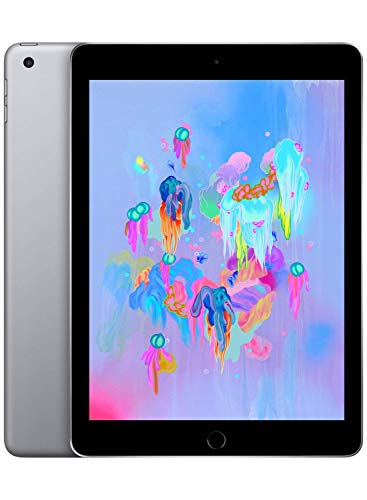


🚀 Elevate Your Everyday with the iPad!
The Apple iPad (Wi-Fi, 32GB) in Space Gray combines a stunning 9.7-inch Retina display with powerful A10 Fusion chip performance, ensuring a seamless user experience. With advanced features like Touch ID, high-quality cameras, and up to 10 hours of battery life, this iPad is designed for both work and play, making it a must-have for the modern professional.
| ASIN | B07BTS2KWK |
| Batteries | 1 Lithium Polymer batteries required. (included) |
| Date First Available | November 1, 2018 |
| Is Discontinued By Manufacturer | No |
| Item Weight | 1.8 pounds |
| Item model number | MR7F2LL/A |
| Manufacturer | Apple Computer (Direct) |
| Product Dimensions | 9.8 x 7 x 2 inches |
O**R
Replaced my MacBook Pro with a 9.7” iPad 2018 model (see review for full details)
Like all Apple products I’ve ever owned / used - it just works. I am currently using my iPad in an experiment in portable computing. I work in finance and couldn’t justify the cost of an iPad Pro, nor did I need that level of graphics power. Instead (and always enjoy a challenge) I opted to get the least expensive iPad (2018) with 32GB Ram. I knew I needed only a few apps - primarily word, excel, Microsoft One Drive for iOS and Google Drive. What I have up and running and with using less than 10 of the 32 GB of storage: Microsoft One Drive Google Drive (temporary - migrating from Google to One Drive, so necessary at this time) Safari - native iOS app performs beautifully on my company’s web-based platform Microsoft Word - needs office 365 account for maximum benefit Microsoft Excel - needs office 365 account for maximum benefit Host of other apps - native and third party (like the Amazon App) but not any games, and I don’t store any music, podcasts, movies, or other storage-intensive media. I have used Google Chrome for iOS and it works well, but I prefer the user interface of Safari, so I stuck with that. On iPad, either browser works well and I can see benefits for one over the other and vice-versa, but for my purposes, Safari is fine. I have my iPad connected via Bluetooth to a portable keyboard that I also acquired on Amazon’s website, which makes this work more like a notebook computer overall. I also have a stylus from Amazon that works beautifully since I don’t have a mouse, and I’m not sure I could use one now anyway... when using (now my daughter’s) MacBook Pro, I find myself reaching for the screen to navigate by touch (d’oh!). I have the iPad sync’d to my iPhone for messages and for calls - WiFi calling and calls on my iPhone. Calls are clear, iMessage works great - for iOS and texts forwarded from non-iOS devices. I have my iPhone set up for a WiFi Hotspot when needed. The only thing I “miss” is not having my music and media stored locally. I have this partially addressed by having most of my music in the cloud and music plus all other media stored on an external hard drive that I access through a portable router. Benefits - this weighs less than half what my MacBook Pro weighed, and travel is much easier. Still have to remove the iPad for TSA when going through security, but it’s so much lighter. This has actually been a Godsend of late; my wife had an accident and broke her ankle. I’ve been driving her to appointments for work since I can work remotely, and once again, the iPad is amazing. Paired with my keyboard and iPhone HotSpot and it’s like I’m in the office, only much more convenient. It’s faster than my desktop PC and faster than my former MacBook Pro. Hard as it may be to believe, the iPad feels like it was made to access Google drive and Microsoft One Drive, and I can access files nearly 3x faster than my desktop PC when connected to the same internet. In fact, the iPad is on WiFi and the desktop is wired, and the iPad wins. I can do all my work in the scaled-down iOS apps, or I can use Office.com and log in through Safari and access One Drive and Word and Excel online. There are a couple of features not available in the scaled down iOS versions but they’re not significant enough to deter me from doing all my work on the iPad when necessary. Intuitive controls - gestures and swipes work as they do on a MacBook Pro touchpad. This made the transition way easier. Inexpensive Accessories - Amazon has a host of accessories that work brilliantly with the iPad and have made this transition entirely possible and within a very tight budget. Drawbacks: Charger cable is kind of short. I can buy a third party cable, but I like the way the Apple OE cable performs. I work around it and use the battery and although the cable is short, the battery does last all day for WORK. Streaming Hulu when I should be working? Not so much. Learning Curve: It does take some getting-used to when ditching a Magic Mouse or touch-pad. Allegedly, a future update will give iPad the capability of communicating with a Magic Mouse 2, but I’m not in a hurry to get a mouse. Not having media on-hand all the time. It’s more of an inconvenience than a drawback.
S**N
Is it good for Art? Answer is 100% yes. It is fantastic for art.
# Preface: The Generic Tablet Overview # You already know it is an iPad meaning it is an excellent high-quality tablet with tons of feature, good performance, beautiful screen, etc. If you want to buy a tablet, yes buy this or a newer one if your budget allows it. No question about "is the tablet worth it". # Privacy # Also, Apple is big on User Privacy unlike other large companies so better them than some other tablet. # Main: The Art Overview # It is perfect for something twice its price point. You can make comics, portraits, sketches, everything very nicely and professionally on it. And drawing directly on something is so much nicer than drawing on an external tablet like a Wacom and looking at the screen. So why this over the larger newer iPads that support the newer pencil? Price really. This is cheap. And performs like a $1000 piece of hardware. -- Software is Important -- The iPad and Apple Pencil provide all the infrastructure, but to really bring it to professional quality use, you will need good appropriate Apps. Use an App like ProCreate (top-notch all-around art program) or the pricier Clip Studio Pro (premium product for making comics). There are other products that do these things in their own style such as ComicDraw. These really provide a lot of capabilities to make it feel like you are just drawing on paper. Software quality will affect your experience. -- The Artist Questions -- Does it have parallax? I haven't noticed it. It draws the line exactly where you expect it. If there is any, it is incredibly negligible; the glass layer and the screen are pretty tight together. Is there jitter? Not noticeable either. I don't find it my work even when inking a sketch slowly. Is there pressure sensitivity? Yes, plenty of it. How many levels I am not sure but I can get the lines how I want them gradually going from thin to thick. Software can build upon the built-in pressure sensitivity for additional effects. Is there tilt response? Yes. When you tilt your pencil you can shade or draw thicker lines than if you don't. Does it feel like it is gliding on glass? Yes, but I don't find it slippery where I can't control the lines. Doesn't have the same bite of paper where your pencil can come to a dead stop without you needing to hold your hand steady. Here you will need to keep your hand steady as there is no real friction to prevent the pencil from moving further. But it has not affected anything negatively. Do you get a slight tapping sound when lifting and replacing the pencil? Yes, you do. Use a lighter hand for less noise. :) What kind of art can it do? You can essentially do a complete pipeline from gestures and storyboarding, to initial and final sketches to inking to a full color, inked comic page ready to be published. Or a portrait or landscape. The software determines what styles and capabilities it has such as pencil vs chalk vs paintbrush. I highly recommend this product for any artist beginner or intermediate (or advanced even) that is on a budget. # Note # It will take a few sketches and there is a learning curve since it is essentially a different medium. So like controlling a pencil is different than controlling a paint brush. Controlling this pencil is different. So give it a few drawings and invest some hours to get comfortable with it. I started a little clumsier but several hours later it feels as natural as paper.
A**M
Excelente produto. A entrega foi rápida, tudo dentro do esperado.
S**T
It's awesome device, i like its features (iOS) Got it for reasonable price too
R**R
So far, all working as expected. Nice graphics and fast performance. Very easy set-up process if you have another Apple iphone or ipad
C**E
Muito bonito, chegou antes da data prevista. O produto é de boa qualidade e muito lindo
M**A
روعة
TrustPilot
1 周前
1 个月前