We remain fully operational. Our teams are working around the clock to ensure your deliveries continue safely.

下载应用程序




🔄 Master your multi-device workflow like a pro — no compromises, just seamless control!
The Hearvo USB 3.0 HDMI KVM Switch empowers professionals to effortlessly share 2 monitors, keyboards, mice, and USB peripherals between 2 computers. Supporting stunning 4K@60Hz resolution and equipped with adaptive EDID technology, it ensures smooth, high-quality visuals. Its compact design and robust push-button plus iOS remote control make it an essential tool for streamlined multitasking in any modern office or WFH setup.



| ASIN | B0D5D5T4SS |
| Actuator Type | Push Button |
| Best Sellers Rank | #510 in KVM Switches |
| Brand | Hearvo |
| Circuit Type | 2-way |
| Color | Black |
| Connectivity Protocol | USB 3.0 |
| Connector Type | Hdmi |
| Contact Material | Aluminum |
| Contact Type | Normally Open |
| Control Method | Remote |
| Control Type | remote |
| Controller Type | iOS |
| Current Rating | 1 Amps |
| Customer Reviews | 4.0 4.0 out of 5 stars (75) |
| Date First Available | May 28, 2024 |
| International Protection Rating | IP00 |
| Item Dimensions LxWxH | 5.12 x 2.48 x 1.1 inches |
| Item Weight | 12.6 ounces |
| Item dimensions L x W x H | 5.12 x 2.48 x 1.1 inches |
| Item model number | STK-S7232H2-A |
| Manufacturer | Steetek |
| Mounting Type | Rack Mount |
| Number of Items | 1 |
| Number of Positions | 4 |
| Operating Voltage | 5 Volts (DC) |
| Operation Mode | ON-ON |
| Product Dimensions | 5.12 x 2.48 x 1.1 inches |
| Terminal | Through Hole |
| Unit Count | 1.0 Count |
A**X
Way better than I expected honestly
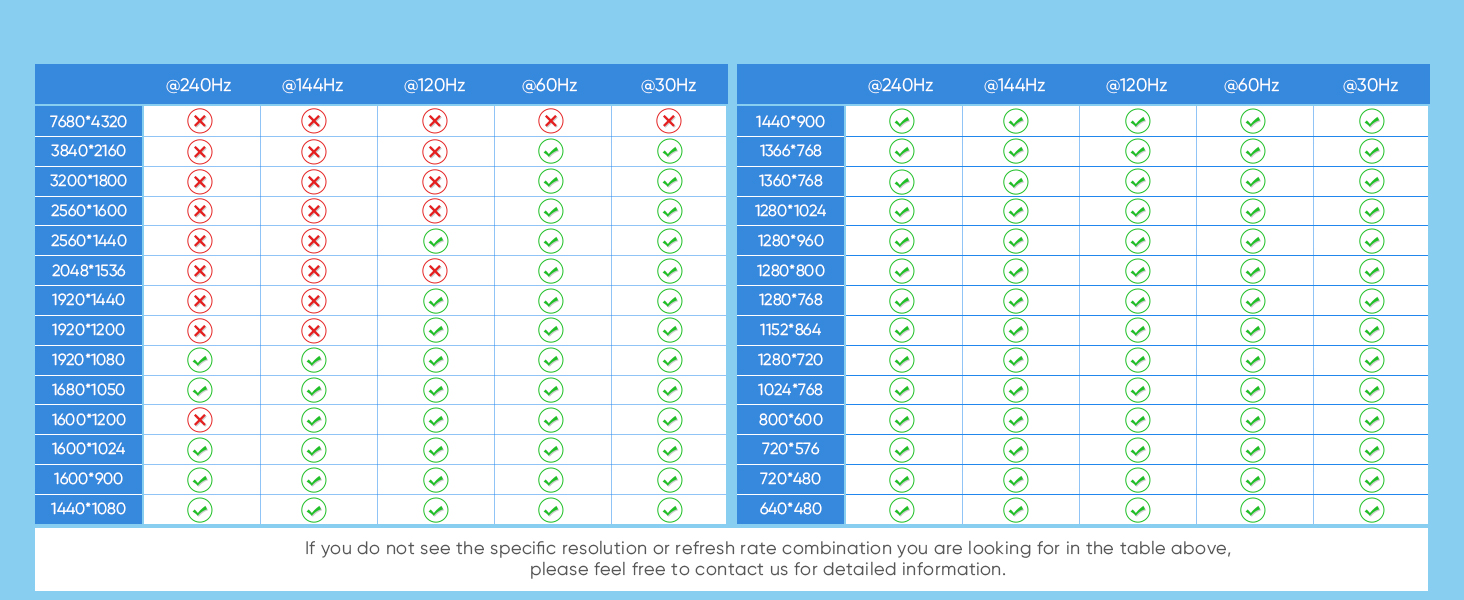
I had pretty low expectations for a dual monitor kvm, given comments I've seen online. This has worked excellently. First off, it was smaller than I had a realized, and it fits neatly on my desk. In terms of ports, all of them work without issue. It might be nice to have another USB slot but 3 is sufficient for my wired keyboard, mouse, and webcam. There's no audio output plug which I would have liked, though I'm not sure if that's something I could realistically ask this kind of device to do. Anyway, your computers can send audio to the monitors over HDMI. The button on the device to switch computers is physically robust. It takes a few seconds for my whole setup to switch, which I think is mostly on the end of the computer suddenly seeing new devices. Usually works without issue. There are some limitations to refresh rate and resolution. Both my monitors are 1440p, so I can run them both at a maximum of 100Hz, which is lower than what they're capable of. Overall, it's a worthwhile tradeoff for convenience, and I can run a secondary displayPort cable if I want, to switch to for gaming.
C**R
Gamechanger for WFH
I can finally write a review for this. If you were planning on using this exactly as intended it would be a super easy install. My setup is a little different on how I am wiring things and it is still working for what I need. It's and easy switch over between the 2 options and seems to switch rather quickly. Its pretty discrete so it can be hidden if needed, especially with the button that comes with it. If you have a WFH and gaming setup this is clutch for making everything connect smoothly.
M**A
Was a great little KVM...
Jan 2025 update. This little guy gave up the magical grey smoke and stopped working. I voided the warranty to see if it was something I could fix. It is not. Oh well, worked great until it didnt. Previous review: I bought this KVM to save some real estate on my desk. I have tried a few previously but they did not work with my monitor setup. This one worked right out of the box and has been a great addition to my multi-computer setup. I highly recommend it.
S**.
Best one of its kind
I tried many KVM switches and this one turned out to be the best one that works well for my specific setup. I have a work laptop that uses a docking station and a personal laptop that doesn't. I need to connect both laptops to 2 monitors and need to be able to switch between them so that I can keep my work related stuff separate from my personal stuff. Many of the other KVM switches that I tried had trouble switching the display on the monitor when I switched from the personal laptop to the work laptop. The reason I figured is because of the docking station used by the work laptop. But this teetek KVM switch works fine even with the docking station though there is a slight delay in showing display when I switch to the work laptop. But when I switch to the personal laptop, it switches the display almost immediately. I have been using this product for little over a month and happy with it so far.
C**~
It works very well, but...
So far, it has worked correctly and as expected, but the device isn't perfect and has its drawbacks. I'm using it with a mini PC for personal freelance work and my Lenovo Legion Go. The device's construction is quite solid; it's hard plastic, but it doesn't feel too bad. The time it takes to switch between devices is quite good. The display on the monitors is quite clear, and I haven't seen any lag or flickering on either computer. The peripherals also respond correctly; you should always connect them to the USB 3.0 port. It's appreciated that it has a USB-C connection for the device's power needs. There are several downsides. The device's size is extremely small, and while that helps minimize the amount of space it takes up on your desk, it also means the connections and cables are extremely close together. The power button is too close to the HDMI cables, making it awkward to turn the device on and off. The packaging doesn't include a single HDMI cable, only the USB 3.0 cables, so you have to buy all six HDMI cables separately. Luckily, I had them at home and didn't have to buy anything, but the cables I did have were quite large, so I have a lot of cables behind the monitors. This last point is a general downside to these devices. While they help you use monitors and peripherals between different computers, you'll always need a lot of cables. I can't imagine the desktops of people who have up to three computers. The price seems a bit high, even with discounts, considering it doesn't come with a single HDMI cable. Overall, it's not a bad device, but it's not perfect either.
B**E
Exactly what I wanted
Updated Review 6/24/25 After speaking with the manufacturer and changing out cables to exclusively utilize the DP outputs from my doc, it is working as I had hoped. Updated my review from 3 stars to 5 stars as a result. Original Review This KVM switch is not doing what I had hoped it would do. My computer set is as follows: PC1: Laptop connects to a Dell D6000 universal dock - Dock connects from the HDMI port to KVM Switch PC1 HDMI A Input - Dock connects from a DP port to a DP to HDMI cable which then connects to KVM Switch PC1 PC1 HDMI A input PC2: Desktop - HDMI output to KVM Switch PC2 HDMI A input - DVI output to DVI-to-HDMI cable. HDMI end of cable to the KVM Switch PC2 HDMI B input KVM & Monitors - KVM HD Out A to Monitor 1 - KVM HD Out B to Monitor 2 PC2 works just fine. PC1 isn't working as I expected. I expected to be able to use my Laptop screen as screen 1 and extend to the two monitors. Instead, my laptop sees the Laptop screen and Monitor 1 as the same screen. It won't let me do three separate screens. I used to be able to do this when I didn't utilize the KVM and just used the docking station.
N**N
No monitor inputs
This product didn't have the ports that I needed. That was my bad.
TrustPilot
3天前
1 周前