We remain fully operational. Our teams are working around the clock to ensure your deliveries continue safely.

下载应用程序





Buy anything from 5,000+ international stores. One checkout price. No surprise fees. Join 2M+ shoppers on Desertcart.
Desertcart purchases this item on your behalf and handles shipping, customs, and support to SINGAPORE.
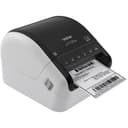
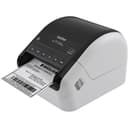
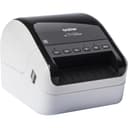
🚀 Elevate your labeling game—print smarter, faster, wireless and wide!
The Brother QL-1110NWB is a professional-grade thermal monochrome label printer designed for wide-format labels up to 4 inches. It supports versatile wireless connectivity options including Bluetooth, WiFi, and Ethernet, enabling direct printing from mobile devices and PCs. Featuring a barcode crop function and compatibility with major database formats, it streamlines label creation for shipping, postage, and professional identification. With plug & label ease and robust SDK support, it’s built for seamless integration and high-volume, precise label printing in dynamic office environments.


| ASIN | B079G51QT9 |
| Additional Printer Functions | Print Only |
| B&W Pages per Minute | 1 ppm |
| Best Sellers Rank | #33,406 in Office Products ( See Top 100 in Office Products ) #93 in Desktop Label Printers |
| Brand | Brother |
| Built-In Media | Brother QL-1110nwb Label PrinterP-touch Editor Software & DriverAC Power CableUSB CableStarter Rolls:DK-1247 Diecut Large Shipping Labels (41 labels)DK-2205 Continuous Length Paper Tape – 2.4" (62mm) x 16.4' |
| Color | Black And White |
| Color Depth | 1 bits_per_pixel |
| Color Pages per Minute | 1 ppm |
| Compatible Devices | PC, Smartphones |
| Control Method | App |
| Controller Type | Android, iOS |
| Customer Reviews | 4.3 4.3 out of 5 stars (845) |
| Dual-sided printing | Yes |
| Duplex | Simplex |
| Global Trade Identification Number | 00012502648949 |
| Hardware Interface | Ethernet, USB |
| Ink Color | White |
| Item Dimensions D x W x H | 6.7"D x 8.7"W x 5.9"H |
| Item Type Name | Direct Thermal Printer |
| Item Weight | 3.9 Pounds |
| Manufacturer | Brother Printer |
| Maximum Copies Per Run | Very High |
| Maximum Copy Resolution Black and White | 300 x 300 |
| Maximum Copy Resolution Color | 300 x 300 |
| Maximum Copy Speed Black and White | 1 ppm |
| Maximum Media Size | 11 x 17 inch |
| Maximum Print Resolution Black and White | 300 x 300 |
| Maximum Sheet Capacity | 1 |
| Maximum print Resolution Color | 300 x 300 |
| Model Name | Model: QL1100NWB DIFFERENCE:USB Host Port |
| Model Number | QL1110NWB |
| Model Series | QL1100 |
| Number of Drivers | 4 |
| Number of Ethernet Ports | 1 |
| Other Special Features of the Product | Wireless |
| Output sheet capacity | 1 |
| Paper Size | 4 Inches |
| Print media | Labels |
| Printer Connectivity Type | Bluetooth, Networkable, USB, Wireless |
| Printer Output Type | Monochrome |
| Printer Type | Thermal |
| Processor Count | 1 |
| Resolution | 300 x 300 |
| Scanner Type | Sheetfed |
| Series Number | 1100 |
| Specific Uses For Product | Business, Professional, Shipping, Labeling |
| Total USB 2.0 Ports | 1 |
| Total Usb Ports | 1 |
| UPC | 012502651659 012502648949 |
| Unit Count | 1.0 Count |
| Warranty Description | 2 year limited |
| Warranty Type | Limited Warranty |
A**R
The best label printer on the market
Simple to set up and use, WiFi connection works perfectly, labels print fast and look totally professional. This is the only label maker I use and is miles above the previous label printer I had. It's also nice and quiet and has a small footprint - perfect for my desktop. Well done, Brother!
L**A
Finally printing labels off Iphone! Happy Day!
I am ecstatic! I ship daily and was tired of cut and tape. I have tried 3 other printers. Rollo, Zebra and Jaiden. I could not get any of them to easily print off of my Iphone. I tried everything. I would have to save and then print and then go back and delete the file. It was a pain so I gave up. But then a busy weekend hit and my run of the mill printer went on the blink. I had to save qr codes and wait in line for them to process at the post office. I can't waste that much time daily and really not good for the customers behind me. I thought there has to be a way! So I tried the brother. The instructions are super confusing. Do this for wired don't do that for bluetooth. After a frustrating time I decided to wait till the next day with a fresh brain. This is not my forte but I was determined. Silly me thought I could plug and go. No! After thinking about it I knew it couldn't just pick up a wifi signal because of a password. I needed it wireless because there is NO room for a desk & laptop in this space. It had to work off phone. Just plugging it in the phone was not picking up the printer as an option. I figured it needed a go between for wifi and password. I downloaded the driver on my computer in the other room and choose to do so wirelessly just to make sure it was all going to be wireless. Brother-USA Support dowload driver. It took a while and it looks like it's not doing anything but patience. In less than 5 min it was all downloaded. I thought for sure it was not going to work, but iphone recognized it, no hassle and printed perfectly on first go. I never could get the scale right on the other printers. It was postage stamp size or only showed a partial label. The Brother QL1110NWBC printed 4X6 properly and looks great. Very happy camper!
J**P
Splurge on this Amazing printer! Perfect for Poshmark. Prints Wirelessly!
I did a lot of research on Dymo XL, Rollo and Brother QL-1110NWB (this product). Since I primarily sell on Poshmark, I need to print usps 4 X 6 labels. I pretty much run my business from my iphone and hardly ever use my computer & wanted to print wirelessly. This brother printer is more expensive (almost double) than the first two mentioned. First I ordered the Rollo printer but once I got it I quickly realized few things that weren’t going to work. First, although the Rollo is the smallest of the 3, I didn’t like how the labels have to sit behind the machine. Just takes up unnecessary space that I don’t have to spare. Secondly, It didn’t print boldly. The barcode was dark but the customer & return addresses we’re patchy and faded looking. Lastly, I just decided I really didn’t want to have to go on to my computer to print address labels. Note: Before I returned, I did call rollo support (which you have to email & they call you) to try and fix settings and print darker but it didn’t work. I decided to make the splurge and buy the brother printer and I’m so happy I did. I was able to directly call the customer service # and they walked me through the set up. Now I’m printing directly from my phone no problem and this has changed my life! No more printing postage on printer paper, folding/cutting out and taping into package! I know you other resellers can feel my pain! lol The brother is just more compact with the roll of labels inside the machine. Prints boldly and prefect every time! I know I haven’t mentioned the Dymo but after reading/watching a ton of reviews, youtube videos the paper seems to jam a lot. I hope this review helps other Poshmark, Ebay, Etsy etc. sellers. I couldn’t find a lot of info on if this printer was compatible with Poshmark. Brother Customer service doesn’t even have PM listed on their compatible server list just the other big selling platforms. So I’m here to tell you it does work and worth every penny! Just be sure to buy the brother labels. I know you’ll be tempted to buy ‘compatible’ 4 x 6 labels but get the Brother ones. Using them will make your machine last longer and no paper jams. Hope this helps! I felt compelled to share :)
N**D
Misleading Description of Abilities
I was looking forward to ditching laser or inkjet printers (and ink / toner costs) for shipping eBay & Amazon orders with a faster, smaller device. Even though this was about $100 more than similar devices, it had wireless connectivity so I planned to use it with my iPad. It wouldn't work. After 45 mins with Brother CS, they finally admit it won' work with a iOS remote devices, but it will if wired and if I download their software. I buy a used mac laptop, thinking this'll still be worth the savings in the long run. Load the software. Still doesn't work. CS tells me it must be wired to work correctly. I connect it. Still won't print eBay labels properly, cropping about 3/4 of image, making them useless. I spend hours googling, trying to make sure I have all the setting correct on my laptop and the printer, still no luck. Call CS again, and they finally admit you have to download every label and crop it (and it has to be EXACT or you'll lose crucial info, like part of the barcode) before printing. That's it, I'm out. If I wanted to do that much work, I never would've purchased it. Also why am I spending an extra $100 for features the item doesn't have? They may have changed the description of the item because if you look at negative reviews, many now cite these misrepresentation. A total waste of my time - don't get suckered like I did. Brother should be ashamed to make deceptive claims about performance features.
M**I
Excelente impresora. Acepta diversos tamaños de etiquetas. El programa para diseñar tu propia etiqueta es muy intuitivo. Yo compre una hacer 2 años y se daño repentinamente (no se porque) pero compré esta inmediata para reponerla.
J**Z
La mejor impresora termica del mercado, cumple lo prometido, buen rendimiento y la conectividad inalambrica es buena.
M**K
Printer is good , it print well with no issue . Only reason I returned it because it requires brother lable only which is very expensive. Than I purchased a zebra which I can use standard thermal lable which I can purchase from any where
TrustPilot
2 周前
1天前