We remain fully operational. Our teams are working around the clock to ensure your deliveries continue safely.

下载应用程序


🎥 Capture Every Frame, Own Every Stream
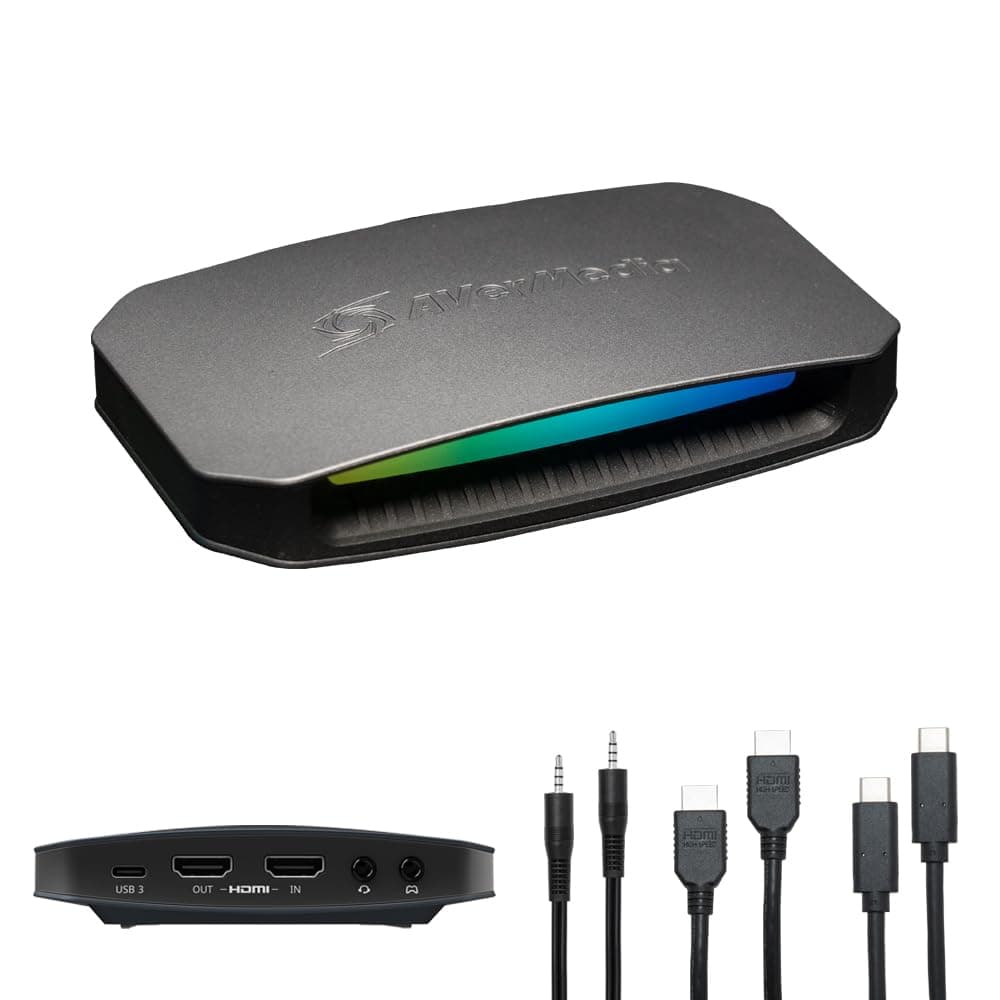
The AVerMedia Live Gamer Ultra 2.1 (GC553G2) is a cutting-edge HDMI 2.1 capture card designed for professional-grade 4K60 streaming and recording. Compatible with PS5, Xbox, Switch, and PC/Mac, it offers ultra-low latency 4K144/120 passthrough, built-in party chat support, and customizable RGB lighting. With USB 3.2 Gen 2 connectivity and multi-channel audio capture, it delivers seamless, high-quality gameplay streaming on platforms like Twitch and OBS, making it the ultimate tool for content creators aiming to stand out.


| ASIN | B0CGD86HNB |
| AV Output | YUY2, NV12, RGB24, P010(HDR), MJPEG |
| Antenna Location | Video Recording |
| Best Sellers Rank | #36 in Internal TV Tuner & Video Capture Cards |
| Brand | AVerMedia |
| Built-In Media | 4-Pole 3.5mm Audio Cable, HDMI 2.1 Cable, LIVE GAMER ULTRA 2.1 (GC553G2), Quick Start Guide, USB 3.2 Gen 2 Type-C Cable |
| Compatible Devices | Gaming Console, Personal Computer |
| Customer Reviews | 4.2 4.2 out of 5 stars (249) |
| Global Trade Identification Number | 00850036764465 |
| Hardware Interface | HDMI |
| Item Dimensions | 2.7 x 7.3 x 6.3 inches |
| Item Type Name | Game Capture |
| Item Weight | 115 Grams |
| Manufacturer | AVerMedia Technologies Inc. |
| Mfr Part Number | GC553G2 |
| Minimum System Requirements | Operating System: Windows 10 x64 / 11 x64 or later |
| Model Name | Live Gamer ULTRA 2.1 |
| Model Number | Live Gamer ULTRA 2.1 |
| Operating System | Windows 10 x64 / 11 x64 or later |
| Other Special Features of the Product | 5.1 Multi-Channel Audio, Built-in Party Chat, Custom RGB Lighting, HDMI 2.1 Input/Output, Low Latency |
| Platform | PlayStation, Xbox |
| UPC | 850036764465 |
| Video Capture Resolution | 4K60 |
| Warranty Description | 3 year manufacturer |
N**E
The Best Capture Card I've Used In 10+ Years of Content Creation
Over 10 years ago I started with a Easycap using Integrated graphics on a mini Acer PC and later upgraded to a Elgato HD and then switched to the Avermedia brand around 2018 and never looked back. Here's some key features why the AVerMedia Live Ultra Gamer 2.1 is the best card to date: - Video / Audio quality: When running the AverMedia Ultra 2.1 in OBS to record gameplay, if you use custom FPS settings you can record up to 144fps. I confirmed the FPS by using both VLC player and Da Vinci Resolve to monitor frames rates in the preview window. - The setup of the card was quick and easy BUT a possible major issue could be the card will only works on a USB C plugin when connecting to the PC. I tried a couple other regular USB to USB C cables and got the flashing Yellow light error from the built in RGB on the front of the capture card. Since the card can record up to 4K 144FPS a USB C 3.2 Gen 2 cable is needed to make the card work. That cable was brand new in the box. My suggestion is check your PC to make sure you have a USB C input that this card can connect too before purchase. - During a 5 hour broadcast on Twitch the card worked perfect with no dropped frames in OBS while both streaming and locally recording. I did run into an encoder overload issue when trying to record 1440p 120fps while also streaming due to limitation of my RTX 3060 so that should be another thing to keep in mind. When I tested only recording at the higher frame rates this capture card on OBS had no issues. - One other inconvenience is the Avermedia software didn't register the RBG lighting at all in the Avermedia software. To change this I had to go into Windows settings and into Dynamic lighting to change the color and pattern of the RBG. Settings pathway: (Windows Settings/Personalization/Dynamic Lighting) - There's also 2 audio ports for connecting 3.5mm audio cables to the capture card. If you have a audio mixer like the Roland Bridgecast (highly recommend) you already have access to the multi channel audio anyway. Overall the stability of the cards capture will make whatever project or stream you're working on look and sound professional with minimal effort when it comes to setup in OBS (free software most all creators use)
Z**M
Excellent 4K Capture Quality — Portable and Versatile
This is a great product that can do much more than just game capture, depending on the software you use. The video and audio quality it produces are excellent, with a clear picture and clean sound. I also really like the portability of this capture card, which makes it easy to move between setups. Overall, it’s a high-quality, versatile capture device that performs exactly as expected.
O**Y
This Works Great ON PS5 and XBOX S!!
I originally bought this to capture video on the XBOX S, but am now successfully using it to capture video on the PS5. The video is captured using the Avermedia Streaming Service. The resulting videos of game play look great. By the way I do not recommend using RecCentral 4 with this card on the PS5 -- the audio is not synced with the video.
K**.
Downs about the CC
It may be the best Capture Card but it doesn’t work unless you disable HCDP
X**S
GET THIS OVER THE ELGATO 4K X
I feel this capture card absolutely deserves more love, it’s as good as the elgato 4K X with a bonus feature such as plugging your headset straight into the capture card. I do wish avermedia upgraded their software but everyone uses obs anyways. another thing they should have added which they did in their previous model is keep the micro sd slot so that gamers without a laptop or pc could record in full 4k 120fps or 60fps. Love how you can customize the lighting on this capture card. recording in 1080p 60fps is a thing of the past. this will make your vids look amazing
L**E
Live Gamer Ultra 2.1 Gradual Audio Desync and Crackling Sound Issue in OBS + Solution
In general, I have no issues with the video, the image is correct in 4K, and I can use it with HDR without any problems. However, when I try to use it with OBS, the audio first produces a crackling sound. This is relatively fixed by disconnecting and reconnecting it, but what persists is that after a short period of time, the audio becomes out of sync, which is annoying when I'm capturing something or streaming. At the moment, I haven't found a solution. If this situation changes, I will update this review or feedback. * Update: I found a solution for the desynchronization in OBS. This can be fixed by adding a new audio input capture and selecting HDMI/Line In (Live Gamer Ultra 2.1 Audio) there. It is important to avoid selecting it in the properties of the capture device in OBS. With this, the audio will no longer have desynchronization issues. After that, you need to configure the advanced audio settings in OBS to ensure it works on your stream. An optional step, according to Avermedia support, is to turn off automatic VRR on the capture device (I haven't tried it). Regarding the crackling sound issue, I consulted with support, and they told me you should turn off microphone noise reduction via Nvidia Broadcast or sound software. I haven't tried it, as I solved it by disconnecting and reconnecting the capture device.
T**1
Très bon boîtier qui permet d'avoir un pass-through de haute qualité pour les consoles récentes. Par contre attention il se branche en USB-C. Dommage que le branchement casque soit à l'arrière et que le volume soit un peu faible sans modification.
R**S
Entrega muito rapida para o brasil. qualidade da placa é excelente!
M**K
I was surprised with its small size, which is a plus. The box works intuitively without the need for setup and you can get going in minutes. The RGB is in a rainbow pattern by default, but with a firmware update you can get from the company's website, I was immediately able to control the lights from the Windows interface itself without any extra software, which was incredibly convenient. It comes with an HDMI cable of good quality. The only lesser component in the package is the 3.5mm cable, which was picking up some static, but it's cheap to get a better one and once I swapped, it was giving me 100% clear sound. Recommended!
I**7
Anche se ha qualcosa in meno rispetto al live gamer ultra preferisco questo, almeno non ha la ventola di dissipazione che fa il macello notte e giorno, era sempre in funzione, questo invece è silenzioso e fa quello che deve fare
K**E
Die AVerMedia HDMI 2.1 Capture Card bietet eine erstklassige Möglichkeit, hochwertige Videosignale aufzunehmen und zu streamen. Mit Unterstützung für HDMI 2.1 bietet sie ultraschnelle Datenübertragungsraten und ermöglicht die Erfassung von Inhalten mit einer Auflösung von bis zu 4K bei 60 Bildern pro Sekunde. Die Capture Card ist ideal für Content Creator, Gamer und professionelle Anwender, die hochauflösende Inhalte aufnehmen möchten. Sie bietet eine einfache Plug-and-Play-Installation über USB-C und ist kompatibel mit einer Vielzahl von Geräten, einschließlich PCs, Laptops und Spielekonsolen. Dank der integrierten Hardware-Encoding-Technologie können Videos in Echtzeit mit geringer Latenz und hoher Qualität aufgenommen werden. Die Capture Card unterstützt auch HDR-Passthrough, um die bestmögliche Bildqualität zu gewährleisten. Zusätzlich verfügt die AVerMedia HDMI 2.1 Capture Card über Funktionen wie Live-Streaming, Aufnahmeplanung und mehr, um den Anforderungen verschiedener Nutzer gerecht zu werden. Mit ihrer robusten Konstruktion und zuverlässigen Leistung ist sie eine ausgezeichnete Wahl für alle, die professionelle Videoaufnahmen und -streaming betreiben möchten.
TrustPilot
1 周前
3 周前