We remain fully operational. Our teams are working around the clock to ensure your deliveries continue safely.

下载应用程序


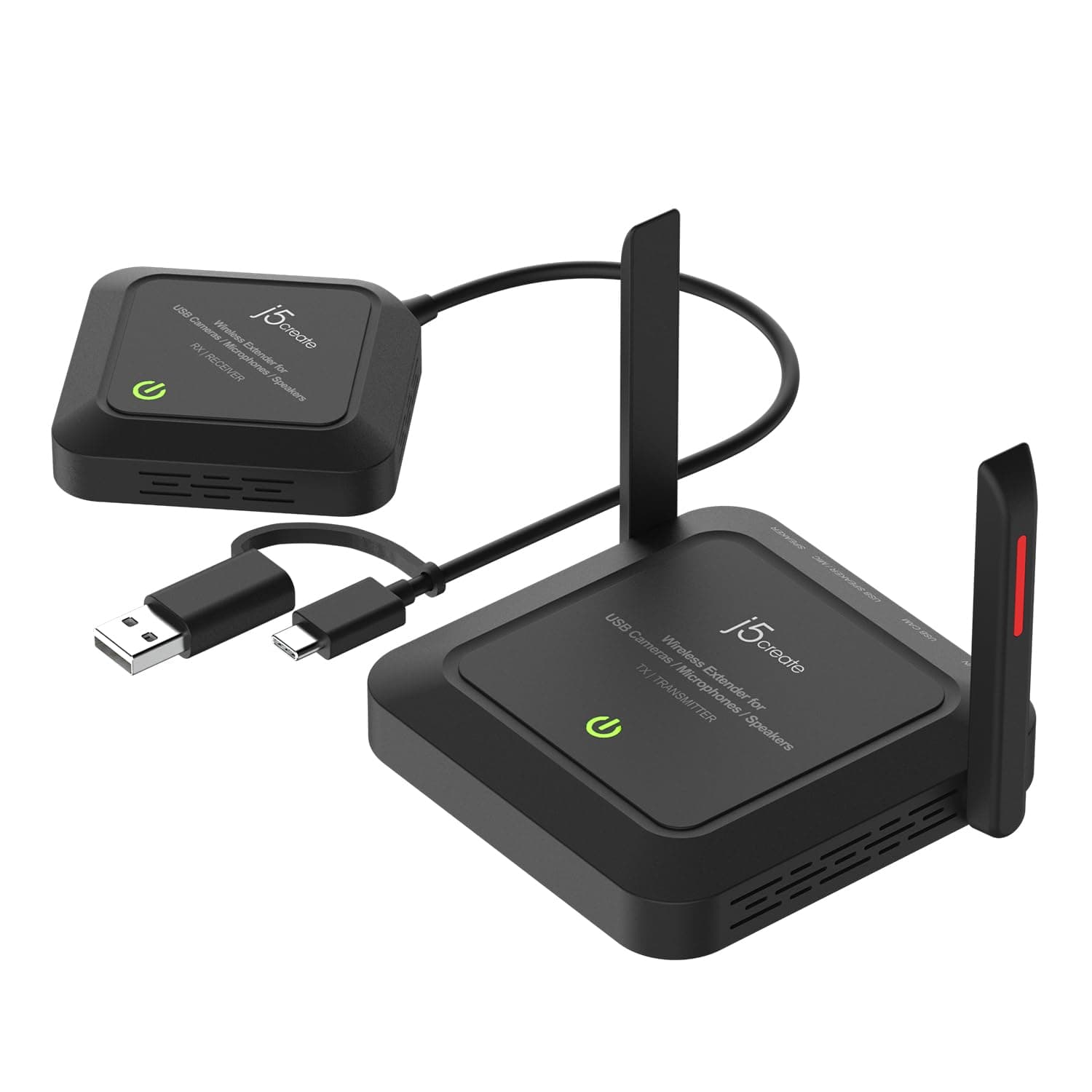


🚀 Cut the cables, not the connection—wireless freedom for pros on the move!
The j5create JVW120 Wireless Extender transforms your USB webcam, microphone, or speaker into a cable-free setup with up to 82 feet of wireless range. Supporting 50 Mbps data transfer over a stable 5 GHz connection, it delivers low-latency, synchronized audio and video compatible with Windows, macOS, and Chrome OS. Ideal for professional streaming and conferencing, it offers effortless plug-and-play installation and supports popular video formats like H.264 and MJPEG, making clutter-free, high-quality remote communication a reality.


| ASIN | B0C84PHSVY |
| Best Sellers Rank | #166 in Repeaters |
| Brand | j5create |
| Built-In Media | JVW120 |
| Color | Black |
| Compatible Devices | Laptops, desktops, and tablets running Windows, macOS, and Chrome OS |
| Compatible Operating System Family | Windows |
| Customer Reviews | 3.9 out of 5 stars 79 Reviews |
| Data Link Protocol | USB |
| Data Transfer Rate | 50 Megabits Per Second |
| Hardware Interface | USB |
| Item Weight | 0.4 Kilograms |
| Manufacturer | j5create |
| Mfr Part Number | JVW120 |
| Minimum Required Operating System Version | ChromeOs 134, Windows 10 |
| Model Number | JVW120 |
| UPC | 847626006210 |
| Warranty Description | 2 Year Limited Manufacturer's Warranty |
N**H
Works seamlessly, well, and easy to set up.
We run a cooking club and the "demonstration kitchen" in the clubhouse was poorly thought out. When we use the cooktop, our backs are to our guests, so not only do we have to turn around to talk to them, but our very presence block their view of what we're doing. While the right thing to do would be to rebuild and reposition the appliances, that is rather expensive. So, instead, we bought some cameras and monitors so we can display what we are doing to our guests. This was a partial solution as we needed to run cables from the cameras. That's where this device comes in. It hooks up to the USB camera and provides power to it. It also transmits what the camera sees to a receiver attached to our control computer. Setup is incredibly easy: We plug them in and turn them on. When the transmitter and receiver mate up, the respective LEDs turn from red to green and we know it works. Shortly thereafter, we see images on the computer. Success! We have had no compatibility issues with any of the cameras we've used, nor the computer. While we do not use this particular functionality, there are connections for microphones as well so it can transmit sound as well as video. We could see no perceptible lag between action on the cooktop and its display on the monitors, which is great. In other words, this product is doing everything that we wanted and needed and we could not be happier with it!
J**N
It worked!
I have a new conference room, and the cable from the tv to the center console on the table was dead. I hunted around for a) wireless cameras (pretty expensive) and b) wireless USB extenders (not many, and not many reviews of those available). I have a Windows 11 setup. It's about a 15 foot distance, max. I had purchased J5 adapters before, so I gave this a shot. It worked out of the box--could not have been easier to configure (you just have to plug one unit in to the wall and the camera and then the other unit into a docking station). You wait for the lights to turn green, and it worked with no issues. We attached the transmitting unit to the back of the TV using velcro (it's pretty light). So much for the first day, but a really promising start.
A**R
I works... somtimes`
I installed this unit and it initially started working but ever since I added it, it does stall the video from the camera often, not sure why??? I've tried to trouble shoot this unit and it still stalls often. I have a Windows 11 OS and I've tried Windows update and other things I could think of but no dice.
A**.
works but always needs a reboot to reconnect
many times need to plug and unplug to reconnect it
V**A
Finally a great wireless webcam solution
I've been looking for a wireless webcam solution to capture video feed from about 30' away. The J5create Wireless Extender allows me to setup my broadcast mission control at the back of the class room without having to be tethered to the camera up front. The setup was quick and easy and the transmitter and receiver connected quickly. I'm powering the transmitter and the camera with a power-bank so I don't need to plug into the wall. There is a slight lag with the video transmission but it's within acceptable parameters. Very happy with this one.
J**M
Apple Compatibility
This product does not work with Zoom on Apple Macbooks with Intel i5 or i7 processors. Video is not smooth and jitters in a way that makes it unusable.
A**N
Very Pleased!
This device accurately transmits webcam video and audio wirelessly to a remote location. I have only needed it to transmit to about 25 - 30 feet, so I can't attest to a maximum range. I tried experimenting to see whether I could use it with my telescope's eyepiece camera, but I couldn't get it to work. It seems to be designed primarily for webcams. All-in-all, I am very pleased with it.
C**M
Marginal success.
Works for webcam. Worked at first for my obsbot camera. It went to marginal performance after computer software update then no performance after another update. I suspect they did not upgrade the firmware and didn't really care about my problem. Had to purchase a simple webcam. This camera performed acceptibly
TrustPilot
1 个月前
1 个月前