![INIU Link Cable, [16FT 5m] VR Cable USB 3.0 High Speed Type C Charger Cable Fast Charging While Playing,USB to USB C Cable for Meta Oculus Quest 3S 3 2 Pico 4 Accessories and Gaming PC Steam VR](https://m.media-amazon.com/images/I/81JcVzpTtFL.jpg)
🎮 Level up your VR game with the cable that keeps pace with your passion!
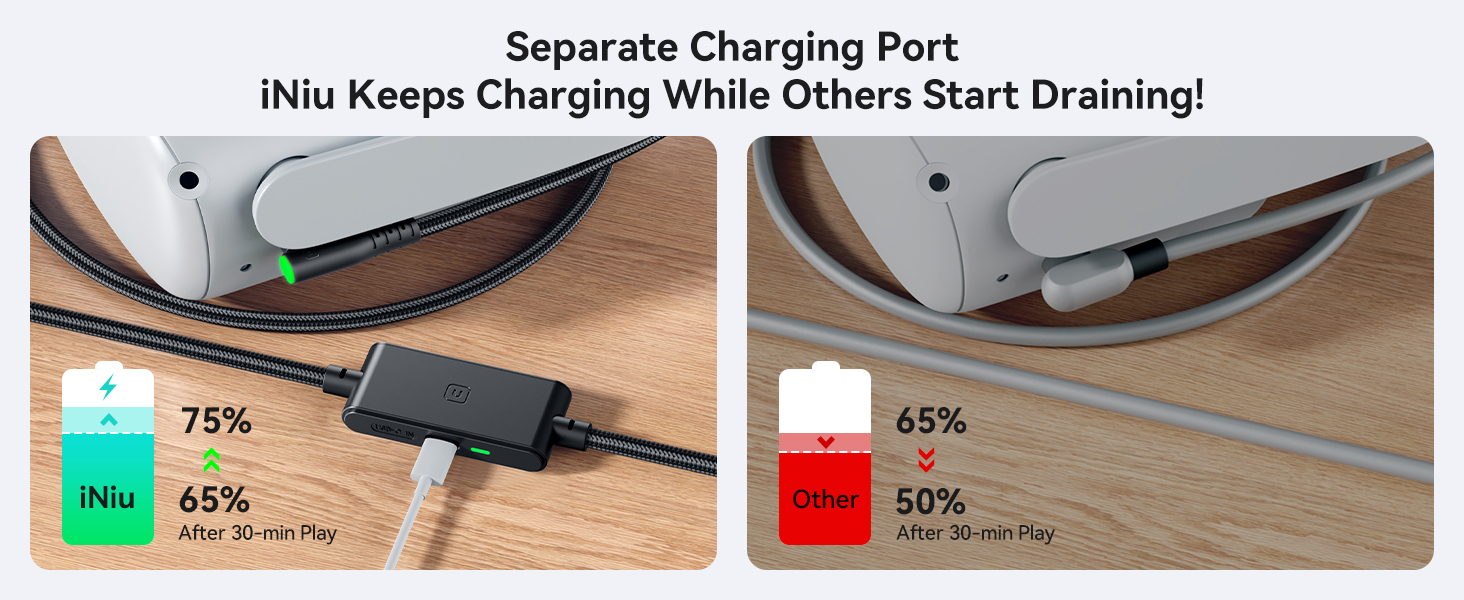
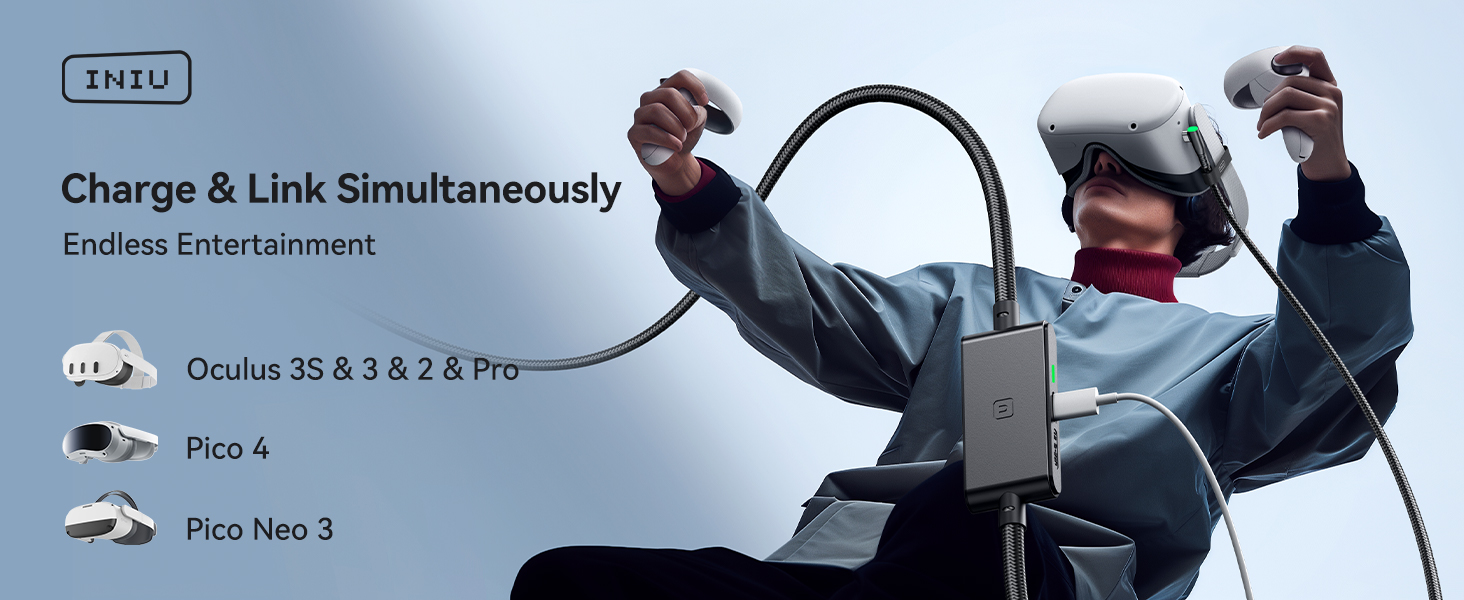
The INIU Link Cable is a 16-foot USB 3.0 Type-C VR link cable designed specifically for Meta Oculus Quest 3/2/Pro and other leading VR headsets. Featuring a dedicated 3A fast-charging port, SmartProtect2.0 chip for battery safety, and a durable 90° USB-C connector tested for over 45,000 bends, it ensures uninterrupted, high-speed data transfer at 2.5Gbps and freedom of movement during intense gaming sessions. Backed by a 3-year warranty, it’s the ultimate accessory for serious VR enthusiasts.





| AC Adapter Current | 3.1 Amps |
| ASIN | B0BRQMFDQ3 |
| Best Sellers Rank | #1 in Serial Cables |
| Brand | INIU |
| Cable Type | USB |
| Color | Black |
| Compatible Devices | Meta Quest 3s, Quest 3, Oculus Quest 2, Quest 1, Quest Pro;Pico 4, Pico 4 Pro, Pico 4 Enterprise;PC VR Steam VR |
| Compatible Phone Models | Meta Quest 3s, Quest 3, Oculus Quest 2, Quest 1, Quest Pro;Pico 4, Pico 4 Pro, Pico 4 Enterprise;PC VR Steam VR |
| Connector Gender | Male-to-Male |
| Connector Type | USB Type C |
| Customer Reviews | 4.2 4.2 out of 5 stars (3,058) |
| Data Transfer Rate | 2.5 Gigabits Per Second |
| Date First Available | January 5, 2023 |
| Indoor/Outdoor Usage | Indoor |
| Item Weight | 8.8 ounces |
| Item model number | DI-401 |
| Manufacturer | Shenzhen Topstar Industry Co.,Ltd. |
| Maximum Voltage | 9 Volts (DC) |
| Model Name | DI401 |
| Number of Items | 1 |
| Number of Pins | 9 |
| Outer Material | Plastic |
| Package Dimensions | 10.91 x 10.08 x 0.67 inches; 8.78 ounces |
| Recommended Uses For Product | Accessories for Oculus Quest 3s 3 2 vr Headset |
| Release date | December 31, 2023 |
| Shape | Round |
| Special Feature | 16ft Long Cable, Data Transfer, Fast Charging, High Speed, USB 3.0 |
| Specification Met | UL |
| Type of item | Electronics |
| Unit Count | 1.0 Count |
| Wattage | 18 watts |
P**N
Nice!
Works very well. The quest system recognized the cable and fits on my quest 2 headset. gave it a test on Vrchat for a week and it runs smooth as butter very long cable so I'm able to walk around with no troubles but be aware this dose NOT charge your headset while you are playing however this dose not bother me much but just and fyi for anyone looking to buy this. all in all it is a very good cable and a cheaper alternative for the official quest cable!
J**L
VERY GOOD. LEARN HOW BY READING.
5 star so far! Just got it today. I used it at first with a 45 watt anker charger and the orignal 3 foot occulus charging cable, but kept saying water in port like the other reviewer here "Works fine, but a minor problem. When using this, my session gets interrupted for my headset to say "not charging due to loose debris in the charger port", only for charging to have been unaffected." SO TO FIX IT, I used an anker 20 watt usb c charger and the official charging cable that came with occulus. YOU MUST PLUG IN A USB CORD INTO THE PORT, without it , it will not charge right! Now I don't have any water in port warnings.. TLDR : PLUG LONG CALBE INTO HEADSET AND PC. THEN GET 20 WATT USB CHARGE WITH TYPE C , THEN PLUG IN OFFICIAL OR HIGH QUALITY USB C TO USB C CABLE INTO PORT ON THIS CABLE FROM THE CHARGER. I can play horizon center and still charge!!!! VERY GOOD. Fans spins up and is running great!
A**Y
Great choice
Worked exactly as intended and charges the headset nicely. No complaints
K**H
great cord, but doesnt last super long for hardcore players.
it was good while it lasted, but after about 3 months of using it for charging and using it for pcvr, it stoped holding any charge, and i would get notifications every three seconds saying "charging device has disconected". also, i made this mistake, if you are using vertual desktop for PC VR, a link cable doesnt to anything, VD ignored it.
J**Y
Good product
Cable is nice and long. Charges device while using USB data.
C**.
Works great, no issues - 1 month review.
It has been a little over one month now and this cable has done great. I have not had the connectivity issues some other reviews mention nor any durability issues. On that second point, then again, it has only been one month of moderate use. Around 50-60 hours of playtime total so far with it. Gaming has been great. Being able to leverage my PC's higher performance for higher fidelity graphics and the ability to play PC only titles has been fantastic. I had gotten this cable for $21.99 which is a steal compared to the around $80 for the Meta Quest Link Cable. For the price I highly recommend it. In the worst case you return it and try another cable, but if you have a similar experience to me you will not need to do that. -------- Since some people have had issues with charging or connectivity I will describe my particular setup that worked for me first time and every time after. Link Cable -> PC, Link Cable -> Headset (Quest 3), Quest 3 charging cable -> a Anker quick charge power brick.
A**E
I want to love it
So I got this to hook up to my desktop and it works and it doesn't. Let me explain, if you know what you're doing. You can get it to work every single time. Sometimes it acknowledges it and sometimes it doesn't. I find plugging it in and out and then plugging it back in works. You just have to finagle with it. But overall it's nice, when it does work I get good quality gaming out of it. I also have the Asus rog, so I use the 45 w charger to charge the headset on this line. And it works really good
J**M
It was great for a while.
Very recently I started getting back into PCVR but wanted a way to keep myself connected. Without having to worry about battery life. I use wired ALVR and had been dealing with cables that just made my quest slowly die over time, so I decided to get this cable. It worked great for the time. I had it until a few days ago. I was playing blade and sorcery and randomly just got disconnected from the link cable. It immediately reconnected back, so I didn't think too much of it, but then it kept doing it. Every minute or so it'll disconnect and then reconnect. Eventually, it stopped working at all. And then after reconnecting all the cables it started charged looping. The green light would come on but then it would keep blinking and then eventually it would stop but my quest would start slowly charging causing it to die on the charger. I don't really like Meta so I usually keep my wifi turned off so I don't update. I thought maybe it was an issue with that, so I ended up updating my quest to no avail. I tried plugging in the cable to many other devices and it still gave me the same issue. My primary headset is a Meta Quest 3. I have two Quest 2's that also experienced the same issue with the same cable. I don't know how it happened or what even started it, but i took really good care of the cable. I really don't understand what happened.
D**N
The cable works as intended. A plugged-in Samsung goes from 3h charge time without extra power, then down to 37min with the original charger plugged into the power slot. Note that the original charger, plugged in directly to the phone, activates "Super fast charge" (25min), whereas the extended cable only activates "Fast charge" (37min). While this is definitely better than a basic USB cable and does not alter my review, it's worth knowing you don't get a 1:1 power output ratio. I don't have a VR headset (yet - which prompted my need fo this cable) and I may update this review when I test this cable out with that.
K**I
خرب علي بسرعه
D**O
I know that QUEST 3 battery is super bad, but with this I played for like 3 hours and it only dropped 1%. I even tried to set graphics and stuff to high and only 1% was dropped. It works amazing, the quality of the cable is really good too. I totally recommend this. You need to connect the cable in the next order for it to work: 1. Turn on the Quest. 2. Connect the USB cable to the 3.0 port. 3. Then, connect the TYPE-C to the Quest. 4. Finally, use the original charger (Idk if it works with others) and connect it to the little rectangle thing on the long cable. The port is on the side and it will display a white light when connected. 5. ENJOY. Sé que la bateria del Quest 3 es super mala, pero con este cable jugué como por 3 horas y nomás bajó 1% de bateria. Incluso intenté subir los gráficos al máximo y solo 1% bajó. Funciona perfectamente, la calidad del cable es increible tambié. Super recomiendo este cable. Para que funcione necesitan conectarlo en el siguiente orden: 1. Prende el Quest. 2. Conecta el cable con USB a un puerto 3.0 en tu PC. 3. Después, conecta la entrada TIPO-C al Quest. 4. Finalmente, utiliza el cargador original (no sé si funciona con otros) y conéctalo al pequeño rectángulo que esta en el cable largo. El puerto está a un lado y va a prender una lucesita cuando se conecte. 5. DISFRUTAA YYEAAA
L**S
If you're looking for a high-quality link cable that keeps your Meta Quest 2/3/3S charged while playing, the INIU 16FT Link Cable is an excellent choice. Unlike many other cables, this one features a separate charging port that connects to your Quest’s original charger and cable while also linking to your PC. This ensures that your VR headset maintains its battery charge, allowing you to play almost indefinitely without worrying about power drain. Performance & Charging Capability The INIU Link Cable delivers high-speed USB 3.0 data transfer, providing a stable, low-latency connection for smooth PC VR gaming. The biggest advantage is its dual connection design—by plugging into both your PC for data transfer and your Quest’s charger for power, the headset receives enough energy to prevent battery drain, even during extended play sessions. This is a huge upgrade over many other link cables that slowly deplete the headset's battery over time. Comfort & Mobility At 16 feet (5 meters), this cable is long enough to give you some freedom to move around without feeling too restricted. The cable is durable yet flexible, preventing tangles and making it comfortable to use for a long time, even for action-heavy VR games. Keep in mind that the cable is a little heavier than other options, but I was not able to feel any difference or discomfort while using my Quest 3S . Value & Recommendation For the price, the INIU Link Cable offers a fantastic balance of performance, charging capability, and comfort. If you want a reliable link cable that allows you to play for hours without battery anxiety, this is one of the best options available. ✅ Pros: ✔ Prevents battery drain – Play almost indefinitely ✔ Dual connection – Supports both data transfer & power ✔ Long 16ft cable – Provides movement freedom ✔ Fast & stable USB 3.0 performance ✔ Durable and flexible design ❌ Cons: ➖ Requires an extra outlet for the Quest charger ➖ Slightly bulkier than standard link cables due to the extra charging connection Final Verdict The INIU 16FT Link Cable is an excellent choice for anyone looking to play PC VR games without worrying about battery life. Its separate charging port design is a game-changer, making it a far superior option to regular cables that slowly drain the battery. If you want uninterrupted, long VR gaming sessions, this is the cable to get!
M**N
PCVR için en iyi kablo piyasada budur. 3A olması da avantaj, şarjım hiç bitmiyor.
TrustPilot
1 个月前
2 周前



