We remain fully operational. Our teams are working around the clock to ensure your deliveries continue safely.

下载应用程序


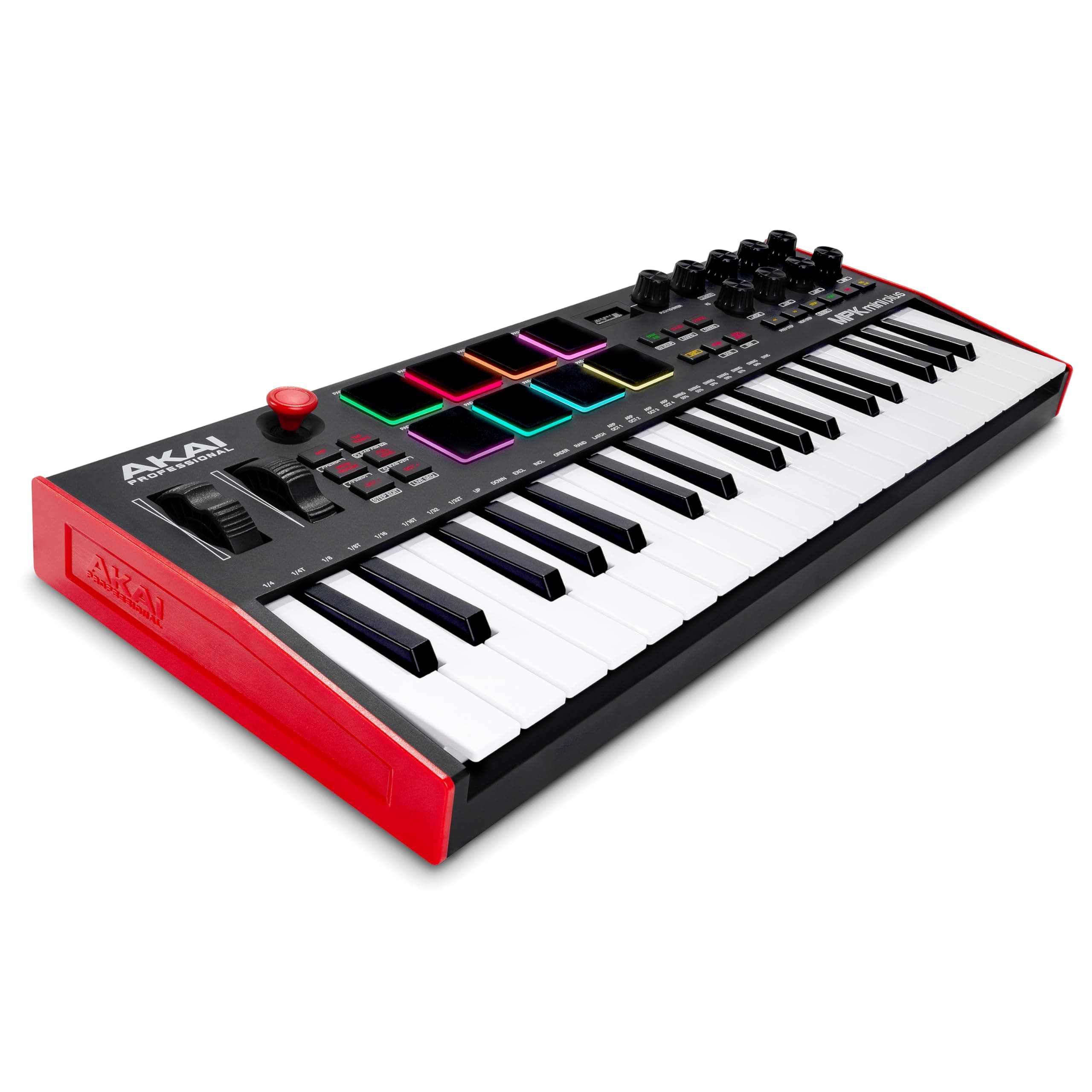
🎶 Unlock your studio’s full potential with the ultimate portable MIDI command center!
The Akai Professional MPK Mini Plus is a USB-powered MIDI keyboard controller featuring 37 mini keys spanning 3 octaves, 8 RGB MPC pads, and a built-in 64-step sequencer. It offers advanced connectivity with MIDI, CV, and Gate I/O for versatile studio integration. Bundled with MPC Beats software and exclusive Native Instruments sound libraries, it empowers music producers with a compact, professional-grade production toolkit designed for both desktop and standalone use.


| ASIN | B0BFBDT2D2 |
| Best Sellers Rank | 986 in Musical Instruments & DJ ( See Top 100 in Musical Instruments & DJ ) 10 in MIDI Controller |
| Brand Name | Akai Professional |
| Colour | Black |
| Compatible Devices | Laptop, Desktop, Tablet |
| Connectivity Technology | USB Type-B Port, 1/8" (3.5mm) CV Outputs, 1/8” (3.5mm) CV Clock In/Out Ports, MIDI DIN In/Out Ports, Sustain Input |
| Connector Type | USB |
| Control Method | Touch |
| Control Type | keyboard, knobs, pads MPC |
| Country of Origin | Philippines |
| Customer Reviews | 4.5 4.5 out of 5 stars (1,961) |
| Global Trade Identification Number | 00694318025802 |
| Hardware Interface | USB |
| Hardware Platform | Mac |
| Human Interface Input | Keyboard |
| Included Components | MPK mini Plus, USB Cable, Software Download Card, Quickstart Guide, Safety & Warranty Manual |
| Instrument | Keyboard |
| Instrument Key | Any |
| Item Dimensions D x W x H | 18D x 45.1W x 5.2H centimetres |
| Item Type Name | AKAI Professional MPK Mini Plus - 37 mini Key USB MIDI Keyboard Controller with 8 MPC Pads, Sequencer, MIDI/CV/Gate I/O, and Music Production Software |
| Item Weight | 1.3 Kilograms |
| Keyboard Description | 3 octave 37-key USB MIDI keyboard with compact, dynamic design and 8 MPC RGB pads advanced performance |
| Manufacturer | inMusic Europe Limited |
| Material Type | Plastic |
| Model Name | MPKMINIPLUS |
| Model Number | MPKMINIPLUS |
| Model Year | 2022 |
| Noise Control | None |
| Number of Keys | 37 |
| Outer Material | Plastic |
| Platform | Mac, Windows |
| Product Style | Controller only |
| Product Warranty | 12 months manufacturer. |
| Size | 37 Keys |
| Special Features | USB powered; sequencer; CV/gate output; pitch and modulation wheels; includes production software |
| Supported Software | MPC Beats Software |
| Total USB 2.0 Ports | 1 |
| Total USB Ports | 1 |
| UPC | 694318025802 |
| Unit Count | 1.0 count |
R**D
Powerful MIDI controller for the technically savvy at a great price
Have just received this and it doesn’t disappoint. I picked up a Black Friday offer on a return to the price is to die for. I simply plugged the akai into my PC via usb after downloading MPC beats. After that it’s pretty simple. The akai mpk mini plus has lots of controls and is already synced with mpc beats so I can pretty much control the software via the keyboard, drum pads, knobs etc. Most of the YouTube videos cover different versions, unboxing or comparison so don’t cover the key info. Other DAWS seem to require subscription/purchase or configuration. If you understand and know what you want then it doesn’t have to be hard and CoPilot can provide good instructions. So after a few days, there are a few teething problems but it all works fine. videos available on YouTube by akai and inmusic (their other brand) are essential watching. These videos demonstrate how to register and download/install software. A key video is the hardware and midi mapping setup - initially missed this and couldn't get the transport buttons to work but it is explained clearly along with using mpc learn. there are several pieces of software available to provide a sound library which all work well with MPC beats,the default DAW. The additional software requires keys/subscriptions but there are plenty of free VSTs and plugins out there at no extra cost. Update: after using the mpk and mpc beats software for a couple of weeks I am very pleased with it and still learning. I have found a number of free VST packs and a site with free midi file downloads. I have also got myself an ewi. There are some great tutorials from akai on how to use mpc beats and it seems that the full mpc software is not much more complex and comes with more built in instruments and samples which is all good.
A**D
Great tool for producers seeking portability without sacrificing functionality.
The AKAI MPK Mini Plus is a compact yet powerful 37-key USB MIDI keyboard controller, ideal for music producers and performers on the go. With 8 responsive MPC pads, it allows for dynamic beat-making and sample triggering. The extended key range offers more melodic flexibility compared to its smaller counterparts. It features intuitive controls like pitch/mod wheels and assignable knobs, making it versatile for DAW integration and real-time performance. Despite its small size, the build quality is solid, and it’s plug-and-play for easy setup. Pros: Compact and portable 8 quality MPC pads for beats 37 mini keys for added range Easy USB connection Cons: Keys may feel small for some users
V**R
Great product
Really good product. Good size and quality keybed. The MPC Pads work great as well as the pitch and mod wheels. Sequencer and arpeggiators are great to use as well on MPC Beats. Would highly recommend
B**K
for you to decide if this is a problem..
MIDI works perfectly and comes with a cable to plug into the PC that connects with the DAW. Every function works easily. Much better than the mini version and has exactly what I need. For the price range this is very nice. Big problem however. The keys shake a bit. If you were to put your hand on a key and move it the key will move with it quite easily and that causes for a bit of trouble. Also when having the MIDI keys facing towards the ground and pressing a key down causes for almost like a maracas shaking sound. Extremely weird. It interrupts it and is terrible. I was testing it and playing fast and numerous different compositions. However just blueprinting a main melody then quantizing and adding more via note drawer this is a perfect midi. It works and handles itself easily. If you are expecting to test it and really grind on the keys you might face a small issue. I found this easy to get use to however.
B**G
Great piece of kit
This is a great piece of kit. Sensitive keys and beat pads. Lots of flexability via a software interface. This is my first MIDI kit and im enthralled. The USB lead that came with it was far too short. But hey, not really an issue.
J**E
Great value for money
This was bought for a Christmas present for my son and he was more than happy, for people who are interested in music production, this is a great start. It's nice to hear how creative he can be with music, would definitely recommend.
M**S
Excellent little keyboard
Perfect keyboard for my other equipment. Can be powered using a usb cable from other devices to save on power connections
S**.
Akai and Reaper: A worthy match
My keyboard is an oldie so needed something smaller and more mobile whilst studying and creating audio piece for videos. I am a complete noob and not used a keyboard in over 10 years. This badboy is so versatile. Having used with Reaper, Native Access, and Spitfire Audio...all of you musical needs tapped into. If you are new to the MIDI lifestyle, this is great for the noobs! Instructions are simple. Make sure you decent software. There are loads of free instruments to get you started. Great value for money, sturdy keys, compact and tidy appearance. Adequate spacing between dials
Z**L
Der Name Akai Professional ist bei diesem Gerät mal kein reißerischer Werbespruch. Ich würde glatt 10 Sterne vergeben wenn es ginge. Das Keyboard kommt mit einem USB Kabel und einem Quickstart Guide sowie einer Anleitung zur Registrierung. Das USB Kabel ist recht kurz was dem einen gefällt, dem anderen aber nicht. Da ein USB Kabel kein Kostenfaktor ist muss man darüber auch nicht lange schreiben. Das Minikeyboard ist für das Komponieren am PC gedacht. Sicher geht das auch mit einem großen Keyboard aber so muss man sich nicht von der PC Tastatur wegbewegen. Die Inbetriebnahme ist recht einfach: Akai MPK mit USB Kabel anschließen und Gerät bei Akai registrieren und danach die Softwarepakete herunterladen. Dabei erfolgt auch die Aktivierung der Software. Man bekommt auch ein Programm mit dem man die Firmware des Akai MPK aktualisieren kann was auch sehr einfach war da es gut beschrieben worden ist. Die 3 mitgelieferten VST /AAX/ Standalone Instrumente sind schon der Hammer. Mit Essential Keyboards erhält man ein riesiges Klavierlager was wirklich alle namhaften Klaviere und Flügel abdeckt von denen man schon mal etwas gehört hat. Das alleine würde schon den Kauf rechtfertigen. Mit Electric erhält man ein weiteres VST Instrument das auch alle möglichen Klaviere enthält und dabei noch viele Einstellungsmöglichkeiten bietet. Abgerundet wird das ganze mit dem Hype VST Synthi der ein sehr großes Spektrum an Sounds aus allen Bereichen enthält. Ich bin von den Sounds total begeistert und sie stellen eine sehr gute Ergänzung für mein Cubase Artist dar. Zusätzlich erhält man auch noch MPC Beats mit mehreren Drum Kit Bibliotheken von denen einige auch bei Steinberg Groove mit dabei sind und den BFD Drumkit Player mit der Basis Sound Bibliothek. Letzterer ist für mich persönlich überflüssig. Die Drum Kits in MPC Beats klingen schon fett und das Programm ist auch als VST Version enthalten. VST's sind virtuelle Instrumente die sich in einer DAW (Digital Audio Workstation) Software wie ein eigenes Instrument bedienen und spielen lassen. Cubase Artist lässt z.Bsp die Nutzung von verschiedenen VST's gleichzeitig zu. Da kann man klanglich schon zaubern. Mitgeliefert wird auch eine 6 Monat Lizenz für Reason+. Da es Reason+ aber nur im Abo gibt kommt das aufgrund der dauernden Kosten für mich nicht in Frage. Das muss jeder für sich selbst entscheiden. Wer keine DAW Software wie Cubase, Reason oder Fruity Loops nutzt kann auch zur mitgelieferten Software MPC Beats greifen. Darüber hinaus lassen sich die Instrumente auch direkt auf dem Desktop als Standalone Instrumente starten was gerade zum austesten der Sounds eine gute Sache ist. Ich kann hier nur für Cubase schreiben da ich damit arbeite: Das Akai MPK lässt sich einfach in Cubase einbinden. Im Steinberg Forum findet man auch ein fertiges und funktionierendes Midi Controller Script und auch die Pitch Bender Wheels funktionieren, was will man mehr ? Vorausgesetzt man hat einen leistungsstarken PC, fühlt man keine Verzögerungen beim spielen der VST Instrumente. Die MPC Pads funktionieren im Steinberg Groove Agent ohne das man etwas umstellen muss. Da man aber nur 8 Pads hat und Groove 16 anzeigt kann man die Pads mit einer Bank Taste einfach am Akai MPK umschalten. Das Spielen der einzelnen Spuren und auch deren Aufnahme ist in Cubase ein Kinderspiel. Wer nicht so geübt ist kann die Mini Tastatur natürlich auch zur Step by Step Aufnahme im Sequenzer oder Pattern Modus verwenden. Das Keyboard hat die Größe einer PC Tastatur mit Ziffernblock so das man es problemlos vor die Tastatur legen kann. Wer das vorhat sollte allerdings ein USB 2.0 Kabel mit Winkelstecker verwenden damit das Kabel nicht an die Tastatur kommt. Der USB Anschluss ist ist von vorne gesehen hinten rechts am Akai MPK. Da das 37 tasten Keyboard eine Miniatur Tastatur hat ist es nicht für dicke Finger geeignet ! Das ist aber kein Makel beim Akai MPK sondern betrifft alle Keyboards mit Mini Tastaturen. Die Tasten und auch die Pads sind anschlagsdynamisch. Das Spielgefühl ist gut wobei die 3 Oktaven einen sehr guten Kompromiss zum Tonumfang darstellen. Mir wären 2 Oktaven gerade bei 4 stimmigen Akkorden zu wenig. Die Oktaven lassen sich für Aufnahmen über das MPK oder auch die3 DAW Software leicht transponieren. Für das AKAI MPK wird auch ein Editor mitgeliefert mit dem man diverse Einstellungen inkl. Beleuchtung, Sequenzer Patterns etc editieren und als eigene Programme speichern und auch laden kann. Wenn ich bedenke dass das Akai MPK mit dem umfangreichen Softwarepaket nur 145 € gekostet hat komme ich mir schon fast wie ein Dieb vor ;-). Wer erste Erfahrungen am PC mit Musik und DAW Software machen will für den ist es ein günstiger Einstieg da alles mitgeliefert wird. Und für 26 Euro gibt es dann auch noch von Steinberg Cubase Elements zum DAW Einstieg. Wem die 2 nutzbaren VST Instrumente in Cubase Elements nicht reichen kann dann später seine Version auch noch auf Artist oder Pro upgraden. Das Akai MPK hat noch diverse Anschlüsse wie z.Bsp Midi in und Midi Out. Damit kann man dann auch direkt ein entsprechendes Keyboard direkt am Akai MPK anschließen falls man kein Midi Interface besitzt. Ich bin auf jeden Fall total begeistert und werde wohl noch ein Weilchen brauchen bis ich alle Features getestet habe. Ich hatte mich für das weiß/rote Modell entschieden da meine PC Tastatur auch weiß ist. Das macht auch optisch etwas her. Am Akai MPK befindet sich auch eine kleine OLED Anzeige an der man z.Bsp. die Anschlagsstärke der Pads oder auch alle anderen Parameter ablesen kann. Wer am PC Musik machen möchte, Keyboard spielen kann, und nicht nur pattern Editoren benutzen möchte für den ist das Akai MPK die richtige Wahl. Zum Keyboard lernen kann man es auch verwenden wobei ich dafür eine normalgroße Tastatur mit mindestens 61 Tasten bevorzugen würde. Für unterwegs als Standalone gerät ist das MPK nicht geeignet da es eine USB Spannungsversorgung benötigt und kein eigene Klangerzeugung integriert hat. Wer so etwas braucht findet das aber auch bei Akai.
V**Y
Very good product and easy to set up and start using. Delivery by Amazon was fast. I am very satisfied with this purchase.
C**R
I upgraded to this one from my miniPlay. The only thing I wish it had. Its own internal sound bank with an 1/4” jack out. Like my miniPlay.
B**.
Good midi controller and respected brand.
A**R
想像以上に良かったです。 まず、何よりも37鍵盤というのが、自分には最適でした。 plus 購入後、すぐに「mpk mini IV」が発売されましたが、 plus は、37鍵盤の上、機能的にはほぼ上位互換、なので、残念感はありません。 (打鍵感がどうなのか気にはなりますが) また、持っている多くのdawや音源に対応できてありがたかったです。 キーボード部についてはいずれも問題なく使えています。 ただし、ソフトによって、ノブとパッドの対応ができなかったりしています。 ノブを含めて、概ね対応できたものは、「Arturia analog-lab pro」 「NI Kontakt 8」「NI Komplete 15 Select」 (「Komplete Kontrol」はそれなりに便利です) ノブが対応できていないのは「Reason13」、 「KORG m1 v2」「KORG opsix native」あたり。 ※「Reaper」と「Falcon」「SynthMaster」については忘れてしまいました(現在手元にないため) 特記事項として、今回購入した「mpk mini plus」と 以前に購入した「mpk mini mk3」両者の特典を利用して、 2種類の「NI Komplete 15 Select」(BeatとBand)を無料で入手できました。 大盤振る舞いと言えるのではないでしょうか。