We remain fully operational. Our teams are working around the clock to ensure your deliveries continue safely.

下载应用程序


❄️ Stay Cool, Stay Ahead: The Silent Guardian Your Tech Deserves
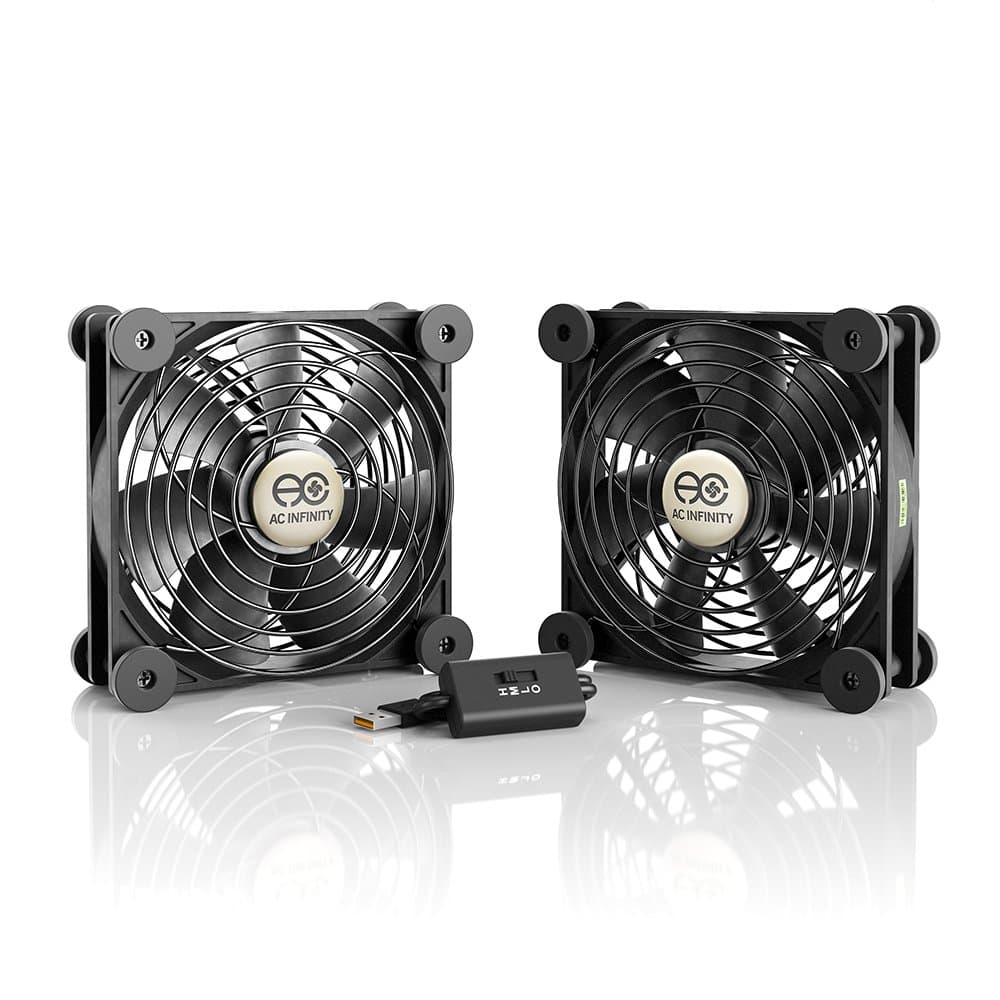
The AC Infinity MULTIFAN S7 is a UL-certified dual 120mm USB fan designed for ultra-quiet, efficient cooling of gaming consoles, DVRs, receivers, and computer cabinets. Delivering 104 CFM airflow at just 19 dBA noise, it features a multi-speed controller and durable dual ball bearings rated for 67,000 hours. Its flexible orientation and USB power make it the perfect compact cooling solution to extend the lifespan of your high-performance electronics.


| ASIN | B00JLV4BWC |
| Air Flow Capacity | 104 Cubic Feet Per Minute |
| Best Sellers Rank | #19 in USB Fans |
| Brand | AC Infinity |
| Brand Name | AC Infinity |
| Compatible Devices | Gaming Console |
| Cooling Method | Air |
| Customer Reviews | 4.7 out of 5 stars 36,687 Reviews |
| Included Components | item |
| Item Dimensions L x W x H | 4.7"L x 1"W x 4.7"H |
| Manufacturer | AC Infinity |
| Material Type | Rubber |
| Maximum Rotational Speed | 1300 RPM |
| Noise Level | 19 Decibels |
| Power Connector Type | 2-Pin |
| Product Dimensions | 4.7"L x 1"W x 4.7"H |
| UPC | 854759004341 |
| Unit Count | 1.0 Count |
| Voltage | 12 Volts |
| Wattage | 5 watts |
F**S
Cooling my modem and router
My last cable modem up and died after just one year, I'm pretty sure because it got so hot all the time. It was a modem+router so extra hotty-hot-hotness from all the circuitry packed into one case. My son thinks this is sort of normal lifespan for routers and modems - he expects only 3 to 4 years. Well I got 8 years out of one of my last modems and 10 out of the other (same modem, WTGS54 whatever that was, it was a very good modem for its time and I got more than enough throughput from it for my needs, including streaming video, I was still running one up until 2 years ago). So *I* was shocked at its short lifespan (especially given the cost, over $200) even if he wasn't. There is just more electronics involved in these tasks, packed into less space, than the older modems. They are GOING to get hot. So in order to keep that from happening again I bought this USB fan kit, comes with 2 fans hooked together, to replace the floor fan I had aimed at the new modem and separate router. I was getting some of these anyway to put on my LED grow lights to cool them (they will ALSO last longer if you keep them cool) so I took one of those and shoved it under the router (because its a flat design, give me vertical any day) and stood the other one up next to the cable modem (which is vertical). I've got them on low and they are cooling both devices very well. On low the router gets barely slightly warm, and the better design of the vertical case for the modem leaves it totally cooled down with this little fan. If I had it to do over I'd look harder for a vertical router as well, its easier to keep them cool. AND they take up a lot less space! I've got a bunch of old computer cases with fans going to waste, I will likely make some USB fans from all those old bits and pieces, but they are likely to be a lot louder. This fan is extremely quiet even on high. I can't hear it at all on low. Also these fans in particular are optimized for humid environments so I wouldn't use anything else in my grow room. A lot of people use the other dual fan kit with the larger fans but they are using them to move air over microgreens to cut down on mold and fungi, I don't have that problem, I just need to cool the lights to improve their longevity, so I'm trying these smaller fans (take up less headroom over the lights, giving me more space under the lights because I can move them further up). I highly recommend cooling your router/modem/game console whatever electronic devices you have sitting around generating heat with some kind of fan, and these are very quiet, easy to assemble (as in plug them in), and very effective. I've seen some people insist that you shouldn't do this because it might "blow dust into the case" - where do these guys live, in the middle of death valley? LOL! Just do it. I've had a floor fan blowing across my very very ancient laptop to keep it from overheating for about 5 years now (even laptop coolers can't cool it enough) and its still going strong. I can even play (very very old) games on it still. Heat will kill your devices WAY faster than whatever tiny specks of dust these fans probably won't blow into the cases anyway. Also, if you have one of those stupid refrigerator closet things where they've built an enclosure all the way around the fridge, that is trapping heat and shortening the life of your expensive stainless steel fridge - you can use these fans to draw hot air out of that too (though I'd go with the larger version for that). Personally I'd tear that crap out but failing that, install these in a side or back wall and pull that heat out of there. Your fridge will thank you. Your bank balance will be the better for it over the long haul.
C**R
Miracle Fans
I just bought a used Onkyo TX-SR805 receiver already knowing that they run hot from reading reviews. When I arrived home I immediately set it up and liked the sound. Within 30 minutes I put my hand on the top of the receiver and could not believe how hot it was. You could fry an egg on it. I knew this was not good. I then noticed that the side vents, one on each side, housed a fan each. The fans were not working. I believe this is one of the reasons Onkyo has a reputation for very hot receivers, inefficient cooling system. Replacing them would probably not be cost effective. I purchased this set of fans from Amazon and set them up vertically at the rear of the receiver, one on the left and one on the right, to push the air towards the front of the receiver and out of the cabinet (I have an audio visual cabinet with doors. I keep the doors open). This setup produced cooling and the fans were powerful enough to push the air out of the cabinet but the cooling was only fair. I was not satisfied since the receiver top was still hot, though not as hot as before. I now proceeded to lay both fans on the hottest sections of the receiver venting the hot air out of the receiver and was amazed at the results. The receiver cooled down so much that when I touched the top of the receiver I felt no heat. I ran my hand across the top of the fans and I felt the hot air being drawn out completely. By the way the setting I have it on is HIGH. I didn't try medium or low since this receiver produced atomic heat. The receiver remained pretty cool with this second setup. I just purchased another set to stand up at the rear of the receiver (as was my first setup) to push the hot air forward away from the front of the receiver, as I plan to elevate on 4 columns (4 black pepper shakers from Dollartree-perfect size-about 1/8" taller than fans) my turntable. It remains pretty stable. As mentioned previously, I have my audio visual components (8 in total) enclosed in a cabinet with doors. There is an open back and the doors swing out and to the side and back, out of the way, making it perfect for my rig. Will probably update with photos once everything is in place. Definitely recommend these fans. Especially for the price. I was going to buy AC Infinity's more expensive setup with the 3 fans that lays on top of the receiver and vents out the rear but didn't want to spend $119 for it. I read in the reviews that it was a little noisy and that thermostat is inaccurate. Two sets of fans for $30 and 4 black pepper shakers from the Dollar tree (come in a set with salt) for a total of $34 Will actually do a better job because you are using 4 fans this way, which can be Daisy chained compared to only 3 fans with the $119 rig. As a former Marine we are taught to improvise and improvising can save beaucou bucks. Wishing you the best and God bless. UPDATE:. Just received the second set of fans and set them up at the rear of the receiver to push the air out of the front of the cabinet. Fan setting is on high for all the fans. Works marvelously! Haven't purchased the pepper shakers yet from Dollartree (was there today and forgot-set it up earlier with two of the shakers-one salt white and the other pepper black-work perfect!) so I have the turntable set up on empty medicine bottles. Supports the turntable steadily. Bottom of turntable is not hot as air extracted upwards from receiver vents is immediately being forced forward by rear fans and forced out of the front of the cabinet. These fans are GREATTT! I can feel the hot air being pushed out the front when I stand in front of the cabinet. Feels like a furnace is on. Really glad I found these on Amazon because this is really a great receiver and was concerned that it would sizzle out on me. Now I have to figure out how to hide the wiring on the floor. Pictures enclosed for viewing fan setup and turntable elevation. Wishing you all the best.
K**N
not a lot of bad I can say.
I have bought two of these now, one to cool a crt and another for a tube amp, the one being use on my crt has been running nearly 24/7 on medium for almost a year, its still going strong, no signs of it stopping any time soon. The noise level is also quite good, on low its almost inaudible, on medium it is audible but realistically you won't hear it at even a short distance (a foot or two) high however is audible and can be heard from a distance, but audible does not mean loud, its still just a mild low hum, not annoying. As for feel in the hands it does not feel cheap, the plastic housing is thick and the grills are solid metal, even the rubber feet don't feel bad. They also have the ability to daisy chain so that you don't have to use up a bunch of usb ports if you use multiple (like me.) Overall these seem to be a great product, quiet, reliable, and well built. I do have one complaint though, they don't move a lot of air, yes the fan is small but an 80mm fan can easily move more air than this, however the amount of air it can move will usually be enough to cool something, as excessive heat is normally caused by stagnant air and this fixes that even on the lowest setting (for reference my tube amp ran at roughly 130-140 degrees F and even on low it drops temps to around 100 degrees F.) If you need a fan that moves a lot of air to cool an especially hot item, this is not what you should get, look elsewhere, otherwise 5/5.
C**R
Strongly recommended for anyone in the market for a modem fan
This thing is genuinely impressive with how quiet and low-key this fan actually is. It's great for cooking down modems without actively pushing more dust into them and the instructions and connectivity are relatively simple. The package doesn't come with a mid-level power supply box that is needed for this kind of device which is the only reason it's not a 5*. The materials seem sturdy and quality is definitely noticeable.
D**D
Highly recommended
I use two of these S2s on top of the One Connect Box for my Samsung TV. The Samsung box is in a media cabinet with good passive airflow but that box gets hot! Setting the speed to LOW or MEDIUM keeps the box much cooler. You can connect these fans together, then then plug them one into the USB port of the Samsung One Connect Box. They will turn on/off with the Samsung box. Play around with speed settings to find the optimal setting, as I believe the fan closest to the USB plug sets the actual speed and the fan furthest away has to be set on HIGH (per the user manual from the AC Infinity Website). Underneath my One Connect Box I have two AC Infinity Multifan S7 and then a Blu-ray player. The second image "Specifications" is confusing so I would ignore that. These are two S3 fans (dimensions 4.7" x 4.7" x 1"), 19dBA combined when set on LOW, 52 CFM EACH when set on HI. These fans ARE LINKED TOGETHER, you can not separate them, which is why they're sold as a Multifan system. If you're looking for separate fans in this size, get two of the S3s. These fans only have one speed controller that sets the speed for both of them. Since I have these wedged between two components and only the rubber feet are providing any extra space, LOW and MEDIUM are the only settings that don't cause a lot of air noise. I'm assuming the fans won't last super long since I'm using them in a way they weren't built for, but they're cheap so meh. This set up keeps my components cool with very little noise! I've had numerous AC Infinity fans over the years, the build quality is so good they last for a very long time. Always at the top of my list when looking for fans.
K**C
AC Infinity MULTIFAN
**AC Infinity MULTIFAN S2** I placed this fan on top of my Xbox Series S to help with cooling. It's USB A and comes with a power block, a speed controller and rubber feet. I plugged it in to a WiFi outlet so I can turn it on remotely when I start playing, without having to reach behind the console. Installing it was easy, insert the rubber feet, plug it in, and set the speed. It has three speeds The lowest speed is very quiet and you can barely hear it. I use it on the middle speed, you can hear it if you are listening for it but after a few minutes it fades into the background. I'm not really sure if my Xbox needs it or not, but it does get warm, and it's narrow in my entertainment center. This fan blows the air out sideways, I turned it so it blows out the back where there's room for the heat to dissipate. When I'm using the Xbox, the air coming out of the fan is warm, which means it's functioning as expected. Cool is better than hot, I'll take it. So far so good. I would say it's a good value for the money.
D**3
Almost Invisible/Stealth Quiet
Im writing this review during a very HOT unusual few June weeks in Minnesota, its been over 90 for almost 2 weeks now, I have a full size 42U server rack for my home lab, it has a big hole on top that nobody's exhaust fans fit, 21 x 5.5, but the 140mm measurements of this fan is just big enough that I can sit about 4 of them on top of the racks hole. I work in Tech Recycling, so I see what happens to most tech equipment when its removed from service, its rare to see AC Infinity products, I rescued a old AC Infinity Controller they don't appear to sell anymore, but its similar to the one they sell now, and rescued a 2U Rackmount 4 fan with controller unit, I was amazed how quiet the rack mount fan unit was even after many years of use, the LCD controller is a bit hard to read, but other then that it works fine. So I needed some USB fans to plug into the other controller I rescued, I was concerned there was only 2 USB ports, which is the same as new model they currently sell, but when these fans arrived, I saw a lovely daisy chain USB connector, apparently you can have up to 4 of these on 1 of the USB controller ports so those 2 ports give you maybe 8 fans , I don't need that much, but its a nice feature, I plugged these in to the old controller set it on AUTO and away they go. The controller appears to have Low/Med/High setting but these fans also have a 4 way switch on the cord which seems to be 1 notch higher then whats available on the controller, I have them maxed, very light hum, not much more then my laptop fans on a hot day. Compared to others, I have rescued hardwired plug and run fans with no thermostat, that sound like a bunch of servers running, so these are by far the quietest ive heard (almost can't tell they are running), Now that I know they daisy chain, I bought 2 more, with 4 of these at about $15 each vs $300-400 exhaust fans that are usually 120mm, they sell for most racks this is a great deal and larger. Perfect product, not sure how strong they are? they are not as FAT/DEEP as some Ive seen at work, its very hot, my rack runs about 3-4 degrees hotter then the room its in, so even with the fans they are having a hard time cooling it down, but air circulation is always good. its hard to get cool when the room itself is hot upper 80s, and rack is maintaining lower 90s. Only thing I would add to this product, RGB colors would be nice for those of us that like adding colors to our loved computers, but probably wastes electricity and reduces power so maybe its better they don't have color lights. (only if it don't sacrifice cooling power) CLIPS, since Im buying 4 of these to fill that big 5.5 x21 inch hole in my rack that normally a bunch of wires would go through, but in my home lab all wires go down, Im using that hole as a exhaust for the heat to exit up to the ceiling, these cool rubber feet are nice, but it would be nice to clip these together with some kind of clip so instead of 4 loose fans its 1 big fan. The feet are good, but since I have 3 cats that can jump on top of the rack it would be nice to link these fans together with some kind of bracket or clip just in case, not too worried about it, but it would be a nice modular feature. Lucky for me its only hot in Minnesota 3 months a year, so most the year these fans won't have to work hard, but they are running 24/7 now in a near 90 degree room. These would be great for quiet rooms, chances are your normal household fan is louder. Love the product, both the old ones I rescued that were not quite ready to be recycled yet, and these new fans.
S**8
Quiet and Efficient
The temperature in my old WD two-drive NAS was constantly reaching 56 degrees Celsius and at times 60c - 61c as the small internal fan just couldn’t move enough air to make a difference. I purchased this fan because of the low voltage required to power it, the 3-speed option, ability to daisy chain additional fans if ever needed, and after reading other reviews about how quiet it is. I also need a fan that is USB and that I could easily mount on top of my NAS to draw the air across my drives and out the top of the unit. The fan has rubber feet to soften any vibration that might occur and was very easy to mount for my application. After installing the fan I set it on the low setting and it is so quiet I had to double check to make sure it was even working. On the low fan setting the NAS temperature has now been 36 Celsius to no more than 41 Celsius which is a great operating temperature. I have been very pleased with this fan so far and would recommend to anyone needing to cool a NAS, router, cable modem/gateway, or other electronics that might be located inside a cabinet or closet.
TrustPilot
1 个月前
4天前