Some deliveries may take a little longer than usual due to regional shipping conditions.

下载应用程序



🎨 Elevate your color game—because your visuals deserve precision that speaks volumes.
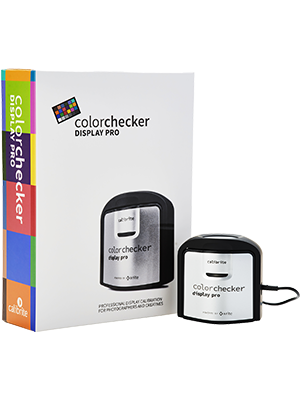
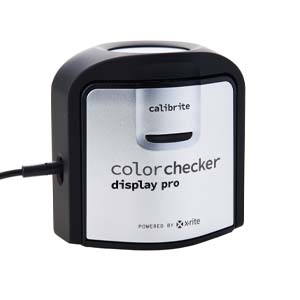
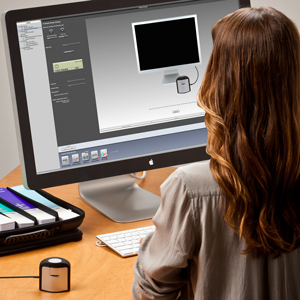
The Calibrite ColorChecker Display Pro (CCDIS3) is a compact, professional-grade color calibrator designed to deliver consistent, high-accuracy color profiles (∆E < 2) across multiple display types. Featuring a rotatable diffuser arm for versatile use, an integrated tripod mount for projector profiling, and powered by industry-leading X-Rite technology with user-friendly ccProfiler software, it ensures your monitors and projectors display true-to-life colors effortlessly—perfect for photographers, videographers, and creative pros aiming to eliminate guesswork and wasted prints.





| ASIN | B0973JMM4S |
| Aspect Ratio | 16:9 |
| Best Sellers Rank | #35 in Photographic Light Meter Color Calibration Charts #2,965 in Computer Monitors #81,273 in Computer Accessories & Peripherals |
| Customer Reviews | 4.1 4.1 out of 5 stars (202) |
| Date First Available | June 11, 2021 |
| Item Weight | 4.9 ounces |
| Item model number | CCDIS3 |
| Manufacturer | Calibrite |
| Product Dimensions | 1.5 x 1.5 x 1.5 inches |
| Resolution | 1920 Pixels |
| Total Usb Ports | 1 |
J**T
Colors have improved on screen
I purchased this to help my monitor better represent the colors in my photos for printing on the Canon Pixma Pro-200. Unsurprisingly, the colors my monitor used by default were off the mark and left me to guess and check my photos with ink-wasting test prints. After using the Colorchecker Display Pro my monitor shows colors that are more accurate to what the prints show, with a validated ∆E < 2. Thankfully my computer starts with the updated color profile without me needing to run the program to recalibrate every time I turn my computer on. This device does what it's advertised to do and I'm satisfied with my purchase. I have fewer wasted photo prints and my display seems to have better color pop compared to whatever cast was over everything prior to calibration. Results there will vary from monitor to monitor and user to user, but seeing greater purity in colors by removing a color cast improves the qualitative experience. You'll know it when you feel it for yourself.
K**A
This actually works
I don’t usually write reviews but I think this product type is important just incase there is anyone with my similar set up wondering. I am no expert in display calibrating so I won’t deep dive specs like a colorist would but I am a photographer and videographer so color accuracy is super important. I own the new Mac studio with the m1 ultra processor and two of the LG ultrafine 4k monitors that are exclusive only at apple and a 16 inch Wacom cintiq pro. I absolutely love these displays the colors are amazing, displays are very bright, they are made for apple so they work perfectly with and Mac plus they are retina calibrated from the factory. Are the displays a little pricey? yes totally but as nice as the 5k studio display is it's way over priced and you could go for the 5k ultrafine display which is 5k sure but has less ports?.... The problem was when I purchased the second 4k display about 1 month ago, I already owned one of the displays for about 6 months. The new display was giving off a warmer tint that was not correcting. The built in color sync software was helping but still wasn’t able to be as precise as i need to sync all screens. I ended up buying the color checker display pro as well as the spider x pro. If you ask why both well it’s because I was not finding anything on which would actually work based on my displays or operating system. I’m not saying the the Spider x doesnt work in general im just gonna say it didnt work in my situation and end "user friendly" as they say it is it was super annoying that you couldnt use color profiles on other monitors and you couldnt be as fine tuned as you could with calbrite. The reviews said the software and interface are daunting but thats totally false. There is an advanced interface and a basic interface I stayed in the basic interface because again i am not a colorist or know the ins and outs of display calibrating. In the basic interface you can still be very exact and type in exactly what color ratios you want or like in my case my original display was giving of the color that I liked and wanted to keep so I ran a display check to see what numbers it was giving of, recorded them and applied those exact specs to the new monitor and the wacom tablet and boom! problem solved and now all three monitors are giving off the exact same color and I can finally work in peace. I hope this review helps.
D**O
Great calibrator for my BenQ monitor
Works great with 3rd party software like the Palette Master Ultimate or the Calibrite software. Accurate calibrations for my primary color grading needs of Rec709, Adobe RGB & SRGB.
W**L
I've greatly underrated color management...
I didn’t realize how important color management was until a friend took me through the profiling process on her monitors and then we looked at the before and afters. I was shocked at the difference. When I profiled my monitors and my laptop I saw an immediate difference, particularly in the shadow detail and the skin tones. I also learned that the brightness on my monitor was set too high. I am already saving time in my editing process. Totally worth the investment.
R**L
Does not work with my LG 32EP950 JOLED panel, zero response form tech support
I am now very disappointed with this product after I upgraded one of my monitors to an LG 32EP950 which is a JOLED RGB (not WRGB) panel. Essentially, this unit cannot seem to read red correctly. You can Google for "Calibrite Display Pro JOLED" to view my thread on DisplayCAL forums which has measurement reports for this unit plus for the SpyderX and also for this unit on an IPS LED panel. In short, I do not believe that the unit itself is defective bec it works perfectly on the IPS LED panel, but fails miserably for a sweep of reds on the JOLED. Even more disappointingly is that I had opened a support ticket with Calibrite and received no response after days. That led me to investigate further with DIsplayCAL to come to these conclusions. Also, Calibrite advertises this unit as being updatable to support new technologies by using a new matrix -- well, maybe if they care to respond to support requests and produce an update....? Previously, I was in love with this product over the SpyderX bec I got much more accurate/reproducible results. But now that I have learned to use DisplayCAL, I find that maybe there was more of a software difference bec I can get equally good results with DisplayCAL and the SpyderX (takes a bit longer as DisplayCAL is not super easy to use) .... and the SpyderX works for my JOLED panel. I know that the majority of reviews, etc., favor Calibrite and only recommend SpyderX on price. I fell for that and switched. Now I am switching back.
M**L
Better than the HL models for lower light readings.
Better than the HL models for lower light readings. Unless you are working with brighter displays like HDR this Display Pro is all you need. It's way more accurate at the lower/darker end of the spectrum.
W**E
Return Customer
I've used this product in the past. For the most part, it does what I need (as an amateur photographer). Use of the product is easy if you go with the default settings. I'll have to research a more in depth use of advanced settings which are not self-explanatory. A huge negative - it is Made in China. The user manual text is light gray; the font size is so small it makes it difficult to read. While registering this item, you have to enter the serial number found on the weighted piece also too small to read (I snapped a photo of it to zoom in to read it). Again, Made in China!
B**E
Lasted not even two years before it stopped working. Did the job while it lasted but will not buy another one. That's two similar products now, the first one the rubber coating perished.
L**T
If you want your prints to look like they do on your monitor then you definitely need a calibrator like this. Typically the default screen settings are super bright so prints will often look much darker as a result. It certainly helps if you have a good quality IPS panel, but this monitor also does a very job with cheaper screens not optimised for colour editing. Overall a great bit of kit and software is quite powerful and fairly easy to navigate.
A**R
Did exactly what it said it would, shame I only needed it for 2 screens..
J**E
Es un calibrador de pantallas de calidad y fácil de usar, nueva versión del conocido x-rite i1 Display Pro. El software del fabricante es fácil de instalar y de utilizar. Lo he probado con la pantalla de mi MacBook Pro (sólo se puede ajustar el brillo) y con una Dell p2415q.
A**R
I've always known about these devices but never really invested in one. Glad I did, why didn't I do it sooner! Downloaded the latest software and after installing found it easy to calibrate my monitor. It was quick enough in the basic setting but there are more advanced settings if that's what you need. The comparison of the before and after at the end really made me realise how off colour my monitor was, printing for exhibition, so needed to be spot on. Defiantly recommended!
TrustPilot
2 个月前
1 个月前