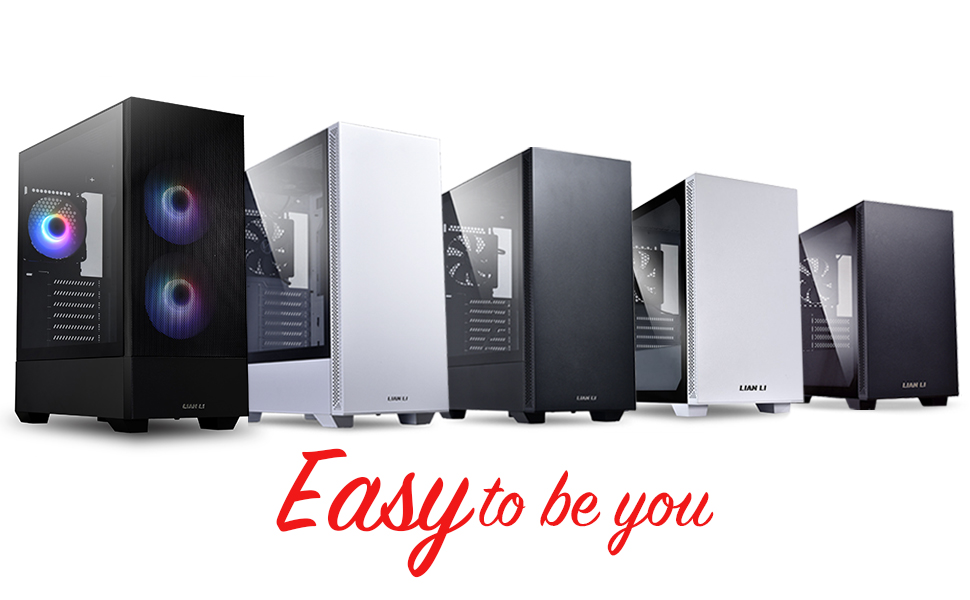
🔥 Mesh, Glow & Flow — The Ultimate Mid-Tower for Next-Level Builds!
The LIAN LI LANCOOL 205 MESH is a mid-tower ATX PC case designed for gamers and enthusiasts seeking superior airflow and style. Featuring a high-ventilation mesh front panel with magnetic dust filters, three pre-installed ARGB PWM fans with customizable lighting, and a tempered glass side panel, it supports multiple motherboard sizes and water cooling setups. Its smart cable management and modular design make building and upgrading effortless, while ensuring your rig stays cool and visually stunning.


| ASIN | B093TNMQ9W |
| Antenna Location | Gaming |
| Best Sellers Rank | #157 in Computer Cases |
| Brand | Lian Li |
| Case Type | Mid Tower |
| Color | LANCOOL 205 MESH RGB - ATX - Black |
| Compatible Devices | ATX motherboards |
| Cooling Method | Fan |
| Customer Reviews | 4.7 out of 5 stars 3,221 Reviews |
| Enclosure Material | Tempered Glass, SPCC Steel |
| Fan Size | 140 Millimeters |
| Hard Disk Form Factor | 3.5 Inches |
| Internal Bays Quantity | 4 |
| Item Dimensions D x W x H | 8.07"D x 8.07"W x 19.09"H |
| Item Type Name | desktop-computer-shell-cases |
| Item Weight | 15.5 Pounds |
| Light Color | white, warm white, cool white, red, blue, green, yellow |
| Manufacturer | Lian Li |
| Material | Tempered Glass, SPCC Steel |
| Model Name | LANCOOL 205 |
| Motherboard Compatability | ATX |
| Number of Fans | 3 |
| Other Special Features of the Product | ARGB LED Lighting PWM Fans, Magnetic Dust Filters |
| Power Supply Maximum Output | 550 Watts |
| Power Supply Mounting Type | Internal |
| Recommended Uses For Product | Gaming |
| Supported Motherboard | ATX |
| Total Expansion Slots Quantity | 7 |
| Total USB 2.0 Ports | 2 |
| Total USB 3.0 Ports | 2 |
| Total Usb Ports | 2 |
| UPC | 840353040434 |
H**R
Really nice micro PC case for small builds!
I used the Lancool 205 Micro case for my first PC build and I couldn't be happier! It's an amazing micro case and I absolutely loved how it turned out. I'm not at all an expert in PC building, but I hope that my feedback helps a bit! Here are my specs - GTX 1050 - GIGABYTE B550M DS3H - Crucial Ballistix 3200 MHz DDR4 - ARCTIC Freezer 34 eSports DUO - GIM KB-28 RGB Case Fans, 3 Pack White 120mm - EVGA 220-G3-0750-X1 Super Nova 750 G3, 80 Plus Gold 750W - Seagate BarraCuda 2TB Internal Hard Drive HDD - Crucial MX500 1TB - AMD Ryzen 5 3600 Pros - Really easy to work with - Lots of different ways to route cables - Simple and minimalist design - Micro tower is small enough to fit on top of a desk without looking too big - Air flow on the back, top, front, below the psu, and on the sides of the front panel (enough to fit total of 5 fans // 1 fan in the back, 2 fans on the top, and 2 fans in the front) - Removeable Magnetic dust filters on the top and the bottom - Fits the ARCTIC Freezer 34 Esports (grey/white) PERFECTLY, goodness I was worried that my cpu cooler wouldn't fit, but it fit absolutely perfect with a tiny bit of room between the tempered glass and the front of the cpu cooler - the gap in the front is big enough to fit a custom rgb panel - the temps are nice! my GPU runs around 35-41°C - the glass feels very high qu (it's pretty heavy too!) Cons - I wasn't sure if this was the motherboard or the case (maybe it was just me?) but I found it very difficult mounting the motherboard onto the case. When I would screw the motherboard onto the case, I just could not get them to go inside. I managed to get the corners in, so I left it at that. This may have just been my fault though and I didn't want to strip the screws :'( - This is me just being a little picky, but I wish the little raised cable management things in the back of the case (I'm not sure what the technical term is) was slightly larger to fit bigger zip ties and velcro cable ties - I wasn't sure if the case was supposed to come with a mounting tray, but mine didn't come with any (I'm still not sure if the mounting is included or not) so I put my HDD in the drive bay and I placed my SSD right on top of the drive bay and zip tied it down Overall, the microATX case is absolutely beautiful and very well made! It's user-friendly and great for beginners that want a smaller build!
C**A
Great airflow, very cute!
This was my first time assembling my own build, and aside from some skill issue/inexperience on my part, this was such a novice friendly case! The screw holes are all great fits and the metal seems good quality, there were so many extra parts included, and they even came in a cute little plastic box with customizable dividers! I think my one gripe is that there doesn't seem to be a whole lot of room in the back for my chunky PSU cable, especially with the slightly cursed cable management on the pre-installed fan hub. I ended up mounting my SSD to the back of the case and completely yeeting the HD cage underneath, which gave me significantly more real estate and it all worked out. One thing I love is that there's more than enough from for my thicc ass GPU (Gigabyte RTX 3080 Vision) which was a pain point in my last case. I wouldn't recommend anything larger, though. I've noticed a significant difference in my airflow and temperatures as a result of this case, even when I'm gaming. If you're looking for a mid sized ATX tower that's cute and budget friendly but still with good airflow, this case won't disappoint.
S**N
Solid white case.
I got this case on sale for $80 at the time and would highly recommend it. I wanted a white case that had a glass side panel for a good price, and this was it. The case was easy to put together, and all components fit perfectly in the case. I'm running a 3060ti for reference in the pictures, but the case will fit the other 30 series Gpu's that are larger as well. Airflow is overall great, the front of case has holes down both sides to allow more airflow to be pulled in from the front fans, and I use the top and rear fans for exhaust. Each of the sides has a magnetic dust filter (top of the outside of the case, bottom of case for power supply fan, and front case fans have a dust filter behind the front white cover piece of the case). The only gripe i have about the case has to do with the fans. The front and top case fans are screwed into a bracket that slides into place, so you screw the fans into the bracket and slide the bracket into the case. The problem with this is that it just created extra moving parts that seem unnecessary. Would much rather just screw the fans directly into the case itself. Other than the case is great. I love the mounting for the 2.5" SSD drives, they are on the opposite side of the case (behind the solid white side panel) and slide up flat against the case so they are easy to add or remove ( there are two slots) without taking everything apart. Case also comes with a bracket used for adding normal size HDD drives in the bay where the power supply sits, but i don't use any so i took it out to shove all my extra cables into. The glass panel has some tint to it as well which is nice.
P**O
Overall good case (Lilian Li 205 Mesh)
So overall, this case is a pretty good one, and a pretty good upgrade from my H510 Elite Case. Here are some of the benefits of 205 Mesh. Pros: -A good amount of usb 3.0 and usb c ports in the front (an upgrade from my previous case) - Allows for good airflow, depending on how many fans you have installed - Although I changed the fans, they did come with a rgb controller and actually looks pretty good - A good amount of room for a large two fan gpu to fit - Also has a good amount of space in the back to add up a bunch of ssds and hdds Cons: - One if the major cons that really pissed me off (and almost made me return the case) was the radiator clearance. On the site, Amazon listing, and manual, it says that for aio radiator 280mm can fit to the front of the case. I’m telling you this right now it doesn’t. I had to change the orientation of my aio, which wouldn’t haven been bad if even at the top of the case my aio would barely fit. I have a b450 thomahwak max and a 280mm kraken cooler. There is literally no space up there and I had to maneuver it in a way where it could fit. Luckily it did, although I’m not sure for 240mm aios, I think you guys will face the same situation but have a better outcome. Other than the cooler situation, this case was pretty easy to build in. And deserves 4 stars. Warnings: -If you have a 3 fan gpu do not buy this case it will not fit -If you have a 280mm cooler, the only way you can orient the cooler in a functional way would be ontop.
E**N
Absolute Champion for the budget- Wouldn't recommend any other case for MicroATX
Originally, I had intended to get the Corsair Crystal 280x, A nice, easy to assemble, and cable manage micro-atx case. However, I found this case right before I was about to order that case, and I am extremely glad I did. -For starters, the price is cheap- 70$ at the time of purchase, which is less than half than the Corsair Crystal 280x. For this price, you get exceptionally high build quality. All panels (all high-quality aluminium and tempered glass) fit perfectly and feel solid, as well as easily attach to the case. It comes with magnetic dust filters for the top and front of the case -Airflow is exceptional, and exhaust/intake restrictions are very little/none. My temps have dropped by 2-4 degress since implementing this case compared to my previous case (using corsair fans, not the stock fans). I had to mount my 240mm radiator for my AIO at the front of the case, as I could not get my fans and radiator to clear my RAM when mounting at the top. Even then, this likely varies from motherboard to motherboard. -The size! It's incredibly small, while maintaining easy part compatiblity (I've seen builds with 3080's fitting, no problem) It's still very easy to build in as long as you use a modular PSU, and you should. It's about the same height as other micro-atx cases, but much thinner. It having a basement certainly helps with the cable management. At the end of the day, I would reccoment this case for anyone building a Micro-ATX system, I'd even go as far to say this is the best bang-for-the-buck case option, maybe even the best in general. In Short: -Amazing Price -Looks Great -High Quality Build -Easy to Build in with Modular PSU -Fits most GPU's -Just get it
D**B
A great budget case with solid quality of life that knows what to prioritize
This case is not the greatest case in the world. The magnetic filter on the top slides around too much. The side panels don't have the greatest fit tolerances I've ever seen on a case. The hard-drive bay in the bottom is virtually useless, because you can't run any significant number of power cables past them from the PSU to the rest of the computer. The cables running to the daughter board are delicate to the point where I was concerned about accidentally damaging them. There are a lot of individual screws, many of which I really wish were captive so you didn't have to worry about loosing/misplacing them. The metal outside panels are flimsy and a bit thin. There are no good dust-filters built into the system. But despite all these shortcomings, I'm very happy with this case. The fans are great, relatively quiet and with fancy lights that plug onto the RGB header on your motherboard. You've got a great selection of front IO ports, though most budget oriented motherboards out there that I've seen don't have a USB C header, making the inclusion of a USB C port for front IO a bit of a waste. I would have rather seen a 3rd non-USB C port, but the 2 that are there are certainly welcome. The air flow is great, keeping my GPU and CPU cool with only an additional CPU cooler needing to be installed (Ryzen 5700x and Radeon 6700xt). The case was shipped with good packing materials, making me optimistic that the glass panel would not be damaged in transit. The instructions aren't the best I've ever seen, but I was able to follow them without any great degree of trouble. You've got good Sata SSD mounts hidden between the motherboard panel and the outside non-glass panel. Cable management options are (hard-drive bay aside) excellent, with lots of intelligently placed gaps and clear routing lanes. It's well optimized, so the case doesn't have any huge dead zones of empty space, and as a result is more compact than you might expect from a desktop case. It supports a variety of configurations, and in a PC where you don't have a GPU that requires dedicated PCIE power cables, you might have the space for the hard drive bay in the bottom. For a budget case, you get a clear priority of functionality > aesthetics > build quality here, while not sacrificing too much to the point where it becomes a liability. If you're trying to save a bit of money on your case, I can certainly recommend this one.
D**A
Excellent Case, Some Things to Consider
I am giving the LANCOOL 205M a 5 star review. At the time of purchase, it was ~$97 which was a very good value considering it comes with 2 high quality fans (near silent). The build quality is also very good, but I did manage to break a plastic tab when removing the front panel. Lian Li customer support sent me a brand new panel from Hong Kong, no questions asked! However, I will avoid removing the front panel in the future. The LANCOOL 205M case supports "Micro ATX" boards and in my mind I had envisioned it to be a little smaller, regardless of having checked dimensions. In reality it is not that much smaller than the Corsair 4000D. The RGB version of the Corsair is more expensive, but looks very similar with a couple nice upgrades. Specifically, it has an improved front panel including a USB-C connection and an audio combo jack. If you plan on using a 3.5mm headset with a microphone, the LANCOOL requires a splitter. My overall recommendation is if you are considering the LANCOOL 205M to also consider the Corsair 4000D or perhaps even the LANCOOL 205 MESH C.
P**S
Clean look and very easy to install parts into
I've built a couple of PCs now and this is one of the easier cases I've worked on - panels and air filters can be removed and replaced without any trouble, the interior is surprisingly spacious which means less cursing when trying to install parts into tight spaces, and has great airflow + space for fans. The cable management holes and ports are well positioned, and combined with the hidden PSU shelf, glass door, and white exterior, makes for a very clean look (especially when combined with other black or white parts). The built-in adapter plug for the front panel headers is also much appreciated. A few things to keep in mind though: - Case can fit almost any video card, but triple fan cards will make cable management in the bottom front area of the case a bit tricky. I had a dual fan card so this was not an issue. - Each of the included front case fans has its own PWM and aRGB header, so make sure your motherboard has at least 2 SYSTEM_FAN and ARGB/JRAINBOW headers (or buy a cheap aRGB fan hub, like I did). - Some mobo standoffs are already installed, but if you're using an mATX mobo, make sure to install a few more for good support.
TrustPilot
2 周前
1 周前