We remain fully operational. Our teams are working around the clock to ensure your deliveries continue safely.

下载应用程序





Power Up Your Projects! ⚡
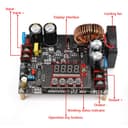
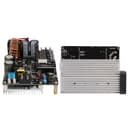
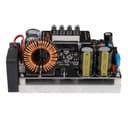
The DROKDC Buck Converter is a high-performance DC to DC step-down power supply module, capable of converting input voltages from 10V to 65V down to adjustable output voltages between 0V and 60V, with a maximum output current of 12A. It features a user-friendly LED display for real-time monitoring, constant current and voltage settings, and built-in safety features to prevent misoperation. Ideal for professionals seeking reliable and efficient power solutions.


| ASIN | B08LPVWX74 |
| Best Sellers Rank | #566,587 in Tools & Home Improvement ( See Top 100 in Tools & Home Improvement ) #2,579 in Power Converters |
| Brand | DROK |
| Color | Black |
| Customer Reviews | 4.0 4.0 out of 5 stars (305) |
| Input Voltage | 65 Volts |
| Item Weight | 10.8 Ounces |
| Manufacturer | DROK |
| Mfr Part Number | 200310AFA |
| Model Number | 200310AFA |
| Number of Outlets | 1 |
| Output Voltage | 60 Volts |
| Plug Type | 2 Pin |
B**E
Good value. Works great. Negative ground.
When shopping for a 120VDC voltage booster, I considered another product. Amazon had noted that it was returned very frequently, so to be careful with the order. In the comments, someone noted that it had a positive ground common to both input and output. This would be a no-go for my application, and probably for most applications. So I kept looking. The listing for THIS booster circuit didn't specify positive or negative ground, but the manual seemed to imply a negative ground. Indeed it is a negative ground, common to both input and output. (It can be wired with three wires if desired.) The board was easy to install, and it operates rather intuitively. It can be programmed to put out a predetermined voltage when powered up (without requiring any buttons be pressed). Or it can be programmed to produce that voltage only when a button is pressed. When it is not producing the programmed voltage, it puts out a fraction of a volt less than the input voltage. (I didn't test whether this voltage could be killed with a small resistive load.) I powered my board with 12VDC and boosted to 120VDC. When powering up, it takes a few seconds for the capacitors to charge and for the output to ramp up to 120VDC. The output is steady and smooth, and the voltage is accurate. I can't attest to how well the board performs under a heavier load. I'm only drawing about 25 mA from the board! Others have suggested that the board whines under load, However, with my light current draw, I have heard no whining.
J**A
Absolutely KILLER unit!
Blown the fuse twice and killed the power source once. This machine will find the power in anything and suck it dry! First time blowing the fuse I stupidly wired up the input with REVERSE VOLTAGE (whoops!) Put in a new fuse and back & running. 2nd time because I tried to start my giant diesel rig drawing from it while it was ON. (DONT) but if you do, just put a new fuse. You CANT DESTROY THIS UNIT!!!! Simply set the V and A using the easy interface, before , or AFTER turning it on.. allows realtime adjusting of parameter being displayed. One time I killed my car being used as the power source. BE CAREFUL! Build a low voltage cutoff into the input side so you don't kill batteries like I've done when gas ran out on the source side. It only stops manually. Set a LVC circuit to around 12.7V . This way the unit will only be able to suck juice when the engine is running and save some power for the next startup (after refuelling.) I can't tell u how pleased I am with this unit after building it into a plastic utility box and wiring up some Anderson cons to the in and out with 12AWG as well as cut holes for venting and applying screens. NOW I CAN CHARGE ANYTHING! (And kill any power source that doesn't run infinitely) the power is yours! Use wisely.
X**I
Apparently will not work with my laptop ymmv
I have to say this is a quality product even though it's really frustrating that it doesn't come with a box. I'm going to tell you how to fix that. Just buy one of those little plastic trays from the Dollar tree. The one that's too small for pencils or anything but little change things. It fits right over this thing so take a small anything flat that isn't conductive and glue it to it and then put that box over it. Take scissors and cut a flap where the input wires go and one where the output wires go and you're set as far as protecting it and then you can just lift that cover off and put it on as needed. Now as to not being smart enough for my laptop. First of all I have to say you have to set both the voltage and The max amperage to what they are supposed to be just what is on your existing adapter. The computer has a charging circuit inside and it's really quite sophisticated. There are essentially two computers working. One is a main integrated controller and then there's the charging subsystem and it's possible for a manufacturer to build into the power adapter, some kind of resistance value or other source of verification that that is indeed the original power adapter which I think my laptop has that. If that's true, then there's no way that you can use one of these buck boost converters without hiring an engineer to change that resistance value . So The rest of the story goes that I did not originally set the max amperage because the boost converter itself is only capable of a total of. I think it's 15 amps and the adapters is 11.7 amps but will only take what it wants. Well that's not a good idea because what happened Was it basically scrambled Something inside that very complicated circuitry and the computer no longer would charge or run from the power adapter. It would only recognize the battery and it was using the battery power only. That was not something that I needed at that moment for sure because I'm mobile in between homes and in between cities. So losing your laptop is not good timing. This all has to do with mobile power for me to get by. And ultimately, the best solution is to use an inverter with your existing power brick. Just don't spend a lot of money on an expensive inverter that you're probably going to want to replace. Just get a simple pure sine wave inverter. Maybe as little as 500 W but you can probably get 1,000 or 1,500 W for the same price. I'm not here to give you that advice actually. So having just spent over $1,000 to move my stuff into storage I am broke and so I have to return this thing just to get an inverter to replace it. I may try resetting my subsystem again and the way you do this is Basically there's either a a button. Excuse me, a hole in the base of the computer usually to press or you have to disconnect the battery and then hold the power button for 30 seconds and then reconnect the battery. So that worked to restore my laptop. Thank goddess. But I have no better use of my laptop than what I started out with a couple of weeks and $300 ago. I'm forced to use my PayPal credit on eBay or possibly home Depot but I need it now so thanks again. Amazon prime for your return policies. Last update so I had a really inexpensive inverter 700 W that I got from harbor freight a long time ago. I don't know years ago that turned out to be a modified sine wave. You have to look in the details doesn't say and that's plenty. Good enough to run these adapters. There's a lot of fear about it, putting interference or destroying things in your computer and all that. Oh, I wouldn't run a computer directly, but it's not being run directly. It's being run through a very sophisticated adapter that's designed to take all kinds of different waves or waveforms so that's the first thing. The second thing is that you don't necessarily have to run the computer while you're charging, so at least as an experiment because I'm a cautious fellow- the first thing I did was charge my computer while it was off technically hibernating. And it worked that cannot harm your computer and it's not going to harm your adapter. So there you are. You have like a $30 or $10 at a swap meet inverter to run your laptop in your car. However, do get a storage battery and a charger. That's where the other $300 came from.
M**.
Happy with my purchase
I ordered one of these and had to send it back and get a replacement because it was not working properly. The second one works perfectly perfect for my project
Y**N
Don't bother
Don't bother with these things. They can't hold constant voltage. I bought 3 of them and they all had the same problem. My use case was to attempt to bring up the voltage on some solar panels to be within spec for my microinverters so we're not talking 12V -> 120V or anything stupid like that... We're talking 17-20V to 34V and the units would constantly reset themselves after hitting the target voltage. The panels in question were 195W bifacial panels that were recording 170W each when hooked up the the Victron charge controller I have that charges my 12V batteries. Let's just say that a different product worked and kept the voltage stable and these went into the trash can.
S**N
Parfait pour mes besoins. Fonctionne très bien.
H**R
Bueno
F**9
100 positive
D**.
I wish they would start putting these in external cases but it’s a great device.
TrustPilot
4天前
5天前