Desert Online General Trading LLC
Dubai, United Arab Emirates
Desert Online General Trading LLC
Dubai, United Arab Emirates


🎉 Game Anywhere, Anytime!
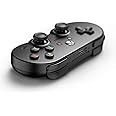
The SN30 Pro for Xbox Cloud Gaming on Android is a cutting-edge mobile gaming controller that allows you to play Xbox games directly from the cloud on your smartphone or tablet. It features an adjustable clip for various smartphone sizes, Bluetooth connectivity for easy pairing, and an impressive 18-hour rechargeable battery for extended gaming sessions.


I**S
8BITDO Fixed and working happy days! 5 STARS HERE!
The media could not be loaded. ***UPDATE***Back to 5 stars SO HAPPY!Found out what the annoying bluetooth interference was, it was my LG SL6Y soundbar, ive returned it because it developed several faults 🤬I now have the SN7CY LG soundbar and theres no issues running this controller with the latest firmware update.Very happy indeed i love using this controller on my Nvidia shield pro, loving the retro gaming especially with the xbox button configeration'A' at the bottom and 'B' on the right.*Very comfy*Easy to use*Great button feel*Great analogue sticks*Internal battery lasts a long time*Perfect size*Great button layout*Great for navigating android menusWell worth a buy, ive just preorder the SN30 PRO 2 aswell in grey 😁for ps1 gaming etc.Love Love Love it!If you liked this review or it helped you out in anyway, please do give it the thumbs up 👍🏻Many thanks Louis***Original review***See video for LG SL6Y interference!Can not be used if you are running it on the SL6Y soundbar with bluetooth.Im using an Nvidia shield pro with my LG SL6Y soundbar connected via bluetooth, as soon as you connect up your 8bitdo SN30 Pro controller via bluetooth it interfers with the sound coming out your speakers on any game platform.SO FOR ME ITS ABSOLUTELY USELESS FOR MY CINEMA & GAMING SETUP!I am gutted because this little control pad is ace but i can't bare listening to my games through the dreadfull speakers on my projector.SORT IT OUT 8BITDO!,ITS A LOAD OF POO! 🤣(Glad it weren't the controller, sorry for the trouble 8bitdo 😏)
B**D
Responsive, Easy to use with good battery life.
The controller is very good, it's responsive for a Bluetooth controller, the buttons feel snappy and easy to reliably press.I don't use it consistently but in the month I've owned it I've only had to charge it a few times. It unfortunately a little small, which means users with larger hands may struggle to use it well, and the playstation layout of the analogue sticks may turn some buyers off if they find the placement uncomfortable. There's also a small issue with the deadzone of the controllers, you need to push the sticks a little further than I personally like but that's all down to preference.All together though it is a good controller and I've very happy with the purchase of it.
M**N
Very nice, but limited functionality (updated)
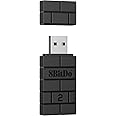
It's a brutally nice controller. I love the shape of it, always have. Dating back to the SNES days. My favourite 8BitDo controller is SF30 Pro witrh the EU/JP coloured buttons (Which they don't sell anymore), and I have/tested almost all of 8BitDo's other controllers.The D-Pad on this one is slightly nicer than on the SF30 pro; more precise and less mushy. The analogue triggers are a nice addition, and essential for certain genres of games. Other than that, the functionality isn't much different, except this controller also doesn't have rumble, or Gyros, and missing basically all the connectivity options of the SF30 Pro.The included clip is nice and fits the SF30Pro perfectly, and it was the main reason for me purchasing this item. i.e. for the clip. I own the 8BitDo Xbox Elite controller clip too and it's the same quality. Meaning it's probably the best clip on the market due to its dual-hinge design.Now comes the negatives: this controller only works well with Android phones. This isn't a surprise as it's literally in the name, but I'm still disappointed with that. I'm not a fan of intentionally handicapping a product, yet it is understandable from a marketing perspective. I accept if it literally only works with Android. The annoying part comes in the fact that it can connect via bluetooth to Windows 10 and Steam even picks it up as an Xbox One Controller, but when you go to use it, there are myriad problems, such as double inputs on each press in Streets of Rage 4, or triggers not working in Cuphead even though all the controls are mapped properly. I double and triple-checked the mapping in Steam and the problems persisted.My unit came with FW version 1.0 and I updated to 2.0... 1.0 was completely significantly worse than 2.0, but with either one, it doesn't work properly in Steam/Windows.I also tested it with the MayFlash NS-30 Pro and it doesn't work with that either. I don't have a brown 8BitDo "brick" dongle to test with as mine stopped working... I will test with it though when I get another one.Overall I think it's a missed opportunity to make the perfect pad for 2D retro games on Windows Game Pass and light 3D gaming too. Xbox Cloud gaming on Android simply doesn't justify this exclusive treatment in my opinion. Then again, if that is all you're into gaming-wise... then bump the rating up to 5/5, cos this is as good as it gets if you want a portable controller that's easy to transport for Android. Then again, if you're into Android gaming, you'd probably be better with something like the Razer Junglecat or Kishi Pro.Update: I finally got to test this with the brown "brick" bluetooth adapter and it works flaslessly. This is now quite possibly my favourite 8BitDo controller.
A**S
The perfect compact, portable controller! Steam PC work around in review.
I was looking for a controller for my PC that was Bluetooth and similar to the SNES controller in shape but with analogue sticks and 4 shoulder buttons; this couldn't be any more perfect. I was a little unsure buying this controller as some people said it doesn't work properly on PC and some say it does. Well, it works fine connecting to PC via Bluetooth to play emulation, but using it on Steam out the box was a bit hit and miss... until I found a solution.I know this is marketed as an Android controller, but I thought I'd give it a try as I love the black look and the idea of analogue triggers. After looking online it looked like my only option to get it working on Steam properly was to purchase the additional USB adapter. I looked around a little more and someone mentioned I could use some software that maps the buttons and "tricks" the PC into thinking it's a proper controller. The software is called "XOutput". Once you configure your controller with this software, you can set it so it auto turns on when you boot your PC in the background, and then all you have to do is power up your controller and it will work on ANYTHING, emulation, Steam, you name it.After a small amount of work to configure the controller on Windows, I would recommend this 100%. I'm giving it 5 stars as it's doing as advertised, and more.