
下载应用程序



🖤 Cool in black, quiet in action — the ultimate low-profile CPU cooler for the discerning pro.
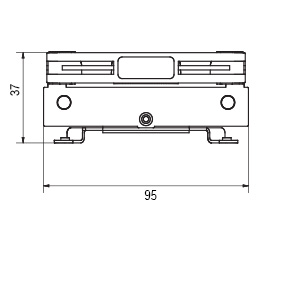
The Noctua NH-L9i chromax.Black is a premium low-profile CPU cooler designed for Intel LGA1200 and LGA115x sockets. With a minimal 37mm height and a compact 95x95mm footprint, it fits perfectly in ultra-compact HTPC and small form factor cases while ensuring full RAM and PCIe compatibility. Featuring the award-winning NF-A9x14 92mm fan with PWM for silent, efficient cooling, it includes high-quality NT-H1 thermal paste and the SecuFirm2 mounting system for easy installation. Renowned for its durability and backed by a 6-year warranty, this cooler is ideal for moderate heat loads on Intel Core i3, i5, and i7 processors.




| ASIN | B07Y892M38 |
| Best Sellers Rank | #459 in Computer CPU Cooling Fans |
| Brand | Noctua |
| Brand Name | Noctua |
| CPU Socket | LGA 1200 |
| Cooler Heatsink Compatibility | Intel LGA1150, LGA1151, LGA1155, LGA1156, LGA1200, AMD AM4 with NM-AM4-L9aL9i |
| Cooler Heatsink Material | Copper and Aluminum |
| Customer Reviews | 4.7 out of 5 stars 1,423 Reviews |
| EU Spare Part Availability Duration | 6 Years |
| Global Trade Identification Number | 09010018000191 |
| Included Components | Cable Body |
| Item Dimensions L x W x H | 3.74"L x 3.74"W x 1.46"H |
| Item Weight | 380 Grams |
| Manufacturer | Noctua |
| Mounting Type | Chassis Mount |
| Product Dimensions | 3.74"L x 3.74"W x 1.46"H |
| UPC | 841501100192 |
| Unit Count | 1.0 Count |
| Warranty Description | 6 year manufacturer’s warranty |
A**S
Great product 5/5 would def buy again
little trick to install on setups in a case already but fits great for an LGA1151 socket. excellent for the price, cooling is a little under what expected but better than stock for sure. noise is extremely minimal. worked right out of the box with no hassle after installed. lifespan looks promising. will update if any failures occur.
J**.
Best option for low space
Best option if you’re needing absolutely zero profile cooler. For basic office style use it’s absolutely adequate. For gaming it’s adequate as well, as long as you have reasonable expectations. I use this on a 10700k for gaming and have absolutely no issues. My average gaming load is about 55-60W at 20% CPU usage, my average gaming temp is 65C. So it easily cools with headroom available. I would say probably 80W gaming load would be about max you would want to use this cooler with. It’s acceptably quiet, like basically you don’t notice the fan noise unless you put your ear up to the case, and that’s with the fan over 2000rpm. Really good overall cool. And looks awesome in black lol. Quality is absolutely bulletproof.
T**I
In a league of it's own!
Beyond satisfied with this CPU cooler. Fit like a glove in my LGA1200 motherboard. After firing it up, I am now a Noctua fanboy (who would've thought PC fans would have a fan base). Don't think I'll ever use another brand for all future PC projects moving forward. The cost was concern enough for me to push off this purchase when I originally built this SFF PC project, but it's totally worth the price tag. For added quality Noctua flair, they didn't just include a brand sticker, they included a metal branding emblem. It really seems like Noctua considers every detail and strives to push the bar. Categorical opinions: Noise - Unbelievable... Just fired it up and had a hard time believing it was running. My new SFF project now has only Noctua fans for cooling, and there's no perceivable difference between on and off. Performance - Undeniable Beast... Didn't expect even the idle/low load temperature to drop, but immediately saw improvements. Cost - eh, didn't want to drop $50+ on a CPU cooling fan, but you definitely get what you pay for. Somehow, Noctua completely justifies the price tag. Installation - Not difficult, but potentially inconvenient... If this is a replacement CPU cooler for you, like it was for me, be prepared to disassemble everything unless your case has motherboard backside access. It's just 4 screws, but slightly inconvenient. Packaging - Amazing... I have never opened up a fan package and was wowed (wish I took a picture before I installed everything).
D**L
Noctua makes it easy.
Slim design. Keeps a 10600 cooler than intel stock cooler and looks way better. Fan quality is exceptional. Easiest cooler I've ever installed. Line up holes install 4 screws good job on design noctua. Included thermal paste is pretty good as well. It spreads very easy pea size dot in middle of processor and it spread over entire surface easily. I removed cooler to check. Had to clean and reapply paste but it was my first time using noctua thermal paste and cooler. Also it's a lot quieter than stock cooler.
T**3
Great coolers...consider airflow of your system strongly
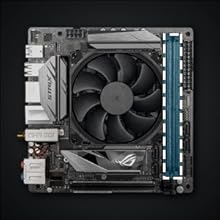
Great cpu cooler for Intel as this is the l9i not the l9a-am4...I am not going to sit here and bash noctua for this cooler not working well with amd like many others here have done becase they clearly state that this is not a good solution for amd as there amd specific nh-l9a is bigger and comes with the right mounting system...but with that sead considering I purchased both the l9i and l9a croma I did with minimal effort sucsefuly swap the mounting kits for both of these without stripping the screw as I currently posses enough commen sence to use the the proper size Philip's head to prevent slippage and stripping🙄...just saying... ok now for my one and minimal complaint that I have with how these both models are manufactured...the venting is position in a way that it is going to be almost compleatly blocked off by the ram slots and the vrm cooler if there is one on your board but considering the primary users for these are probably using mini itx boards in the mid to high range these itx board arrange there componets and cpu sockets in a way that compleatly clash with these coolers I'm my opinion both of these noctua coolers would perform significantly better if they vented out the top and bottom were they are likely to have much more clearance for airflow but that being sead this is a difficult engineering problem becase a vertical slatted cooler is going to dump air out right into the GPU or any componet in the first pcie alot so I can see why they would be hesitant about doing g that but considering I personly own half a dozen mini itx systems of mixed amd and Intel I can say that both of these cooler on all my high end boards would have much better clearance venting vertically rather than horizontally to the socket orentation...but with only one exception being a 3900x both these coolers still manage to maintain lower than throttle temps on all systems iv tested both of them on so I'm still giving them both 5stars
S**H
Good Low Noise Fan - Had Issues Installing
So my son save all his cash to buy his first new gaming rig. He worked with his friend and put together a build within his budget of just over $1k. He didn’t want to use the CPU fan that comes with the AMD processor he was buying and decided on this Noctua NH-L9i fan. Unfortunately this setup would not work with the. motherboard he choose because it sat to wide and low and blocked the closest Ram Slot on the motherboard. He was pretty disappointed but realized that there was an option to contact Noctua and get an adapter plate shipped out to better mount he fan and not block the Ram Slot. One thing I tell anyone building a computer is take your time and if something isn’t working to stop and review everything carefully and slowly before you proceed. Plowing forward often causes one to make a mistake and problems will occur. I gave him this advice but as inexperience computer builders do they don’t take this piece of advice and problems arise. Issue one was the screw to that mount the fan to the CPU heatsink. There were four Phillips head screws and he stripped the last one. He attempted to remove it again a second time and striped it further. I was able to save the situation after carefully thinking out what options and method to remove this stripped screw since it was inset flat to the surface of the heatsink. The only option was to use the tightest fitting Philips head bit I could find with my cordless drill and with full weight pressing straight down ever so slowly remove the screw. Issue two was getting the Noctua mounted. You are provided a different bracket to mount the fan to the heatsink and the accompanying (what I would call) retention mounting bracket that fits on the Bach of the motherboard through the four holes. They fit 8nti the four holes loosely and when we tried to mount the setup we could not get all the screws in. We initially were able to get one then two screws mounted, but the final two were impossible to mount. The spring tension on the metal bracket was just to strong and the mounting pressure we have to apply my son was concerned something would break. I tried slightly bending the bracket so it would be possibly easier to scre it down but that really didn’t help much. We were able to finally able to install all four screws and applying the thermal paste. Take away is make sure your motherboard and CPU fan setup are compatible and don’t block or cause issues installing all your equipment. The Noctua fan is nice. It’s quiet and low profile for this application.
A**0
Does job well enough.
8700k on Strix Z390-I, MSI 1080 Sea Hawk X, Silverstone SX700-LPT, all in a Sliger Cerberus X. Using one 120mm Arctic F12PWM on the hinge fan bracket, positioned to blow air towards the motherboard approx. above the CPU fan. Runs at high 30s to mid 40s idle, max 85c during long periods (8+hrs) under varying load, room is usually 60f to 70f(15-20c). Used to run very hot (throttle) when starved for air by ATX bracket which placed the PSU about 5mm above the cooler. Make sure there is good airflow for this cooler. Any prospective Cerberus X shoppers should take note of incredibly low motherboard clearance with rear mount ATX PSU. Not very aggressive fan curve. Also for airflow, GPU AIO radiator fan is blowing air into case at front. No exhaust fan, but plan on getting Noctua NF-A9 PWM for the 92mm exhaust at the top rear of the case (SFX internal plate config). Pretty quiet as well, easily drowned out by other fans/outside noise. Am definitely planning to quieten the rest of the fans though.
R**N
Nice Looking Low Profile Cooler for i7-10700
I am going for a small minimalist build and decided to get this cooler for its color and size. I paired it to a i7-10700 processor on a Z490 ITX board. Very easy to install. I took the following steps Step 1: applied thermal paste on CPU Step 2: placed cooler upside down and place on a flat surface Step 3: Flip motherboard upside down and align it to the cooler Step 4: screw in the cooler Temps for stock are 36c idle and 82c while playing COD MW. Fan is quiet when running small tasks. Fan gets louder when gaming but is not louder than the GPU fans. I have it in a NZXT 510 case with 2 intake fans and 2 exhaust fans but the back panel is not closed due to the SFX PSU cables being too short. I’ll be moving this setup to the Cooler Master NR200 once that arrives.
TrustPilot
1 周前
4天前