Desert Online General Trading LLC
Dubai, United Arab Emirates
Desert Online General Trading LLC
Dubai, United Arab Emirates


🎧 Amplify your world with precision and power—zone by zone!
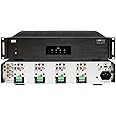
The OSD Audio MX880 GEN2 is a slim, 8-channel Class D amplifier delivering 80W per channel, designed for multi-zone audio distribution in residential or commercial settings. Featuring front panel on/off controls for each zone, it combines high-efficiency amplification with robust protection circuitry, making it ideal for audiophile-grade sound and flexible installation.


A**W
Works great for my outdoor speaker setup
I've been pretty happy with this amp. I'm using it to control several outdoor speakers around my yard and pool area.Some tips for those of you that say the app doesn't work:- You're probably using a VPN, and the device can't be discovered when connected to a VPN even if you allow your VPN client to access local network resources. The app's logic seems to take your current IP address, which if connected to a VPN would be a non-routable IP address on your local network, and then attempt to scan for the device. So turn off your VPN, then scan for your Nero Max 12. Once you've discovered the IP Address, you can manually set it in the app settings and you can then re-connect to your VPN. This caught me up when I first got the Nero Max 12, but has never been a problem since I discovered the solution.In addition I was able to find a way to hook this into my Home Assistant setup and truly tie it in with the rest of my smart home. To do this, you can use the Home Assistant "Monoprice 6-zone amplifier" integration, and enter "socket://<nero IP address here>:8080" during the integration setup. This is a completely undocumented feature that took me some tinkering to come across. The only thing you cannot control with Home Assistant is the mixer, which is fine because it's not something that you always want to tinker with. So just use the phone app for the mixer configuration when you setup your speakers and use home assistant to control the zone power and volume for each zone channel.Another pro tip for people looking for a way to stream music across your multi-zone audio system. It's as simple as buying a device that can stream and connecting it to one of the Nero's source inputs. For me, I purchased the Audio Pro Link 2 (available on Amazon) and connected it to my Nero using the optical input source. This works flawlessly for me and have been very happy. You can also hook the Link 2 up to Google Assistant and then add it to one of your speaker groups if desired. Spotify sees it and streams to it perfectly and then it's just a matter of turning on the zone(s) I want to hear my music over outside.One other thing to note that is not documented anywhere in the manual that I came across when tinkering. There is a network configuration page where you can setup a static IP address for the device if desired. This seems to be for the rs232 controller that's baked into the amp. Simply goto http://<IP Address of Nero>, and the user & pass is 'admin'. I have no need for any of the advanced configuration there since I setup a DHCP reservation for the device on my home network so I have a consistent IP address for the device, but wanted to share the findings.One more thing to mention is that for me at least, there is no wifi antenna as depicted in the product images, just an ethernet port. That was not a big deal for me, because my Nero is racked in my home network rack and I directly connect the device to my network switch over ethernet. I didn't attempt to see if it has any wifi capabilities, but as mentioned in the previous paragraph, it appears you could potential setup a wifi connection using the advanced configuration page (I found this documented in the MAX12 connection and quick guide PDF).Finally, if you really want to geek out, you can connect to the device over telnet and send commands over command line. I did find all the commands documented in a manual (MAX12 connection and Quick Guide). Just run 'telnet <your nero IP address> 8080', and then you can start running direct RS-232 commands, which you can read about in the aforementioned manual. This could maybe be useful when building a custom automation via a script or some sort of a custom integration, and is basically how the Home Assistant integration works.
D**G
Outstanding 8-Zone, 16-channel Home Music Distribution Amplifier
I purchased the OSD MX1680 as a multi-zone music distribution amplifier for my home to replace an ELAN 1650 digital amplifier that died last week. I currently have speakers installed in 7 rooms and one set of speakers on our backyard patio for a total of 8 zones. I use Google Chromecast audio devices as audio inputs to allow apps such as Spotify to cast music selectively across the 8 zones.While I have only had the MX1680 installed and working for the past week, so far I am very impressed with the quality, the features and the ease of configuration/use. Shipping was prompt and the OSD MX1680 arrived in great shape two days after placing my order. Packaging was excellent with the manufacuturer box securely fit inside the shipping container (i.e. double boxed) . The MX1680 is much smaller and lighter, delivers more power and has many features that make it superior to the ELAN 1650. Each zone of the MX1680 has as slide switch that allows easy selection of line input, BUS1 or BUS2 inputs. I connect the Chromecast audio units to the two BUS inputs and set the slide switches to direct a common audio signal to specific groups of speakers so that the same music track plays in multiple rooms. This is very easy to configure and change if I wish to group the speakers differently. The sound quality is excellent with plenty of power (50W or 80W/channel into 8 ohm and 4 ohm speakers, respectively). I also really like the audio sense feature that activates channels when the input signal is present and turns off the channel after a few minutes when the no input signal is present. This should prolong the life of the unit and minimize heat generation when not in use.While I only had the unit for about a week, so far I am very impressed with the quality, features and performance of the MX1680 and would recommend the unit to others looking for an multi-zone music distribution amplifier. One item to remember, the channel volume controls on the back of the unit are all set to zero by default, so remember to turn up the volume settings as you install the speaker wires. Hope this is helpful....enjoy!
F**D
Great amp, and does work with app connectivity
Lots of bad reviews on here mentioning the app doesn't work. First of all, I have 3 of these now, 2 of them are wireless and I use the app to control them. You have to connect them directly to an ethernet cable. If the app is not discovering the unit, you can use an IP scanner to find the amp, and put in the IP address manually. Every time you turn the unit on, you wait 20-30 seconds for it to come online on the app.The sound quality is great. While it could be more fluid, like the more modern streaming systems, it works every time if you set it up correctly. Also, you can actually call them on the phone, and a person answers and provides you direct support about anything. I was impressed.
D**-
Great multiroom amp for the price with an App that can control it.
I read all the reviews on how hard this would be to set up and use the App. Setup was pretty straight forward. The product is ethernet wired only. There is no Wifi, so you will need to have it wired direct to your router. Don't get confused with Groups and Zones. The zones are the 6 zones that you have wired to the amp. The groups are only if you are running more than one ODS Nero Max 12. You will need to go into the App and into the connect / Info upon setup. Mine was able to find the Nero under Group 1 when I selected Auto Device IP. You will need to initially set the zone volume levels, treble and bass settings for each zone. You can do this when you name the zones. All zones sound pretty good. In each zone setting you can set the default source that you want to run on. I put all zones on source 6 and ran it off of a google chromecast connected to a HDMI extractor feeding an optical output. I connected the chromecast to my google home. Spotify sees it when connect. I can use my Google home to turn on and off the music. You will need to app to turn zones on and off. The system rocks with all zones playing.