We remain fully operational. Our teams are working around the clock to ensure your deliveries continue safely.

下载应用程序




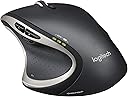


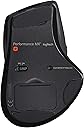
🖱️ Elevate your workflow with the mouse that masters every move.
The Logitech Performance MX Wireless Mouse is a high-end, ergonomically designed wireless mouse featuring Logitech Darkfield Laser tracking for precise movement on any surface, a rechargeable battery lasting up to 6 months per charge, and a versatile dual-mode scroll wheel that supports both click-to-click and hyper-fast scrolling. With six customizable buttons and app-specific profiles, it offers unparalleled productivity and comfort for professionals and gamers alike. Though discontinued and replaced by the MX Master 2S, it remains a benchmark for performance and reliability.


| ASIN | B002HWRJBM |
| Additional Features | nv: Interfaces^1 x USB - 4 pin USB Type A | Movement Detection Technology^Laser | Features^Logitech Darkfield Laser Tracking |
| Antenna Location | Office |
| Are Batteries Included | No |
| Are Batteries Required | No |
| Battery Average Life | 6 months |
| Best Sellers Rank | #1,306 in Computer Mice |
| Brand | Logitech |
| Button Quantity | 6 |
| Color | black |
| Compatible Devices | Laptop |
| Connectivity Technology | USB, Wireless |
| Customer Reviews | 4.2 4.2 out of 5 stars (6,122) |
| Enclosure Material | Plastic |
| Global Trade Identification Number | 00097855060273, 04008928095104 |
| Hand Orientation | Right |
| Hardware Platform | Laptop, PC |
| Item Dimensions L x W | 5.1"L x 3.9"W |
| Item Part Number | 910001105 |
| Item Weight | 147 Grams |
| Manufacturer | Logitech, Inc |
| Mfr Part Number | 910-001105 |
| Model Name | 910-001105 |
| Model Number | 910-001105 |
| Movement Detection | Laser, Optical |
| Number of Batteries | 1 Lithium Polymer batteries required. |
| Operating System | Windows 7, Windows Vista, Windows XP |
| Power Source | Battery Powered |
| Range | 10.0 meters |
| Style Name | Modern |
| UPC | 097855060273 |
| Unit Count | 1.0 Count |
| Warranty Description | 3 year limited |
G**S
It is a really nice mouse.
My initial experience with a Logitech Performance MX mouse. First thing, it is a mouse for the right hand. Whose right hand I asked myself, surely not MY right hand. I wondered if the hand that it was designed for was an alien, with absurdly long triple jointed fingers and an unusually shaped palm attached to an arm that swept horizontally at an odd angle. I continued to gripe and complain to myself until the phone rang and I tended to business. Several minutes later I found myself back at the keyboard and mouse and realized that I had transitioned to the new mouse without thought. Yes definitely some alien brain manipulating handiwork here. To install it, I put the rechargeable NiMH AA battery into the battery compartment. The battery included didn't impress me much and it was also completely uncharged so I put in a better class of battery that I happened to have at hand. I did notice that the charger cord had a nicely sculpted 'grip' on it. That was a nice touch, along with the faux-leather pouch to contain the accessories: charger, charger cable and receiver extension cord. I was happy to see that the battery compartment has room to hold the *tiny* USB dongle that plugs into the PC and provides the wireless receiver. The 'UNIFYING' technology allows one single dongle to server multiple Logitech devices. As I already had an existing Logitech device and a dongle, I didn't bother to put it into the PC, I just left it in the mouse battery compartment and was happy that it had a safe place where it wouldn't get lost. The Logitech setpoint utility was already installed on my Windows 7 PC at work and it recognized the Performance MX right away. I noticed that *unlike* some other mice that need to be 'woken up' and discard the first few mouse movements, the Performance Mouse is instantly responsive. Maybe that is the 'performance' part along with the 1500dpi resolution and darkfield dual optic sensing. The mouse tracks smoothly and reliably. I was surprised that the extra buttons were well placed and not subject to unintentional activation. I had myself unintentionally become accustomed to the mouse in a short time. I used the mouse for the rest of the day, and before leaving work I packed it up to take home. After packing up the MX, I put my original mouse back on the desk and was shocked at how... dull and unresponsive the old mouse felt. The MX mouse installed into Windows 8 at home without a problem, and again was nice to use. The Logitech setpoint software running in windows 8 has some options that work differently than when it is run in windows 7. For example, the ability to assign window flip/ aero flip/ application switcher doesn't seem to work on Windows 8 when assigned to one of the additional buttons. I haven't contacted Logitech about this. In the end, I really like this mouse, it works well, it is cordless, responsive and comfortable. I might even get another one for work. It is a really nice mouse. Follow-up: since my initial review on January 4, 2013 it is 9 months later (Oct. 2013) and I'm still using this mouse. It is still a bit large for me and I tried a very similar styled 'marathon mouse' for smaller hands for a while but it just didn't perform as well. This performance mouse needs a recharge every couple of weeks but it is easy to recharge it by plugging in the USB cable. This mouse can be used while recharging, or left plugged in overnight. The mouse has held up well after lots of use, many hours a day with minimal signs of wear, a bit of shine on the left mouse button press area but all other parts showing no obvious signs of wear. The teflon slider pads are ample and in place. Best thing about this mouse: it tracks well, every button click registers when it should and it is responsive. Still a really nice mouse.
D**N
Logitech's Mighty Mouse
I've been a fan of Logitech since I bought my first mouse and keyboard from them (MX3100). Since then they have continued to keep my interest (and my patronage) by constantly developing new and innovative products. The dependable quality of Logitech devices has been the main reason I stick with them and the new Performance MX Mouse continues this trust. I wasn't sure if this mouse could hold a candle next to my beloved MX-1000, which had finally retired itself with a worn down right-click button. However, the Performance MX surprised me. Ergonomics: The first thing I noticed was the comfort - this mouse fits like a glove in my hand and it's so light it feels like I'm moving a cloud around. The rubberized thumb rest is just that; an excellent resting place for my thumb. My fingers do not get cramped or ache even after hours of use, and I should know about this since I'm an illustrator and spend many hours on the computer. Great Features: I wasn't fond of the scroll wheel placement on the Revolution, but with the Performance MX this has been replaced by two Back and Forward buttons. An awesome feature for me because I'm constantly going back and forth on web pages checking out my work. Right below these buttons is a single Zoom button, which I changed in the settings to refresh the page (Ctrl+F5). On the very bottom of the rubberized thumb rest area is a small icon, which I did not see at first and so when I inadvertently pressed down on this all my open programs and windows zoomed out and I was like 'Woah!' I could now pick whichever window I wanted by clicking on it and it would zoom back in to normal size. This is a great feature! The main scroll wheel on the top can move like greased lightening, but since I'm old school I preferred the simple click-click scroll of the older mouse. Thankfully Logitech must have some old-fashioned nerdiness in them, too, because you can press the small button behind the scroll wheel and it turns into the click-click function I love. Kupo! Having an On-Off switch on the bottom is a must for any cordless mouse and naturally the Performance MX has one. Unifying Receiver: I was really impressed with this new innovation. Not only is this thing tiny but it will work with all my wireless devices (negating the hassle of using multiple USB receivers). I have an old Logitech MX3100 keyboard and it worked without even a hiccup once I plugged the receiver in. It's also nice to have the receiver out of the way and not sticking out of the front of my PC's IO port. I just used a Logitech USB extender I had lying around, plugged it in, and have it sitting on the back of my computer desk. Nice and neat. Battery: At first I was a bit puzzled about the little black leather bag that came with the mouse. Not being one to read the manual it took me a few minutes to figure out that it contained the "extras" - a new slimmer version of the USB extender, a nice long USB cord, and the square plug that fits into the wall outlet. I thought it was a nice touch on Logitech's part to put these extras in their own little zippered bag. The battery in the mouse lasts about as long as the one in my old MX-1000 did. And since it takes AA rechargeables I can use my Eneloops with it as well. This is an exellent plus in my book because now there won't be any issues with the battery dying and me not being able to replace it because it's part of the mouse. I also like how you can still use the mouse while it's plugged into the wall charging. As always Logitech's presentation and packaging of their products gets kudos in my book. You don't need to be Superman to rip the thing out of some plastic cocoon; the box comes with a very easy to open lid and you can even keep the box to store the mouse in (if you so desire). All in all I believe Logitech has created their own version of the Mighty Mouse here (at least for us non-Mac users) and I can't recommend it enough. I know the price is a bit more than other wireless mice, but you're getting the Logitech brand and quality and the Performance MX more than lives up to it's price tag.
わ**こ
これより新しいMX MASTERが出ているが、持ちにくいので、左手用のサブ機にしかならなかった。仕事で一日中持っているので、このマウスが最高に操作しやすいし、違和感や疲れが少ない。
N**O
Entrega: Rápida, confiable, segura, el pedido me llego antes de lo esperado y en buen estado, gracias. Opinión: Es un excelente mouse, un poco grande a lo esperado (pero los botones son grandes, si eres de mano pequeña aun así te servirá) tiene muchas funciones a programar para su uso (descarguen el programa de la pagina oficial logitech), lo recomiendo al 100% para aquellas personas que se dedican a trabajar en diseño, programación o están todo el día en la computadora, es muy confortable y ergonómico (tu mano y muñeca te lo agradecerán), cumple con todo lo que promete en las reviews que dan. Aparte los materiales se ven resistentes y elegantes, así que no solo es funcional si no también impresiona con su aspecto.
A**T
Darkfield sensor allows you to use the mouse on any surface, I am using it on fully transparent glass table. It's a good mouse for users who use mouse for cursor control. Forward button may be little difficult to reach for someone with short thumb. Some reviews have mentioned mouse double clicks with a single click but have not noticed that as yet on mine.
C**X
La souris Logitech MX est tout simplement géniale. Elle offre une excellente prise en main et est très confortables. Les touches raccourcis sont parfaitement positionnées et facilement reconfigurables au besoin. La souris est très précise autant sur un tapis de "Gamer", une planche de mélamine ou sur la jambe de l'utilisateur. Je l'utilise régulièrement pour des présentations debout et je peux interagir sur l'écran en glissant simplement la souris sur ma cuisse et sa fonctionne parfaitement. Sa forme offre une prise ferme permettant son utilisation en se déplaçant sans risque de l'échapper. Elle est excellente autant pour le travail de bureau quotidien que pour le "shooter gaming". Je la recharge environ une fois par semaine en la laissant allumé toute la journée et l'utilisant environ 4 heures par jours. Sa prise de recharge permet l'utilisation sans contrainte lorsque le fils est branché. Je recommande absolument cette souris de qualité à tous. Livraison rapide avec Amazon Prime.
上**郎
購入して約13年、もう外見はボロボロですがいまだに愛用しています。 性能といい大きさといい文句のつけようがありません。 最近接触が悪くなってきていますが一応一個だけ予備を所持しています。 後継機種があるそうですが全くの別物でがっかりしました。 なのでそのストックも開けるのがもったいないくらいです。