
下载应用程序



🚀 Small size, big impact — your sleek storage sidekick!
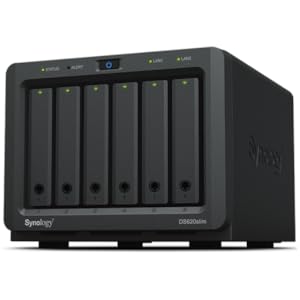
The Synology DS620slim is a compact 6-bay NAS designed for professionals craving powerful, flexible storage in a mini footprint. Supporting 2.5” HDDs and SSDs with RAID options, it delivers fast encrypted data transfer speeds up to 220 MB/s read and 190 MB/s write. Equipped with 2GB DDR3L RAM (expandable to 6GB) and advanced Btrfs file system, it offers robust data protection with thousands of snapshots. Plus, its dual-channel 4K video transcoding makes it perfect for seamless media streaming and productivity in any modern workspace.
| ASIN | B07V6CC4M2 |
| Best Sellers Rank | #25 in Network Attached Storage (NAS) Enclosures |
| Brand | Synology |
| Color | white |
| Customer Reviews | 4.4 4.4 out of 5 stars (122) |
| Date First Available | July 20, 2019 |
| Hard Drive | 30 TB |
| Is Discontinued By Manufacturer | No |
| Item Dimensions LxWxH | 6.89 x 5.94 x 4.76 inches |
| Item Weight | 3.08 pounds |
| Item model number | DS620slim |
| Manufacturer | Synology |
| Product Dimensions | 6.89 x 5.94 x 4.76 inches |
| Series | DS620slim |
Z**E
Awesome for its size. It’s pretty small
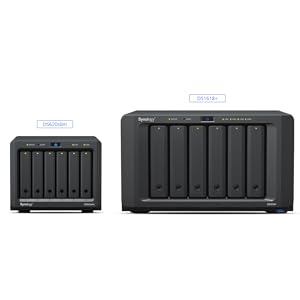
I already own a DS1621+ but this little thing is great. I bought it originally to set up for a family member but they ended up not needing it so now I have an extra NAS to play around with. My one complaint would be simply that I didn’t realize how expensive 2.5” drive storage was. I never really thought about it until getting this. Most 2.5” SATAIII drives are not made for NAS setups. When you start getting in to the higher capacities the price jumps up significantly. While the stock fan isn’t that loud, if you plan to keep this near you like on your desk I would recommend buying the Noctua NF-A8 ULN fan. It makes this thing almost dead silent. It’s VERY easy to install. The stock fan is attached to a panel that just pops right out and you swap the fan easy peasy. Just remove all the little rubber corners on the Noctua so that it fits in easier. While this device “officially” supports 6gb of RAM, you can actually install 16gb and it runs just fine. No errors or even warnings. Just look for 16GB(8GBx2) PC3L-14900S DDR3L Laptop RAM DDR3 1866MHz 1867mhz SODIMM 1.35V Non-ECC. You unscrew the bottom panel and it’s right there. Easy to swap out. If you want to use this for Plex, know that it’s great for that. If you plan to have a decent sized library then it could get a little pricy for you to get a lot of storage with 2.5” drives but what this thing does have going for it is that the internal processor is an Intel Celeron J3355. This processor supports Quick Sync. So this little device can hardware transcode and it’s not too bad at it. So while I wouldn’t use this to replace any hardcore Plex machine you could have, if you are just starting out with Plex or setting up a server for someone else, this is a great device to do that with. You’re not going to replace a server that’s has something like a Quadro P2000 or a RTX A2000 but if you’re not looking to go that hardcore then this is a decent solution. Overall I’d say that if you’re not worried about the cost of storage with 2.5” drives then this is a great little NAS. I would suggest before you purchase you go compare prices of 3.5” drives to 2.5” drives and that may help you decide if this one is right for you.
C**.
Nice product
As you would expect from Synology. It works fine and quality is good. It has been running for a while now and I added a UPS to ensure my NAS is not interrupted and can be shutdown safely when battery is low. I would highly recommend this product.
C**A
Solid performance and resilient, rarely have I seen any issues, but a better CPU would be nice.
I only give it 4 stars because of the drive chassis’ are cheap and plastic and for the price they could easily be metal. One of mine broke so is forever in the dislodged / pull-out position. I don’t use the Synology applications and run everything in Portainer with Docker Compose files (i.e. “Stacks”) so as far as the OS it did fine for me and rarely when I cannot get to Portainer through Tailscale it is nice to simply use the Dynamic DNS to reset it. My only complaint is the CPU could use a MASSIVE update for the price and still not be a loss proposition for Synology. I’ll probably go with TruNAS and a dedicated server if I ever get beyond the scope of what I am doing. For now this is just easy and works fine.
J**N
Compact and Powerful NAS Solution for Small Spaces
Pros: - Compact design for 6 x 2.5" SSDs - Flexible RAID configurations - Real-time 4K video transcoding Cons: - Limited RAM expandability - Basic processor Wanted streamline file management and media streaming in a small environment. Transformed workflow with seamless file synchronization and reliable data protection. Setup can be confusing for someone with no/minimum experiences.
E**A
it is compact, reliable, and do search easily
It is VERY reliable and I can search the files easily, unlike the ASUS, which I have to rely on Unix or rely on their "web interface" to search for files. Synology did it right.
B**B
First Time NAS!
This was my first NAS other than a simple USB drive attached to my router. Setup was a little tricky, but considering that it was my first experience with these kinds of devices it was understandable. So far it has been up and running for a couple of days now. I have an older router so the software that Synology uses could not automatically set it up. This is where the difficulty began. I enjoy tech challenges though. If you are a technophobe, I would suggest something else. I still am having issues with SSL errors when connecting to the NAS and have not yet tracked down the cause. Other than that it has been an incredible introduction to the world of personal cloud storage. I have taken all of my stuff off of the cloud storage service that I was using and put it on this. Once set up all of my photos and videos are backed up to it and easily accessible from my phone. If your worried about manually configuring you router for port forwarding, synology offers "quick connect" service which bypasses all of the setup headaches. I did not that the DIN plug where the unit gets its power from was a little flimsy.
A**R
Disappointed
A desktop application and browser extension by Synology must be running at all times on your computer for you to be able to view photos in the common HEIC format (all pics you take on your iPhone are in this format!) in Synology Photos. Synology Photos must natively support this common format rather than bogging down people's computers for basic functionality.
M**G
Working without issue -
Purchased for the footprint - Specs below for anyone looking for a small NAS March 2024 update - No issues to report. Add a usb 2.5 gig network adapter which Synology does not support and getting 250 to 280 mb data transfers. Performance - 110-120 mbps on an 1 gig ethernet connected / 35-42 mbps wireless 5ghz Running Synology SHR 2 - with 6 shucked Seagate Portable 5TB External Hard Drive HDD https://www.amazon.com/dp/B07VS8QCXC?psc=1&ref=ppx_yo2ov_dt_b_product_details Upgraded to 16 gig memory - https://www.amazon.com/dp/B0145WDNF2?psc=1&ref=ppx_yo2ov_dt_b_product_details Initial NAS disk setup took a little over 4 days to complete / Data scrub takes 1 day to complete
D**E
時間を指定して、パフォーマンスと静音のバランスを調整できるので、設置場所に応じてうまく調整するといいかもしれません。 後継モデルが出ることがあれば、拡張ユニットへの対応と、2.5インチ専用の拡張ユニットの発売もぜひ検討していただきたいなと思いました。
C**L
Works very well, however, upgrading from an old Synology NAS may require you to reset your settings. However, what makes this NAS so great is that it can actually take 16gb of memory. More than actually supported, if you find the right set of RAM sticks.
S**N
Setup is easy but be aware this supports the laptop format hard drives not the large desktop sized 3.5 inch ones which are a bit cheaper per drive.
J**T
fast delivery very good unit
B**A
I switched from a 4-bay HDD enclosure, hoping for a near-silent setup after loading this little beast with SSDs. Unfortunately, the fan has other plans, persistently ticking away in a way that's downright maddening. My DS418play was noticeably quieter. Could it be a case of bargain-bin fans?