We remain fully operational. Our teams are working around the clock to ensure your deliveries continue safely.

下载应用程序


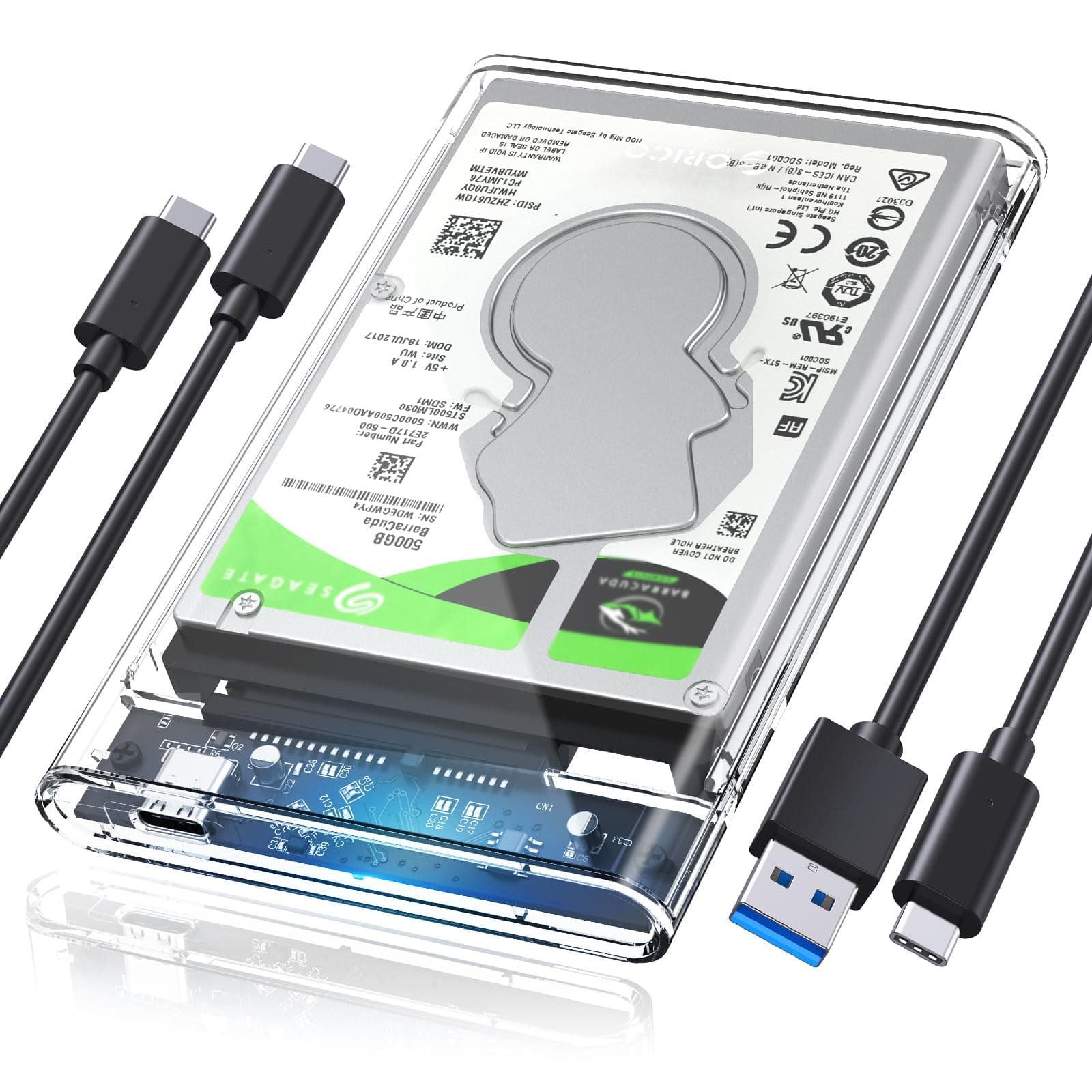
⚡ See your data fly with style and speed!
The ORICO 2.5'' Hard Drive Enclosure combines cutting-edge USB 3.1 Gen2 technology with a sleek transparent design, delivering up to 10Gbps transfer speeds and tool-free hot-swappable convenience. Compatible with 7-9.5mm SATA SSDs and HDDs, it supports all major OS platforms and gaming consoles, featuring smart auto sleep to protect your data and extend drive life. Ideal for professionals seeking fast, reliable, and visually engaging external storage.




| ASIN | B07R9HVZMX |
| Best Sellers Rank | #15 in Enclosures |
| Brand | ORICO |
| Color | Transparent |
| Compatible Devices | Desktop |
| Customer Reviews | 4.6 4.6 out of 5 stars (696) |
| Data Transfer Rate | 10 Gigabits Per Second |
| Enclosure Material | Polycarbonate (PC) |
| Hard Disk Form Factor | 2.5 Inches |
| Hardware Interface | USB Type C |
| Hardware Platform | PC |
| Item Dimensions L x W x H | 4.92"L x 3.11"W x 0.51"H |
| Manufacturer | ORICO |
| Memory Storage Capacity | 6 TB |
| Supported Devices Quantity | 1 |
| Warranty Description | 12 |
J**M
Excellent quality, performance and price
I am pleased with my purchase of the Orico USB 3.1 Gen 2 USB-C enclosure. As others have mentioned, it is quite easy to install the 2.5” drive. I installed a 2 TB Crucial SSD which is capable of 560 MB/sec read and 510 MB/sec write speeds. Because the drive is 7mm and just lays inside the enclosure, I was concerned about damaging the SATA III connector when transporting the drive, so I attached the spacer, so the drive height was 9mm. The spacer just goes around the outer edges of the SSD, so you can still see the label on the drive through the clear enclosure (which I like). I am considering whether I should also put a narrow plastic piece between the drive and the back of the enclosure to prevent the drive from moving away from the SATA connector as well, but the drive seems snug, so for now I not going to do that. I have tried the drive with five different machines and so far, I have not had any major problems, and am satisfied with performance on each system. CrystalDiskMark testing shows 407 – 414 MB/sec read speeds and 383 – 440 MB/sec write speeds on the three systems with USB 3.0 or 3.1 Gen 1 (type A) ports. On the two systems with 10 Gbps USB 3.1 Gen 2 (type C) ports, CrystalDiskMark testing shows 477 – 507 read speeds and 498 – 507 write speeds which is only slightly better but is still fairly close to the 560 MB/sec read and 510 MB/sec write speed the installed drive is capable of. I transferred a 17 GB image file across my Gb network to the drive on several different systems and got a “sustained” transfer rate of 113 MB/sec. What impressed me about that is that on most of the other USB external drives I have, transfer speeds drop (or fluctuate) drastically while copying large files to the drive.
D**1
Great value HDD and SSD case
Great case for quick swap among HDds or SSDs to view contents or use for back up. Drives swap in seconds and it is easy to see which drive you are using due to clear case. Case snaps securely closed, but is easy to slide open. Comes with USB a and c cables.
J**W
Simple, easy, effective
It works without fuss, no heat or noise issues, two usb cables provided, nice to see inside. Really helped me out with salvaging an undamaged harddrive when a computer burnt out beyond repair.
E**S
Nice to look at but not one I'd travel with
I have always used opaque enclosures, so having a clear one is a novelty. I don't plan on taking it anywhere, so the build quality and materials should be fine, but there's no way I'd travel with it. The cover would come off constantly and the plastic would probably crack as well. I knew what I was getting and I'm okay with it.
A**S
Una muy buena caja, cumple con la velocidad que menciona 10Gbps apesar de estar limitada por el bus SATA.
H**Y
Always easy to use
Insert a drive, plug it into your computer, you're ready to go! Tried this with a 1TB SSD and my PS3 and it always works like a charm and transfers fast! Excellent product
A**R
N/a
Good
R**O
Excellent use of an internal drive being used externally.
Fast shipper. Very well made care with all the necessary cables, etc.
S**K
I liked the way the seller approached me.. the product was really good with good customer support
A**O
The enclosure was built to a very high quality and worked perfectly and was specified and supplied with two separate connecting leads, one terminated in a USB C and the other terminated with the 'old fashioned' 11 x 5 mm USB A?) connector. HOWEVER, Please note that in order to get the 1TB Western Digital HDD taken from my old laptop to fit snugly inside the ORICO case, I had to unscrew and remove all the metal tabs and flanges that were used to secure the HDD into the old laptop with its worn out keyboard. Removal of this metal work around the WD HDD did slightly reduce the level of Electro magnetic screening on one side of the salvaged HDD but this will probably not be problematic in every day purely domestic or home use.
A**Y
Ordered and waiting for refund I received black Micro USB 3.0, 5 Gbps enclosure which is a lower performance and cheaper enclosure it also looks like bad quality plastic material with cheap manufacture process it looks horrible. it's nothing like the pictures Briefly it's a scam
D**Y
Está es mi segunda carcasa, está segunda para un cliente. Lo compre por la entrada que es menos susceptible a fallas con el tiempo de uso.
M**A
وصل بدون كابل ال usb type c لا يدعم اصلا ال usb type c منتج كاذب وغير صحيح وغش وتضييع وقت