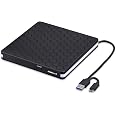
💿 Burn Bright, Burn Fast — Your Portable Media Powerhouse
The Amicool External DVD Drive is a sleek, portable optical drive featuring USB 3.0 and built-in USB-C connectivity for ultra-fast 5Gbps data transfer. Compatible with Windows, Mac, and Linux, it supports DVD+/-RW and CD-R/RW formats with max read speeds of 8X for DVDs and 24X for CDs. Its slim design and embedded cable make it the perfect companion for professionals needing reliable, driver-free plug-and-play media access on the go.


| ASIN | B07PV958PN |
| Additional Features | CD Burner, DVD Burner, Portable |
| Best Sellers Rank | #98 in External CD & DVD Drives |
| Brand | Amicool |
| Built-In Media | 1 |
| Cache Memory Installed Size | 2 MB |
| Color | Black |
| Compatible Devices | Desktop, Laptop, iMac |
| Connectivity Technology | USB |
| Customer Reviews | 4.2 out of 5 stars 12,938 Reviews |
| Data Transfer Rate | 1 Gigabits Per Second |
| Digital Storage Capacity | 5 GB |
| Form Factor | Portable |
| Global Trade Identification Number | 08431270266087 |
| Hard Disk Description | Hybrid Drive |
| Hard Disk Form Factor | 3.5 Inches |
| Hard Disk Interface | ATA-4 |
| Hard Disk Rotational Speed | 1 RPM |
| Hardware Interface | USB 3.0 |
| Hardware Platform | Laptop, PC |
| Item Dimensions L x W x H | 5.51"L x 5.51"W x 0.67"H |
| Item Type Name | computer-external-cd-and-dvd-drives |
| Item Weight | 320 Grams |
| Manufacturer | Amicool |
| Media Speed | Max 3.6 MB/s (CD), Max 1.2 MB/s (DVD) |
| Model Name | BT686 |
| Model Number | BT686 |
| Operating System | Linux, Windows 10, Windows 2000, Windows 7, Windows Vista, Windows XP, mac os |
| Optical Storage Read Speed | Max 24xCD / 8xDVD |
| Optical Storage Write Speed | Max 24xCD / 8xDVD |
| Special Feature | CD Burner, DVD Burner, Portable |
| Unit Count | 1.0 Count |
| Warranty Description | 12 |
D**R
Works Great!!
I recently got a new Macbook Air with a USB-C port instead of plain USB ports. I also got an adapter to allow me to still use my USB drives and devices. When I tried to burn a CD from iTunes, my computer couldn't write to my burner through the adaptor. Amicool to the rescue! I purchased an Amicool External DVD drive with USB 3.0 and USB-C cables built into the drive. It's great. Since the cable is attached to the drive, I don't have to worry about misplacing the cable. The drive worked great. It was fast and easy to use. Thanks, Amicool! One small thing - the cable attaches under the drive and you have to bend it back to plug it into your computer. If you don't get it just right the drive is sitting on the cable and so the drive doesn't sit solidly on the table. If you push the cable down hard, it will, but it's easy to not do that. I have an external hard drive with the cable built-in, but instead of coming out of the bottom, it comes out of the side. Maybe for the next upgrade. . . But it's an excellent DVD drive and I'm very happy with my order.
A**A
Great plug and play DVD player for my MacBook Air (2020)!
The one thing that made this DVD player stand out from the others I was looking at was the fact that it had a USB-C adapter already attached to the player. I have a MacBook Air (2020) that only has USB-C ports so this was important to me. I’ve checked and both the USB and USB-C adapters work beautifully. I did not have to install a driver as Mac already has a driver included in their system. I had to search for it because it doesn’t appear in the Mac Launchpad or in the utilities folder like in previous MacBooks. The easiest way to find it is to do a search using “spotlight” (the magnifying glass icon on the top right of your screen). Another plus is that the DVD tray where you insert your DVD actually pops out at the press of the button on the DVD player itself. My last external DVD player did not have this and I had to eject it from within the app or by right clicking on the DVD icon from my computer. This didn’t always work out so well. I haven’t tried writing anything to a DVD yet, but I don’t normally do that anymore anyway. But for my purposes, this DVD player works beautifully. This DVD player does not work when connected directly to a projector. But there is a work around. If you connect your computer to your projector and the DVD player is connected to your computer, you’ll be able to project your movies onto any surface. It’s also important to note that this DVD player does not connect to other devices like tablets or phones. Again, it only works when connected to a computer. Over all, I’m pretty pleased with this DVD player! It’s portable and the wires fold away nicely for storage. It does everything I need it to do.
K**.
Pairs well with MacBook Air
I needed a CD drive to pair with my MacBook Air and this worked perfectly! I was just needing to access photos, so I can’t speak to how it does playing any other type of media. Note that it is older technology so it takes a little while to load. I like how the cords are self contained and powered through your computer so you don’t need to keep track of an extra power cord. I originally bought the CD drive with just the USB 2.0 cord and tried to use an adapter; this however did not work. If your computer uses USB-C then make sure you are buying the correct CD drive. I like that this drive offers both options. Overall, this is compact, sturdy, and gets the job done. It works great for the price I paid.
S**)
besssst cd reader
came in perfect condition and nothings broken — works great too :D
M**S
Very easy to use!
This seems very easy to use. I am testing it now and it's simple to get started with it right of the box- just plug the usb into your laptop and click the little "in/out" button on the side panel of the dvd player so it ejects, then put the DVD in. As soon as I closed it started making noise like it was reading it (not too loud, similar to my regular DVD drive) and my pc detected it instantly. My pc is set to the same region as the DVD but I was prompted by DVD player program to change the region of the external drive in order to play the DVD (it was factory set to region 6 it seems) so I just clicked that and it changed to region 2 and is now about to play my movie which I have paused. It's a nice looking black device, looks easy to store or leave out on the table, lightweight, and I think it may be the solution I needed for my current drive which is unreliable and starting to go. Very pleased so far and hope it continues to work great but I will update if necessary. So far so good and for a great price!! I'm glad I got it.
R**R
Good luck getting it to eject. And it malfunctioned after three discs....
On a positive note, the unit has two different types of power plugs, allowing for some versatility in linking to a desktop or laptop. On a scale of 1 to 5, that's one of five, or 20% positive. This is a plug and play unit on my Apple desktop running Ventura 13.3. HOWEVER: there is NO ICON that appears on the desktop screen. Makes for difficulty in ejecting it properly, and to GET IT to EJECT properly. The unit comes with a stretched-film cover over the top, and that can obstruct the DVD tray from opening. So remove that. There is a small eject button, which sort of works, 2-3 times out of ten. As long as it is lit, that is. The small back-up ejection hole that will take a straightened paperclip is of no use AT ALL. It plain flat does NOT WORK. At the end of the DVD, the unit powers OFF. Once it powers off, the ability to EJECT powers off too. So, had to pull and replace the power cord hooked into the back of the computer. Speaking of the power cord, it's EXTREMELY SHORT, necessitating my rearrangement of the desktop. Bottom line: It works if you're willing to figure out HOW TO MAKE IT WORK! I'm no techno-genius, and do like things a bit less complicated. If you can find a better unit, even at a higher price, then buy it. This unit is for someone on a tight budget who doesn't mind messing with a brand new purchase to get it to work. UPDATE: I ran three discs through it, and the last one ran at almost double speed. It skipped most of the content in the disk. I have RETURNED THIS UNIT. Spend a bit more, and get something that will WORK!
S**H
Works great!
The DVD drive works great. The first I received was visibly defected (broken reader so it turned on but couldn't read any discs). However the replacement came as expected and works great. We primarily intend to use it for playing movies so I can't speak for it's other uses. I attached a picture to show what it should be showing up as if your drive/computer is reading the disc correctly. Go to files and This PC and the DVD drive should be showing up even without a disc in (DVD RW Drive). Once you insert the disc it should show up similar to the picture if it is reading correctly. As suggested in the instructions we downloaded VLC and it plays everything great on Windows 11. If you want to save space for the external drive hooked up to a desktop, we used mounting tape and attached it to the side of our PC. Overall this is a budget friendly DVD drive and is for sure worth it for our needs!
D**W
Reliable, Sleek, and Plug-and-Play
I needed a dependable external DVD drive for my laptop that no longer includes one, and the Amicool USB 3.0 Type-C drive delivered exactly what I hoped for. Setup was effortless, just plug it in and go. No drivers, no fuss. It worked seamlessly on both my Windows 10 desktop and my MacBook, which was a huge plus. The slim design is modern and lightweight, making it easy to carry around or store in a drawer when not in use. It reads and writes CDs and DVDs quickly and quietly, with no annoying whirring or lag. I’ve used it to install software, back up old discs, and even burn a few music CDs for my car, flawless every time. The dual USB-A and USB-C compatibility is a thoughtful touch, especially for newer devices. If you're looking for a portable, affordable, and efficient optical drive, this one checks all the boxes. Great value for the price
TrustPilot
2 个月前
2 周前