
下载应用程序





⚡ Power up your laptop, light up your game.
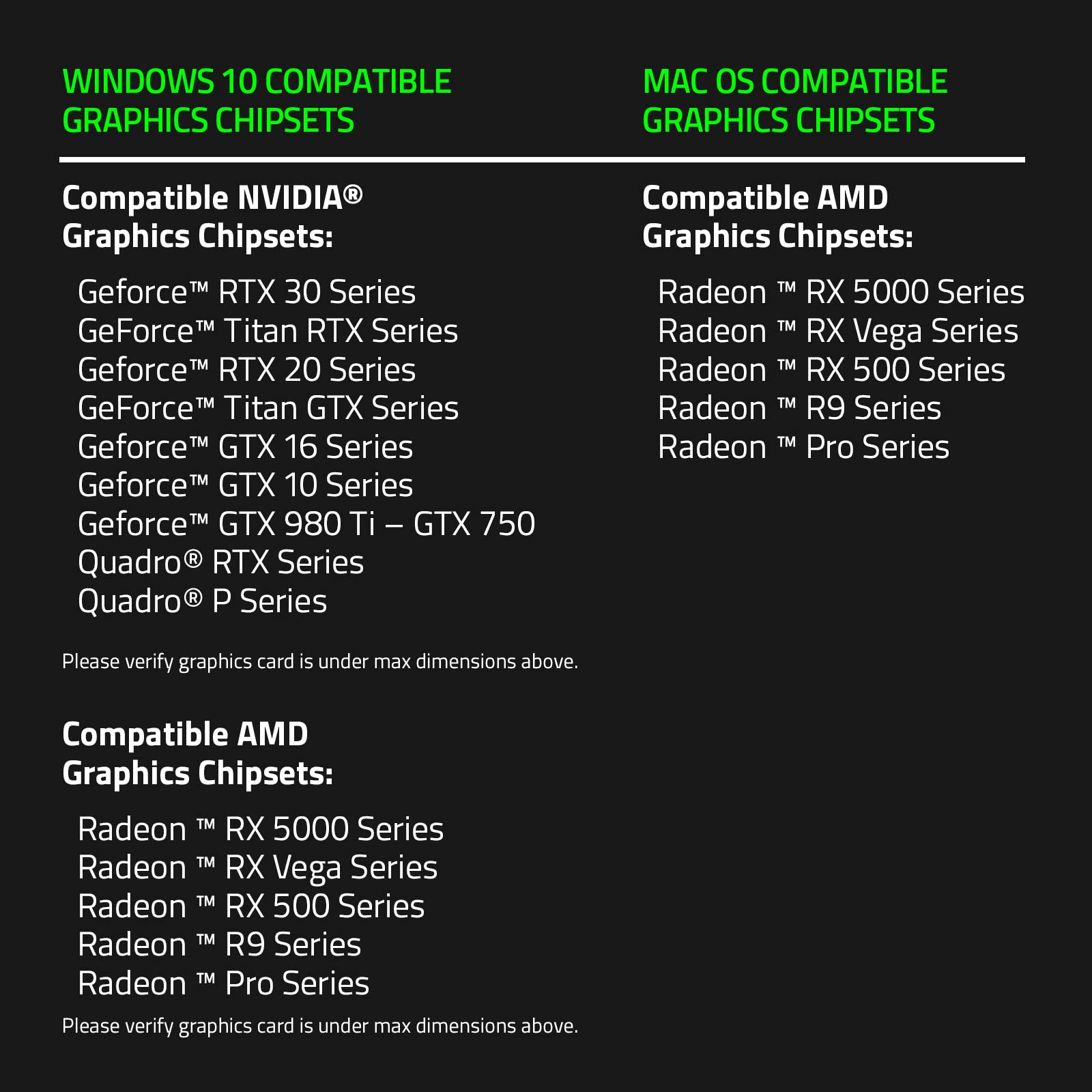
The Razer Core X Chroma is a premium external GPU enclosure that elevates Thunderbolt 3 laptops into desktop-class gaming and workstation rigs. Featuring a robust 700W PSU with 100W laptop charging, support for full-sized PCIe graphics cards up to 500W, and customizable 16.8 million color Chroma RGB lighting, it delivers unmatched performance and style. Compatible with Windows and macOS (AMD GPUs only), it offers versatile connectivity with 4 USB 3.1 ports and Gigabit Ethernet, making it the ultimate upgrade for professionals craving desktop power on the go.


| ASIN | B07Q78VMPW |
| Best Sellers Rank | #1,007 in Enclosures |
| Brand | Razer |
| Card Description | Dedicated |
| Color | Classic Black |
| Customer Reviews | 4.1 4.1 out of 5 stars (1,943) |
| Date First Available | April 16, 2019 |
| Hard Drive Interface | USB 3.0 |
| Hardware Platform | Linux, Mac, PC |
| Item Dimensions LxWxH | 14.7 x 6.6 x 9 inches |
| Item Weight | 15.23 pounds |
| Item model number | RC21-0143 |
| Manufacturer | Razer |
| Number of USB 3.0 Ports | 4 |
| Operating System | Windows Vista;Windows XP;Mac;Linux |
| Processor | none |
| Product Dimensions | 14.7 x 6.6 x 9 inches |
| RAM | 16 |
| Series | Core X Chroma |
| Standing screen display size | 27.56 Inches |
D**2
Works great, plug and play... but heavy
As a part time gamer and full time Mac user, I wanted to play some games to my monitor when I am at home. Firstly, works great with Vega 64 and VII from AMD. These are, as of this review, the most recent GPU cards that both the box and the OS support. Moreover, to game you really need to go bootcamp... games just don't run well on OS X (despite the ports). Being able to reboot my machine into windows without unplugging something was key to my workflow. Plugging in the GPU and connecting this to the system is a breeze. I HIGHLY recommend a longer cord (Zikko makes a 6.6 foot TB3 that works perfectly). The PROS: All of them. I have the non-chroma version because ... I'm not an RGB guy and I don't need all those ports as I already have a big TB3 hub (having multiple TB3s on the MBP makes this a simple set up). The CONS: The thing is heavy... with the longer cord though, you can retire this unit to a safe location. If you are using the Chroma version, you will not be able to do this as the hub is built into the box... just a word of warning. Also, because of how the fans are set up, your GPU fans and the enclosure fan blow toward each other. Make sure the back of this unit is WIDE open as in don't put the back up to a wall. This is the only way the hot air can go to escape. Overall, this is the best eGPU enclosure by far... the power is perfect... The fan issues are minor at best.
K**E
Premium Build Quality
I don't know about you, but I shopped around and around and around for eGPU cases. I looked at all of the premium vendors for Apple supported devices, and honestly this is the nicest and most practical case out of all of them. Unlike most cases there are vents on 4 sides of the case. It has a 72mm fan pulling in air opposite of the Graphics card and pulling in more are for the PSU... which most cases lack. It comes with a 600w power supply unit. Most cases don't have that and cost much more... Why? I have no clue except they include extra Thunderbolt and USB ports. (Which in my case I don't need slowing down the graphics card's Pipeline Thunderbolt basically already took it to 80% regardless of speed) I know some people love RBG but I hate RGB and I am so glad this case does not factor extra RGB into the cost of the product because it is a waste of electricity and money. Its smooth and black and it hides very well on one of the shelves of my desk. (They don't have sides so air flow is not an issue) Honestly it works really well and at first I was surprised that the 72mm fan was keeping my card so cold that it did not cycle at all until I was in a game for at least a few minutes. Only down side is that the Thunderbolt cable included was a little short... I can make it work but it would have been nice to have a 3 foot cable if that was technically possible with Thunderbolt. Very happy with this purchase and I think Razer really proved they can also make products for the active professionals, not just gamers.
C**O
Enclosure works great, Thunderbolt is a nightmare
This works great out of the box and if you have a Windows laptop or NUC or something similar. The nightmares begin on day 1 however. Thunderbolt is to blame here... I spent a while trying to find the "right version" of the Thunderbolt drivers to get this working stably on my HP Spectre laptop. It ended up only really being fully stable when I disabling the internal dGPU video card and turning off power management on random stuff like the ethernet card! It really feels like incantations to get this to just not blue screen the laptop. Worse, it would "plague" it for the duration before it blue screens. I'd unplug the enclosure and then go to a coffee shop and find the laptop already blue screened and on the login screen hot in my backpack. If I didn't plug in for a while, no problems like that. When this works, it's actually REALLY good. The video card, I've used an RTX 2080, and Intel Arc 770, only runs at PCI-e 4x but that's plenty for playing games on that are powered by a laptop. Diablo 4, Dead by Daylight, Overwatch, even Cyberpunk, run ok on this. There's some stutters and dips in FPS, but those really can be mostly attributed to the laptop. PCI-e 4x is just not slow enough for this to matter to gaming. Also, I was running an external display. Running the internal laptop display means you have to copy the framebuffer back to the internal card and it's not variable... the 4 PCI-e lanes are split so 2 go to the card and 2 come back... and that severely limits the framerate, makes things feel laggy, and causes a lot of stuttering and slowdown. I ran CUDA workloads on this as well... and honestly didn't see too much difference with the same video card in a normal PC motherboard. There were times it "felt like" the models being uploaded to the card was running slower, but the actual processing times and numbers really didn't reflect measurable differences. Thunderbolt in general is just super unreliable. My HP Spectre, a few Intel NUCs, a Dell XPS, and some other hardware all have random issues with Thunderbolt docks, VGA passthrough, and all the issues with stability. It's great if you're in a pinch, but terrible if it's your only setup. I'd recommend this only if you want to sit at a desk with your laptop and game every now and then but otherwise have a primary gaming computer setup. I can also recommend using it with an Intel NUC where you're ok with the occasional crash/random reboot.
J**S
Es perfecta para mi, tengo una laptop con procesador core i5 11a gen. con gráficos integrados Iris Xe, pero no es buena con la mayoría de juegos actuales. Con este adaptador puse una RTX 3060 y los juegos van a máxima calidad en 1080p sin problema. Montarla es muy fácil y lo único que se requiere es conectarla y abrir el administrador Thunderbolt y listo. La computadora instala automáticamente los controladores de Nvidia y la mayoría de juegos reconocen en automático la gráfica, si ya tienes un juego con una configuración previa toca reconfigurar el juego o bajas la aplicación GeForce experience y esta te los configura, esta también sirve para que mandes tus juegos a streaming con el "moonlight" en el celular. Excelente compra, vale la pena al 100% el costo.
R**S
Funciono muy bien en la MacBook Pro 2017 lo resultados al ponerle una Quadro RTX 4000 fueron simplemente impresionantes, pero cuidado lo probé en la laptop workstation Dell Precision 5520 y los resultados fueron pésimos, en mi opinión si lo vas a comprar que sea para una MacBook Pro con procesador intel desde 2016.
D**N
EDIT April 06/2019: I've upgraded my rating because the product really does deserve 5 stars. I am having great success with this Razer Core X external GPU enclosure attached to an Asus Zenbook Deluxe 8th-gen i7 ultrabook. I am NOT gaming, I'm primarily running the Adobe Creative Cloud usual suspects: Photoshop, Premiere, Illustrator, Dreamweaver as well as Autocad and Revit. I installed a NVidia Quadro P620 card in the enclosure. Everything is far faster than before - very pleased with the upgraded performance. Installation in Windows was painless for the most part, but you should be aware that there was a very long delay while Windows detected the enclosure and set up the software for it, and there is absolutely no indication that anything is happening. If I didn't have patience I may have rebooted too early and screwed the whole thing up, but I checked Task Manager and could see the process taking about 20-30% cpu so I just let it go until it calmed down. Still no indication that it finished when it finished, I just waited a few minutes more then rebooted. Then I downloaded the latest card drivers from NVidia (ODE version not QNF) and installed them. Rebooted again. Then I plugged in the actual Display Port cables from four Asus 2560 × 1440 monitors and everything came up roses. The enclosure is practically silent - virtually impossible to tell it's even getting power. And huge. In fact it's bigger than most of the desktop computers in our offices. But that doesn't matter because it just sits behind the screens and does its job quietly out of sight. I docked one star because I could not believe that I had to pull out the cordless drill and drill a hole to be able to secure the Quadro card in its slot. This won't be an issue for those with dual-width or wider video cards, but the Quadro P620 is a single-slot card and there's no hole to fasten the card's bracket to the enclosure case. Easy fix by drilling and tapping a hole in the case, but now I have to find a slot adapter cover plate to fill in the gaping hole beside my Quadro card, since the adapter cover that comes with the enclosure cannot be used as it's designed to be discarded once a card is installed. It's too wide to use. Kinda lame. If it weren't for this deficiency in design I would award this enclosure with 5 solid stars. I hope this helps. UPDATE MARCH 2/2019 This enclosure is still working perfectly. I use it every work day. Great product.
E**K
Excelente servicio y calidad altamente recomendable
J**N
Creo que funciona bien, yo la compré por qué se me descompuso el de la lap, solo que se ha pasmado las dos pantallas un par de veces y nos hay ya no regresa, no estoy seguro si es por tema del producto, o es mi computadora la que tiene ya ese problema,