We remain fully operational. Our teams are working around the clock to ensure your deliveries continue safely.

下载应用程序


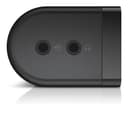

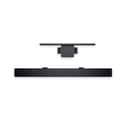
🎧 Elevate your desk vibes with sound that’s barely there but totally noticed.
The Dell Stereo SoundBar AC511M delivers crisp 2.5W stereo audio powered entirely via USB, eliminating the need for extra cables or power sources. Designed to mount discreetly under compatible Dell monitors, it saves desk space while enhancing your audio experience for work, gaming, and entertainment. With plug-and-play ease and broad Dell monitor compatibility, it’s the minimalist sound upgrade every professional needs.


| ASIN | B07FZY2MJN |
| Additional Features | Lightweight |
| Age Range Description | All Ages |
| Antenna Location | For Computers |
| Audio Driver Size | 40.39 Centimeters |
| Audio Driver Type | Dynamic Driver |
| Audio Output Mode | Stereo |
| Battery Average Life | 1 Hours |
| Best Sellers Rank | #58 in Home Audio Sound Bars #93 in Computer Speakers |
| Brand | Dell |
| Built-In Media | Soundbar USB to USB extension cable Aux-in cable Documentation Soundbar mount |
| Color | black |
| Compatible Devices | Desktop, Laptop |
| Connectivity Protocol | USB |
| Connectivity Technology | USB |
| Control Method | Touch |
| Controller Type | Corded Electric |
| Customer Package Type | FFP |
| Customer Reviews | 4.2 4.2 out of 5 stars (3,084) |
| Enclosure Material | Plastic |
| Frequency Response | 20000 Hz |
| Global Trade Identification Number | 00884116311843 |
| Is Electric | Yes |
| Is Waterproof | FALSE |
| Item Dimensions D x W x H | 1.5"D x 15.9"W x 1.9"H |
| Item Type Name | Dell Stereo SoundBar (520-Aaot) |
| Item Weight | 1 Pounds |
| MP3 player | No |
| Manufacturer | Dell Marketing USA, LP |
| Maximum Range | 20 Meters |
| Model Name | AC511M |
| Model Number | AC511M |
| Mounting Type | Plug Mount,Bar Mount |
| Number of Audio Channels | 2.0 |
| Number of Items | 1 |
| Number of Power Levels | 1 |
| Power Source | Corded Electric |
| Speaker Maximum Output Power | 2.5 Watts |
| Speaker Size | 40.39 Centimeters |
| Speaker Type | Soundbar |
| Specific Uses For Product | personal, gaming, business |
| Subwoofer Connectivity Technology | Wired |
| Total USB 2.0 Ports | 1 |
| UPC | 884116311843 |
| Unit Count | 1.0 Count |
| Warranty Description | 1 year Limited Hardware Warranty |
| Warranty Type | Limited |
| Water Resistance Level | Waterproof |
| Wireless Technology | Bluetooth |
| Woofer Diameter | 40.6 Centimeters |
J**.
Works great with just a USB cable: No aux cable required!
I was hesitant to buy this speaker for my Dell U2415 monitor based on so many reviews that said it didn't work as advertised (i.e. that it needed both a USB connection for power as well as an aux cable for the sound signal "THAT ISN'T EVEN INCLUDED!!!). Some folks even said that it didn't work with both a USB and aux cable connected. But I wanted a speaker that wouldn't take up any space on my desk and I don't need disco club volume nor thumping base, so I went for it. I figured worst case I'd need to use an aux cable (or worst worst-case it wouldn't work for me at all and I have to return it, but hey, returning stuff is one of Amazon's strengths, right?) So anyway it delivered next day after ordering (the joys of living in a metropolitan area!), I pulled it out of the box and connected the speaker's USB cable into one of the monitor's USB hub outlets and voila, sound was coming out of the speaker even before Skype and all of the other annoying Microsoft bloat-ware had finished starting up after I powered my computer on. Absolutely no setup of any sort required from me on the computer side of things. See the attached picture to this review for how the computer shows the speaker in the audio output section after all is said and done. So easy and I'm running Windows 8 on this machine, for Pete's Sake! Which leads me to wonder; do people not realize that if you plug this speaker's USB plug into one of the monitor's USB ports that the monitor itself has to ALSO be connected to the computer independently via its own USB cord? Even if you don't have your monitor hub connected (or don't have a monitor hub at all), the attached USB plug on the speaker has quite a long cord so hypothetically it would easily plug directly into the computer itself. I haven't tried that, but am absolutely confident it would work just fine. Even better, theoretically, since plugging the speaker into the monitor USB port instead of the computer's means the audio has the extra complexity of going through the USB hub in the monitor. Not that I've noticed any problems at all with that but I suppose if you were doing high data-rate transfers through the hub the sound could take a hit because of it. Sound is perfectly fine, even great, for the size and price of this thing. Again, I don't need disco club volume nor thumping base nor battlefield realistic sound for my application so you may feel differently. Actually I had to lower the speaker, computer, and music app volumes all down to the lower ends of their respective sliders while playing some test tracks since my kid's bedroom is right next to my "office" and the sound output was pretty significant when I first plugged it in. My U2415 has two slots in the bottom of it that were covered up with some glorified tape pieces. Once I pulled the tape off with a mini-screwdriver the two tabs on top of the speaker slotted right into the monitor slots and it looks just like one of the photos Amazon has posted for this item. If you go to Dell's page for this speaker, click on the "Tech Specs" tab, and scroll down to "Compatibility" you'll see a long list of Dell monitors this speaker is designed to work with. I'd guesstimate 2 out of 3 or maybe even 4 out of 5 in that list don't need the included monitor stand mount (the list differentiates which do or don't). Mine was one of those that don't so I can't speak to people's issues with the monitor stand mount, but I'm wondering if their monitor is even on that list at all.
E**T
Great size and sound - fixed my issue of trying to constantly swich my 5.1 between computers.
Great size and sound - my dedicated speaker for 2nd pc, fixed my issue of trying to constantly switch my 5.1 between my two computers. Sound is nice and clear with good depth - projects sound very well, quite bose-ish. Wish there was some way to clip it to my monitors stand (my dell monitor does not have the clips for it to attach directly to the bottom of the monitor sadly). Had to make due with it sitting on a couple of books underneath the display. Sound is great - esp given the fantastic price - cord is plenty long too. Love that it's long and thin - makes it very inconspicuous, JBL would make me buy something round and large and impossible to place out of the way. Dell did this exactly right and are selling it for half what they should be...
A**B
Decent sound, strange quirk
Pros: >Easy to install >Sounds much better than I expected >USB Audio and AUX input both work great >Powered by the same single USB plug that can transmit data. No external power plug or brick required! >Volume control is easy, although non-precise via dial. USB volume control from PC is as-expected Cons: AUX audio doesn’t work unless the USB is plugged into a functioning computer/data source. If you try a power brick via USB the soundbar will turn on but no sound will come out of the aux. It is a wild limitation and took some digging to find online as it’s not listed at all in the owners manual or QuickStart guide that I received. NOTE: the usb source and aux source do NOT need to be the same. I have the aux going to the monitors’ aux out and a chromecast as HDMI in. The usb is recognized by your computer and can play audio on its own if you choose. Overall I have a setup that now works and I am pleased overall. (I’m using it with a chrome cast and 4k monitor as a “TV” of sorts when not using the monitor AS a monitor)
M**M
Couldn't be more pleased
I couldn't be more pleased with this soundbar. Easy setup. Big sound. Small price. I have side-by-side Dell monitors and have the speaker sitting on my desk between the two. I have not experienced any hum or buzz, as others have mentioned. In fact, I bought this soundbar to replace older Dell speakers that had developed an annoying buzz. Very happy with this purchase.
R**H
Good for cleaning up the desk
This is not a good sounding sound bar. It's not too bad at lower sound levels, but once past one-third volume, the sound quality really starts to suffer and becomes painfully so above two-thirds volume. Of course, I do not expect it to sound all that good, given they are small computer speakers. I have had very nice computer speakers in the past that sounded much better than these, but I need speakers more for video meetings than I do music, so I'm making the compromise to de-clutter my desk. The worst part about these speakers is they are terribly noisy when nothing it playing. There's a distinct level of hiss that emanates from them. It doesn't matter how loud or soft (or even off) the volume is, there is always hiss. It's soft enough you can ignore it, but it can be annoying. However, these are very nice when it comes to getting the clutter and cables off your desk, as they attach to the bottom of my Dell monitor and all the cables for it are hidden in the monitor's "cable alcove" at the back of the monitor. This is the *only* reason I keep them. Would I buy it again or recommend this to friend: Probably not, unless they really wanted an uncluttered desk.
T**L
Excelente qualidade de som, fácil controle de volume e encaixe perfeito no monitor Dell, está barra de som fica bem bonita e discreta.
M**Y
Worth for Money
C**N
Barra de sonido que se adapta perfectamente al monitor mediante unas pestañas o a la barra del pedestal del mismo mediante accesorio incluido, se tienen las dos opciones, en mi caso monitor Dell U2415. Buen sonido, sin exagerar, pero mucho mejor que si viniesen los altavoces integrados en el monitor. Excelente calidad de materiales.
ن**ن
ممتازة لكن يجب التأكد انها تركب على شاشتك قبل الشراء
A**.
Bon produit