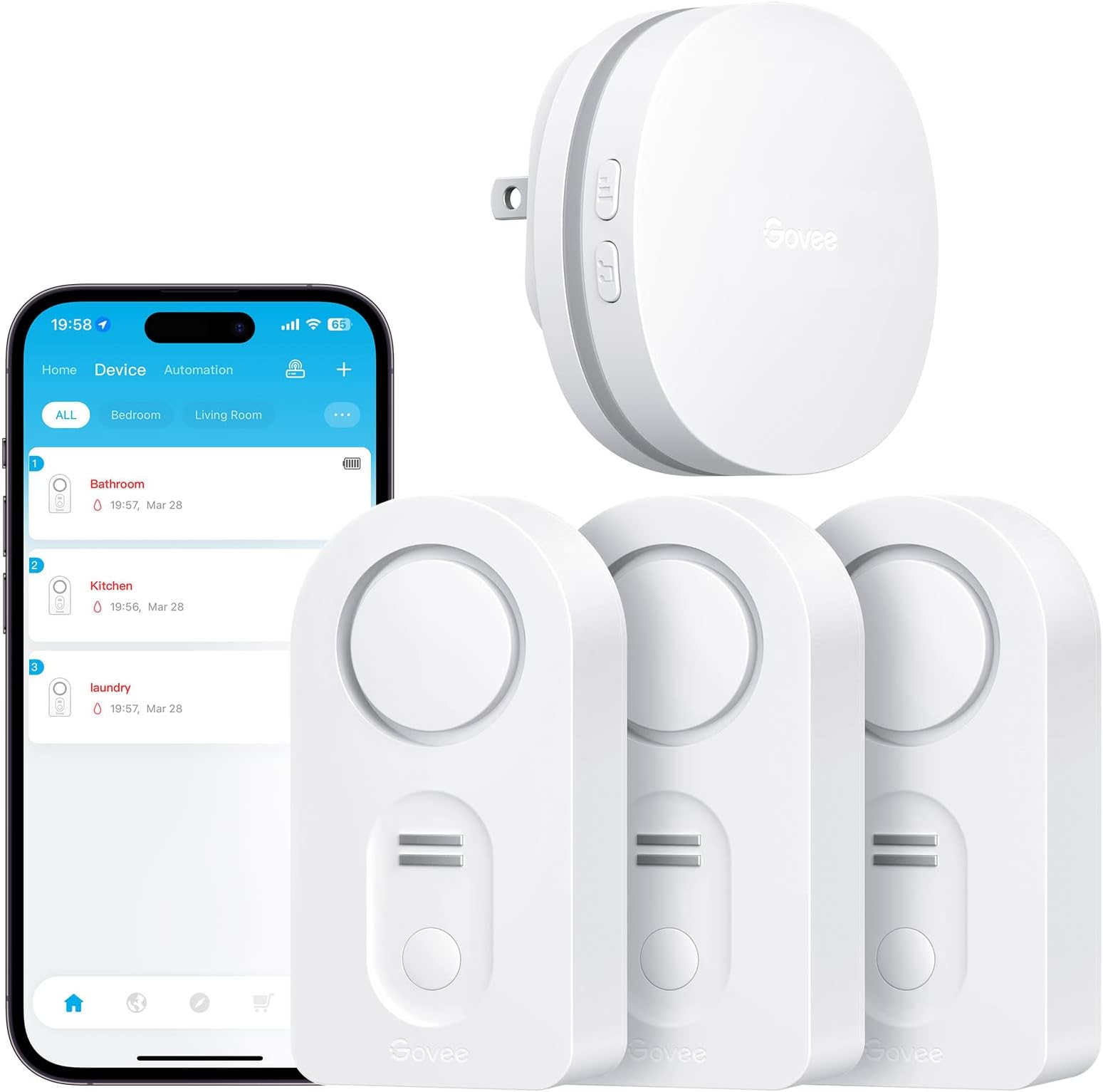



WiFi Water Alarm
Product ID: 96847749
Details
- BrandGovee
- ColorWhite
- Compatible DevicesSmartphone
- Power SourceBattery
- Product Dimensions3.46"L x x
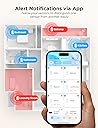
📱Instant app & email alerts
📶Connects up to 20 sensors
🔔100dB adjustable alarm
💧 Stay dry, stay ahead — never miss a leak with smart alerts!
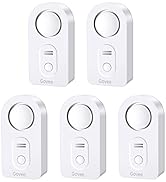
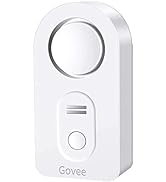
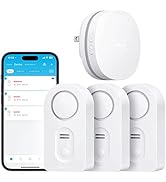
The Govee WiFi Water Leak Detector 3-Pack offers a smart, scalable solution for home water protection. Featuring a robust WiFi gateway that supports up to 20 sensors, it delivers instant app and email alerts alongside a powerful 100dB adjustable alarm. Designed for easy setup with battery power and customizable sensor naming, it’s ideal for basements and homes seeking proactive leak detection and peace of mind.







| ASIN | B07J9HZ5VN |
| Audible Noise | 100 db |
| Battery Description | Alkaline |
| Best Sellers Rank | #85,420 in Tools & Home Improvement ( See Top 100 in Tools & Home Improvement ) #67 in Water Detectors & Alarms |
| Brand | Govee |
| Color | White |
| Compatible Devices | Smartphone |
| Control Method | App |
| Customer Reviews | 4.3 out of 5 stars 10,994 Reviews |
| Item Dimensions L x W x H | 3.46"L x 1.77"W x 1.04"H |
| Manufacturer | Govee |
| Maximum Range | 196 feet |
| Mfr Part Number | B5040101 |
| Model Number | H5040+H5054 |
| Mounting Type | Tabletop Mount |
| Number of Batteries | 6 AAA batteries required. (included) |
| Number of Items | 3 |
| Number of Packs | 3 |
| Power Source | Battery Powered |
| Product Dimensions | 3.46"L x 1.77"W x 1.04"H |
| Sensor Technology | Contact Sensor |
| UPC | 799953927983 |
| Unit Count | 3 Pack |
L**D
Works like a tank.
I bought this six years ago. I’ve changed the batteries two or three times. It’s saved my hide a couple times. Yesterday morning, I was changing the battery for one of my alarms next to my sump pump as I was replacing it I couldn’t see very well, and I dropped the alarm into the sump pit on accident. I heard the “kerplink” of the alarm splashing into the water… And then a muffled alarm. I was all the way dressed and late for work, so I did what anybody else would do – I pretended I didn’t do it and walked away! I figured I would just let it break – the thing certainly wouldn’t last more than a few minutes fully submerged, right? Then came the alarms on my cell phone. And the emails over and over again, it was incredibly annoying and interrupted my day. I had to shut off my phone during important meetings and confess to coworkers what I had done earlier that day. Over and over again, it didn’t stop. 12 hours later after I put the kids in bed, I went back to my basement and fetched the alarm out of the water, fully submerged. The battery was still at maximum level, it was still screaming, and alarm both audibly, through email, and incessant notifications. EXACTLY ITS JOB. Perfect! But this little bugger with six year old technology did its job all day long, fully submersed, and didn’t give up. THATS AMAZING! I set up my hub once six years ago and it’s easy as can be. I’ve changed wifi equipment and it all transferred. I’ve had trouble with other hubs but not this one. THIS IS A TANK! So far, im more thankful for this than my fire alarm!
G**A
Great product, poor instructions
This water alarm comes with 3 sensors, which you wirelessly connect to a "gateway" resembling a mini router which gets plugged into a standardized household electrical outlet and remains plugged in. Once these sensors are "paired" with the "gateway" and you enter in information on an app downloaded on your smartphone, the system is operational. I have tested each sensor placing it on a wet sponge. The sensor would begin sounding a shrill beeping alarm, and seconds later you would receive a warning via your smartphone informing you that there is a leak detected, and from which detector (you get to name each detector's location). So if you're not home, you can rush home or alert a neighbor about your flooding home. If you're far away on vacation and don't have family or a friend who can gain entry to your home, you can panic and get used to the idea that your home is getting ruined by water and, subsequently, mold. You can also purchase additional sensors and link them to the same "gateway" you already have. The system I purchased would not link to my cell phone, rendering it useless if nobody was home. I emailed Govee technical support who sent, within hours, correct or nearly correct instructions on how to pair it. I am pretty much a technical idiot, so if I was able to pair these sensors, you probably can. I just don't understand why a company wouldn't enclose the correct instructions with a product. Apparently something was lost in the translation from a Chinese language to English. For a $75 one-time fee, Govee could probably have hired a proficient translator to write the freakin' instructions that could be followed by customers easily. I gave 'em 5 stars anyway.
T**H
Good quality item for the money
I had a minor leak on a attic water heater. Luckily my wife heard water dripping. The water heater being in the attic makes me uneasy as it could easily be a big problem if leaking. I ordered this item in hopes of finding a future leak before it could cause major damage. First impressions were that the item appeared to be of higher quality than expected. A year ago I was having issues with my Wifi and purchased a MESH router, which has been great with good connectivity and range. It broadcasts in 2.4 and 5 G. This sensor system uses 2.4G. I followed the instructions and downloaded the app to my Iphone 11 but could not get the app to detect my Wifi. Although both signals were being broadcasted, the phone was connecting to the 5G, thus not allowing the app to connect. My router app even has an option to temporarily turn off 5G for this very kind of application but still the app did not see the signal. I tried a few tricks I saw on the internet with no success. What worked for me was using a old Ipad my wife never uses that connects only by 2.4G. I downloaded the app to the Ipad and it easily found the signal. The install was smooth after that. I tested the sensors in the sink and they worked perfectly. Each unit has a speaker that emits and loud alarm plus the phone gave a warning also. Hope I never have to hear the alarm but I do have some peace of mind knowing I have the sensors.
C**S
Catch flooding early, peace of mind!
I knew it was inevitable this Spring, my basement was going to flood. No way around it. I hired a lemon of an excavation company last year to stop it, they did the worst job imagineable and made the problem worse. They basically created a basin that collects rain water up against my house and then just DUMPS it into my basement. Plastic sheeting on the outside helps keep the rainwater out, but after a WI winter with heavy snow & ice, I was concerned that I didn't quite make sure I placed enough sheeting down. So, after a day of chunking ice & vacuuming water on the outside so I remove old sheeting and place new down new before March rain... I placed these sensors down. I was pretty confident only a small amount would leak in the usual spot. I thought 3 sensors was more than enough and I'd place the other 2 in areas of mild concern. Well the usual spot didn't leak, my efforts of ice picking and vacuuming (and probably worrying the neighbors) has paid off. The water came from under the house! A sensor went off just as the water was trickling in. I ran to action... placing towels and quick damn bags down to keep the water from flowing in from the area in the floor. I only had maybe 1/4-1/2" of standing water in a low spot of the basement floor. I discovered my sump pump had actually burned out! And my drain tile was overflowing! Now, keep track of all the gadgets I mention in this post if you deal with flooding, because I believe my paranoia saved me this year... I still had messe, but I cleaned them up quickly and my life was only derailed for a few hours vs days like usual. I love my basement when it's dry, I have a little gym down there. Its my version of a she-shed... Not only did I purchase the quick dam bags, I purchased a portable pump in case s#!% hit the fan and the flooding got bad... so when I discovered my sump pump quit working, I was able to drain the basin and draintile in about 20 mins once I set up the portable pump and garden hose. So make sure you have this essential in your power toolkit also! Because when I discovered the pump was out, it was 630 at night in a rural area where every hardware store was closed and the closest Menards is 45 mins away. I would've had to drive there while my house continued to flood. I just kept up with the portable until I could get my sump replaced! You know what they say, an ounce of prevention is worth a pound of cure! So then the 2nd time the sensors went off, it was because I realized after all this mess with my sump pump, I had unplugged my water softener. I plugged it back in, not realizing the thing drains and the drain pipe was not pointed back into my drain basin where the sump pump is. (K, folks, I'm a single mom with NO mechanical ability AT ALL, everything I have learned in this area is because I'm in desperation to fix an issue and I don't have a man to call) So after I plug it in, and I'm all thankful that everything is finally fixed and I probably survived Spring flood season already, I sit down with a cup of coffee so glad that all the above steps were in place and things didn't turn out as bad as they could've, a sensor goes off 😞🤬 66 gallons of water from that f'n water softener. Imagine if I didn't have the sensor tho, and I just sat upstairs enjoying life thinking all was peaceful and calm while it just kept pouring water in! I caught it 10 mins in thanks to these and was able to stop the flooding and clean up the mess in an hour. So here's your flooding grocery list: GOVEE Water sensors (these are great, especially if you're away from home like I am!) Quick Dam flood bags (can absorb, act as a barrier to keep water from continuing to flow in) Wet vacuum Portable sump pump Dehumidifier Flashlight that you keep on a hook near the area of flooding because you should cut power to the house until you know its safe to enter without getting electrocuted Lots of extra towels to dry up the floor after you've removed the bulk of the water! Husband 🤣🤣🤣 jk
B**S
A Lifesaver for Every Home - Govee WiFi Water Sensor 3 Pack Review
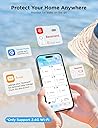
I recently purchased the Govee WiFi Water Sensor 3 Pack, and I can confidently say that it's one of the best investments I've made for my home. These little devices are absolute lifesavers when it comes to protecting your property from water damage. Installation was a breeze - just a matter of connecting them to my 2.4GHz WiFi network (note: they don't support 5G WiFi). Once set up, they worked seamlessly with the Govee Home app, allowing me to monitor the status of each sensor from my phone. The 100dB adjustable alarm is loud enough to get your attention, even in a large house. It's a reassuring feature knowing that you'll be alerted immediately if there's even a hint of water where it shouldn't be. The fact that you can customize the sensitivity level ensures that false alarms are kept to a minimum. But what truly sets the Govee WiFi Water Sensor apart is its ability to send email alerts. This means you're not reliant solely on the app - you'll receive a notification even if you're away from your phone. This level of responsiveness is crucial for avoiding major water damage incidents. The sensors themselves are well-built and feel durable. They're compact enough to be discreet, yet sturdy enough to handle any potential moisture. I placed one in my basement, another in the laundry room, and the third under the kitchen sink - all high-risk areas for leaks and water damage. Since installing these sensors, I've had a couple of instances where they detected water where it shouldn't have been. In both cases, I was able to address the issue before any serious damage occurred. It's incredible how much peace of mind these sensors provide. The battery life is impressive. I've had them for several months now, and they're still going strong. The low battery alerts are another thoughtful feature, ensuring that you're never caught off guard. In terms of value for money, this pack of three sensors is reasonably priced considering the level of protection they offer. When you compare it to the potential cost of water damage repairs, it's a small price to pay for such a valuable safeguard. In conclusion, the Govee WiFi Water Sensor 3 Pack is a must-have for any homeowner. It's reliable, easy to install, and provides an extra layer of security against water damage. Don't wait until it's too late - invest in these sensors and save yourself from potential headaches and costly repairs down the line. I highly recommend them to anyone looking to protect their home and belongings.
C**S
SECURITY RISK. CAN'T RECOMMEND AT THIS TIME.
Update 10/7 Govee got back to me. If this Support Engineer's description and troubleshooting steps are right, no one should buy this kit at this time. First off, if you use an Eero, as I said before, it won't work out of the box and it requires a support call to them to disable 5GHz (shame on you Eero for not making that a user toggle, BTW). But here's the issue -- look at #6(A). The password recommendation is 8 characters, numbers and letters only. From what I can tell so far, that isn't a temporary thing. If you want Govee to stay on your network, you have to basically give your WiFi the security of a piece of Swiss cheese. No WiFi password in this day and age should be 8 characters. With access to a botnet or AWS instance farm, a WarDriver or your neighborhood script kiddie will have it cracked in minutes, or in the best case for them, a couple of days. This is unacceptable and I don't know how this could have scored an 'Amazon's Choice' banner with that level of insecurity. I've responded asking if there is a way to reload the firmware on the device and if they have anything in a Beta stage that could be tested to resolve these issues. If not, this is getting returned. Here are Govee's troubleshooting steps and notes: If the gateway is unable to connect to WiFi, please follow this troubleshooting: (1) If the mobile phone WLAN/Wi-Fi switch is not turned on during setup, there is no WiFi list selection, please go to the phone settings page to re-open the mobile phone WLAN/Wi-Fi until the prompt disappears. (2) In the WiFi setting interface of the APP, please fill in the your home WiFi account and password correctly. If you need to switch WiFi, please do not choose the WiFi named "Govee_gateway_XXXX"; (3) Please check if the network standard is 5G network, please switch to 2.4G network standard and restart the router. (No supports 5G) If the router supports dual-frecuency, please turn off 5GHz before connecting:) (4) Please check if the WiFi network is normal. Please use the mobile phone to connect to the WiFi network to confirm that the network communication is normal. (5) Please check if the WiFi network account and password are correct or not, and enter the correct account and password to reconnect. (6) If the WiFi account number and password are not compatible, please mo-dify them to a simple (number and letter combination) account and password before connecting. A. The password length is recommended to be 8 digits. There can't be any special symbols (eg: '=&<>"" {}) in the WIFI name and password. B. If the router has the anti-mite network function enabled, please disable it. C.Please chan-ge the encryption method in the router settings to TKIP&AES; D. Due to the difference of routers, if the above methods can not solve the problem, please restart the router or chan-ge a router to have a try; (7) When APP prompts you to connect a WiFi starting with Govee_gateway_XXXX, and you can't find it in the WLAN setting, please check if the light on the gateway is flashing slowly blue or not. If not, press long the WiFi pairing key for 3 seconds until the blue indicator light flashes slowly. (8) If the router is not compatible with the device, please use the mobile phone hotspot to connect. (9) Please turn on GPS/location and Bluetooth. (10) Please log in to the router and enter its security settings interface to disable Mac address filtering. (11) As for IOS, please note that there will be an extra blank, please de-lete it when you enter WIFI password, thank you! (12) One example from our customer: complete setup if I disabled mobile data connection on my phone. Gateway to WIFI: https://youtu.be/m_A_4Fg0Jd0 Update 10/4 I spent over an hour on the phone with Eero Support working through this and they turned off the 5GHz band completely, and the gateway still wouldn't connect, and they never saw it try to connect during the setup process. Still haven't heard back from Govee despite two requests within the app and multiple emails directly to Support. About to return this. I had high hopes for this little kit, and it looked like it was precisely what I needed. I read the reviews and ignored the negatives thinking 'surely, in a network as well built and modern as mine, there won't be issues, after all, I've not had any problems with other 2.4GHz only devices'. Don't make that mistake. It seems that this system works if you have a 1994 WiFi setup with horrible security, no band steering and don't use a mesh of any sort. If your WiFi setup is in any wise modern, don't bother. I don't generally say flat-out to not buy a product, but I have yet to get something even close to working or get a response from the company. I run an Eero Pro configuration and have terrific WiFi throughout the house. The system supports both 2.4GHz and 5GHz bands simultaneously, with band steering technology in place. The WiFi 5040 gateway Govee has built simply will NOT connect to it, no matter what I do. I have other 2.4GHz only devices, some of them pretty old, that work flawlessly with Eero. I don't think it's an AP/Mesh problem, it looks to be a client problem entirely. I thought it was the password being too complex, based on some reviews that said simplifying their password helped. Turned on Guest access with a horrific password, and it didn't make any difference. Thought maybe the beta band steering I have enabled was causing an issue, so I turned that off and started again. Nope, no dice. I happen to have a mobile hotspot that operates in a fixed 2.4GHz band for WiFi, still wouldn't connect to that, though I'm still suspecting that connection issue is related to the complex password I have on that device, but it's too troublesome to change that for me to keep troubleshooting. Support? They don't reply if I log a problem via the app or an email, so I can't really say they have good or bad support, because from my perspective they have NO support. What's so painful to me is I'd be willing to help them figure out what's going on if they'd only respond. I work in the tech space, and troubleshooting these sorts of things is something I do all the time. As it is I'm going to have to explore other solutions.
D**T
Protection from water leaks
The device took me a while to get it connected! I didn’t think the sensors had connected to the gateway BUT I found out I just needed to be more patient. Everything got connected. I tested the sensors. The alarm on each sensor went off as required and I’m very pleased.
I**R
Up and Running
After reading the one and two star reviews which complained about difficulties in connecting up the system I still went ahead and purchased because there seem to be many more purchasers who had successfully installed the system. I have just completed the installation of the app, the hub, and the first sensor within 10 minutes - And some of that was the time taken to carefully read the instructions and follow the steps. I have my first sensor installed under the sink, and when I get the time will install the other eight sensors which I have purchased, in strategic locations around our condo. I suspect each one will take only two or three minutes if the experience of the initial installation is repeated. One piece of advice which may be helpful is that, if you have several sensors, you really need to list where each one is - as well as allocating them “locations” on the app. The sensors are pre-installed on the app (1,2,3, etc) but you need to look carefully at the serial number AND the sequential number shown on the app, and compare it with what is on the plate on the back of the sensor itself. That identifies which sensor you are installing and you can then create on the app its unique location and “add“ the sensor to that location using the + sign. I found that the preset locations were too general, so I changed them on the app - for example “living room” to “kitchen sink”. This amount of detail is necessary for me because I am going to be monitoring from a remote location. I need to know exact location of a sensor if it goes off so that I can guide the caretaker or plumber to exactly where the problem is. If you are living permanently on site, you may be happy to leave out that step. Hopefully that’s it! So far it does what it says on the box! UPDATE: All nine sensors now connected without any problem. Took about thirty seconds each to connect to hub, rename location on app, and allocate sensor. I have labelled each sensor with a number as the serial numbers on the unit don’t always tally exactly with what shows up on the app. Tested with water - loud warning from the sensor, notification on the app, and instant email. So far - excellent!
F**A
No warranty
After 9 months of use, the gateway keeps on disconnecting without connecting back to the WiFi. Became useless. Contacted the seller for warranty. Was told to contact Govee directly, who said this seller isn’t an authorised one and warranty is void... A joke... Avoid this seller by all means. The product itself is nice. Buy directly from Govee and you’ll be on the safe side.
L**Y
Cost-effective excellent Wi-Fi enabled water leak detectors
Govee WiFi Water Sensor 3 Pack, Water Leak Detector 100dB Adjustable Alarm and App Alerts, Leak and Drip Alert with Email, Wireless Detector for Home, Basement(Not Support 5G WiFi) These are cost-effective Wi-Fi enabled water leak sensor devices. This pack comes with three wireless sensors that check in to a single Wi-Fi plug-in hub. This type of design allows you to buy many sensors for a cost-effective price. There are other water leak sensors that have Wi-Fi built into the leak sensor itself however the obvious trade-off here is that each of those are typically 40 to $70. With this type of design each water sensor uses a 433 MHz RF signal to the central hub. And the hub itself connects to Wi-Fi using 2.4 GHz Wi-Fi. Because of the low RF range it is quite capable to be placed pretty much anywhere in your house and reach the Wi-Fi hub. The water detection is very quick and it notifies your phone and sends an email. Within 10 seconds of detection you will get a phone app notification as well as an email and obviously you will hear the siren go off loudly. The water leak sensors have three volume levels for the siren. Basically you would want to set this to the high level. Each of these sensors uses two AAA batteries. The anxiety that one day you will run out of batteries on a sensor is eliminated by the fact that it checks into the app and your phone app displays the battery level of each sensor independently. Each sensor can be labeled to however you want to be descriptive. In order to figure out which sensor is which, you basically trigger the water sensor and the app tells you which one is firing and from that point on you know which sensor to label. This is a very nice water leak detection system not only because it works quickly, but it being wifi enabled to your phone with minimal notification delay, is just invaluable. Disclosure: I own a few dlink water sensors which are all stand alone wifi enabled detectors and they cost 70$ each!!! Quite frankly this govee system works better and notifies you quicker even! I also own non connected water detection sirens..they work great too , you just never know when the battery is dead ... And you never know if it's going off when you're not home. I recommend this over D-Link and any other non wifi enabled devices. . Hope this helps
K**M
Highly recommended for proactive leak monitoring in any home.
I recently installed the Govee Water Sensor 3-pack, and it has been a game-changer for monitoring potential water leaks around my home. These sensors are small, unobtrusive, and give me peace of mind knowing I’ll be alerted immediately if water is detected. Setup & Ease of Use Setting up these sensors was quick and straightforward. The app walks you through connecting each sensor to Wi-Fi, and placement is flexible—you can use them in basements, under sinks, near water heaters, or behind appliances. Once placed, they work instantly without any additional setup. Performance The sensors are highly responsive. Even a small amount of water triggers an immediate alert to my phone, giving me enough time to address the issue before it becomes a bigger problem. The notifications are reliable, and the sensors seem very accurate. Build Quality These sensors feel solid and well-built. They’re compact enough to place discreetly, yet durable enough to last for years without issue. Battery life is excellent, so I don’t have to worry about frequent replacements. Final Thoughts Overall, the Govee Water Sensor 3-pack is a must-have for anyone who wants to protect their home from unexpected leaks. Easy to install, reliable, and highly effective—these sensors give me confidence and peace of mind.
A**.
Good Value but Room for Improvement
Overall, these are good value with lots of nice features. But there is one really glaring missing feature that Govee needs to add if they want a full 5/5 rating: The android app does not show sensor signal strength to gateway, nor does it show status. So the app shows all the sensors regardless if the gateway sees it or not. So if a sensor is in a puddle of water but the signal is not getting through, you have no way of knowing there is no signal, and of course it does not signal that it detects water. So it creates a false sense of security. I have sent the suggestion to Govee support but no answer. I suggested showing signal strength for each sensor, status of each sensor, and an alarm option if a sensor drops off. I am hopeful they see the logic and add this feature to the app. After final placement of the gateway, I tested each sensor with a plate of water, at the sensor location, to make sure each has a proper signal where they are placed. A painfully tedious process to make sure each is within range, which could be avoided if I had some way of knowing the sensors have adequate signal strength. But even with that precaution, I have no way of knowing if there is a sensor barely within signal range. It is unfortunate that such a overall good system has such a glaring flaw. Otherwise I think it is a pretty good system. Instructions are quite good, so setup was quite simple. And I overall like how the alarm is audible, goes to your phone, and sends an email. Normally I would give a 3/5 rating for such a big flaw, but it is overall a pretty nice package so I give it 4/5. I am sure I am not the only one requesting these additional features, so I am hoping that Govee listens and adds the features in a future update.
K**N
Peace of Mind
Bought this as a Gift for my Parents who own a 1912 home. The house has had problems since day one with water leaking in from ground water. We installed Sump Pumps but occasionally they fail or lose power so this was a good product to notification when that happend. Got the 3 pack and placed them next to place in the basement the collect water first if pumps fail. They are very Loud you can hear them from other rooms. I like that you can have multiple push notifications emails attached so if they aren't home we all get a email Immediately when a sensor gets wet. It great peace of mind and will save you thousands in insurance claims and hassle when a leak does occur. Perfect gift for the family home. My parents are not tech savvy however once set up just check the batteries every 3-6 months or use the App which does give real time battery levels. Pros: Good Value, set up time 40mins, Very Loud. Cons: requires AC power for Gateway wish it had a battery/ac option for power outage. Suggestions: A UPS battery backup for your home Internet and the Gateway will allow you to get push notifications if power outage (for short periods) if your using for my use case. Shipping package 📦 was very damaged on arrival, but product was in perfect condition inside so thats good. So far very happy. Will update in 6 months.
Trustpilot
2 weeks ago
2 days ago