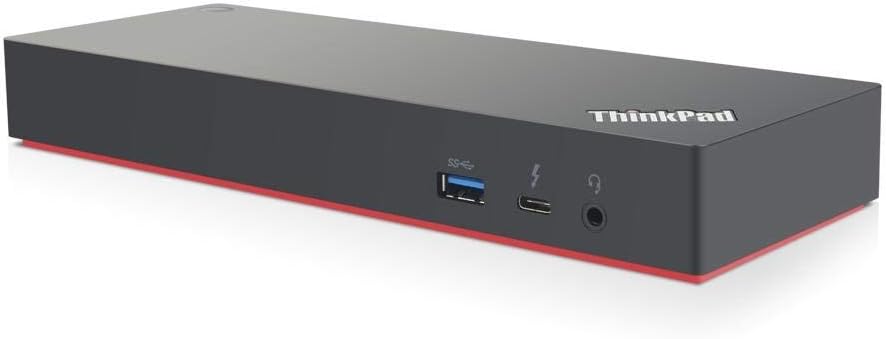
⚡ Power your productivity with the ultimate ThinkPad dock — because your workstation deserves the best.
The Lenovo ThinkPad Thunderbolt 3 Workstation USB Dock (model 40AN0230US) is a high-performance docking solution designed exclusively for select ThinkPad mobile workstations. It delivers up to 230W power, supports ultra-fast 40Gbps Thunderbolt 3 data transfer, and enables up to three 4K UHD displays or a 5K display. Equipped with five USB 3.1 ports and enterprise-grade manageability features like PXE boot and Wake-On-LAN, this dock transforms your laptop into a powerhouse desktop setup, perfect for demanding professional environments.
| ASIN | B07J2TXRF7 |
| Batteries | 1 AAA batteries required. |
| Best Sellers Rank | #18,240 in Computers & Accessories ( See Top 100 in Computers & Accessories ) #975 in Laptop Docking Stations |
| Brand | Lenovo |
| Color | Black |
| Customer Reviews | 4.1 4.1 out of 5 stars (68) |
| Date First Available | October 9, 2018 |
| Is Discontinued By Manufacturer | No |
| Item Dimensions LxWxH | 8 x 4 x 3 inches |
| Item Weight | 0.01 ounces |
| Item model number | 40AN0230US |
| Manufacturer | Lenovo |
| Product Dimensions | 8 x 4 x 3 inches |
J**Y
You need both power cords for the docking station if your not just doing a laptop read user guide
Great product once you get it to work. The upper information should specify that the user guide is there. The Lenovo website did not have it when I went looking for it and support was horrible . They claimed it was not compatible with Thinkpad P1 g1 . This thing works great .
A**.
Not pretty but it works well
Most of the difficulties people are having with this docking station is because of Lenovo's poor documentation of its features. It is certainly designed for workstation-strength laptops, not the ordinary variety. Yes, it does not look pretty with the cables, but Lenovo provides a docking station mount which improves matters. Otherwise, it performs as advertized, although it would have been much better if Lenovo had provided some more in depth information
U**R
Not good for displays - basically an over-priced, underperforming USB hub
I have had this docking station for a year and have found it to be frustrating from day one. My set up is 100% Lenovo: Thinkpad X1 Extreme with GeForce 1050 Ti + 2x P27h-10 monitors. I figured that getting a Lenovo doc would mean it would be seamless. Hardly the case. It's only been problems. I would not recommend this product. I should have known from day 1 to just return it. When you plug it in with the monitors attached, you get a "Display Connection Might be Limited" warning from Windows. Great. To try and solve this I have updated the dock firmware, updated my Thunderbolt drivers, updated my display divers, and finally reinstalled windows from scratch. Nothing fixed it. During normal use, the monitors will randomly just go blank. Sometimes I'm lucky and they come back after ~3-5 seconds, but often I have to unplug/plug the docking station. Doing that has about an 80% success rate, otherwise I have to restart the computer :( A hassle if you are doing something with lots of windows open (I'm a developer so often have lots of terminals/compilations and other uninterruptible processes going). Additionally, sound is extremely unreliable. I use a monitor sound port (the only one one the doc is on the front of it and I don't want the wire running across my desk) and frequently when the computer either wakes up from sleep or the monitors turn on after being off the sound does not work. I have about 80% success with going into device manager, and disable/enable the HD Audio device. If that doesn't work - restart required :( In the end, I've bypassed the doc and plug one of my monitors directly to the thunderbolt port (no "Connection Might be Limited" when I do that) and daisy-chain the monitors using display port. The doc is now a really crappy (as in very few ports with a really short cable) USB hub that I paid hundreds of dollars for.
A**E
Old Unit Couldn't Sync Monitors, New One Works!
I've always had a laptop dock at my desk. It just makes connecting the laptop so much easier rather than having to plug in and disconnect multiple cables when going portable. My new Thinkpad Carbon X1 Extreme Gen 2 uses Thunderbolt instead of a proprietary dock, so I picked up this unit. Yet so far it seems to handle everything I need. I have two monitors connected, Ethernet, audio cable, and all the USB connectors filled, including one going to a filled 10 port USB3 hub. I don't have any USB3 storage connected, as I use a NAS and second drive in the machine. I only occasionally temporarily connect thumb-drives or external drives directly to the laptop, so I don't know how well it would handle storage through the dock. The big annoyance I have with this dock is that it has trouble syncing two monitors. With my old proprietary docks it was instantaneously synced. With a fresh boot of the computer this dock will first display on one screen, then switch to the second, then switch back to the first, then back to the second, etc., etc. in an eternal loop. To fix it I turn off the second screen, wait for the first to stabilize, and then switch on the second screen and it works fine. This loop doesn't happen if I always use the on/off button on the dock. As long as I use that button to put it to sleep and wake it up the dock only does a single cycle of syncing the monitors and it's fast enough that it's not crazy annoying. So, one star off because dual monitors are not as smooth as proprietary docks. **** UPDATE 01/27/2020 They came out with new firmware for the dock in January 2020. After installing it I could no longer run multiple monitors at all, as all screens would turn black whenever the second monitor was plugged in. I had to hard shutdown the laptop to get a screen back. Prior to the firmware update the hub had trouble syncing, but eventually worked. Now, nothing. Every screen black. Tried all kinds of things including different monitors and cables, etc. I now have to plug one monitor directly into the laptop. **** UPDATE 02/11/202 Contacted Lenovo support. They over-nighted me a new unit. This new one works. For the first time it boots up with two monitors connected without any sync issues. So, either the first one was bad or they fixed something over the past 6 months.
R**T
Lenovo
Great rig
W**H
Very nice
Works perfectlly with X1E, nothing strength was happened.
K**U
Good product, I like it.
good
A**R
Completely Useless !
I bought this docking stations for the following reasons: 1. Allow me to run my new Lenovo laptop closed with a large external display, keyboard and mouse. 2. Allow docking quickly. 3. Clear my desktop of unnecessary wires and cables. What I got was: 1. The docking station comes with two large power supplies that must both be used. The wires are not long enough to hide the supplies off of my desk and so the mess takes up about 2 square feet of desk space. 2. The connection to the laptop is one cable. Unfortunately it is about 18" long so the mess can't be moved off the desk. 3. The USB ports don't work. Web searches reveal that by finding some drivers, updating firmware and doing a dance I have a chance that I may be able to make them work. Additional web searching leads me to believe that installing these could cause damage. Not sure which it is, but I expected a Lenovo product to be compatible with my Lenovo laptop out of the box. Save yourself the money. Buy an additional power supply and a cheap USB hub. With those two items you will have a setup that takes up less space and works better than this very expensive junk.
G**T
No dan factura
G**G
Works great on my Lenovo X1 extreme. Have one screen plugged in via HDMI and the other via DVI. So far so good.
Trustpilot
3 days ago
3 weeks ago