Desertcart purchases this item on your behalf and handles shipping, customs, and support to SINGAPORE.
🚀 Upgrade your legacy PC with blazing NVMe speeds and cool reliability!
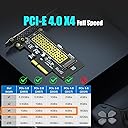
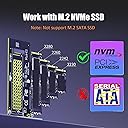
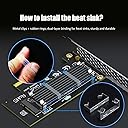
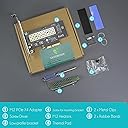
The GLOTRENDS M.2 NVMe to PCIe 4.0 X4 Adapter transforms your desktop’s PCIe x4/x8/x16 slot into a high-speed M.2 NVMe SSD interface, supporting PCIe 4.0 and 3.0 drives up to 4TB. Equipped with an efficient heatsink, it reduces SSD temperatures by up to 20°C, ensuring optimal performance. Compatible with Windows, Linux, and Mac OS, it enables OS boot from NVMe SSDs on most modern systems. The adapter supports multiple M.2 sizes and includes versatile mounting brackets, backed by lifetime tech support—perfect for professionals seeking to extend the life and speed of their existing PCs without costly upgrades.


| ASIN | B07FN3YZ8P |
| Additional Features | PCI-Express 4.0 X4 Full Speed Support |
| Best Sellers Rank | #7 in Serial Adapters |
| Brand | GLOTRENDS |
| Built-In Media | M.2 Heatsink |
| Cache Memory Installed Size | 6 GB |
| Color | Black |
| Compatible Devices | ['Desktop PC'] |
| Connectivity Technology | PCI-Express X4 |
| Customer Reviews | 4.6 out of 5 stars 5,456 Reviews |
| Data Transfer Rate | 64 gigabits_per_second |
| Digital Storage Capacity | 4000 GB |
| Form Factor | M.2 Key M |
| Hard Disk Description | Solid State Drive |
| Hard Disk Form Factor | 22 millimeters |
| Hard Disk Interface | PCIE x 4 |
| Hard-Drive Size | 64 GB |
| Hardware Connectivity | PCI Express x4 |
| Hardware Platform | Linux, Mac, PC |
| Installation Type | Internal Hard Drive |
| Item Dimensions L x W x Thickness | 2.76"L x 2.76"W x 0.12"Th |
| Item Weight | 0.08 kg |
| Manufacturer | glotrends |
| Mfr Part Number | PA09_HS |
| Model Name | PA09-HS |
| Model Number | PA09-HS |
| Number of Items | 1 |
| Read Speed | 64 gigabytes_per_second |
| Special Feature | PCI-Express 4.0 X4 Full Speed Support |
| Specific Uses For Product | M.2 NVMe SSD |
| Unit Count | 1 Count |
| Warranty Description | 30 Day Warranty Against Manufacturer Defects |
N**Y
Works perfectly in 10-year-old Z97 computer.
Used GLOTRENDS PA09-HS M.2 NVMe to PCIe 4.0 X4 Adapter to install a 2TB Samsung 990 PRO NVMe M.2 SSD in my 10-year-old computer build that is sporting an ASUS GRYPHON Z97 motherboard and Intel i7-4790K CPU. Been running a Samsung 1TB SATA 850 Pro SSD for ten years with no issues at all but, need more hard drive space. I knew going in this was on the edge of working at all but had to give it a shot. A new 2TB Samsung SATA drive is three to four time more expensive than this newer Samsung 990 PRO NVMe M.2 drive. The Z97 only support PCIE 3.0 so I knew before getting started I wouldn't get the full speed out of the drive, if this worked at all, but it would at least be a little faster that the SATA drive it was to replace. After installing the adapter and drive I booted PC as normal. Device manger showed the new devices installed. Running the latest version of Samsung Magician software showed the new drive as available for data migration. It performed the migration on the fly in 45 minutes. Next, I turned off the computer and disconnected my old drive. Went into the BIOS settings, and the new drive showed in the boot menu. Selected the drive and the computer booted right up with the new drive. More as an experiment than a necessity I noticed the drive was setup with old school MBR partition table so decided to upgrade the file system to the more modern GTP partition table using MiniTool Partition Wizard 12. After doing so the computer would not boot until I set the boot mode in the BIOS to UEFI mode by disabling fast boot mode. Computer boots right up and all is well! Also, I didn't use the included heat sink as according to the Samsung Magician software the drive is running well within specs averaging 90-100°F without it. Nice to be able to squeeze more life out of this old computer that is still plenty fast for what I use it for. I highly recommend the GLOTRENDS PA09-HS M.2 NVMe to PCIe 4.0 X4 Adapter with M.2 Heatsink for M.2 NVMe SSD.
S**.
Let me boot a new SSD in ASRock Z97 Extreme6
This is working excellently in my older PC using an ASRock Z97 Extreme6. I had an SSD with Windows 7 in the Ultra M.2 slot. The Ultra M.2 slot was special because it was on the PCIe 3.0 lanes from the CPU. With an SSD there, the 16 PCIe 3.0 lanes from the CPU were 8 to PCIe x16 slot 1 (your graphics card), 4 to PCIe x16 slot 2, and 4 to the M.2 Ultra slot. I wasn't running anything needing full 16 lane bandwidth to the graphics card. The SSD access speed up was far more beneficial. Upgrading the system to Windows 10, I wanted a new fresh SSD for that, and would just move the Win 7 SSD to the second M.2 slot (which ran off PCIe 2.0 lanes from the southbridge, sufficient for archive access). Got a new WD_Black SN7100 (PCIe 4.0 native, but should downshift to the slot's 3.0 capability). Even when messing with the BIOS to get it to show storage in the slot, could not boot that thing for nothing. Played with it, searched, others had issues, going PCIe addin board seemed the answer. Thankfully, these boards are not very expensive. Put the Glotrends board in the second x16 slot (which gets four lanes in the current config) with the new SSD mounted to it. I didn't bother with the heat pad stuff. Cooling in the case setup will keep air flow right over the board all the time. Booted up and installed windows and been booting and running no issue since. Excellent! So now there's the GPU on x16 slot 1 with 8 lanes, the old SSD in the M.2 ultra slot with 4 lanes, and the new SSD on the Glotrends board in the x16 slot 2 with 4 lanes. And it's all working great. Glad the product was out there so I could simply update the OS without having to invest a lot of money in any other new components.
L**G
Suited my upgrade to NVMe perfectly.
Worked perfectly to allow me to replace my SATA drive with an NVMe drive. Cloned my original drive. Allowing to boot and run significantly faster. Extending the life of a relatively older PC. Read up on Initializing drives in Windows. These are simple to use but NOT plug and play. This is not a FAULT of the adapter, just a requirement when installing NVMe drives as they are on the PCI buss. Would recommend to someone wanting to add or swap to an NVMe to a Motherboard without NVMe slots directly on motherboard.
J**N
Easy-to-use PC card or an extra NVMe
It works great with the Gen 3 NVMe I bought, but I'm not a fan of the red LED. Still, it's super easy to mount.
F**E
Easy to set up and it works very well
This is a well made product that represents good value for money. It was easy to setup and works 100%. However, I did use another heat sink for the card rather than use the one that is packaged with it. There is one small criticism and that concerns the quality of the screwdriver that is packaged with this PCIe card. It had a very deformed head and would not work on the retaining screw for the NVMe drive. I can see why others who have purchased this product might have had problems with this screw (admittedly it is very tight though). The heat sink that I purchased, to substitute for the one that came with the PCIe card, is this one: https://www.amazon.com/dp/B07KDDKDNN?psc=1&ref=ppx_yo2ov_dt_b_product_details I installed a 4Tb NVMe drive onto the card and wanted to ensure it was well-cooled. The card runs very well with this combination and doesn't get anywhere near max temperature. I installed it in PCIe slot 3 (x4) on an Asus Crosshair Dark Hero motherboard. The heat sink that came with the PCIe card may have worked just as well but I was dubious about the way it was recommended to be attached to the PCIe card (silicone bands or, alternatively, metal retaining clips) which could easily scratch the circuitry on the bottom of the NVME M.2 drive.
B**N
Works Perfectly as Advertised, Great for My NAS!
This single M.2 NVME to PCIe 4.0 X4 adapter works perfectly as advertised. I used it for my new NAS build with the ZimaBoard 2 1664. I used a 3D-printed bracket made from ABS to mount the NAS into a 10" mini-rack. I had to remove the I/O bracket since my 3D-printed rack mount case did not have a way to accommodate it, but the adapter board works perfectly without it. I used standard motherboard standoffs with the holes in the PCB to secure the board to my 3D-printed case. The ZimaBoard 2 recognized the SK-Hynix PCIe 3.0 SSD instantly with no issues, and I am using it to store the server's operating system, docker containers, and virtual machines. The two additional SATA SSDs are in RAID1 for speedy network storage. The included heat sink combined with the two PWM server-grade fans in the bottom of the mini-rack are plenty to keep the drive cool. I rarely see the drive temperature go over 30° Celsius. I paid less than $10 for this adapter card, and in my mind the value is unbeatable. I highly recommend this adapter card. It is just plug-and-play. No extra configuration or drivers required.
B**Y
Works
Seems to work fine, though I've been using it at only PCIe 3.0 x4 speeds. No noticeable latency
R**U
tracers review
i got this for my HTPC which that board had a pci gen 2 x2 NVME slot which basically slowed down the SSD i was using in it this being PCI-E gen 3&4 x4 makes it where the full performance of the current SSD could be maxed out the installation was quite easy and my SSD had booted up without any problems as i had windows 11 enterprise IOT installed on the drive the heatsink will likely help even though the current drive is only gen 3 and sl is the x16 slot i put it in to me the quality is excellent and i see it being compatible with all NVME drives from gen 3 and 4
D**L
Competent card
Works.
J**N
Good option for those who need an extra NVMe drive for their PC
Easy installation, worked straight away with a 2TB Samsung 970 EVO Plus.
J**N
Arrived quickly. Works as intended.
I used it for my new SSD (The KIOXIA 内蔵 SSD 1TB NVMe M.2 Type 2280 PCIe Gen 4.0×4) since my Aurora R11 only had one slot for a NVME M.2 to go into, which was for my OS SSD. I ended up putting my OS SSD into this adapter and using the built-in slot for my new SSD. (To take advantage of the PCIE 4.0 speed) It works great and I have never had a problem with it. It comes with a little LED light in it, so you can check if it is powered/slotted correctly. The heatshield+gel works good too. It arrived the day after I ordered it as well, which was great, since I needed it quickly.
M**N
Just Perfect
I ordered it because I didn't have a second NVME slot on motherboard. Only use it for games and vfx, so far works flawlessly without any issues.
I**A
Compatibilidad y Rendimiento
🔹 Diseño y Funcionalidad: Este adaptador M.2 PCIe SSD representa un avance significativo en el campo de las soluciones de almacenamiento y expansión para computadoras. Su capacidad para trabajar con PCIe 4.0/3.0 M.2 SSD y no limitarse a los SSD M.2 NGFF SATA es un punto fuerte. Esto lo hace ideal para aquellos que buscan aprovechar la velocidad máxima de PCIe 4.0 X4 (64Gbps), aunque es crucial tener en cuenta que tanto la CPU como la ranura PCIe de la placa base y el SSD M.2 PCIe deben ser compatibles con PCIe 4.0 para lograr este rendimiento. 🔹 Compatibilidad y Rendimiento: La compatibilidad con el arranque del sistema operativo desde el SSD PCIe es un aspecto destacable. Sin embargo, es importante tener en cuenta las limitaciones, como la necesidad de reinstalar el sistema operativo y configurar el BIOS/UEFI para arrancar desde la SSD M.2 PCIe. Además, la incompatibilidad con Windows 7 para el arranque del sistema operativo podría ser un inconveniente para algunos usuarios. 🔹 Usabilidad: Como disco de almacenamiento, este adaptador es ampliamente compatible con sistemas operativos modernos como Windows 11/10/8, Linux y Mac OS. La necesidad de inicialización y formateo de los nuevos SSD M.2 PCIe antes de ser reconocidos por el PC es un paso adicional, pero es manejable para la mayoría de los usuarios técnicos. 🔹 Accesorios Incluidos: Los accesorios proporcionados, como el disipador de aluminio M.2, los soportes de perfil regular y bajo, y los kits de instalación, añaden un valor considerable al producto. El disipador de aluminio es particularmente útil, prometiendo una reducción de temperatura de entre 5°C y 20°C, lo cual es crucial para mantener un rendimiento óptimo y la longevidad del SSD. Conclusiones Este adaptador M.2 PCIe SSD es una solución robusta y versátil para usuarios que buscan expandir las capacidades de almacenamiento y rendimiento de sus sistemas. A pesar de algunas limitaciones, como la incompatibilidad con ciertas configuraciones antiguas y sistemas operativos, sus ventajas en términos de velocidad y compatibilidad con las tecnologías más recientes lo convierten en una opción recomendable para usuarios técnicamente inclinados y entusiastas del rendimiento. El conjunto de accesorios incluidos y la facilidad de instalación son puntos adicionales a favor, haciendo de este adaptador una excelente elección para mejorar la eficiencia y capacidad de almacenamiento en configuraciones modernas de PC.
Trustpilot
2 weeks ago
2 weeks ago