


🔌 Stay connected, stay ahead — the ultimate USB-C adapter trio for pros on the move!
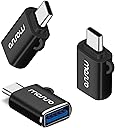
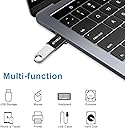
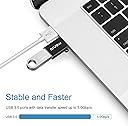
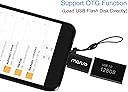
The MOSISO USB C to USB Adapter 3 Pack offers a premium aluminum alloy build with a compact design, supporting up to 5 Gbps data transfer speeds. Compatible with MacBook Pro (2016-2024), MacBook Air (2018-2024), iPhone 15 series, and most USB-C devices, it includes an anti-lost leash for convenience and OTG support for direct USB flash drive access, making it an essential accessory for professionals needing reliable, high-speed connectivity.


| ASIN | B0DJS688NP |
| Best Sellers Rank | #561 in USB-to-USB Adapters #8,942 in Computer Cables & Interconnects |
| Customer Reviews | 4.3 4.3 out of 5 stars (18) |
| Date First Available | October 10, 2024 |
| Item Weight | 0.16 ounces |
| Item model number | a69c0e5c-f4fb-4b47-97dd-5250b1d4634e |
| Manufacturer | Mosiso |
| Package Dimensions | 3.7 x 2.2 x 0.5 inches |
D**E
Handy adapters
I was kind of bracing for these USB-C adapters to be like some of the cheap plastic ones I’ve grabbed from discount stores – flimsy and ready to fall off the cable if you so much as look at them wrong. But I was pleasantly surprised by how much better these feel in terms of quality and construction. They snap onto the USB connector with a solid, satisfying click, and it actually takes a bit of effort to pull them off – which gives me confidence they won’t just pop off on their own. I also appreciate the little “leashes” you can attach to them. You can run the cable through the loop so the adapter stays connected and doesn’t get lost. To be clear – I haven’t done any speed tests to confirm if they truly support USB 3 speeds, but I did plug them into some external WD drives and had no issues transferring data to and from my computer. Overall, I’m happy with them!
B**W
USB A to C adapters I use every day
Our world is flooded with old-school USB A cables and devices. Most new laptops have dropped USB A in favor of the faster and more versatile USB C or in some cases Thunderbolt. These adapters just change the end on a USB A Cable, the speed of transfer is always the speed of the slowest bit in the chain of devices, so there is nothing miraculous here, just super handy. I ran out of USB A ports on my Mac Studio and have 2 unused USB C ports on the front that I use for an external RAID that has a hard-wired USB A cable and for the stack of older devices at the side of my desk I occasionally need to access. These are well made, they look smart and huge bonus points for including a cable leash to keep them hooked to your cable where they are the most useful.
D**W
Great for older devices
My M1 Macbook Pro is from the era where they only had the 2 USB-C ports, so connecting older (really, any) devices can be challenging at times, with an amalgamation of various cords and adapters. Having a handful of these adapters on hand has been key to being able to use some of my older devices, like a cd drive or older external HDDs. It clicks securely onto both the device's USB plug and into the computer's plug, and data transfer speeds don't seem to be throttled at all. The elastic cord on it is nice to loop onto commonly-used devices so I can keep it handy to use when needed.
C**N
Solid adapters for basic use, but design flaws and limited performance hold them back...
I’ve been using the MOSISO USB-C to USB adapters to connect my MacBook Pro with various peripherals, including a thumb drive. These adapters are compact, reliable, and fit snugly into the Thunderbolt 3 and USB-C ports without issue. Performance: For casual use, such as transferring files and accessing standard USB peripherals, these adapters work well. They’re ideal for connecting older USB-A devices to modern USB-C laptops and tablets, providing seamless compatibility for basic workflows. However, it’s important to note that thumb drives connected via these adapters might struggle with high-performance tasks. Based on my testing, they are not suitable for anyone looking to work with demanding formats like 8K RAW or 12K DCI files. These workflows require higher sustained read and write speeds that thumb drives and basic USB adapters cannot reliably provide. Design Feedback: One design drawback is the strap loop, which slightly protrudes on one side. This causes a minor issue when the adapter is connected to the Thunderbolt 5 port situated between the MagSafe 3 and the adjacent Thunderbolt port on my MacBook Pro. While it's not a dealbreaker—given the availability of other ports—this obtrusion could be avoided if the strap loop were recessed or designed as an "inner loop." Such an adjustment would ensure unobstructed use across all ports. Final Thoughts: These adapters are a practical solution for anyone looking to connect USB-A devices to USB-C ports for everyday tasks. I’d recommend them to users whose needs align with casual use or light productivity workflows. However, they are less suited for professionals needing robust performance for demanding video editing or high-resolution formats.
E**T
No problems, does what it's supposed to
Works great, no issues with this USB-A to USB-C adapter
L**N
Worked for my sons play station
Worked well for my sons play station
P**E
Handy to throw in the computer bag
As laptops move away from providing USB-A ports (wasn't the "U" supposed to stand for "universal"?), it's always handy to have some on hand for those legacy USB-A storage drives or other devices. You could use the little attached nylon loop to attach one to the cord of a USB-A device to make it more easily compatible with USB-C-only systems.
W**.
Good compatibility and fits perfectly
Very well-made in good quality a good value for the price. Seems to be compatible with everything you've used it for so far.
Trustpilot
1 week ago
2 weeks ago