


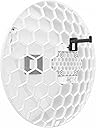

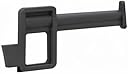
Wireless Wire Dish
Product ID: 79961119
Details
- AntennaSatellite
- BrandMikroTik
- ColorWhite
- Global Trade Identification Number
- Impedance4 Ohms
- ManufacturerMikroTik
📡60 GHz interference-free band
🔒AES encrypted secure connection
🚀2 Gb/s aggregate link
Buy anything from 5,000+ international stores. One checkout price. No surprise fees. Join 2M+ shoppers on Desertcart.
Desertcart purchases this item on your behalf and handles shipping, customs, and support to SINGAPORE.
📡 Unlock gigabit wireless freedom—ditch cables, not speed!
The MikroTik Wireless Wire Dish delivers fiber-like 2 Gb/s wireless speeds over distances up to 1500 meters using a secure, AES-encrypted 60 GHz link. Designed for professionals, it comes as a complete pre-paired kit with powerful CPUs enabling wire-speed throughput and advanced aiming tools. Ideal for interference-free, high-capacity point-to-point connections where reliability and security are paramount.
| ASIN | B07CNSM2JL |
| Antenna | Satellite |
| AntennaDescription | Satellite |
| Best Sellers Rank | #221 in Computer Networking Wireless Access Points |
| Brand | MikroTik |
| Color | White |
| Customer Reviews | 4.2 out of 5 stars 31 Reviews |
| Global Trade Identification Number | 05704174172543 |
| Impedance | 4 Ohms |
| Item Weight | 9.77 Pounds |
| Manufacturer | MikroTik |
| Maximum Range | 1500 Meters |
| Mfr Part Number | RBLHGG-60adkit |
| Model Number | RBLHGG-60adkit |
| Number of Channels | 2 |
| UPC | 680665927739 |
M**C
Gigabit for real!
Do your research and know the physical limitations of 60G. If you are okay with those limitations, this is exceptional. I got a link going 2300 meters which is further than advertised, and speedtest.net shows 860mbps (which is likely my laptop's max capability). MCS7 and radio shows signal quality of 90%. Aiming took a very long time and required a lot of patience. Only been using them for a few days, and first rainstorm we had, I lost connection - which is to be expected with 60G. Must have complete line of sight. One leaf in the way will take it from 90% to disconnected. I plan to test it with IPERF3, but I have not finished building out this part of the network to have the equipment to do that yet. However, I am blown away that I can push gigabit over the air in a spectrum with little to no interference. I plan to use my previous low-speed solution as a backup, and keep this for the 99+% of the time when weather is good. They advertise this as plug and play, which is true, but you REALLY need to update the firmware at a minimum. They have made a LOT of improvements to these radios. I doubt I would've been successful had I not first updated the firmware. You also really need to access the unit's CLI to assist with aiming. Its cool in that once you get it roughed-in, it will say "up 1.6 degrees" or whatever so you can dial it in just right. It is not for a novice. You need to be pretty savvy with networking, using putty, and aiming radios in general to have a good result. I read there are better mounts for these radios available. I ordered a pair and plan to try them, but as of this moment I only used what came in the box, and it seems sufficient.
Z**E
Solved the RF intermod problem
I have a site that has multiple high sensitivity receivers on a wide range of frequencies. Since this site is located in a major market, microwave link frequencies are at a premium. Spring and fall are plagued by microwave ducting, and it's not uncommon to have a distant transmitter override a local hop. 60 GHz is the perfect answer, especially since absorption by oxygen limits propagation at this frequency. The first thing I did was replace a Ubiquiti Gigabyte switching power injector on the line going up the tower with the one supplied by Mikrotik. WHOOPS!!!! When the Mikrotik injector installed, my ethernet speed indicator went from 100mb to 1gbps. Looks like Ubiquiti has a problem with their injectors (Model GP-240-050G). I had even replaced a 10 meter run of CAT7 with CAT8. I installed the dishes, and immediately saw the lock indicator. There are LEDs that tell you to adjust the dish vertically or horizontally. This did not work well for me. I did some digging and found someone else reported something similar. I kept reading, and it appears that this might be one of the models that has a beam-forming antenna. I read that sometimes it's better to visually point the antennas at each other, then reboot. This worked perfectly for me. Data speed went up, and latency went down.
A**R
If your an expert - maybe
If you don't install these for a living and think you can toss these up and go, think again. The user interface is archaic, see photo, and is extremely difficult to use. The devices are configured at 192.168.88.2 & 3, good luck trying to change the subnet and ip address - watch any video on youtube and you will see no one changed it so everything was a test, not real production. As Mikrotik is located in Lativa, there are some real challenges in understanding the limited documentation and very limited videos on setup. You can email support and they say they will respond in 3 days. You also have to unlock any firewalls blocks to eastern europe if you want to visit their site, download any updates, or even post on a forum. I tried both the desk top and antenna versions, after 3 days I got them to work, however they are very, very sensitive to ANY interference. I was trying to connect two buildings about 100' apart shooting behind windows - didn't really work, add a tree or even rain and your done. If you have plenty of time to study all about their router OS, and don't mind ancient tools, and have line of sight with zero interference and you never get rain - these may work.
E**N
Love them Latvians
This stuff just works.
R**N
worked as advertised
worked as advertised
R**C
Fabulous! Mikrotik wins again!
Fabulous!
M**D
Complex, Flexible, Prone to Failure
If you just want to get them working, all you have to do is plug them in. But if you want them secure, with the ability to manage them from elsewhere on a corporate multi-VLAN network, you will need abundant patience and trial-and-error, because the documentation doesn't cover it, the OS documentation doesn't cover this version/device, and the logical steps don't work - even when I changed the default gateway, it would be reverted after rebooting - but it kept the IP address, so I had to be directly connected to reconnect to the unit. Then the device just quit working after a couple of months, and the manufacturer wouldn't support it - I had to go through the seller, not the manufacturer. To their credit, they replaced the entire set. But it failed again a couple of months after that, and just outside the one-year warranty from the original purchase. I plan to get my next set from Ubiquiti, a pair of GigaBeam devices, manageable over their own separate wifi connections - and I'll get them direct from Ubiquiti, so I get a two-year warranty instead of the one-year warranty resellers have. And I'll pay a bit extra for the $12.50 surge protectors.
E**A
Plug and play
Works very nicely, easy to install and set up is basically plug and play, just get. Them close to pointing at each other and bam! They do the rest
M**E
Perfette
Kit perfetto
J**R
Top zufrieden
Produkt übertrifft alle meine Erwartungen. Leicht auszurichten und einzurichten ich erreichen Übertragungsrechte Geschwindigkeiten von 1.79 gb/s im eigenen Netzwerk ohne fein Tuning das höchste waren 2.16gb/s . Ins Internet habe ich nur eine Verzögerung von 1-2 ms und komme bei einer 1000k Verbindung von vodafon auf ca 980mbs1030mbs Download Rate Upload ca 49-51mbs also kaum Verluste
Trustpilot
1 week ago
1 week ago