Desertcart purchases this item on your behalf and handles shipping, customs, and support to SINGAPORE.
🔴 Master your workspace with precision and comfort — the ultimate wireless trackball for pros who demand more.
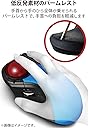
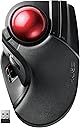
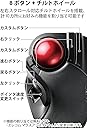
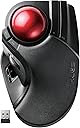
The エレコム M-HT1DRBK is a wireless trackball mouse featuring a large 52mm ball for expansive pointer movement, a gaming-grade optical sensor for superior tracking accuracy, and an ergonomic low-resistance palm rest to minimize wrist fatigue. It offers 8 customizable buttons including tilt-scroll functionality, connects via a compact 2.4GHz USB receiver, and boasts an impressive battery life of up to 534 days in low energy mode. Compatible with Windows and macOS, it’s designed for professionals seeking precision, comfort, and long-lasting wireless performance.

| ASIN | B0735584RM |
| Amazon 売れ筋ランキング | パソコン・周辺機器 - 34,353位 ( パソコン・周辺機器の売れ筋ランキングを見る ) トラックボール - 97位 |
| GTIN (Global Trade Identification Number) | 04953103308152 |
| OS1 | 対応OS:Windows 11、Windows 10、Windows RT8.1、Windows 8.1、Windows 7、Windows XP、macOS Sierra(10.12) ※各OSの最新バージョンへのアップデートや、サービスパックのインストールが必要になる場合があります。 |
| おすすめ度 | 5つ星のうち4.1 3,226 レビュー |
| カラー | ブラック |
| スタイル名 | 無線2.4GHz |
| テーマ | オフィス、自宅、テレワーク、カフェ |
| ハードウェアプラットフォーム | Mac, PC |
| バッテリー付属の有無 | はい |
| バッテリ平均持続時間 | 10 months |
| パターン | 単品 |
| ブランド | エレコム(ELECOM) |
| ブランド名 | エレコム(ELECOM) |
| ボタンの数 | 8 |
| ボタン数 | 8 |
| ムーブメント検出技術 | 光学 |
| メーカー名 | エレコム(ELECOM) |
| メーカー型番 | M-HT1DRBK |
| モデル名 | M-HT1シリーズ |
| ユニット数 | 1 個 |
| 互換デバイス | 対応機種:USBポートを装備したWindows OS、macOS搭載機 |
| 保証内容 | 保証期間:6カ月 |
| 利き手 | 右利き |
| 動き検出技術 | 光学 |
| 同梱コンポーネント | AA battery (2), Receiver, Trackball mouse, user manual |
| 商品の寸法 L x W | 18.2長さ x 11.5幅 cm |
| 商品の推奨用途 | オフィス、自宅、テレワーク |
| 商品の追加説明1 | 小型レシーバー |
| 商品の重量 | 0.57 ポンド |
| 型番 | M-HT1DRBK |
| 必要電池数 | はい |
| 接続技術 | USB 無線2.4GHz |
| 特徴 | 小型レシーバー |
| 色 | ブラック |
| 装飾機能 | ロゴ |
| 通信・接続インターフェース | USB 無線2.4GHz |
| 電池の数 | 1 単4形 電池(付属) |
| 電源のタイプ | バッテリー式 |
| 音域 | 10 meters |
あ**ば
最高の相棒になりました
ロジクールのTM-400を愛用して来ましたが、後継品が出ずに嘆いていた者です。 同じ3本指(玉が小さいので2本指ですかね?)タイプのDEFTも購入しましたが、どうにも納得出来ずにいました。 しかしこのHUGEは玉がデカイ!TM-400よりもデカイ!! 操球感も抜群!メッチャ気持ちいい!!(ポンコツになってしまったTM-400と比べて) そしてカーソルが早い!超早い!デュアルディスプレイの端から端まで一転がし!!(スイッチでいつでも3段階に調整可能) なのに3本の指でボールを保持して細やかに動かすのも自在!!玉に触れてなきゃクリックでカーソルがブレることもない! 大玉最高!!マウスなんていらんかったんや!!!! と、本当にべた褒めしたくなる製品です。 右クリックが細長くて押しにくいと書いてらっしゃる方もいますが、私の持ち方だとボールに掛けた薬指の側面で 常時押せるので抜群に具合がいいです。が、形状やボタンの配置が独特な製品なので、店頭で実物を触ってみるのをお勧めします。 残念な点としては、低反発素材のパームレストですかね!?慣れてきたのでそんなに悪く無いかなー、とも思いますが、 DEFTと似たような無難な形状にして、脱着可能なクッションを付けておけば良かったと思います。 あと、スクロールホイールの質感が凄くショボい(ロジクールの無段階~クリック切り替え機能付きのホイールと比べて) のも気になります、が、些細な事はどーでも良いのです! 親指型しか出さない奴等ではなく、エレコムさんを応援します!!ありがとう!! 操作に慣れてきたのでマウスアシスタント5もいろいろ触ってみました。 使うソフトウェアごとに操作を割り当てられる上、マウスジェスチャにも対応しており非常に使いやすいです。 私はJWCADで使う時には、進むを中央クリック、戻るをESCにしています。 ホイールを一定回数早回しすることで自動送りが始まる機能も、細かく設定できて悪くないです。 ますます好きになったのでもう1台買い足そうと思います。 追記 結局有線のM-HT1URXBKを2台買い足しました。 余ったこいつは車のドアに脱着出来るように加工してしまいました。 運転席のハンドルに取り付けるテーブルの上にノートPCを置いて、ドアの肘置きに大玉トラックボール! HUGEがあれば図面も車でスイスイ書けてしまいます!! これこそマウスには絶対真似のできない芸当であって、トラックボールの完全勝利と言えましょう!!
Z**N
KensingtonのExpert Mouseとはかなり傾向が違う
始めから本体内でカラカラと音がしていて、振ったら中からネジが飛び出してきたので返品しました。 もう少し様子を見て、品質が安定したあたりで再度購入しようと思います。 以下、最近購入したKensingtonのExpert Mouseとの比較です。 ボールに油分を与えた状態での、玉の転がりの滑らかさに関してはそれほどの違いはありません。Expert Mouseのほうが玉が大きくて重いぶん惰性が使えますので、ボールの部分に限って言えばExpert Mouseのほうが使いやすく感じると思います。支持ルビーの大きさに関してはどちらも変わらないように見えます。Hugeの製品説明を見てボールの転がりに関しては随分と期待をしていたのですが、素人向けに書けることを全部書いてあるだけで、冷静に考えてみたら使える道具としては当たり前のことばかりです。 クリック感に関しては、HUGEのほうがセンシティブで操作感が良いです。Expert Mouseの方は意識的に押下して操作する感じですが、Hugeの方は指と感覚がつながっている感じで、感覚的に反応してくれます。 スクロールや多機能性に関してはHUGEが圧倒的に使いやすいです。とても気の利いた位置に欲しいボタンが配置されています。水平に回すホイールも他のスイッチとの位置関係から考えると納得です。これで惰性回転が出来れば文句なしでした。 HUGEとKensingtonのExpert Mouseで悩んだら以下を参考にすると良いと思います。 ・総合的な機能性で考えるならHUGE。全てがとても良く考えられおり、多くの操作をトラックボールのみで行えます。クリエイターが作った道具という感じで、痒いところに手が届いた製品です。デザイン関係のお仕事には良いかもしれません。 ・優秀なポインティング性能のみがあれば良いと言う場合はExpert Mouse。レコーディングスタジオのようにキーボードと組み合わせて、正確で素早いポインティングをとにかく大量にこなせるだけで良いと言う場合は、こちらのほうが効率が上がります。ポインティング性能が高く、HUGEのような解像度切替スイッチ無しでも問題がないほどの「質」があります。こちらは職人が作った業務用の道具という感じです。 物理的な中ボタンが無いことやゴリゴリで突っかかる残念なスクロールリングに関しては多めに見る必要があります。 ・それでも迷ったら2つとも買っておけば良いと思います。仕事の道具として使うのであれば、どちらの製品も簡単に元がとれる内容です。
哀**士
名器の予感
トラックボール派に移行してはや数十年、ほぼ過去に発売となったトラックボールは購入したが、結局「Kensington ExpertMouse ワイヤレストラックボール」を使っていた。 「いったい日本のメーカーは何をやっているだ!?技術力の問題か?」と嘆いていたが、本トラックボールマウスを使ってやっと長年の憂いから解放された気がする。 大型ボールの恩恵による操玉感。目をつぶっても右斜め上にボールピーッと転がせばアプリの閉じるの【×】に行き着く。 かといって、細かい操作も特に違和感無くピタリとその場所に行ける操作性。 また、ウェブの「戻る」「進む」以外の割り当て可能な多ボタン。 総合的に見ると、過去に発売されたマクロソフトのトラックボール「Microsoft「Tracball Explorer」の進化形と捉えるのが適切かも知れない。 ロジクールの「トラックマン ワイヤレストラックボール 」をイメージして買うと慣れるのに時間が掛かるかも知れない。 「ケンジントンのトラックボールマウスを使っているが、多機能ボタンが欲しい」 と思っているユーザーはその操玉感に思わず微笑んでしまうかも知れない。 購入日に試しにjwCADで少し作図してみたが、違和感なく操作ができた。 「これからトラックボールマウスを試してみたい」と思っているユーザーにとって、本マウスが良いのか多少高価だが、「Kensington ExpertMouse ワイヤレストラックボール」が良いのか悩むところ。 実機が触れる場所があれば良いのですが・・・。 多機能派は本マウス(保証期間6ヶ月)でシンプル(実は奥が深い)で長期保証(3年)、Bluetooth接続を求めるならケンジントンでしょうか? トラックボールマウスは個人差があるので、一概に私の意見を受け入れられないと思いますがが、過去のケンジントン以外の人差し指操作型のトラックボールマウスでは近年希に見る商品と思った。 ※ 開封後直ぐはボールがやたら滑ってイライラするが、段々と馴染んで来ます。 ※ 今までにエレコムのトラックボールマウスをご使用になってドライバとソフトを導入済みの方はアップデート(無料)をする必要があります。 ※ 耐久性については分かりません。 以上
A**ー
使用後一年で不具合発生
一般的なマウスからトラックボール式へ乗り換え デュアルモニターを利用しているので画面が広く、マウスを動かす範囲が広いのが苦痛でした こちらはボールをクルクル回すだけで、マウスを持つ手を動かさなくて良いのが楽です 初めのうちは慣れなかったが、1ヶ月くらいで不自由なく動かせるようになりました 初めに注文した商品はガタツキがあり、エレコムへのお問合せにて不良品として確認の後、アマゾンにて交換していただきました 交換品はガタツキもなく、普通に使えました 1年過ぎた現在、利用している途中で急にマウスが動かくなったりします 電池の問題かと思い取替えましたけれど、症状は変わらずです マウスの電源を入れ直しても変化はありません パソコンを再起動すると使えるようになります パソコンのせいなのか、マウスのせいなのか、、、 レビューを見ていると同じ状況の方もいるので、マウスに原因がある可能性が高いと考えています エレコムの別のトラックボールマウスを購入したので、届いたらそれを使ってみる予定です
真**ね
満足ながらも1つの不満
概ね満足しているのだが、1つだけ不満があります。 ただ、これは故障なのか、自分の操作方法が悪いのかの切り分けができないでいます。 それは、左クリックを押しても反応しないことがちょいちょいあります。 ただ、もう一回クリックすると、正常に反応するので、よくわからない状態です。 いやさ、それ以外は大きさ、操作などは満足しています。 そして、なぜかスクロールさせると、操作した方向と反対の方向に動く。。。 何なのだ。
ふ**ん
使いやすい
初めて買ったのですが、とても使いやすいです。 ただデカい…
ア**イ
良かったよ。
商品は良かったけど、私には使いこなせなかったです、残念です。
滝**輝
電池使えない
附属の電池が劣化して使えませんでした。
N**M
As an MS Trackball Explorer user since The Win98/PS2 days, this is an excellent "replacement"
Quick Summary: MSTE users who don't have an MSTE - get this mouse as it's the closest "replacement" to date. Obviously, if one wants a mouse like the MSTE, then get an MSTE. But even a used MSTE costs a bit and you have to be careful of the cord. If one wants something Less Expensive that closely resembles the MSTE and is also cordless, then this is the best mouse on the scene since the MSTE itself. Update2: Trying to add some slightly better pictures and others that show the MS Trackball Explorer, Logitech Cordless Optical Trackmall, and the smaller Elecom "DEFT" trackball mouse. But some pictures are not loading to the site. Sorry. :( Update1: IMPORTANT NOTE: Waaay down in the comments (the oldest one at the "bottom" should be a link to the Elecom software download page and the English PDF manual. As this mouse is "very new" you *DO* need a more recent Elecom proprietary software to recognize this mouse if you wish to use it's three proprietary function buttons (F1-F3). Long Winded Review =============== This new Elecom Fingerball wireless mouse - the M-HT1DRBK - appears to have been released is June 2017 and has been available on Amazon since July 2017. In August I was about to order a second of the smaller Elecom M-DT2DRBKs when I stumbled over this new **larger** "HUGE" mouse and figured it was worth a try. The M-HT1DRBK just arrived and after giving it a ten minute test spin I just ordered two more. No clue if it will take "1-2 months" for the next batch to arrive, or if the price will drop from $85.99, but would say it is certainly worth the investment. FYI: It actually does say "HUGE" on the mouse itself. :) Comparisons to the MSTE (MS Trackball Explorer) ====================================== 1) It has a nice large "red ball" like a certain MSTE we all know and love. In fact, the Elecom ball is slightly BIGGER than the MS one. There were many reviews about the smaller Elecom mouse's "grey ball" having issues, and several people purchased a "blue" M570 ball to swap with the "grey" one. From my quick tryout of this new mouse with it's "red ball", would say that the quality looks to be significantly better than that of the smaller mouse's "grey" one. An excellent improvement. 2) This mouse is *MUCH LARGER* than the smaller "grey ball" M-DT2DRBK. Excellent for people with "larger" (aka normal sized) hands. 3) It is a bit wider than the MSTE, and Elecom moved one of the three proprietary "Function Buttons" to the right side of the ball. If you use their proprietary software, this would give you "two buttons to the right of the ball" just like the MSTE. 4) MOST IMPORTANT OF ALL. This mouse has a PALM REST. As this seems to be an alien concept to most mouse manufacturers I will state it again - this mouse actually has a place for the palm of one's hand to "rest" while using the mouse, so for the first time since the MSTE, there is actually a trackball that not only fit's one's hand, it is actually COMFORTABLE. Plus it doesn't have teeny tiny thumb-killing buttons like a certain L*git*ch Trackman. Wish I could show a decent side-view of the palm rest, but this can also be seen with via the pics on Elecom's web site. 5) ??? I would assume that being a wireless device, there may be an occasional "lag" in response times, but cannot say for certain. However there does appear to be a wired version of this mouse as well. It's part number (August 2017) is M-HT1URBK. Usage ===== Bulk of this review was written after only ten minutes of mouse use, so haven't had the time to give it an extended run, but observations so far are positive. "Weeks later" - Still great. Haven't tried the Elecom software yet myself (not using the F1-F3 buttons). - Seems to respond MUCH better than the smaller Elecom version (blue or grey ball). - Range seems to be about the same as the smaller one. About nine feet out it gets tricky and Line of Sight is critical. - The "left" button isn't as "tall" as the MSTE's, so my clumsy thumb is hitting the wheel, but this should be a minor issue. - ??? I read elsewhere that the "left" and "right" mouse buttons are "better quality" than the other buttons, that one should be able to tell the difference, that they should have made *all" the buttons "better quality", etc. Haven't noticed any difference between buttons yet. Too busy enjoying having a wireless mouse that actually fits the shape of my hand for a change. Customization - aka The Buttons ======================== So far as remapping buttons, "drivers", and support for various operating systems... Would assume this mouse works as a basic mouse in anything from XP up to Win10. You've got your Left, Right, Forward, Back and Wheel Buttons, plus the three Extra Proprietary Function Buttons F1-F3. Remapping the eight buttons and basic customization is where it gets interesting. Would assume one needs at least version 5.1.0 of Elecom's proprietary software to use/control all eight buttons. For now I am sticking with X-Mouse Button Control which allows configuration of everything except the three extra Function Buttons. Both programs allow for the use of multiple profiles for easy customization across different applications. Elecom's software (and English PDF manual) is available from their website. I will try adding possible links as a "comment" later as this review is too long as it is. Odd Future Issue (?) ================ Since the palm-rest is made of a "soft" material vs plastic, I wonder how it might hold up over time. Will it wear out? Time will tell.
�**O
Trackball japo, elegante, funcional y acolchado
Lo mejor del trackball es la cantidad de botones que tiene (programables) y que el tacto al apoyar la palma es acolchado/gomoso. Se alcanza bien con manos grandes (es mi caso) a todos los botones y a la bola. El botón izdo, que es el que quedaría a la altura del pulgar es para mí algo incómodo de alcanzar/memorizar su posición, pero no mucho. El scroll se alcanza bien una vez tienes cogida la posición con el pulgar para el botón izdo. El botón dcho. también se hace un poco raro, pero hay dos en esa zona, luego puedes tener dos configuraciones diferentes (yo uso el más apartado para "suprimir" o para "cerrar ventana", según la aplicación). Por cierto, mención especial al botón del scroll porque tiene modo "tilt" y esto sí resulta bastante poco común (esto es que le puedes aplicar al scroll movimientos laterales también, vamos izda y dcha). Para ir al grano, si queréis detalles mirad el manual buscando en google 20180405_MSC-M-HT1DR_ALL_ver.1.pdf y si no os habéis cansado podéis seguir leyendo la review. Algo que no me gusta es que el fabricante te dice que desinstales los drivers de otros ratones que puedas tener instalados. Yo tengo varios que quiero seguir usando (como el M570 de Logitech) así que no lo hice, y me toca andar extrayendo e introduciendo de nuevo el pincho usb de este dispositivo en cada reinicio del PC (Windows 10) para que lo detecte (aunque los drivers no hay que volver a instalarlos ni me han dado conflictos). Por cierto, los drivers se descargan desde la página del fabricante a la que se puede llegar escaneando el qr-code de la parte inferior del dispositivo (ver imágenes). Sobre la resolución decir que permite varias velocidades (hasta 1500 dpi) y sensibilidades. Yo le pongo la sensibilidad H (parte inferior ratón, la L es para ahorro energía) y la resolución intermedia de 1000 dpi (en caso de una pantalla en 1080 te irá bien así, si tienes 4K o más pantallas o eres gamer tal vez quieras subirla). Así que ese nivel de personalización que permite adaptarse a diferentes configuraciones (resolución, pantallas, etc.) y usuarios (que vayan a supervelocidad o en modo tortuga) también está muy bien. Sobre la duración de las pilas dependerá de su capacidad y del uso, yo recomiendo ponerle recargables de unos 2500 mAh. para que puedan durar unos meses. La bola se puede extraer para limpiar el interior fácilmente (se introduce el dedo por la parte inferior del ratón y ésta sale haciendo presión, no por la propia gravedad). Hay que limpiar de vez en cuando la zona de alrededor de los rodamientos, pero sin obsesionarse. Los rodamientos podrían ser un poco más finos ya que ofrecen algo de resistencia, no mucha, esto va sobre gustos. En definitiva, un ratón muy original y completo (le sube el precio el tema de la logística desde Japón, así que no lo tendré muy en cuenta en la valoración). Si te gustan los trackballs como a mí es uno de los que merecen la pena tener en la colección.
A**P
ottimo mouse (che diventa Top mouse con sostituzione sfere) in versione wireless
PREMESSA: funziona solo in modalità wireless ! (niente cavo, e niente ricarcia via cavo) Per il resto nulla da dire.... è l'huge ! ottimo mouse trakball come che già recensito per la versione cablata (in caso vi invito a leggerla dove ho postato qualche foto) e ora visto la comodità ne ho preso uno wireless per usarlo anche con altri pc ! come al solito , per usarlo con programmi tipo grafica o cad, ho rinunciato alla garanzia l'ho di modificato, sostituendo le sfere originali (testardi alla elecom) con quelle ceramiche, optando per le sfere ceramiche 2.5mm di grado g5 !. Dopo la modifica, il mouse ha cambiato il cosidetto "pelo" (come si usa dire) diventano una periferica top!.
B**K
Alışamadım
Ne kadar alışmaya uğraşsam da alışamadım. Benimle birlikte alan birini tanıyorum, o çok güzel alıştı hatta bendekini de istedi. O yüzden ben alışamadım diye puan kırmayacağım. Ama o kişi oyun için kullanmıyor. Oyunda nasıl kullanılabilir zaten bilmiyorum, kullananı tebrik ederim. Mouse çok büyük. Çok büyük derken ciddiyim, belki normal bir mouse'un 2 katından bile daha büyük. Eliniz küçükse daha küçük modellere yönelin. Yazılımı pek hoşuma gitmedi ve sürekli çalışması gerekiyor. Arka planda Windows hizmeti olarak çalışması da yetmiyor yazılımın hep açık olması gerek tuş işlevlerinin çalışması için. Mouse'un kendi hafızası da yok. Puanı bu yüzden kırıyorum. Bunun dışında malzeme kalitesi gibi diğer kısımları fiyatına göre gayet iyi.
F**A
Inovador, é o melhor que eu já vi em termos de funcionalidade.
Praticamente nota 10 . O único defeito é que não rola com muita facilidade para movimentos preciso, mas tem solução substituindo todas as esferas .
Trustpilot
2 weeks ago
2 days ago