Buy anything from 5,000+ international stores. One checkout price. No surprise fees. Join 2M+ shoppers on Desertcart.
Desertcart purchases this item on your behalf and handles shipping, customs, and support to SINGAPORE.
⌨️ Light up your workflow, command your day!
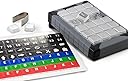
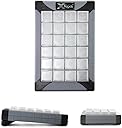
The PI Engineering X-Keys XK-24 is a premium 24-key programmable keypad featuring customizable blue and red backlighting, a durable co-injected case for versatile use, and hardware mode storage for macros. USB powered and compatible across Windows, Mac, and Linux, it’s designed to streamline complex workflows and boost productivity for professionals who demand speed and precision.


| ASIN | B003MB780E |
| Antenna Location | Office |
| Best Sellers Rank | 146,410 in Computers & Accessories ( See Top 100 in Computers & Accessories ) 157 in Numeric Keypads 6,854 in PC Consoles, Games & Accessories |
| Box Contents | USB-Kabel |
| Brand Name | X-keys |
| Button Quantity | 24 |
| Colour | Black and Grey |
| Compatible Devices | PC |
| Compatible Operating System Family | Windows |
| Compatible Tablet Computer Models | AAUB P30 |
| Connectivity Technology | USB-A |
| Customer Reviews | 4.4 4.4 out of 5 stars (323) |
| Enclosure Material | Plastic |
| External Testing Certification | FCC class B, CE, WEEE |
| Global Trade Identification Number | 00703273002404, 05050914712921 |
| Hand Orientation | Ambidextrous |
| Item Dimensions L x W x H | 9.7L x 2.4W x 14.7H centimetres |
| Item Weight | 10 Ounces |
| Keyboard Backlighting Color Support | Single Color |
| Keyboard Description | Multi Functional |
| Keyboard Layout | QWERTY |
| Manufacturer | PI Engineering |
| Manufacturer Part Number | XK-24-USB-R |
| Mechanical Keyboard Switch Model | Rubber Dome |
| Minimum Required Operating System Version | Mac OS X 10.6 Snow Leopard, Windows 7 |
| Model Name | X-Keys XK-24 USB Keyboard |
| Model Number | XK-24 Keypad |
| Number of Keys | 24 |
| Number of Sections | 24 |
| Power Source | USB Powered |
| Product Features | Backlit, Customizable Display Keys |
| Product Warranty | 1 year manufacturer |
| Style Name | Classic |
| Switch Type | Mechanical |
| Theme | Office |
| UPC | 703273002404 |
| Unit Count | 1.0 count |
S**J
... a little on the expensive side but is a great piece of kit
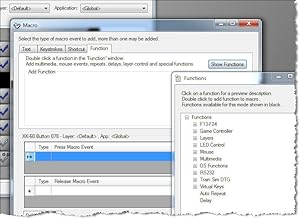
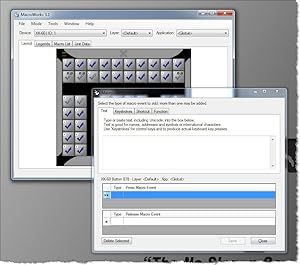
May be a little on the expensive side but is a great piece of kit. Was bought to work with lighting control software to give me quick access to programming. Very easy to set up and also after a quick look at the webpage about led backlights got it working just how I wanted. Very useful in hardware mode as it then stores the keys/macros/shortcuts in the unit so you do not have to have the software on a computer. With the software running however you do get more options like text strings etc. to set to your keys.
G**N
... of us do - you will find X-Keys and excellent tool to save time + be more productive
If you are spending a lot of time working with computer - as most of us do - you will find X-Keys and excellent tool to save time + be more productive. I save each day a lot of time, because instead of using mouse or looking for shortcut lists, I just press the button on my X-keys. But it also helps me to be more productive, because I can use software functionalities I was unable to use before. Simply because I added a lot of less known shortcut to the buttons of X-key. Actually, I was surprised how much it changed the way I work, well above my expectations. I use it all the days.
A**E
Five Stars
Great item, keys programmed to work with Davinchi Resolve
J**T
but very useful. Works on Apple Mac
Expensive, but very useful. Works on Apple Mac.
H**N
Great for X-Plane 11 flight simulator
Deservs five stars but as you need extra configuration software to get it to run with X-Plane 11 I have just done 4 stars. Keys work nice and positively. Somewhat pricey for a game add-on but that's not what it was really designed for. It has a multitude of uses that I am only just scraping the service. Well done to Stick and Rudder Studios for creating the software to run with X-Plane.
H**.
Five Stars
FANTASTIC
A**S
Quick Comparsion
I compared this one to the Expertkeys EK-58 model and decided to go with the Expertkeys one. Mainly because of the superior design and the cheaper price. This one however has backlighting - if you need that.
J**L
Excellent X-Plane Enhancement
I purchased the XK-80 in order to enhance my use of the X-Plane 11 flight simulator, with this item used alongside a specific plug-in for X-Plane. The XK-80 has transformed the accessibility of X-Plane when performing somewhat more involved flights, such as instrument approaches or otherwise where navigating using instruments. Before I bought this item, I would have been forced to adjust instruments in the cockpit using the mouse pointer, which is fiddly, slow and takes attention away from flying the plane. I can now with mere button presses control these functions in a similar way to how one would in an actual cockpit. This is achievable of course using bespoke flight simulator hardware, but it is prohibitively expensive, in contrast to the XK-80, which achieves essentially the same, but at a fraction of the cost. The hardware build feels solid, with a nice rubberised finish and excellent backlighting. Physically setting-up the keys with your own labels is very easy. Additionally, the software that comes with the XK-80, distinct from X-Plane, enables me to use this hardware in a range of other applications if I chose to.
M**E
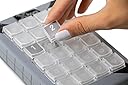
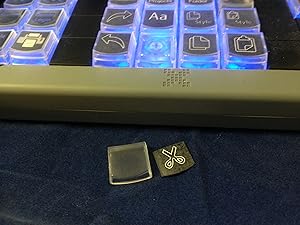
I am extremely satisfied with this product, the build quality is excellent and the programming software is flexible and easy to use. I love the design of the key with the removable key caps to allow for easy application of legends and the interchangeable keys make it easy to create custom layout. I am equally happy with the vendor, the customer service is excellent, there was a MINOR mix up with my shipment and they not only responded quickly but they exceeded my expectations in resolving my concern and making sure I was satisfied, I highly recommend Xkeys keyboards and PI Engineering, I will buy from this vendor again.
H**O
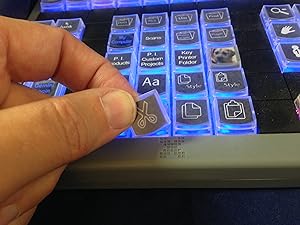
I've customised and used it for vMix for over 2 months now - zero complaint! The keys have good tactile feedback, easy to pull out if needed and the software make printing custom label a breeze!
M**R
I was hesitant about buying this product for a while as I was unsure if it would do exactly what I wanted it to. I wanted to reduce the number of actions I have to take with one hand, like click and drag, and I needed it to be compatible in a variety of settings. The device supports two forms of programming: hardware and software mode. Hardware mode is where you tell the device what to do and whatever it is plugged into simply receives messages. Software mode has many more features such as keys that do different things in different apps. I chose hardware mode because I need it to be a driverless (Plain USB) device. I have mine configured to simulate a mouse with left/right clicks, double clicks, ctrl-left click, and mousse nudging. I also have been mapping all of the shortcut keys that I use onto a single XK-80 key. The device supports two layers so I programmed one layer to work on Windows and the second layer to work on the Mac. Works like a charm. I even have the lights set to match: blue for layer one or Windows, red for layer two or MacOS. Seems very well built - the keys even have little slim caps which pop off the top for a legend to go under. My main beef is that the device can only be programmed from Windows. That's annoying as my only windows machine does not allow me to install anything. So I use VMWare on my MacOS to program it. I also wish it was easier to make nice key legends. Mine look like crap but they work.
C**.
Per chi ha Linux necessita l’aggiornamento del firmware fornito dal produttore, che deve essere fatto SOLO ED ESCLUSIVAMENTE con Windows... insomma “un gatto che si morde la coda”. Per il resto ottimo, soddisfa le aspettative
J**R
I had been feeling some pain in my left wrist for years at work, I decided to buy one of these, and I don't wana go back. I can't install any software at work, so this is perfect, u just program it at home with the native software , save the hotkeys to the memory and plug it in any computer, on windows or linux(I haven't tried it on macos, but I bet it works). It takes some time to get used to it, I had to start little by little using first only 4 keys for a few days, then 8, then 12 and so on... Good thing is you can write the hotkeys in the keyboard to remember it. It also took me a few times to get the layout just right to be optimal, but it is definately worth it. I wouldn't buy a bigger one, this one is big enough. I use it in Maya only(3d software).
Trustpilot
2 days ago
2 weeks ago