Desertcart purchases this item on your behalf and handles shipping, customs, and support to SINGAPORE.
🖱️ Elevate your workspace with precision and comfort — scroll smarter, work longer!
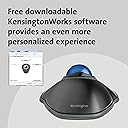
The Kensington Orbit Trackball with Scroll Ring combines a 40mm hard-surface ball and optical tracking for superior cursor accuracy. Its unique scroll ring enables smooth vertical navigation, while the ergonomic ambidextrous design and removable wrist rest provide all-day comfort. Customizable via KensingtonWorks software, this wired trackball supports macOS and basic ChromeOS functionality, making it a versatile productivity tool for professionals seeking precision and pain-free computing.


| ASIN | B002OOWB3O |
| Amazon 売れ筋ランキング | パソコン・周辺機器 - 64,235位 ( パソコン・周辺機器の売れ筋ランキングを見る ) トラックボール - 135位 |
| EUスペアパーツの入手可能期間 | 5 年 |
| GTIN (Global Trade Identification Number) | 00085896723370 |
| OS1 | mac os |
| UPC | 016622822432 777785625413 809385660928 803982770622 085896723370 |
| おすすめ度 | 5つ星のうち4.3 6,049 レビュー |
| カラー | ブラック-ブルー |
| スタイル名 | 有線USB。 |
| テーマ | パソコン。 |
| ハードウェアプラットフォーム | PC |
| バッテリー付属の有無 | いいえ |
| バッテリ平均持続時間 | 2 months |
| パターン | マウス。 |
| ブランド | Kensington |
| ブランド名 | Kensington |
| ボタンの数 | 2 |
| ボタン数 | 2 |
| ムーブメント検出技術 | 光学 |
| メーカー名 | Kensington |
| メーカー型番 | K72337US |
| モデル名 | Orbit with Scroll Ring |
| ユニット数 | 1.0 個 |
| 互換デバイス | パソコン |
| 仕上げ | グロッシー |
| 利き手 | 両利き |
| 動き検出技術 | 光学 |
| 同梱コンポーネント | マウス。 |
| 商品の寸法 L x W | 20.3長さ x 15.2幅 cm |
| 商品の推奨用途 | オフィス |
| 商品の追加説明1 | エルゴノミックデザイン |
| 商品の重量 | 0.65 ポンド |
| 商品外装素材 | プラスチック |
| 型番 | K72337US |
| 必要電池数 | いいえ |
| 接続技術 | 有線 |
| 特徴 | エルゴノミックデザイン |
| 色 | ブラック-ブルー |
| 装飾機能 | ブリキ。 |
| 通信・接続インターフェース | 有線 |
| 電池の数 | 1 単3形 電池 |
| 電源のタイプ | 電源コード式 |
| 音域 | 30.0 feet |
飽**鍋
使いやすくて2個目の購入
昔からトラックボール色々使ってきましたが(ロジクールとかエレコムとかマイクロソフト)、1年前に購入使いやすくて愛用、先日ノートPC買ったので2個目購入、もしも壊れてしまったらまたコレ買うと思います。製品の寸法 115x140x46 ケーブル1480mm
ヱ**丸
Theトラックボール
低価格有線トラックボール 6年使用でスクロールリングの動きが悪くなったため買い替え。 低価格ゆえ、所々チープだが不快感を覚える程ではない。 SlimBlade Trackballも持っているが、こっちの方がネット閲覧には便利。
R**K
スクロールリングなしのトラックボールに耐えられない
スクロールリングなしのトラックボールに耐えられないです。とりあえず、2個買いました。
虹**檎
安くて使いやすい。もうちょっとボールが大きいともっと良い。
何故か、人気のないトラックボール。慣れれば使いやすいのですが。 今まで使用していたものが壊れたので購入。手首の負担を軽減するアダプタもついていて良いです。ただこのアダプタがすぐ取れてしまう。ガムテープで固定しています。ボールが今までのものより2回りくらい小さい。ちょっと落ち着かない動きになってしまう。それでも価格的には十分な機能です。
ヒ**ズ
Macで快適
トラックボールばかりの使用者です。確かに故障も有り買い換えもありましたが、操作性と場所を取らない面で優秀です。動きはなかなかスムーズで満足しています。
M**N
Figure out drag and drop and you're good to go. Works out of the box for Ubuntu 15.04
Solved my problem. New laptop, touchpad was interfering with typing. I bought an optical mouse at Microcenter. Made the mistake of buying a cheap mouse. I went there specifically thinking trackball but came back with a cheap optical mouse. Decided to go with this device because it's well rated. Ordered it. Received within a few days with standard shipping. Plugged it in using Ubuntu 15.04 no problem. I did not anticipate the adjustment required for drag and drop. I'm left handed. After switching the buttons I can click and hold my primary mouse button, drag and drop, no prob. I did spend some time looking for an app to provide click to drag because system mouse settings do not provide it. I found that switching the mouse buttons makes it easy to hold down the primary button and drag back and forth, up and down to my heart's content then release the button when I get to where I want to be. I actually like drag and drop with the trackball more than the mouse now that I've used it a bit because with a mouse you're still holding the mouse when you release the button which can incur additional unintended movement. With the trackball, once you lift your finger off the ball the cursor stays put. The scrollring is awesome. With a 13" laptop there are concessions with the keyboard that required a function key to scroll with the keyboard. The cheap optical mouse had a scrollwheel which was tedious to use. The scrollring on the trackball is precise, zippy and easy to use. I was thinking I might be missing something with two buttons instead of three but a third button to paste doesn't matter. With my setup I can select text with the trackball, release my primary button, click again and drag to a new location while holding the button, release to paste text at the cursor location. Most likely drag and drop 101 but I'm very pleased. I decided on the wired trackball because any device, wireless or not, will occupy a usb port. My conclusion is, can't beat it for the money. Great value. Does everything I need it to straight out of the box. I hope my review saves someone else who may be moving over to a trackball some of the time I put into looking for click lock to drag solutions. You don't need 'em. Just configure the device so you can comfortably hold your primary button while articulating the ball. 9/7/2015 Update. I bought my trackball used. After using it for awhile I noticed that it would sometimes catch inside its cradle causing the cursor to jump. The ball had a small scratch in the plastic. Using a fingernail emery board I smoothed it out then polished with metal polish. Now it's perfect.
J**E
Excellent trackball
Review of Kensington Orbit Trackball Mouse (silver) with Scroll ring. Wired version. Mac OS Mojave (also compatible with Windows). I've never used a Trackball before but was getting fed up with hand cramp on the standard mouse. This trackball comes with a wrist rest which is how I use it. It works straight out of the box. Because the Trackball doesn't move on the desk I didn't see much need for a wireless version. Also, you know a wired version works as soon as you plug it in. The rubber pads keep it quite firmly on my desk. Intuitive to learn. Clicking with the left mouse and dragging with the ball was easy. Nice smooth action. I chose the version with the mechanical scroll ring as I wanted to be able to skim quickly through documents, and I'm glad I did as it works easily. More functionality can be added with 'Trackballworks' which is now called 'Kensingtonworks'. I didn't really need it, but decided to download the software anyway. This required two installations and several restarts before the software recognised the trackball: you have to ensure via 'Security and Privacy' in System Preferences that the OS doesn't stop elements of Kensingtonworks from operating. Once the software was operating successfully I was able to increase the speed of the scroll ring, but that was all I bothered with. I should have bought a trackball years ago. Delivery from Amazon was staggeringly quick.
S**I
Ergonomic precise wonderful
Superb product and worth of money. I would like thanks Kensington for this trackball.it’s amazing,attractive,precise.ergonomic and very soothing to my finger. Now I can take full control of my laptop with finger controls. Before this I was suffering wrist fatigue vague pain and discomfort from using Logitech mouse.Thank to this Kensington trackball now my wrist worries is gone. Bye Bye mouse.
A**O
Very comfortable.
They say these things have a learning curve, but that's nonsense. It's instantly a massive improvement over using the mouse. Much more comfortable, much more accurate.
D**T
ME ha gustado mucho
Es el primer trackball que tengo y es muy cómodo y fundamental la rueda de scroll para una buena experiencia, con una mano muy pequeña quizá sea un poco grande, pero la mía para ser hombre es pequeña y me va bien.
Trustpilot
1 week ago
2 weeks ago