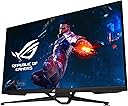
🚀 Elevate Your Game & Work with ASUS ROG Swift PG38UQ – Where Speed Meets Stunning 4K Brilliance!
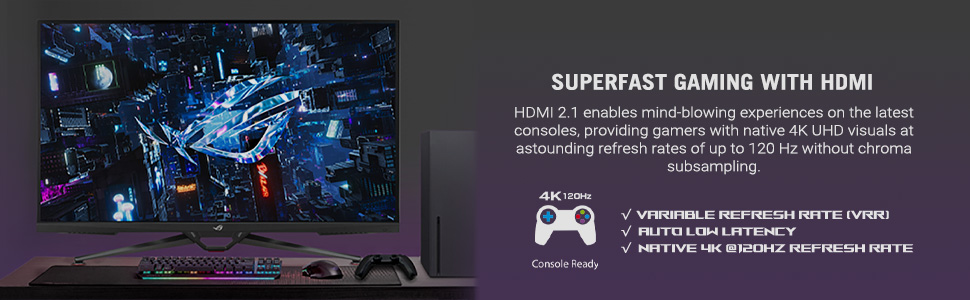
The ASUS ROG Swift PG38UQ is a cutting-edge 38-inch 4K UHD gaming monitor featuring a blazing 1ms Fast IPS response time and a 144Hz refresh rate for ultra-smooth visuals. Equipped with HDMI 2.1 and Display Stream Compression, it supports native 4K 120Hz gaming on the latest consoles without compromise. Certified DisplayHDR 600 and 98% DCI-P3 color gamut deliver exceptional color accuracy and contrast, while versatile connectivity options and built-in speakers make it a powerhouse for both gaming and professional use.


| ASIN | B0BZR81SQG |
| Adaptive Sync | FreeSync Premium Pro |
| Aspect Ratio | 16:9 |
| Aspect ratio | 16:9 |
| Best Sellers Rank | 259,237 in Computers & Accessories ( See Top 100 in Computers & Accessories ) 4,156 in Monitors |
| Box Contents | Color Pre-Calibration Report, DisplayPort Cable, High Speed HDMI Cable, Gmaing PG38UQ Monitor, Power cable, quick guide, ROG Bag Remote Control |
| Brand | ASUS |
| Brand Name | ASUS |
| Colour | Black |
| Compatible Devices | Desktop |
| Contrast Ratio | 600:1 |
| Customer Reviews | 4.4 out of 5 stars 86 Reviews |
| Display Technology | IPS |
| Display Type | IPS |
| Hardware Connectivity | PCI Express x16 |
| Has Color Screen | Yes |
| Image Brightness | 600 candela_per_square_meter |
| Image contrast ratio | 600:1 |
| Item Dimensions D x W x H | 86.1D x 25.7W x 53.8H centimetres |
| Item Weight | 10.23 kg |
| Manufacturer | ASUS |
| Maximum Display Resolution | 3840 x 2160 Pixels |
| Model Name | PG38UQ |
| Model Number | PG38UQ |
| Mounting Type | Wall Mount |
| Native Resolution | 3840x2160 |
| Network Connectivity Technology | HDMI 2.1, DisplayPort |
| Picture Quality Enhancement Technology | ASUS Fast IPS, DisplayHDR 600, Adaptive-Sync |
| Product Features | Adaptive Sync, High Dynamic Range, USB Hub |
| Refresh Rate | 144 hertz |
| Resolution | 4K UHD 2160p |
| Response Time | 1 Milliseconds |
| Screen Finish Type | Matte |
| Screen Size | 38 Inches |
| Screen size | 38 Inches |
| Screen surface description | Matte |
| Specific Uses For Product | Business, Gaming |
| Total HDMI Port | 2 |
| Total USB 3.0 Ports | 4 |
| Total USB Ports | 4 |
| Total Video Out Ports | 2 |
| UPC | 197105043466 |
| Viewing Angle | 178 Degrees |
| Warranty Type | 3 Years Manufacturer Warranty |
R**Z
ASUS ROG Swift 38” 4K Gaming Monitor
This monitor is absolutely fantastic and delivers a premium experience across the board. The matte screen does a great job eliminating reflections, making it easy to use in any lighting. Text is razor sharp, and the IPS panel provides excellent color accuracy—perfect for both creative work and gaming—without the burn-in risks you get with OLED displays. Performance is outstanding. The 144Hz refresh rate combined with G-Sync makes everything feel incredibly smooth and responsive, with no noticeable tearing or stuttering. The build quality is top-notch. The stand is solid and stable, and the thin bezels give it a clean, modern look. It also comes with a remote control, which is a surprisingly useful feature for quick adjustments. Built-in 5W speakers are decent for everyday use, and the USB ports add extra convenience for connecting peripherals. Overall, this monitor is extremely versatile and handles work, gaming, and creative tasks with ease. If you’re looking for a high-end display without OLED drawbacks, this is an excellent choice. Highly recommended.
F**D
Fantastic product!
Check all the right boxes for me: - Large 16:9 format - Non-OLED, so no burn-in - Non-OLED, so BRIGHT even with 100% white - 4K - 144hz - RBG sub-pixel layout so PERFECT text clarity Sure it's not "inky black" like OLED but considering I don't need to worry about OLED-specific nonsense like burn-in or ABSL, I'm perfectly OK with the black level of IPS. Beyond this, everything else is perfect. Colours are rich, whites are bright, above avg refresh rate, VRR, clear text. 10/10.
X**D
El mejor monitor para consola next Gen
Después de usar muchos monitores, por fin llegué a este Rog hdmi 2.1 simplemente es ideal para jugar con consolas nextgen, los colores muy vibrantes y vivos, una instalación muy fácil
N**N
Excellent IPS display, the largest usable size for a flat monitor
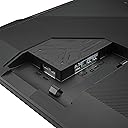
This monitor is pretty excellent all around. In practice, it's like using a 34" 1440p ultrawide display but taller. Similar pixel density, similar width, and the same (RGB) subpixel layout so the text quality is excellent. Basically it's the limit for me from a field-of-view perspective. Any larger than this and it would have to be curved. My desk is 70 cm deep (27.5 in) and that is working well. I certainly wouldn't use this on a desk smaller than 24" deep unless you had clearance behind it to let a monitor arm protrude past the back edge. If you intend to use the included stand, you should have a 30" or greater desk depth. Good thought went into the design of the chassis (except the power plug, which is in a bit of an awkward spot) with upward and downward facing USB ports, and a 1/4" mount on top for a camera, microphone or shelf. I have the Vivo 16 inch shelf (https://www.amazon.com/dp/B0B7VT4167) secured only to the top (not using the VESA adapter) with a single 1/4" screw and a little VHB tape underneath to prevent rotation and that is working well. The included stand has no height adjustment and it's a little invasive on my desktop, so I mounted the monitor to the BenQ Ergo Arm (https://www.amazon.com/dp/B0DTC9KFKL), which supports the weight and size of this monitor very well. The BenQ VESA adapter plate natively accepts the M6 diameter screws needed to mount this monitor using the included standoffs. I chose M6 1.0 x 13mm (Grade 12.9 black oxide) screws from ACE Hardware (16mm was too long, possibly 14mm is the max. It's hard to tell because the internal thread length tolerance of Asus' standoffs varied by at least +/- 1.0 mm) and they are working well with the BenQ mounting plate. Image quality is typical IPS. Good color uniformity, good text quality, acceptable backlight bleed. No dead or stuck pixels. Running on Windows 11, I can't decide if 100% scaling is best or if 125% scaling is best. I will say that running it in 100% scaling is just slightly more dense (smaller text size) than a 27" 1440p monitor. For productivity, this geometry seems to favor either a 2-up (side-by-side) or 4-up (one in each quadrant) window arrangement. Fullscreen games and movies are phenomenal. I am running this at full resolution, 120 Hz on a DisplayPort cable with DSC on from an RTX 5000 series card and I'm not experiencing any of the blackouts or slow-to-wake conditions that others are reporting. Everything considered, I found this to be an easy adjustment from my 27" 1440p and 34" 1440p ultrawide monitors. It's similar to both, just more. As what will probably be my last LCD IPS monitor, I'm finding the advantages to be many and the disadvantages few.
C**N
Great monitor but lasted 11 months
Vertical blue line showing, disappear after 5 min.. I'm adding 1 stars because of the RMA process was simple to do, I will update when I got the monitor repaired or replaced.
Trustpilot
2 months ago
2 days ago