🚀 Elevate your home WiFi game—fast, fearless, and future-ready!
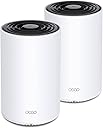
The TP-Link Deco X68 Tri-Band Mesh WiFi 6 System delivers ultra-fast AX3600 speeds and seamless coverage up to 5500 sq. ft., replacing traditional routers and extenders. Designed for busy smart homes, it supports up to 150 devices with advanced OFDMA and MU-MIMO technology. Enhanced by TP-Link HomeShield security and easy app-based management, this 2-pack system ensures a secure, reliable, and intelligent WiFi experience tailored for modern lifestyles.


| ASIN | B08Z492RK9 |
| Antenna Location | Home |
| Antenna Type | Internal |
| Best Sellers Rank | 209,961 in Computers & Accessories ( See Top 100 in Computers & Accessories ) 445 in Whole Home & Mesh Wi-Fi Systems |
| Box Contents | 1 Quick Installation Guide, 1 RJ45 Ethernet Cable, 2 Power Adapters, 2 x Deco X68 Units |
| Brand Name | TP-Link |
| Colour | white |
| Compatible Devices | Gaming Console, Personal Computer, Printer, Security Camera, Smart Television, Smart Thermostat, Smartphone, Tablet |
| Connectivity Protocol | Wi-Fi |
| Connectivity Range | 5500 Square Feet |
| Connectivity Technology | Wi-Fi |
| Control Method | App |
| Controller Type | App Control |
| Coverage | Cubre Hasta 5500 Cuadrados |
| Customer Reviews | 4.4 4.4 out of 5 stars (1,235) |
| Data Transfer Rate | 3577 Megabits Per Second |
| Frequency | 5 GHz |
| Frequency Band Class | Tri-Band |
| Has Internet Connectivity | Yes |
| Has Security Updates | Yes |
| Is Modem Compatible | Yes |
| Item Dimensions L x W x H | 10.5L x 10.5W x 16.9H centimetres |
| LAN Port Bandwidth | 1 Gbps |
| Manufacturer | TP-Link |
| Manufacturer Part Number | Deco X68(2-pack) |
| Maximum Upstream Data Transfer Rate | 3577 Megabits Per Second |
| Model Name | Deco X68 |
| Model Number | Deco X68(2-pack) |
| Number of Antennas | 1 |
| Number of Ports | 2 |
| Operating System | ZyNOS |
| Other Special Features of the Product | WPS |
| Router Firewall Security Level | Basic |
| Router Network Type | mesh |
| Security Protocol | WPS, WPA2, WPA3 |
| UPC | 840030701399 |
| Unit Count | 2.0 count |
| Voltage | 100240 Volts |
| Wi-Fi Generation | Wi-Fi 6 |
| Wireless Compability | 802.11ac, 802.11ax, 802.11b, 802.11g, 802.11n |
C**I
This is the best Mesh for the money. I have one upstairs, one downstairs, no more wifi issue. For a typical house 2 to 3 will cover the entire area without any issue at all. Set up is easy and the connection is robust enough that most issues can be easily resolved. I recommend it.
V**R
Me gusta que es fácil de instalar y usar, hasta el momento he tenido problemas para conectar algunos equipos y no cubre toda la casa, necesito al menos 4, lo cual se me hace bastante costoso.
C**R
Su instalación es muy sencilla y rapida. Mejora totalmente el alcance de la señal en un apartamento de 90m en donde antes habia un modem de Telmex.
B**T
Upgraded to X68 from the deco M5 and what a difference. The X68 runs much cooler the the M5. Please follow the instructions on disconnecting the modem power for 5mins or longer. I didn't and the X68 failed to connect to the modem. I've read on the deco forum that the 5mins flushes the modem cache. Once I did that problems solved. I'm annoyed the deco charges for Web protection. There is a work around for this by using a DNS server with malware filtering. Please search for a DNS server the offers this. I like the App it's easy to use and does not allow a lot of changes which doesn't bother me I need ease of use over tons options, I'm not a power user or gamer. The App allows basic changes which is good IMHO. This is a good option over the latest and greatest. I'ld rather pay less for a 2 year old product than top dollar for the latest and greatest. The WiFi is just as fast as my wired iMac and the is fantastic.
R**I
I was very surprised with the performance of this item. My previous setup consisted of a Netgear WiFi router/switch on the 2nd floor where my cable modem and computer is, and a Netgear range extender and switch on the first floor. My old house has tin ceilings and very dense walls, and my WiFi performance was sluggish. On the patio with my laptop, my download speeds was often less than 1mb/s and I'd often use my phone as a hotspot to get better performance. My liviing room equipment (TV, streaming device, PS5) were all plugged into the range extender, and they'd get a couple Mb/s speed, taking forever to download updates on my PS5. My upstairs bedroom with my gaming and streaming device would likewise be very slow. I needed to purchase additional switches for the Deco units since each Deco unit only has two ethernet ports on it (one for the WAN/Cable Modem connection and one for a device or a switch), but good gigabit switches are under $30, so that wasn't a problem. First I hooked up the 1st Deco unit to my cable modem and then plugged the switch into the 2nd ethernet port. I plugged all my devices (computer, printer, NAS, etc.) into the switch and then went into the Deco app on my android phone. I used the app to connect to the Deco and configure it, giving it the same network name and password as my old Wifi system, and then let it do its thing. I had to go through it twice, I'm not sure why it didn't quite work the first time. But it worked the second time and I pretty quickly had the 1st unit set up. I went downstairs, plugged the 2nd unit into the power supply, plugged the switch into it and all of my entertainment devices into the switch, and then used trhe app one more time to acknowledge the 2nd unit and add it to my network. It worked flawlessly then. Before I go on and extoll the good points, I'll point out the negatives. I'm not sure it's possible to configure the devices without an Android or iPhone. I logged in with my web browser on my PC, but it's just more or less a status screen showing the network and clients and doesn't seem to have anything in the way of configuring the devices. I knocked one star off of User Interface because of that. I know almost everyone has mobile phones now, but I don't like that they're absolutely required to configure a network that may not even have one as a client. Also, my previous devices had some high-level configuration options. A lot of this mesh networking is automatically handled by the devices. I like more user-controlled options. The good points? Signal strength throughout my house is dramatically better! On the patio, my download speeds increased from less than 1mb/s to about 50mb/s. My living room where there was some sluggishness and the speed was just a couple megabytes per second increased to about 250mb/s. My bedroom likewise saw a huge speed boost. I no longer have to wait long amounts of time for updates and downloads. All devices that connected to my previous network connected to this one with no problem, and every single device saw a huge performance boost. This was a wonderful upgrade to my home network!
Trustpilot
2 weeks ago
2 weeks ago