Desertcart purchases this item on your behalf and handles shipping, customs, and support to SINGAPORE.
⚡ Dominate every keystroke with magnetic precision and pro-level speed!
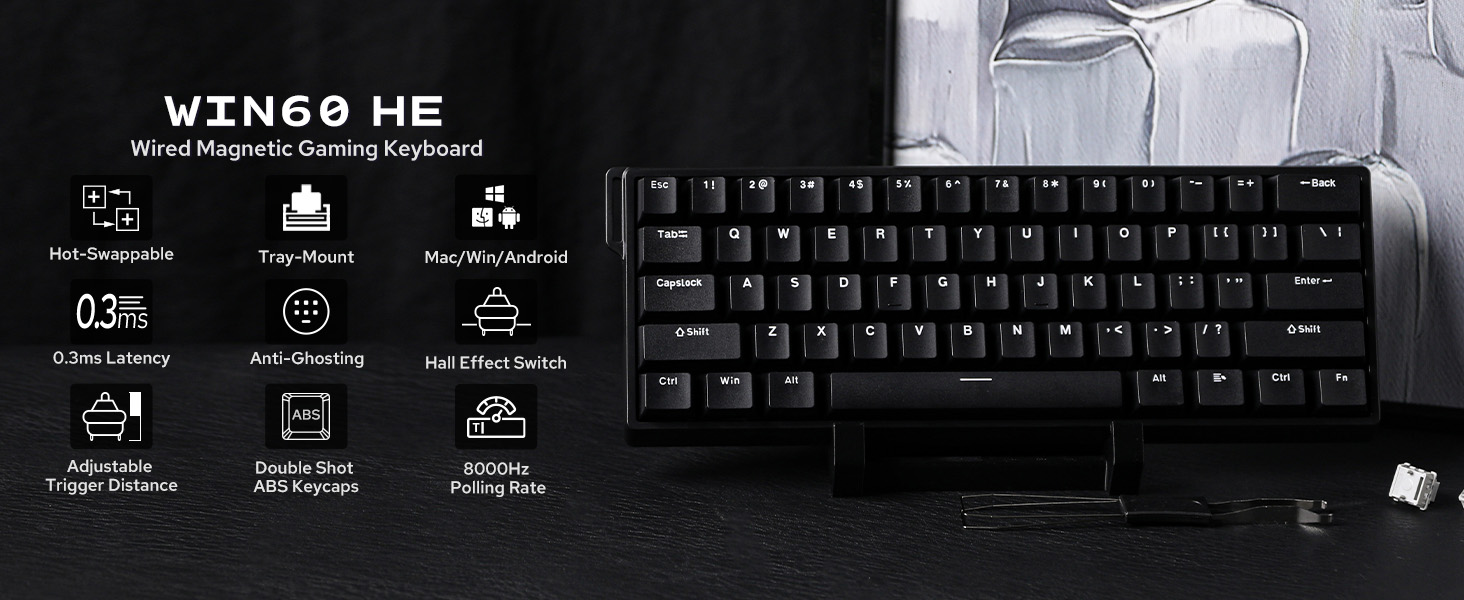
The EPOMAKER Aula WIN60 HE is a wired 60% magnetic keyboard featuring Hall Effect switches with ultra-low 0.01mm actuation sensitivity and adjustable actuation points. It boasts an 8000Hz polling rate and 0.3ms latency for elite responsiveness, ideal for gamers and professionals seeking compact design and customizable RGB lighting. Its hot-swappable keys and web-based driver allow seamless personalization, making it a cutting-edge tool for precision typing and competitive gaming.


| ASIN | B0DSFPVSHT |
| Additional Features | Backlit, Hot-Swappable, Portable, Tray-Mount Structure, Wired Connection |
| Antenna Location | Business, Gaming, Personal, Student |
| Best Sellers Rank | #4,168 in Video Games ( See Top 100 in Video Games ) #390 in PC Gaming Keyboards |
| Brand | EPOMAKER |
| Built-In Media | USB Cable |
| Button Quantity | 61 |
| Color | Black |
| Compatible Amazon Tablet Models | Amazon Fire 5th Generation, Amazon Fire 7 12th Generation, Amazon Fire 7 7th Generation, Amazon Fire 7 9th Generation, Amazon Fire 7 Kids 12th Generation, Amazon Fire 7 Kids 5th Generation, Amazon Fire 7 Kids 7th Generation, Amazon Fire 7 Kids 9th Generation, Amazon Fire 7 Kids Pro 11th Generation, Amazon Fire 7 Kids Pro 9th Generation, Amazon Fire HD 10 11th Generation, Amazon Fire HD 10 13th Gen… |
| Compatible Devices | Gaming Console, Laptop, PC |
| Compatible Operating System Family | Android |
| Connectivity Technology | USB-C |
| Customer Reviews | 4.5 out of 5 stars 1,028 Reviews |
| Enclosure Material | Plastic |
| Hand Orientation | Ambidextrous |
| Item Dimensions L x W x H | 11.89"L x 4.29"W x 1.46"H |
| Keyboard Backlighting Color Support | RGB |
| Keyboard Description | Magnetic |
| Keyboard Layout | QWERTY |
| Keyboard Plate Material | Aluminum |
| Manufacturer | EPOMAKER |
| Mechanical Keyboard Switch Model | Hall Effect Magnetic Switch |
| Minimum Required Operating System Version | Android 3.0 Honeycomb |
| Model Name | WIN60 HE |
| Model Number | WIN60 HE |
| Number of Items | 1 |
| Number of Keys | 61 |
| Number of Packs | 1 |
| Power Source | Wired |
| Recommended Uses For Product | Business, Gaming, Personal, Student |
| Special Feature | Backlit, Hot-Swappable , Portable, Tray-Mount Structure, Wired Connection |
| Style Name | Classic |
| Switch Type | Linear |
| Warranty Description | 1 Year Warranty |
G**G
My first Hall Effect keyboard.
Feels like it's trying to punch above its class. This is my first hall effect keyboard, and my first 60% keyboard. I am a technical documentation writer, and 100% nerd. I am currently typing this review on this keyboard. I can say, first off, that you need to calibrate the board as soon as you plug it in. Just go to the configuration site and start there. Unintuitively, you need to go to the downloads page, then find the keyboard, then click download to go to the web-based configuration page (there isn't even a download required). From there, you'll find the configuration in the actuation tab on the left side of the page. The first thing that I noticed after calibrating was that the switches felt a tad lighter than a linear red mechanical switch. The travel, by default is 1.7mm of the (roughly) 3.4mm total travel on this board. I set my travel to about 0.5mm for a crazy fast response. I also played with the rapid triggering - I'm still not entirely sure how that works, but my understanding is that I would initially press the 0.5mm for the first trigger, then lift enough for it to reset (you can adjust this separately), then re-trigger the key by continuing to press. Honestly, with 3.4mm of travel, I'm not sure I can accurately move my finger in partial-millimeter increments. I'm not regularly bottoming out the keypress with the light touch, but I also don't see a scenario where I would want to set rapid trigger thresholds. You might want to, just not for me. Otherwise, the web interface gives you a few profiles, you can only do one layer of LED's (which is disappointing), but all the keys are configurable just like a VIA board. I just hope their site never goes down, because I haven't found a VIA config file, and it doesn't automatically detect. Being a fan of keyboards, and after testing this out for a quick run through a typing test, I really hated the keycap sounds and the profile of the caps. I had some SA profle caps around, so I put those on, and the sound is much more satisfying, but far from silent. Still, these switches are quite loud for not being mechanical. They bottom out quite loud, and they return even louder. They're definitely more of a clickly plasticy sound than a thocky or thunky sound. Not bad, just not great. I expected them to be quieter with magnets instead of mechanical switches. My final takeaway was that HE boards are different than mechanical boards. I was thinking about swapping the switch out, but there weren't any pins! I laughed because - why would it? The magnetic field sensors in the board would detect when the switches are moving. I might try out some other switches, just to see if there are any that are more resistant/quiet. I'm glad I spent the $40, although I have found other mechanical keyboards that I like much more at a similar price. Most recently, the Keychron K8 Max was on sale for about this price point - and it includes more F-keys, more arrows, more tactile switches (banana or browns), and more connection methods (wired, BT, and 2.4). But, if I were a bigger fan of linear switches, or smaller keyboards, I wouldn't shy away from this one because it has a higher polling rate, the LED's are quite bright, and it is very compact sized, without trading key size. Long term, this will be my racing sim rig keyboard. I love how compact it is for that use case, and the strap is a great way to hang it from the side of the frame.
E**L
Magnetic Switch Performance on a Budget
The EPOMAKER Aula WIN60 HE is an outstanding gaming keyboard that delivers top-tier performance at a very affordable price. It’s especially impressive for competitive gamers who want speed, precision, and customization without spending a fortune. One of its biggest highlights is the Hall Effect magnetic switches, which provide extremely smooth and consistent keystrokes with no physical contact wear. The adjustable actuation (from ultra-light to deeper presses) lets you fine-tune every key to match your playstyle, making it perfect for fast-paced games.
X**V
Good quality and has worked great for a year now.
The cable it comes with is a little buns. I haven’t replaced it yet to know if its just the cable or the usb c port but i cant bump the cable and i have to plug it in and fiddle with it a bit some times or the lights flicker and the keyboard disconnects and reconnects rapidly.
E**N
Best First Gaming Keyboard
As my first ever real gaming keyboard (hall effect) it was so amazing i was so excited when it came i was practically squealing, the key presses sounded so satisfying and the customizable lights on the keyboard were so cool as a 40$ budget gaming keyboard this is crazy i wouldn't be surprised if some people used this for competitive gaming its very good and if one of your switches breaks or something happens to it they give you 2 extra ones to replace it with!! it works perfectly and the web-driver it uses lets you set binds or macros to the keys i love that too, it doesn't feel laggy or has input delay at all especially when you use rapid-trigger, the feel is like a hard sturdy heavy keyboard that wont move if you press a key too hard or hold the side of the keyboard while pressing keys
A**N
Amazing Product
Amazing product and still surprised with how it sounds. As a gamer this keyboard checked out every box that I needed. It feels very premium and not like some cheap plastic keyboard. It feels very durable. The black color I got is very nice and goes well with my current setup.
K**A
Best keyboard
I love this keyboard but I didn’t at first because I didn’t have a way to change the actuation settings but all I had to do was get chrome on my MacBook and now fit my favorite keyboard to this day and I only have some small minor issues with it when I’m pressing more then one movement key it’s dosnt move but I still love this keyboard 🤌🏽
D**D
Super responsive and perfect size
Great key-feel, well made. Looks great, too.
M**S
Broken usb port
Arrived with a broken usb port. Kept disconnecting. If the usb wasn’t broken I’d say it’s a nice keyboard. As long as yours doesn’t arrive with one it should be a decent keyboard
Z**A
5 stars
great budget he keyboard, sounds great, good quality and rgb
H**M
Amazing quality
Amazing quality, came in good condition and all items provided inside (Strap, extra keycap, keycap puller) Software is up to you to install but it still works in plug and play condition.
M**D
Nice and good, recommend
Very good, quality and look 👍
M**L
Perfect
Perfect
M**T
Très bon clavier
Si votre ordi est un azerty les touche pr changer les lumières ne seront pas les mm mais c vrmt un très bon clavier on a tout le matériel requis on a deux touches de rechange si jamais elles sont casser avc sa le retire touche et un mode d’emploi c vrmt le meilleur clavier que j’ai testé.
Trustpilot
3 weeks ago
1 month ago